Index:
RuneScape Plugins Officially Available Now!
[p align="start"]Thanks to the work of our incredible plugin developer community, we're excited to announce that Plugins have officially arrived in RuneScape![p align="start"]Starting today, you can install plugins in-game and use them to enrich your RuneScape journey and gameplay! Included in today's launch are all plugins from our Open Beta![p align="start"]Just in case you're not familiar with plugins: They are handy tools created by community developers that enhance your gameplay experience in a particular way. Different plugins can do very different things. Quest Helper, for example, is designed to guide you through quests, while a plugin like Tilemarkers allows you to mark useful locations in the game world.[p align="start"]Want to make a plugin of your very own? With today's update, we're excited to officially open the development environment and submission process for new plugins to our RuneScape Plugin Hub![p align="start"]Check out developer.runescape.com for everything you need to know on how to make one yourself, and be sure to join the Official RS Plugin Discord to chat to us and our talented developer community![p align="start"]So, whether you've been waiting an eternity for the official launch of plugins or are an aspiring plugin developer, now is the best time to jump in and play![p align="start"]Remember, opening up the RuneScape API is just the beginning of this journey. This is a Jagex officially developed project that we have assembled a dedicated team for and is something we will be supporting in the long run. It has some important differences to other plugin platforms, such as RuneLite, which means that the way plugins are developed, submitted and released may be different to what you're used to.
RuneScape Plugins are built directly into the game.
The plugin hub is a part of the game that you access through in-game windows and settings. As a result of this, what plugins are able to do and how they are displayed is dictated by what is possible to do within that context. Plug-ins cannot live in a window outside of the client.
RuneScape Plugins must adhere to official guidelines.
You can find out more about these guidelines at developer.runescape.com or in our previous blog, but the most important thing to remember is that plugins should only ever support and enhance gameplay, they must never replace it or automatically perform actions for players.
All RuneScape Plugins must go through an official Submissions and Approval process for safety and security reasons.
This means that as a player you never have to worry about whether the plugins you're seeing in the in-game Plugin Hub are safe. As a developer, you can find out more about this process in today's blog or at developer.runescape.com
You'll need a verified email address to access plugins.
Plugins are hosted via a professional third-party plugin platform (mod.io).
We recommend using the email linked to your Jagex Account, even though you can use any email address if you so choose.
Using the email linked to your Jagex Account will make the process smoother for you when we implement automatic Jagex account verification in the future!
We are planning to expand the available mod.io account features in the future, which will include plugin ratings and subscribing to plugins.
Plugins Available Now!
[p align="start"]All of the plugins that were present during our Open Beta are now live in-game.[p align="start"]These include:
Quest Helper (69 Quests).
Menu Entry Swapper
Tilemarkers
Entity Hider
Job Gauges
What's Next?
[p align="start"]We have so many more plugins awaiting moderation, and we can't wait to bring them to you! These include plugins like: Clue Trainer, Ground Items, and more. We're focusing on ensuring launch stability for the first days and weeks of launch. We have fantastic plugins currently moving through the moderation process for release, and we'll let you know as soon as we can when they'll be coming available, especially for the plugins that we know the community is excited for![p align="start"]If you'd like to let us know which plugins you're most excited for, fill out this survey!How to access Plugins
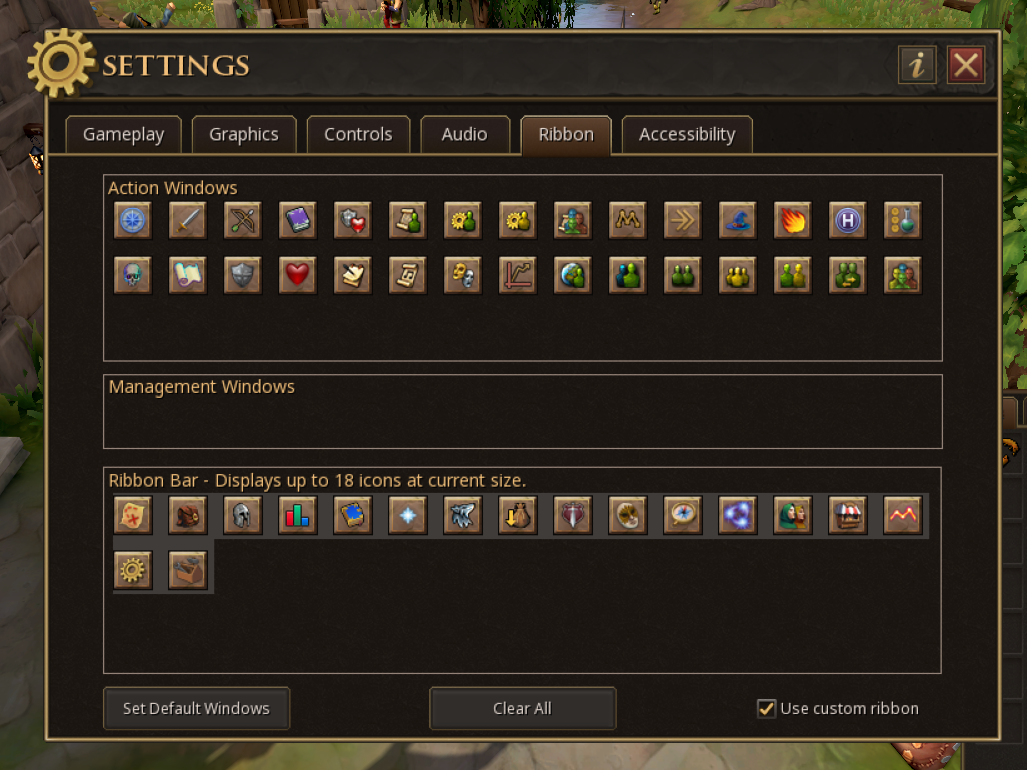
[p align="start"]You can access the RS Plugin Hub in-game through the Ribbon menu, in the bottom right corner of your screen. Look out for the icon that represents a toolbox![p align="start"]From there, you can browse and install available plugins, manage or uninstall the ones you’re already using, and report any issues directly through the Hub.[p align="start"]It's important to mention that a verified email is required to use plugins, as this is required by mod.io, which is the platform we use to host plugins.


Classic interface mode
[p align="start"]The toolbox will be on your ribbon by default as shown below:
Modern interface mode
[p align="start"]If you're using the default ribbon (the one that just shows parent windows), you can access the toolbox by hovering over the Settings button.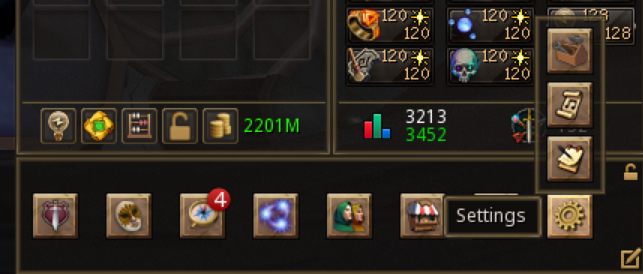
Join our Plugin Developer Community
[p align="start"]Ever wanted to create a plugin for yourself? A clanmate? What about... The entire community?[p align="start"]Whether you have a question about plugin development, or if you just want to personally thank the developer who worked on your favourite plugin, please consider joining our dedicated RuneScape Plugin Discord![p align="start"]We're building a community of players and developers who care about plugins. These are our very own technical wizards and wizardettes who choose to use their technical expertise to create fantastic tools for us all to enjoy in our adventures across Gielinor.
RuneScape Plugin Developer Discord
[p align="start"]The RuneScape Plugin Hub Discord is a dedicated space to chat with like-minded players and JMods about the API, Plugins and development. Even if you've never entered the world of plugin development before, you can join to find out how to create your first plugin![p align="start"]As the API will receive updates over time, this space will also be a place for us to release developer-specific information quickly.Plugin Development and Documentation Website
[p align="start"]Additionally, if you're interested in plugin development: bookmark the website developer.runescape.com. This is our single space for important documentation on the process of creating plugins themselves, and contains all the specific information you'll need around legal bits, guidelines and more.[p align="start"]For larger updates and spotlights, these should still be shared as per usual via official blogs. Speaking of official...New Title: Luanatic
[p align="start"]It's really important to us that we recognise the contributions of our plugin development community, as all of them have spent countless hours coding plugins for our players to use. The grind doesn't just stop once a plugin is made: behind the scenes these developers are looking at feedback, fixing bugs, and adding new features for us all to enjoy.[p align="start"]For this reason, we're releasing a new title to recognise players who have made significant contributions to the RuneScape Plugin Hub![p align="start"]What's the title called, you might ask? Well, we're keeping it under wraps for now, mainly because we want it to be something technical-related, but we're still trying to localize it for different languages![p align="start"]This title will be awarded at Jagex's discretion for any player or developer who has contributed significantly to the API project, using the following as guidance (not strict criteria):
Plugin included in "top downloads" of the month or previous month(s).
Plugin has achieved "Jagex recommended" status, visible on the Hub
Developer, or Player, has become particularly helpful or active within the community for plugin development
This includes but isn't limited to: helping to answer questions from players or developers about the process of plugin development, or testing plugins.
How to: Become a Plugin Developer
[p align="start"]If you're interested in making a plugin of your very own, head over to developer.runescape.com to find out about:
Plugin Guidelines
Our Moderation and Review Process
Our Policy on AI
Developer-worlds to create and test your plugins
How to: Provide Feedback
[p align="start"]How to report a bug with a plugin or provide feedback[p align="start"]As a reminder, Jagex doesn't handle bugs or feedback directly with the plugins themselves.[p align="start"]If you would like to flag an issue or make a suggestion for a plugin, please head to the plugins' mod.io page and check out the description to find the developers' preferred channel for feedback. Some developers want feedback shared directly, and others may prefer it in a dedicated forum or space. The mod.io page for a plugin is linked via the RuneScape Plugin Hub.[p align="start"]You can access it here:

"Buy All" in shops isn't allowed
Players can't make 'Teleport' or 'Drop' a default left click action for items.
API Feature Requests
[p align="start"]An API Feature request is a request for Jagex to open up a particular aspect of the API that can be used to lift restrictions on plugins.[p align="start"]For now, Feature Requests sit with a specific group of trusted plugin developers (the API Council) that we have worked with since the beginning of this project, around 7 months ago. This is mainly to ensure API work is manageable for our internal team, as this group of developers can act as a "filter" for API work to ensure our processes remain manageable.[p align="start"]At the moment, we're at stage one in the process of our API, but as we progress further, we would like to open up API Feature requests to the entire community. We'll work on how we can achieve a good balance of feedback and opinions as this project continues.[p align="start"]If you are considering creating a plugin but you require a specific feature, please consider leaving your feedback with us via Discord or the usual community platforms! It will be taken into consideration when it comes to managing and triaging our work on the API, regardless of whether you're on the API Council or otherwise.
[p align="start"]That's all for now, but this is just the beginning![p align="start"]We're incredibly excited to see how you bring plugins to life, whether that's from using them or creating them. This is only the first step in a much bigger journey, and we'll be working closely with our plugin development community to keep building, improving and expanding on what is possible.[p align="start"]Now it's over to you! Dive in, experiment, and start bringing your ideas to life. Share your creations with the community, and help us shape the future of plugins in RuneScape.