[Changing Subtitle Language(s)]
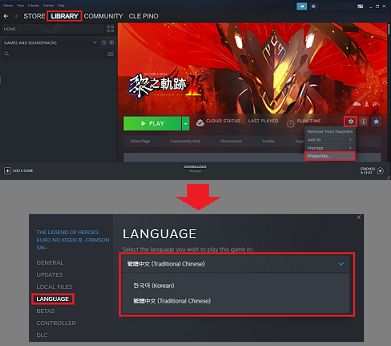
To change the in-game subtitle language(s), please use the following steps:
1. Open Steam and go to the Library.
2. Right-click on the title (The Legend of Heroes: Kuro no Kiseki II -CRIMSON SiN-) in your game library or click "Manage" (gear icon) and select "Properties".
3. Select "Language".
4. Select your desired language(s).
5. Click "Close".
[About GPU Settings]
When a PC is equipped with multiple GPUs (e.g., a PC with a built-in GPU in addition to a graphics/video card), the primary GPU may not be automatically selected to run the game depending on your power-saving settings, etc.
In The Legend of Heroes: Kuro no Kiseki II -CRIMSON SiN-, you can select your desired GPU manually using the Configuration Tool.
1. Select "ConfigTool" from the title menu.
2. Select "Advanced Settings" at the bottom of the dialog and then select the desired GPU from among those installed in your PC.
3. Press "Save and Launch" to save your settings and return to the game.
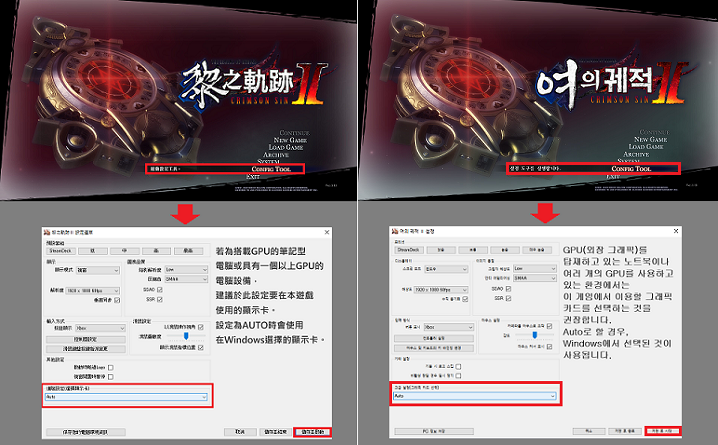
This method should allow you to manually set the GPU used to run the game. If you experience any issues, please refer to the following page:
https://store.steampowered.com/news/app/1811950/view/3416560919699717534