Medieval Engineers: Community Edition Update 0.7.3, hotfix 1 has been released!
The update contains bug fixes, server and inventory improvements, and better modding support.
You can find the full changelog here.
Community Edition Install Instructions:
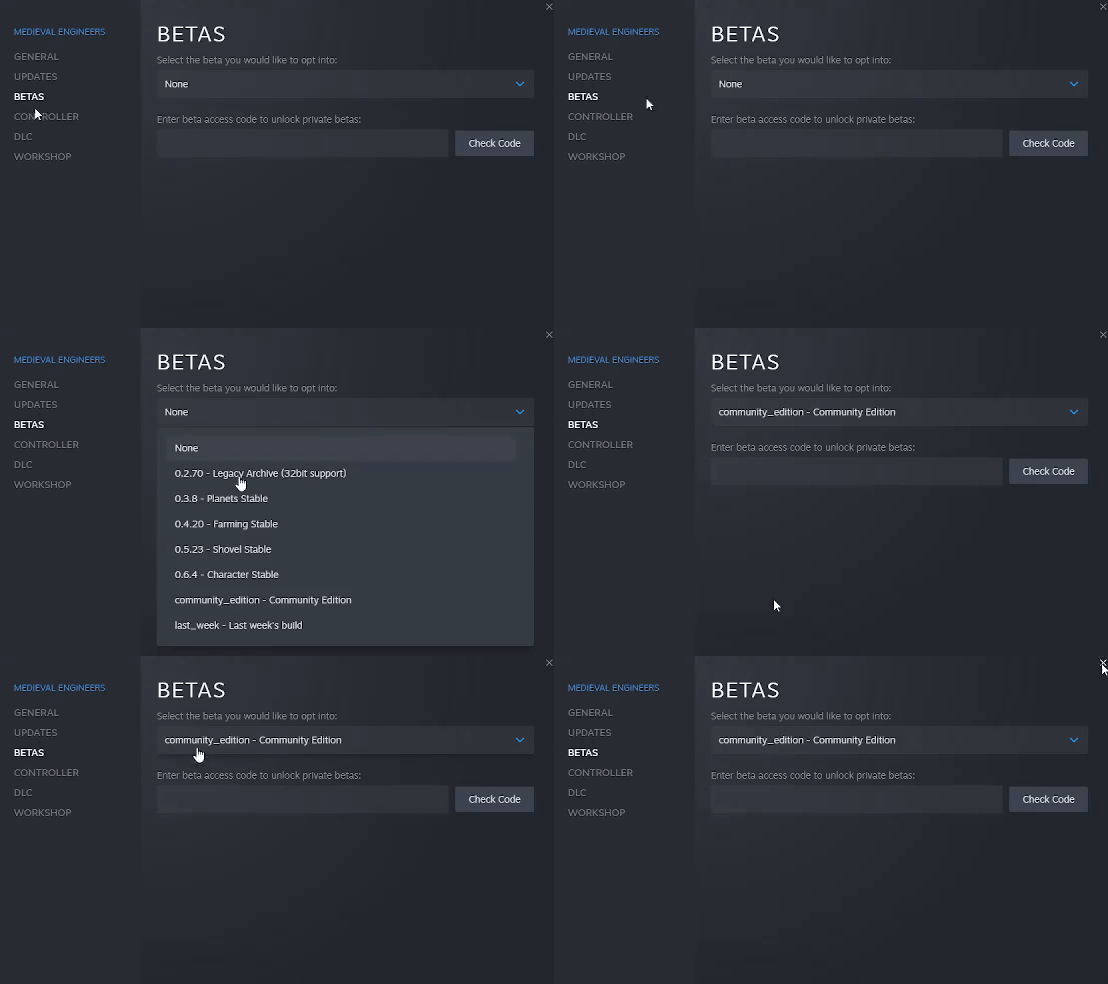
- Head to your Steam Library and right-click on Medieval Engineers.
- Select "Properties"
- From the menu popup, select "BETAS"
- You should now see the option to "Select the beta you would like to opt into:"
- From this menu, select Community Edition.
Q: How do I get updates?
A: Once you have opted into the Community Edition build, Medieval Engineers will continue to update normally, just like any game in your Steam Library.
Q: Does the Community Edition have its own website?
A: You can find Community Edition resources here: Medieval Engineers: Community Edition Website
Q: Where do I report a bug?
A: You can report bugs with Community Edition here: Medieval Engineers: Community Edition Support Portal