Good morning everyone! We hope you have had a good summer so far. This update is going to be going over what we have done in the last 60 days and our current progress.
This has been quite the adventure, however, working in the new design into the game and keeping the same original theme and style has been a lot of fun.
It is even more fun seeing this start to take shape on Dev.
So, without further ado, we will begin with the largest undertaking and the core of all other systems to come: The Item System and the new GUI!
Item system update
As we have walked you through the process of the Item system from the start, we are happy to give you some of the current updates. As a quick review, we have worked on and covered the following:
- Trace and list all current usable Items in-game
- Base Item System design process
- Audit of the current multiple Item Systems
- Audit of the Container multiple systems
- Container System design
- Item and Container design finalization + game-breaking bug fixes
- Container System redesign
- Container System development
- Item System design finalization (UX and system)
- UX Design and development
- Item System development
Now that we have started the Item System (and subsystems), we have a lot to update you on. The main thing everyone has on their mind right now is: How far have we gotten? We are now at the halfway mark. Though the numbers show we are pretty far along, the more we do, the longer it takes because of the intricacies and testing at each step to make sure we are on the right track.
Built in Automation:
The new system will automate the bulk of the processes that currently has to be done in individual steps, one at a time. Part of what takes so long to build a proper system is to bring all of those individual steps into a single functional UX. Through the automation of attaching scripts, specs, and other requirements, we will have a solid foundation that will be much easier to develop the front-end items as well as added back-end functionality.
Below is our current progress as of the first of this month.
Item System Design: 100% | UX Build: 98%
The UX for the new system has all of the base completed. As we move forward to plug in more systems and functionality that will slowly go up. Until we have all subsystems done and plugged in, it will probably remain at 98-99%.
Core system created: 75%
For the Core systems, we have a good chunk done and have even created a few test items. This has worked for both the Item List (Visual indexing) and the Item Creation functionality.
Sub-systems created: 45% | Systems linked/plugged in: 20%
Subsystems created and plugged in will be an ongoing task throughout the game updates. As we test each subsystem and fix any bugs QA and players find, we will move onto the next subsystem. The first subsystem planned (though may change depending on development and testing) will be the Faction system.
External Subsystems: 10%
Though the name may sound like it comes from outside the game, it actually means systems that are outside of the Item System or any subsystems. These are the little extras we will be bringing to the items later on during the beta and polish stages. An example of this could be Custom Stats or Decals.
Over the next few updates we will go into detail on each subsystem that is completed, how that works and how it will relate to items for you in-game.
Old vs. New process:
It is important for us to take our time to do the new system correctly. This saves us time now, and in the future during Beta ensuring faster development. Dissecting the current Item System alerted us to many things which we could improve upon in the new system.
Difficulties we are facing:
We are faced with some difficulties during the development process. Some of these issues will be outlined below.
- Multiple locations of scripts and script lines/commands that handle different aspects per item
- Multiple and unique ways different items are handled back end
- Lack of consistent indexing and/or conflict of indexing.
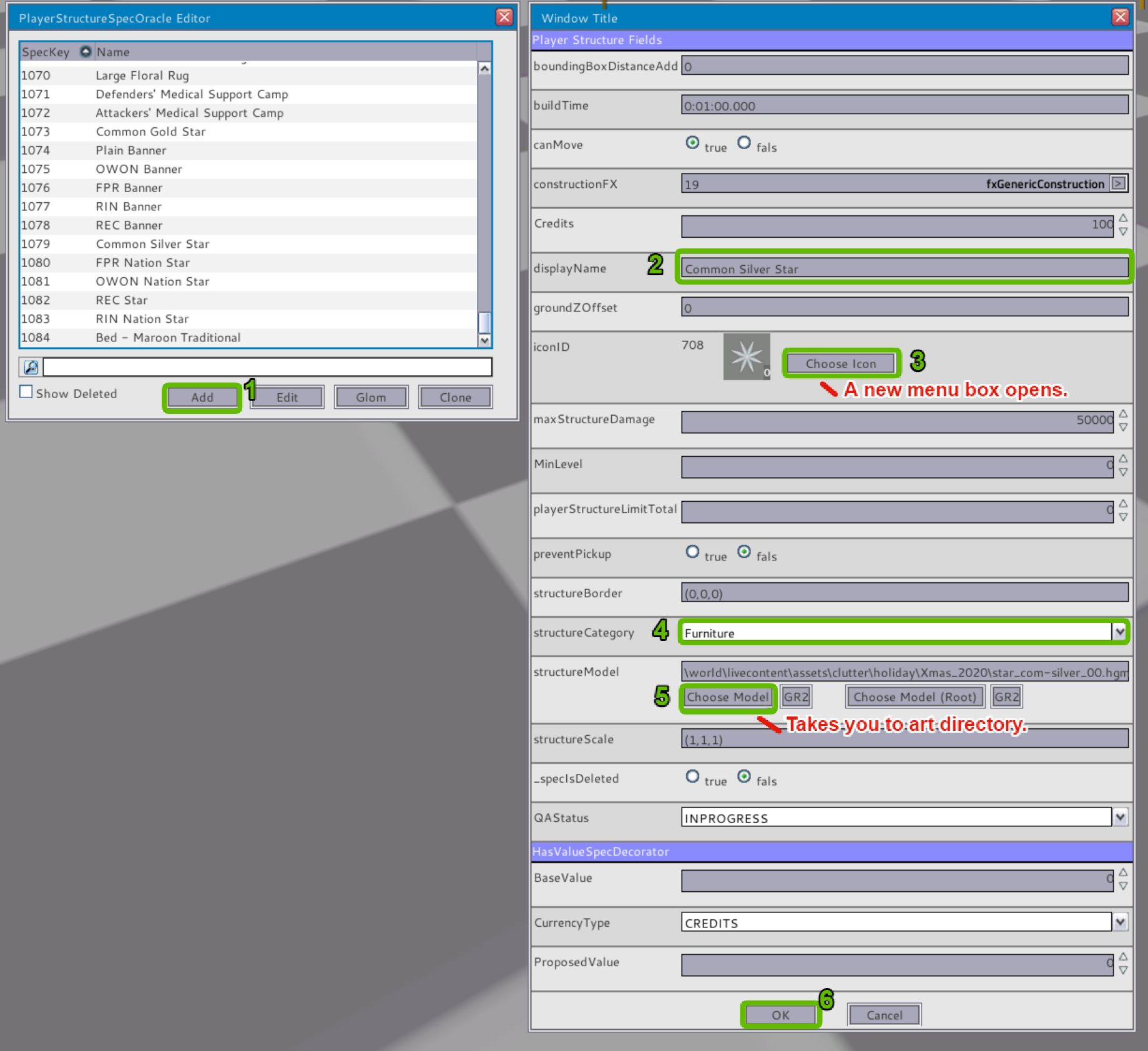
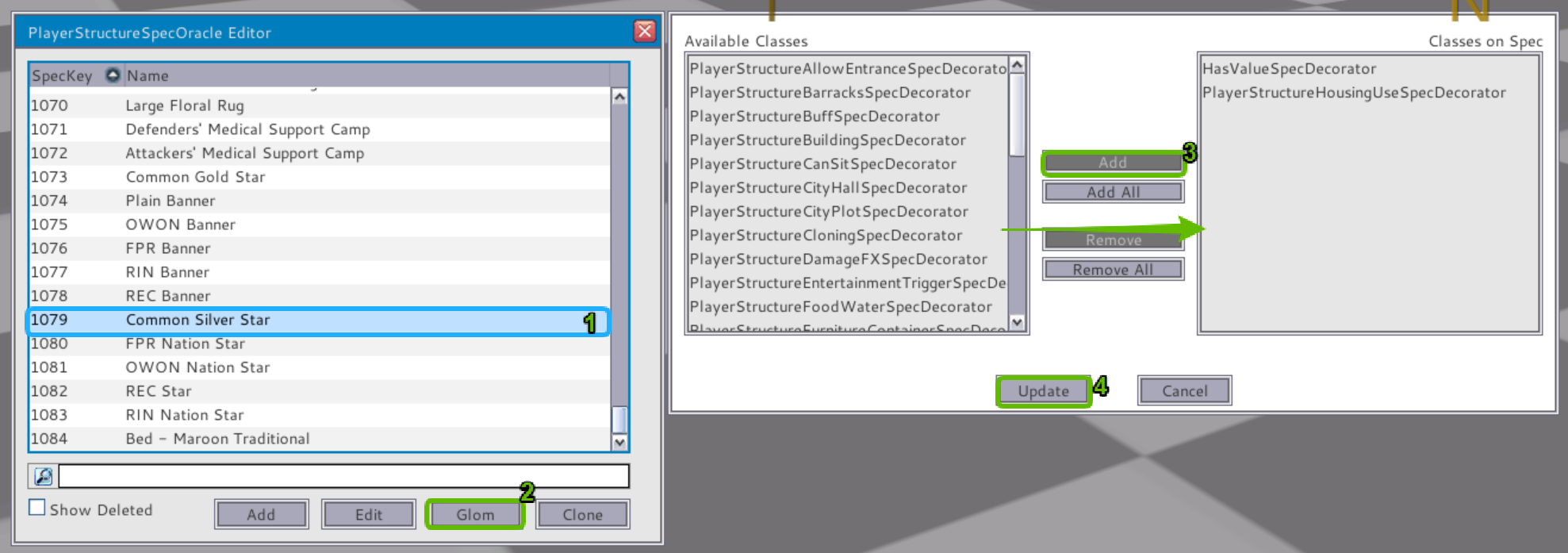
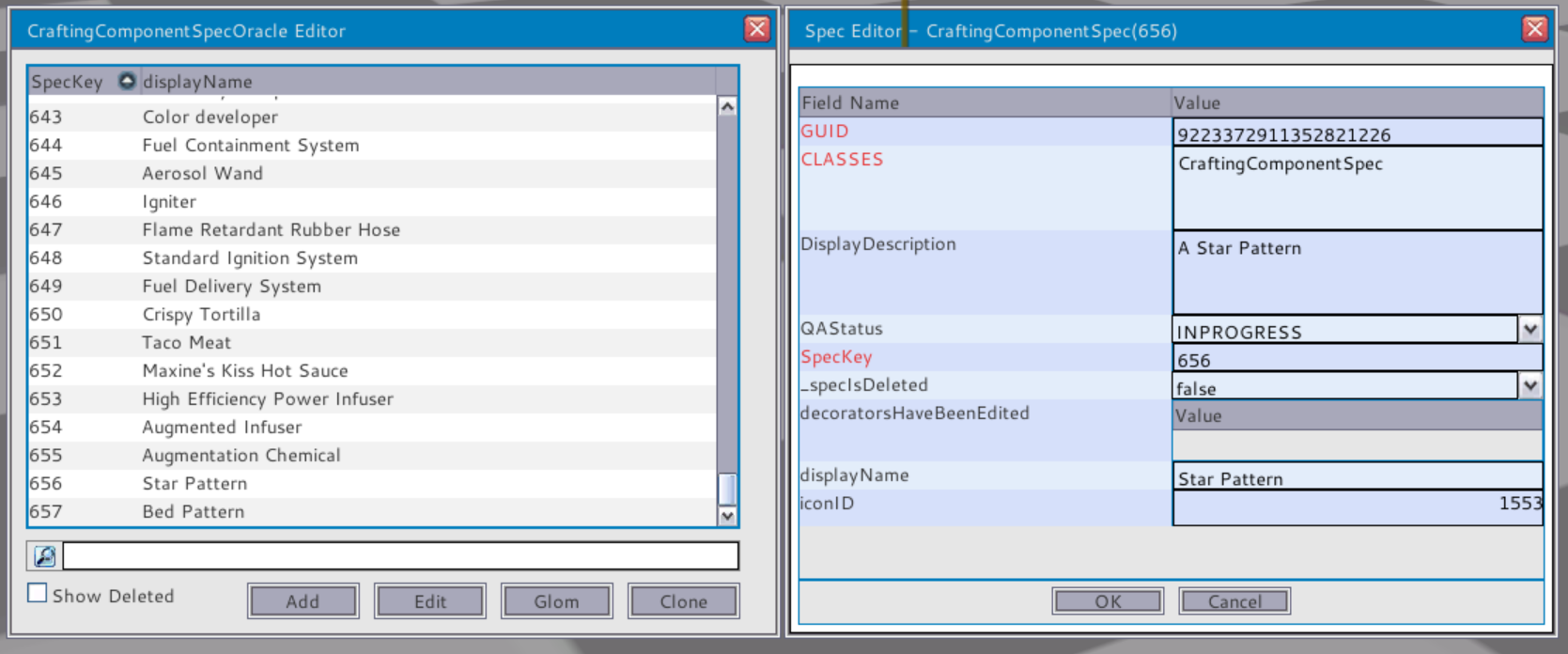
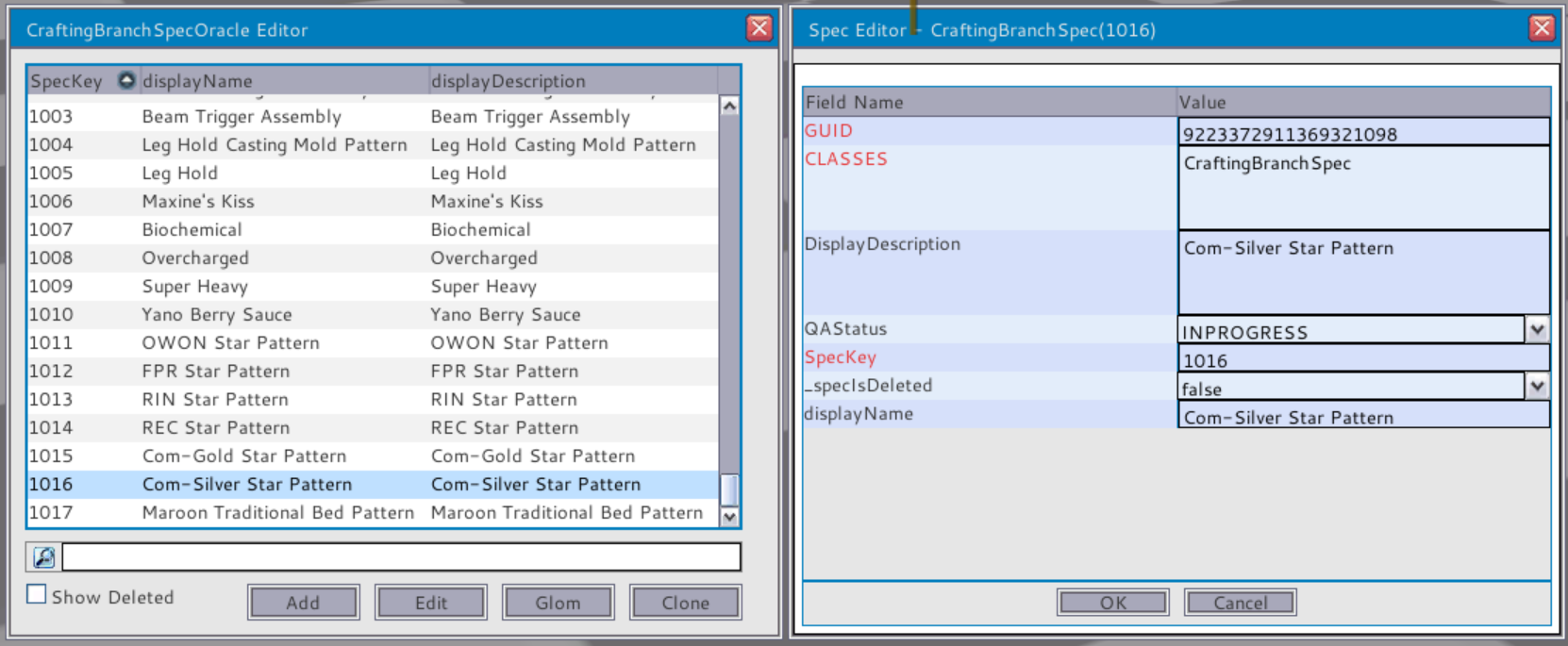
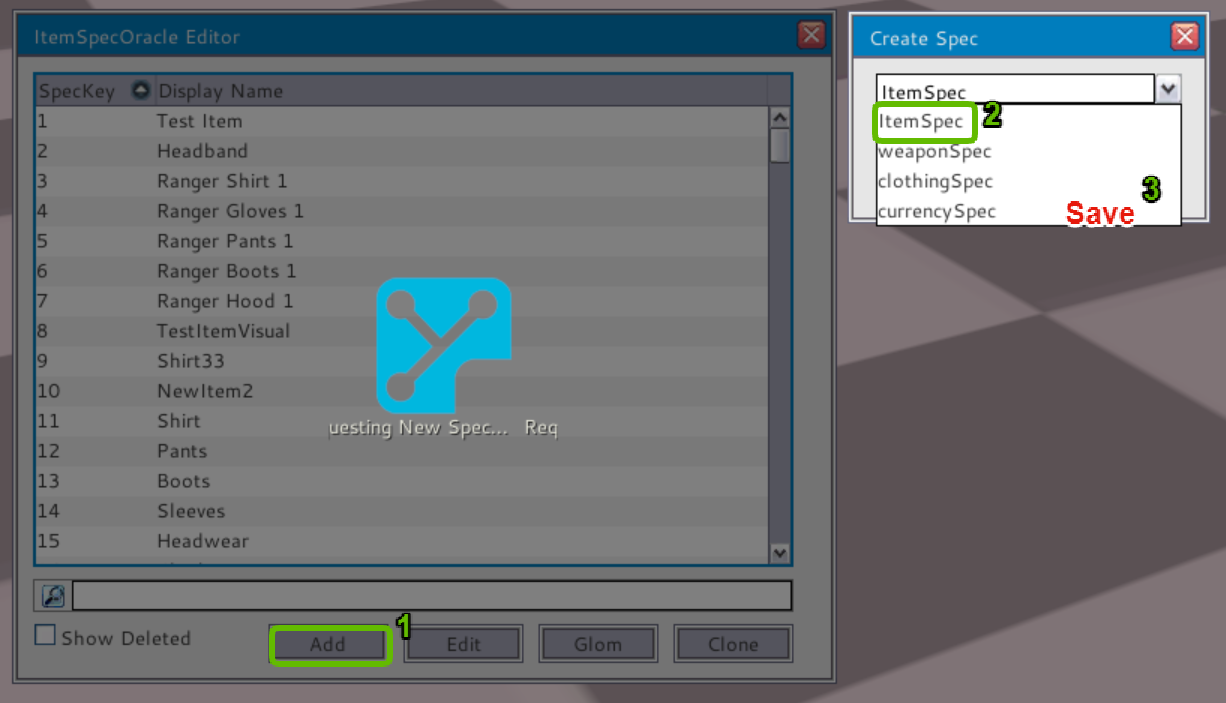
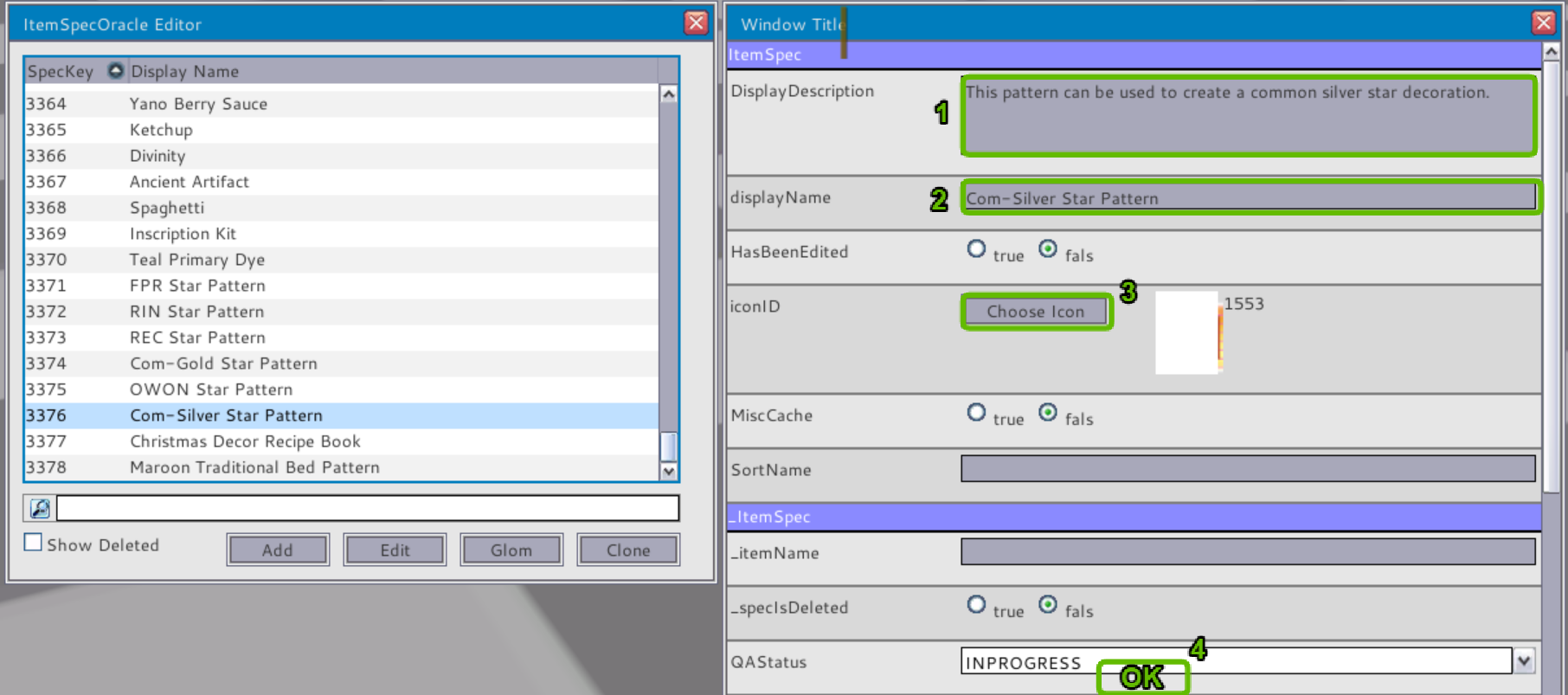
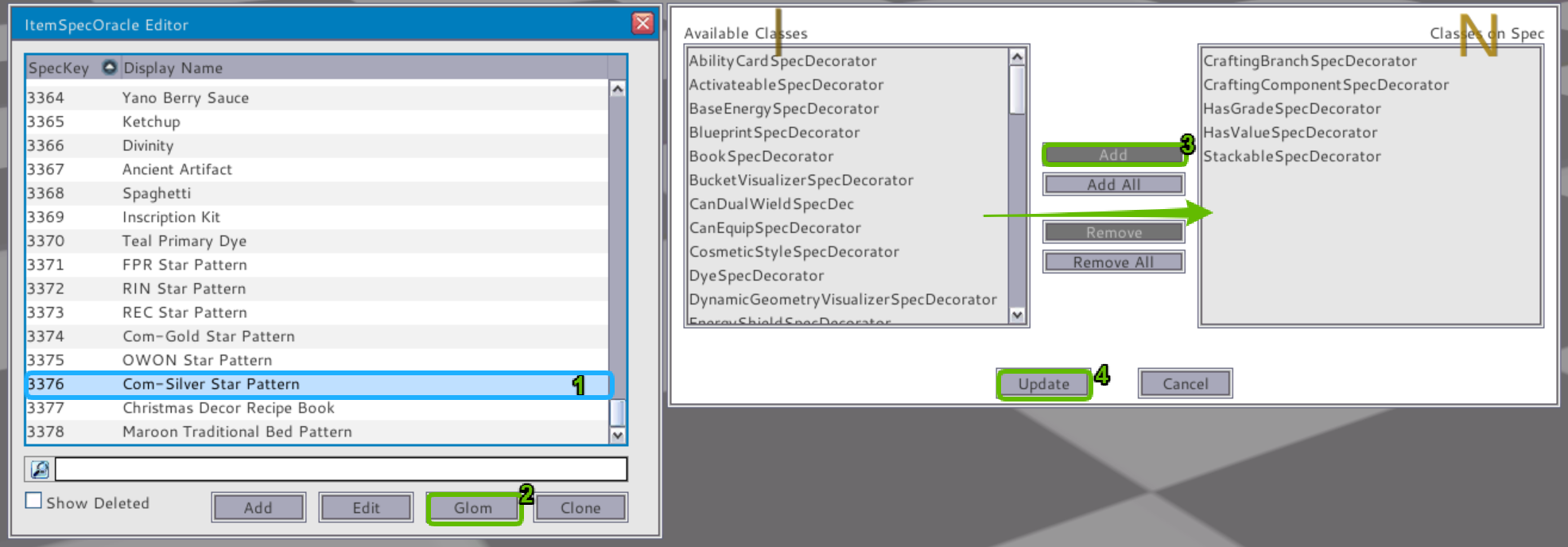
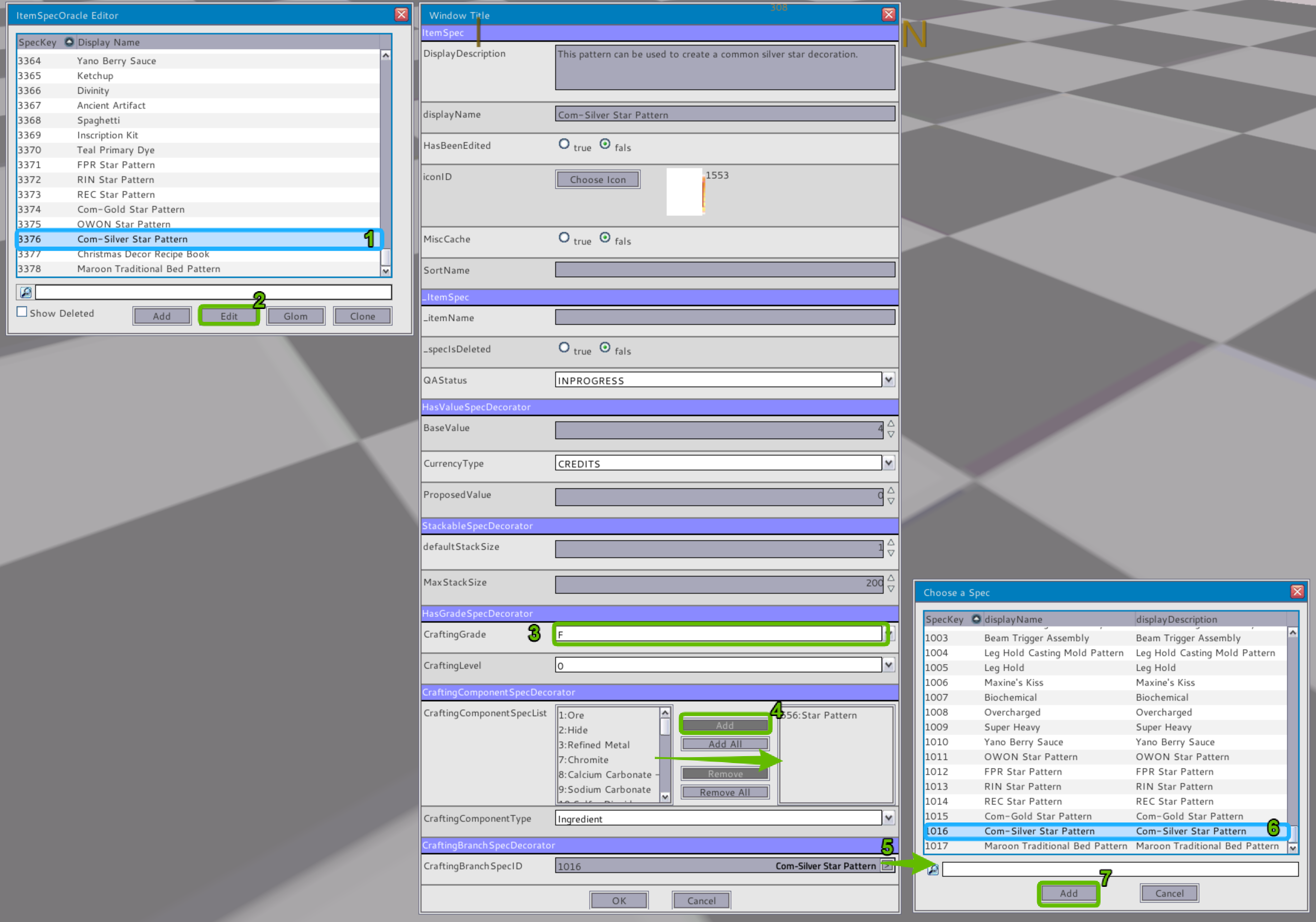
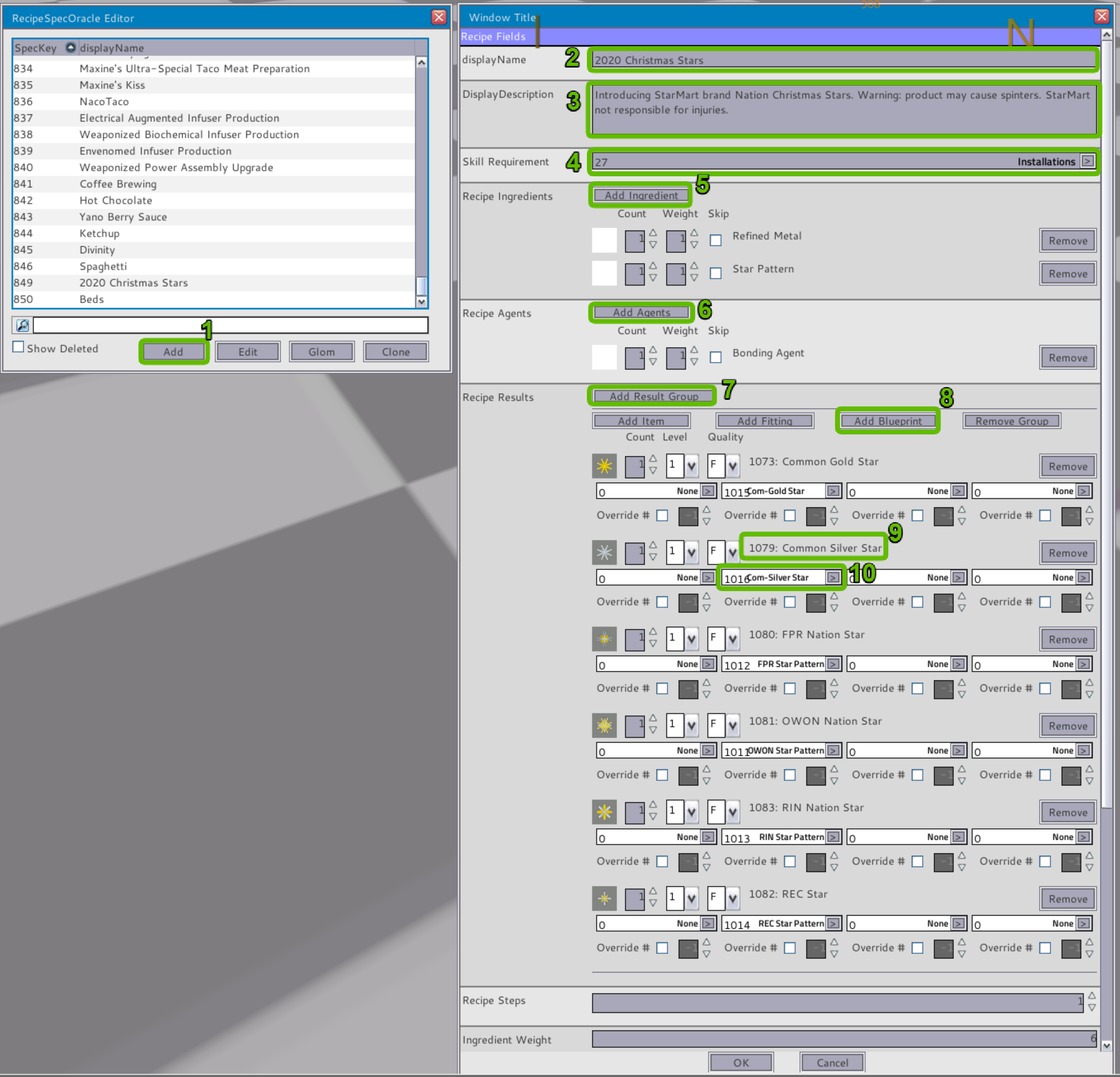
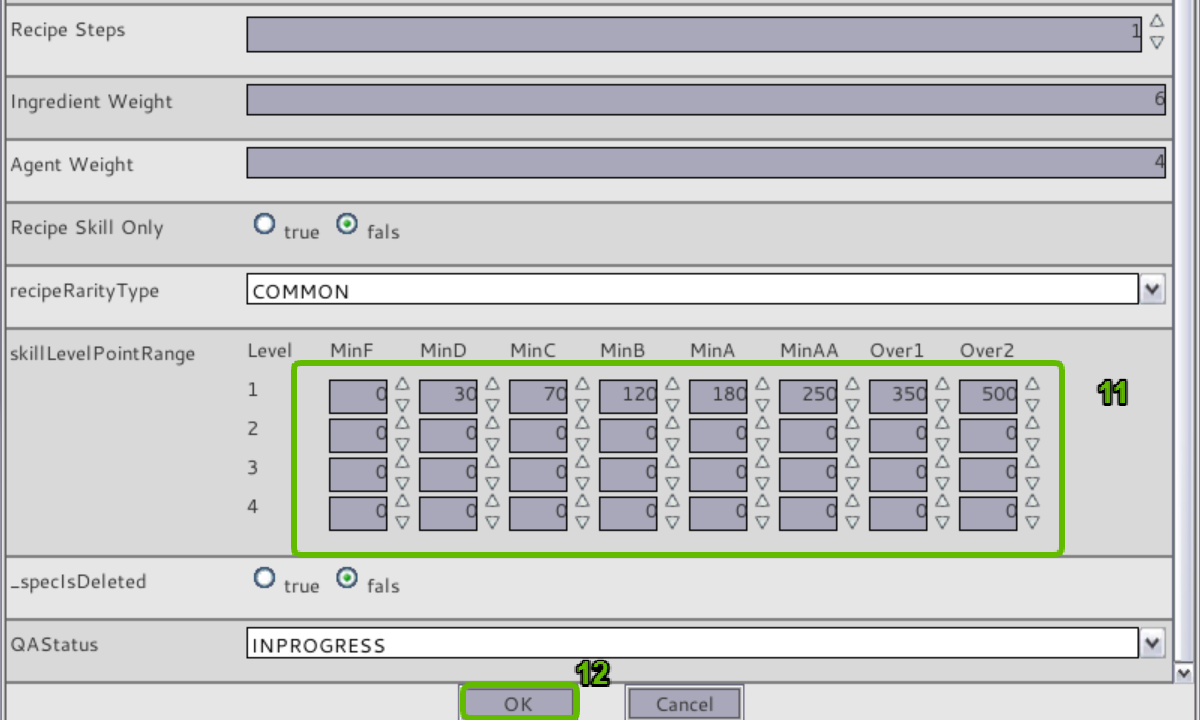
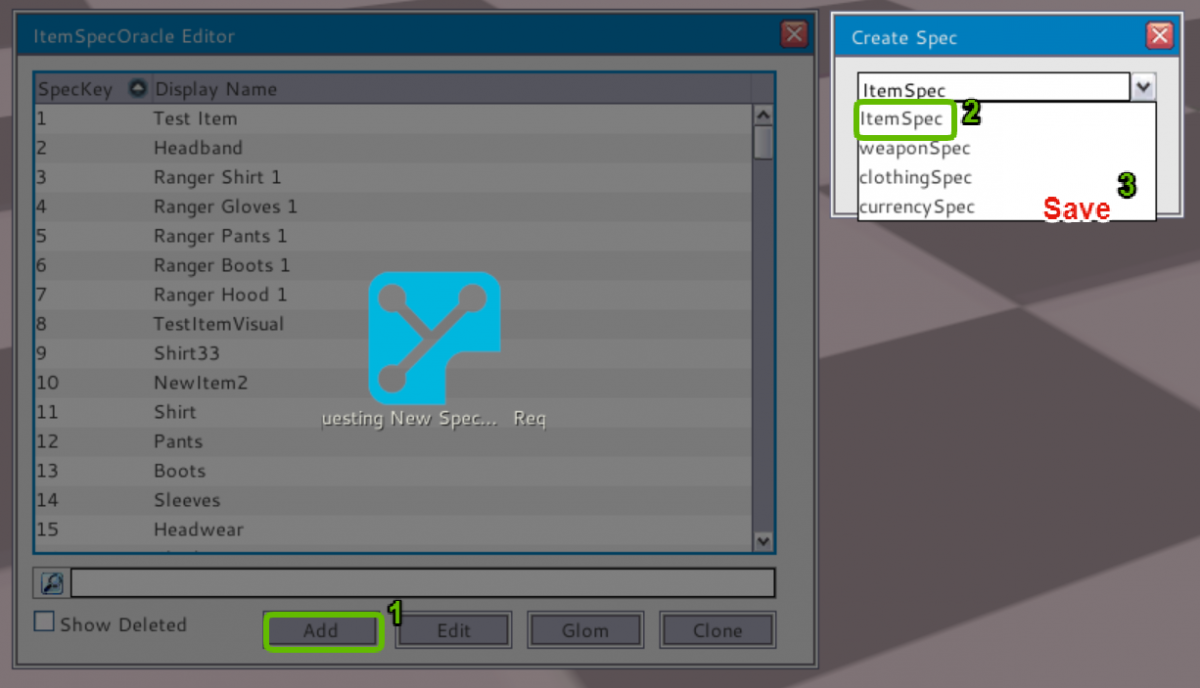
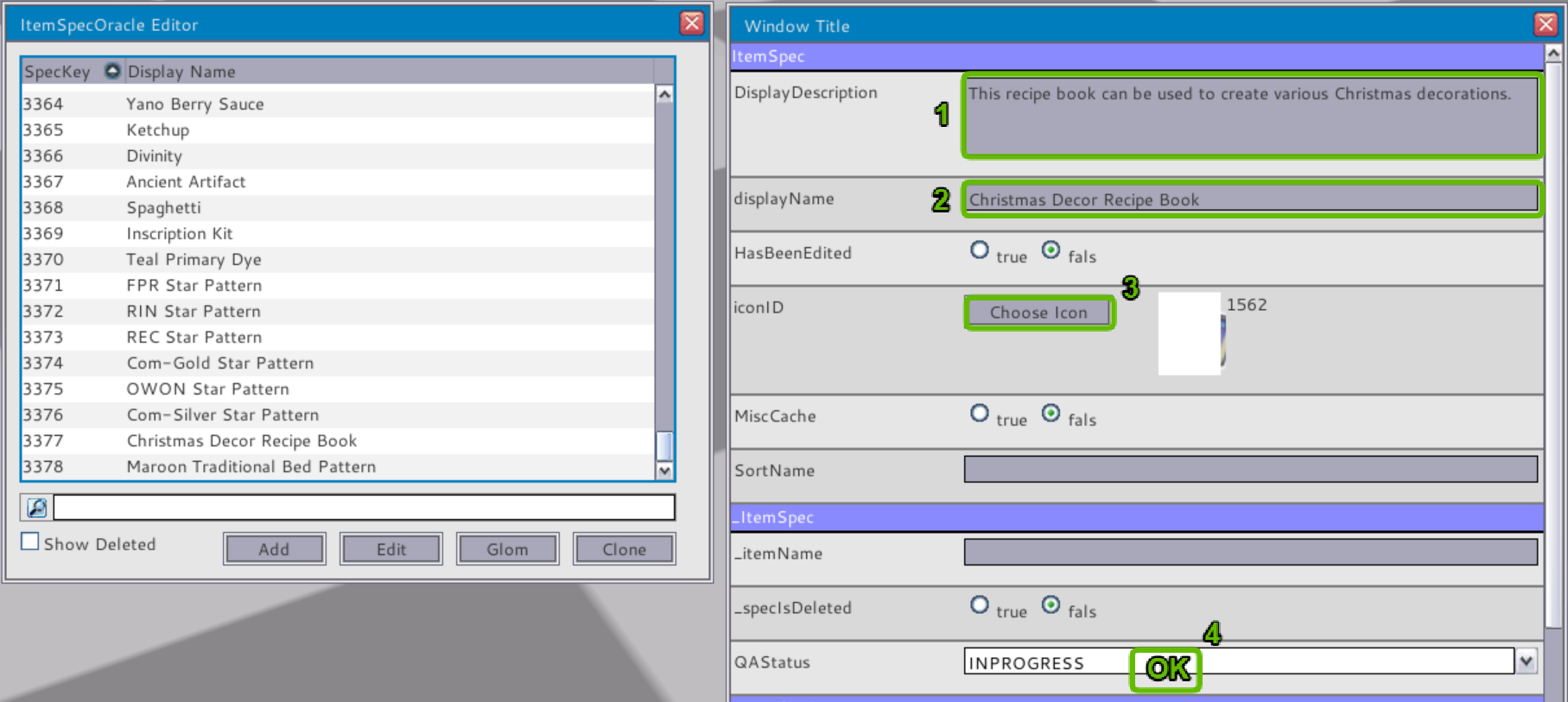
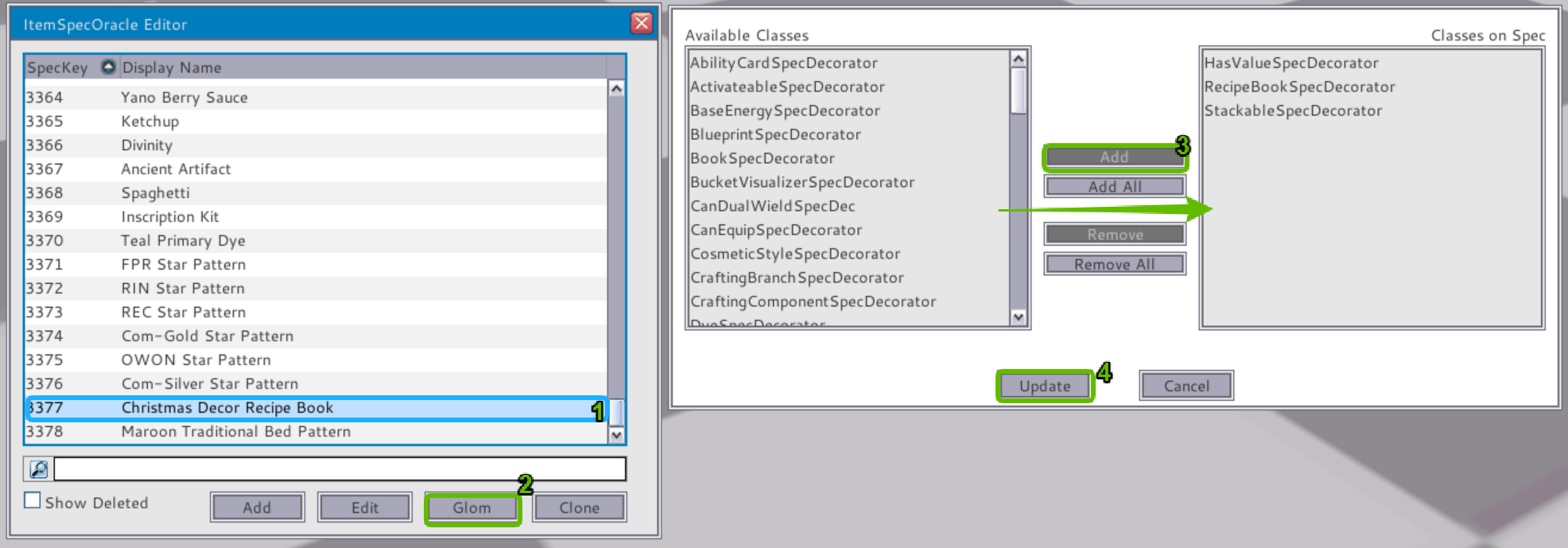
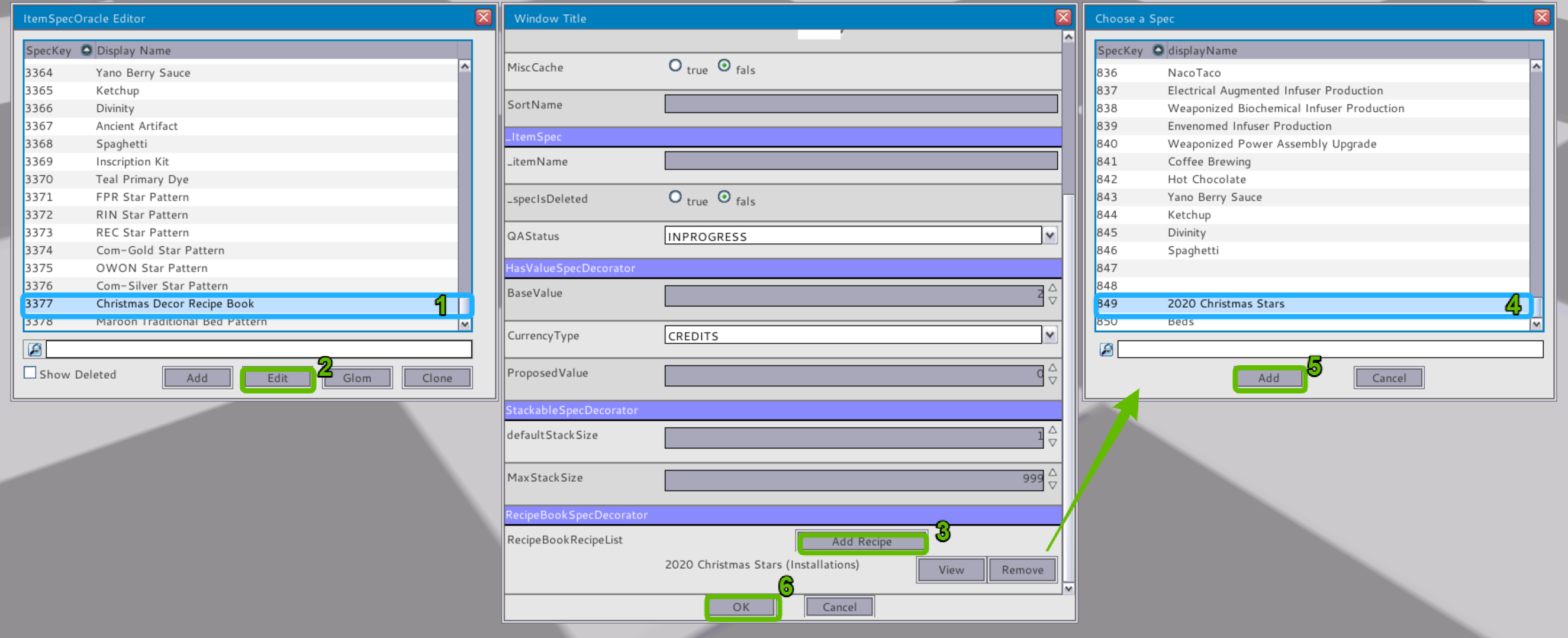
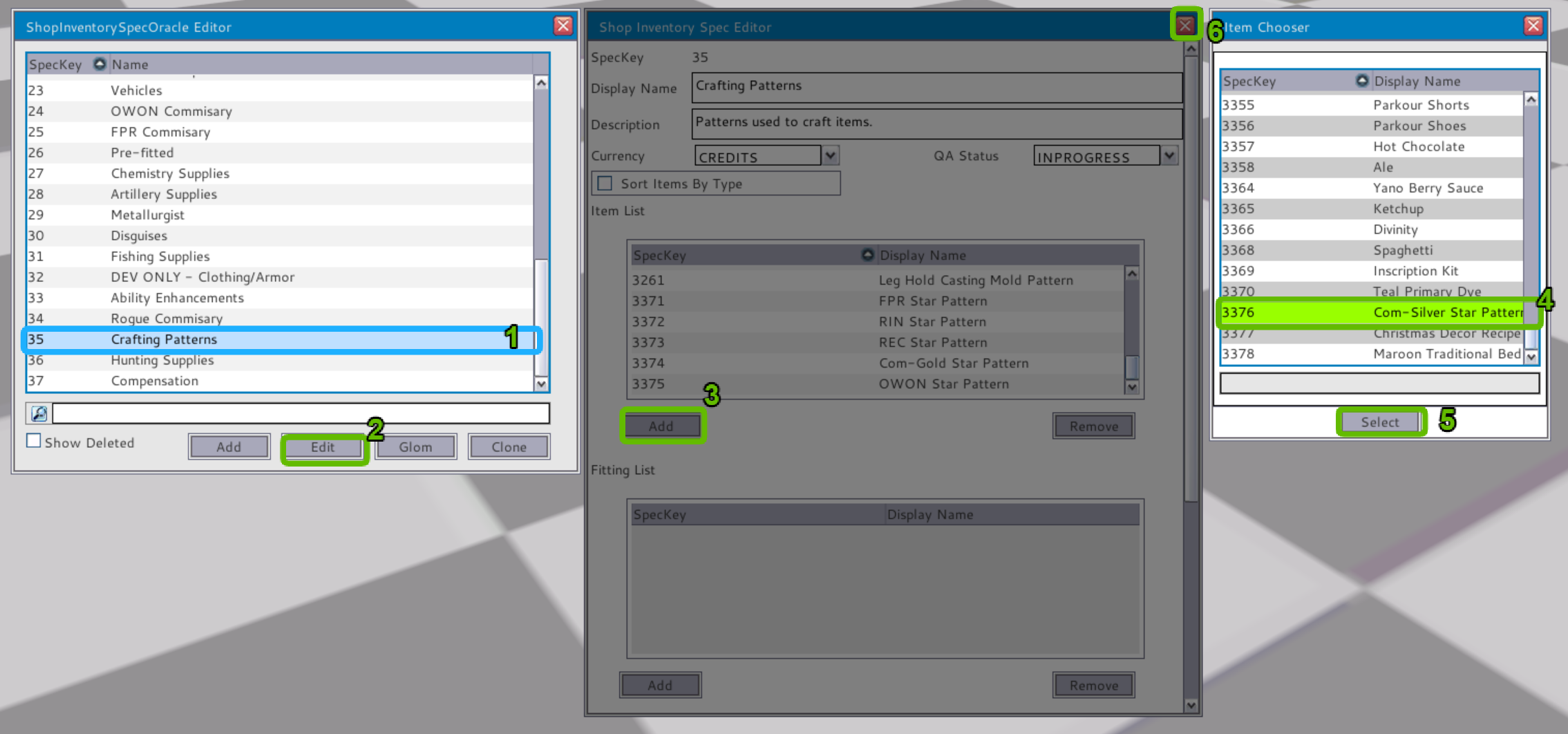
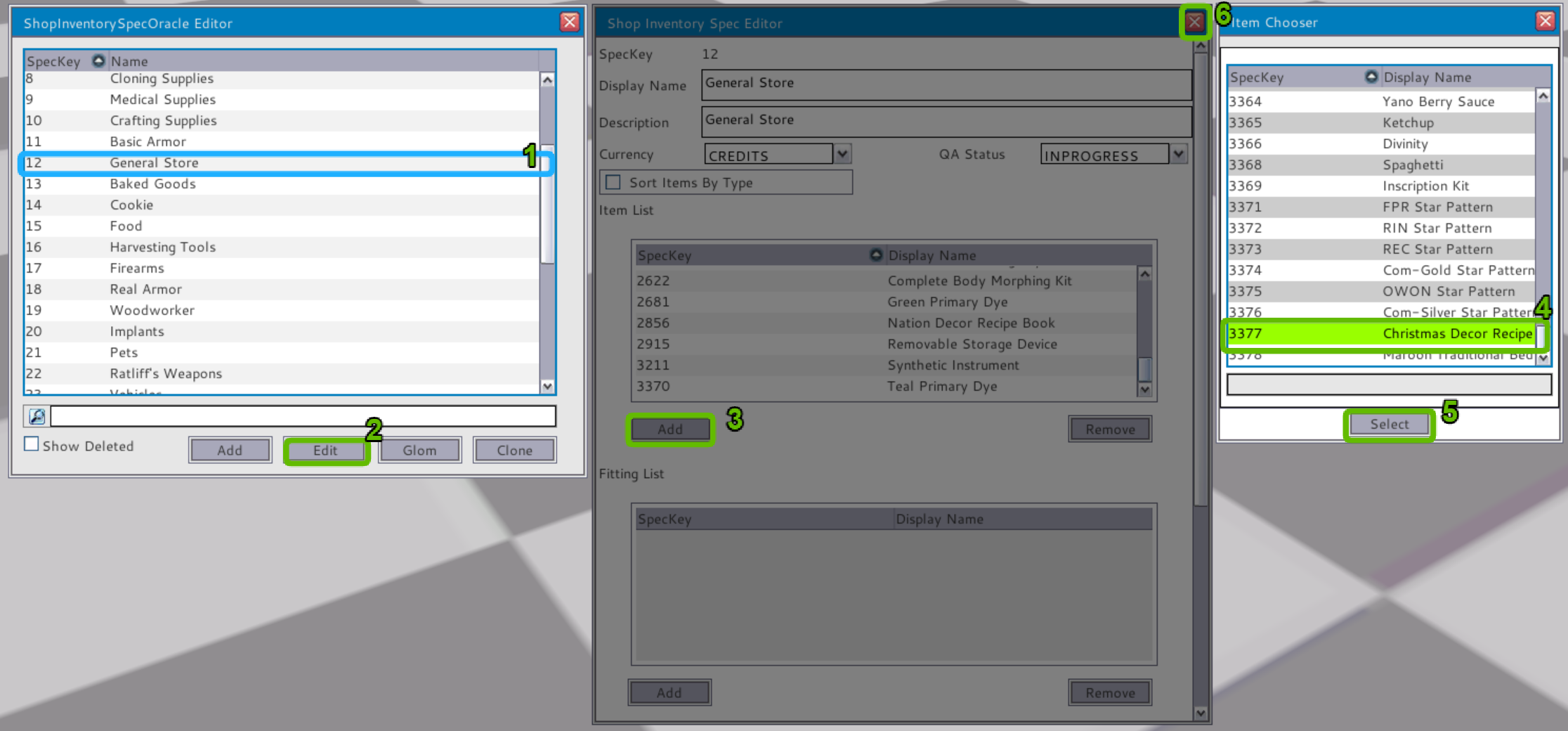
See the table of images below and write-up link HERE for a more indepth of what it takes to make an item using the current system.
Below you will find a table which illustrates the many steps noted above as well as a slightly more in-depth explanation as to how to work through the process of creating a place-able item.
 |  |  |  |
 |  |  |  |
 | ] |  |  |
 |  |  |  |
Making a single item for players using the current system takes
- Each step is a new or different window and panel
- It takes 20 to 50+ steps/windows type of item being created, to create a single item
- If a mistake is made or need to do an edit/adjustment, must go back to the start
- The average time to create a single item under the current system takes between 30 to 60 minutes
The current system requires the in-putter to open and close a large number of windows in order to create a place-able item from start to finish This leads to many extra steps that will no longer be required with the new system. These include creating:
- Player Structure(s)
- Crafting Branche(s)
- Component(s)
- Recipe
- Item(s)
- Component Item(s)
- Recipe Book
The New System
Now the new system! The new system will basically be a “one-stop-shop” for creation through updating items in the game. There is a single window that will allow developers to input and create a new item in just a few minutes no matter how complex that item may seem to players.
We have and are continuing to build in the Item system so that all of the specs and attached fields will automatically be added/attached to the item via HeroEngine's GLOM functionality and system. With us linking these functions back-end into the UX makes the development a lot easier, more precise, and faster.
The new system also allows our developers and in-putters to be able to fix, balance or update an item in a matter of minutes. This will be beneficial for players as well. As we update an item itself, it will update that everywhere in-game with a single save.
This means no more duplicating the update across the core item, player use items, crafted item, recipe item, harvested items, and so on. This also expands into the crafting system once we get there as well. It means that you, the player will not have to get a new item, a new crafting recipe, etc.
Positive outlook info once completed:
| The downside of building the new system on parallel:
|
GUI update
Once finalization is completed on the prototype server we will be moving these over to the Dev server. All systems will have to be added to the new GUI. Updates will continue as we finish each system. EG: faction, crafting, achievements, etc.
Prototype Server:
We are building the GUI on the prototype server initially, and test the style and base functionality. This allows us to build in a clean environment without having to deal with related script bloat currently on the Dev server.
Doing this work first on Prototype allows us to make major changes or adjustments without the worry of breaking other stuff that is currently on the Dev server. GUI Progress:
|
|
Dev Server:
We will then transfer the work done on Prototype over to the Dev server. This lets us avoid double work, and will allow us to make the minor changes or adjustments much quicker. We plan on doing the initial update with the texture and style replacement and only the core systems required with the updates. Any systems that we have not updated or remade will be linked to the visual aspects of the current GUI such as Crafting.
Since many of the GUI aspects rely directly on the corresponding systems, we will push those GUI updates at the time of the system update. An example of some GUI elements that will not be updated initially because of the reliance upon the core system would be Crafting and Housing. Ongoing updates will continue which will add the new GUI to those elements as well as any fixes, tweaks, adjustments or modifications that are required.
Looking ahead
Following our road map, we have been able to identify a few things that we can get out to you this summer and fall before the first Item system push. Next update:
- Small optimizations update coming next
- Asset occlusion culling added
- Terrain occlusion culling fixed
- Terrain optimizations on the island
Next GUI update:
- First GUI initial update coming after Island optimizations:
- Replaces the current GUI appearance
- Reduced ~26 textures down to one (I)
- Fixes major glitches in current
- May fix some or all GUI scaling issues depending on individual pc DPI settings
- Will continue to update GUI as we progress through systems:
- GUI scaling
- DPI Scaling
- Modular design
- Added layout customization and options
NPC Animation update (3rd quarter):
- Small NPC animation optimizations after GUI initial update
- Smaller animation groups to be created
- Animation group loading and unloading (caching)
- Unified animations to reduce load and render time
First Item system update (4th quarter):
- New UX for developers
- Base items recreated (limited for testing)
- Reduction of player gear and items (don't worry we will be adding in better!)
- Removal of items that have been identified as having an IP (Intellectual Property)/Rights conflict
- A Sneak peek at a few of the new items coming in the future.
- Outline of item creation for players and how we will update.
Next Update Article:
Next month's update will be a featurette of what we found regarding the Character/Non-Player Character systems and what our plans for that will be.
Join us on our main forum for more discussion or read the original article HERE.