Setting up the Steam Client for FSX Beta
To join the FSX beta follow these simple steps:
1. Right Click on the FSX: Steam Edition in your Steam Library.
2. Select Properties.
3. Select BETA Tab.
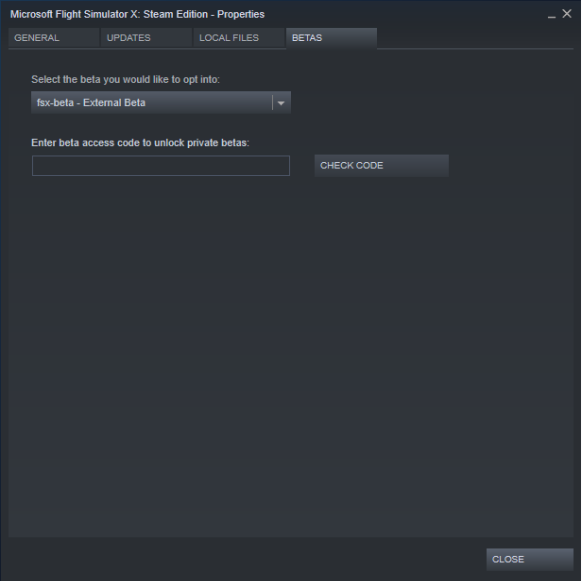
4. Choose fsx-beta External Beta branch. You DO NOT NEED a code.
5. Restart your Steam Client.
To reverse the changes and go to live build once again, just select branch - NONE and restart your steam client.
Bug Fixes
Included in this update are also a number of fixes, which you can find below:
CHANGELIST:
Turbine
- Resolved issue in N1 values where some settings were set to zero
- Fixed issue where fuel flow not saved and set to 0 when started in the air
Agent radar
- Resolved in flight issue which resulted in intermittent crashes when using navigation way-points
Conversion
- Impression fixes when converting knots to meters per second
Piston
- Small fixes to oil pressure table
- C172 oil pressure changed to start with a valid value
Live Weather
- Reintegrated Live Weather
- When a weather station METAR line reading is failing the data will now be extrapolated from the weighted mean of the closest available METAR sources, instead of resetting to default weather
FSX:SE Team