Track time spent on individual tasks!
You can now track how much time you spend on specific tasks from your To Do List!
To get started, organize your tasks into groups. For example, create a tab called "Learning Japanese", add a main task "Reading", and a subtask "Read a short story".
Click the tracking button next to a task's time, and whenever you start a Pomodoro or Flowtime session, the game will automatically track how long you work on it!
See your progress over time!
The Statistics window now lets you see how much time you've spent on selected projects and task groups over the past weeks or months.

The Timer panel also displays your currently tracked task, so you always know what you're working on!
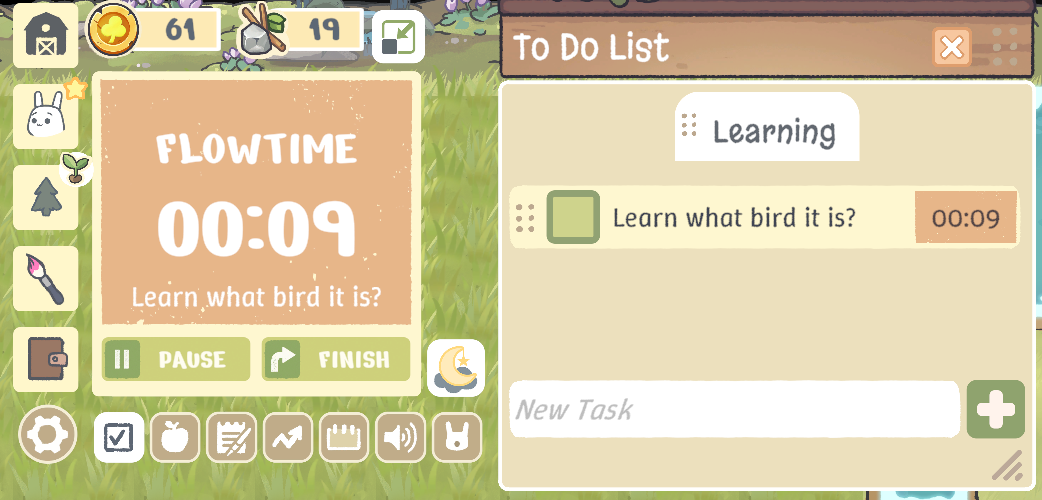
We've also added scrolling to the To Do List tabs, making it much easier to manage multiple projects without everything getting crowded. ----
This is the first version of task tracking, and we'd love to hear your feedback! Let us know what you think and what you'd like us to improve. ----
More UI customization!
After introducing the fully dark UI theme, we temporarily lost the ability to customize tool panels separately.
Now that option is back! You can mix and match themes again - for example, use dark UI windows with pink tool panels.

Small improvements
The Statistics window can now be freely moved around the screen.
Thank you for playing and helping us make Focus Grove better! 🌱