Hello STARDUST Community — Update #P5 is now live!
Hello, this is the Stardust development team. It's been a while.
Have you missed our adventurers Star and Yu? They're back with our fifth update, packed with improvements to early-game pacing, combat information, and controls.
Based on the reviews and feedback you have shared with us since launch, we have released our fifth update. This patch focuses on changes we could make with relatively simple adjustments, centered on the early-game experience, gameplay UX, and some content.
In particular, we have improved early-game progression, movement and targeting controls, the monster counter experience, combat information display, Artifacts and Observatory content, and hotkey and gamepad controls. We would appreciate it if you could check them out.
While this patch may not address every piece of feedback you have shared, we hope it makes your gameplay experience smoother and more enjoyable. We hope you enjoy jumping back into the world of STARDUST! ^^
To celebrate the update, starting tomorrow STARDUST is 25% OFF on Steam🎉
Full Patch Notes
Major Improvements
Early Facility Unlock Timing Adjustments
We felt that the Cafe, Blacksmith, and Observatory unlocked too late, so they now unlock earlier, opening one after another within Chapter 1.
Cafe: after clearing the main quest Tranya Patrol Begins! (Chapter 1, Stage 1)
Blacksmith: after clearing the main quest Catch the Thief (Chapter 1, Stage 3)
Observatory: after clearing the main quest Mindset of an Adventurer (Chapter 1, Stage 5)
Facility introduction dialogue now plays when each facility unlocks.
Related requirements have been adjusted so each facility can be used right after it unlocks.
Lowered the Guild Rank requirement of some items to 1.
Lowered the unlock level of the first Artifact slot from 10 to 8.
Significantly lowered Cafe menu prices, which had felt too expensive.
Tutorial: Yu's Skill Learning Timing Adjusted
In the second tutorial stage, Yu had no chance to use Burning and became much weaker while Flame Burst was on cooldown. To address this, we adjusted Yu's skill learning order.
Yu can now use Flame Strike starting from the second stage.
Starting from the second tutorial battle, you can now chain Flame Strike and Burning as a combo.
In exchange, Yu now learns Emergency Dodge one stage later.
Facing Direction Step Removed After Movement
Having to choose the direction your character faces every time you finished moving made combat feel tedious overall, so we removed this step.
Your character's facing direction after movement is now set automatically based on the movement path.
Accordingly, three counter skills that previously moved the character backward now let you choose the movement direction directly.
Skill | Before | After |
|---|---|---|
Star's Dodge | Moves 2 tiles in the direction opposite to where the character is facing | Moves 1 tile in the chosen direction |
Yu's Emergency Dodge | Moves 3 tiles backward | Moves 2 tiles in the chosen direction |
Chizuru's Night Mist | Moves 3 tiles backward, then attacks an adjacent enemy | Moves 2 tiles in the chosen direction, then attacks an adjacent enemy |
Combat Information Display Improvements
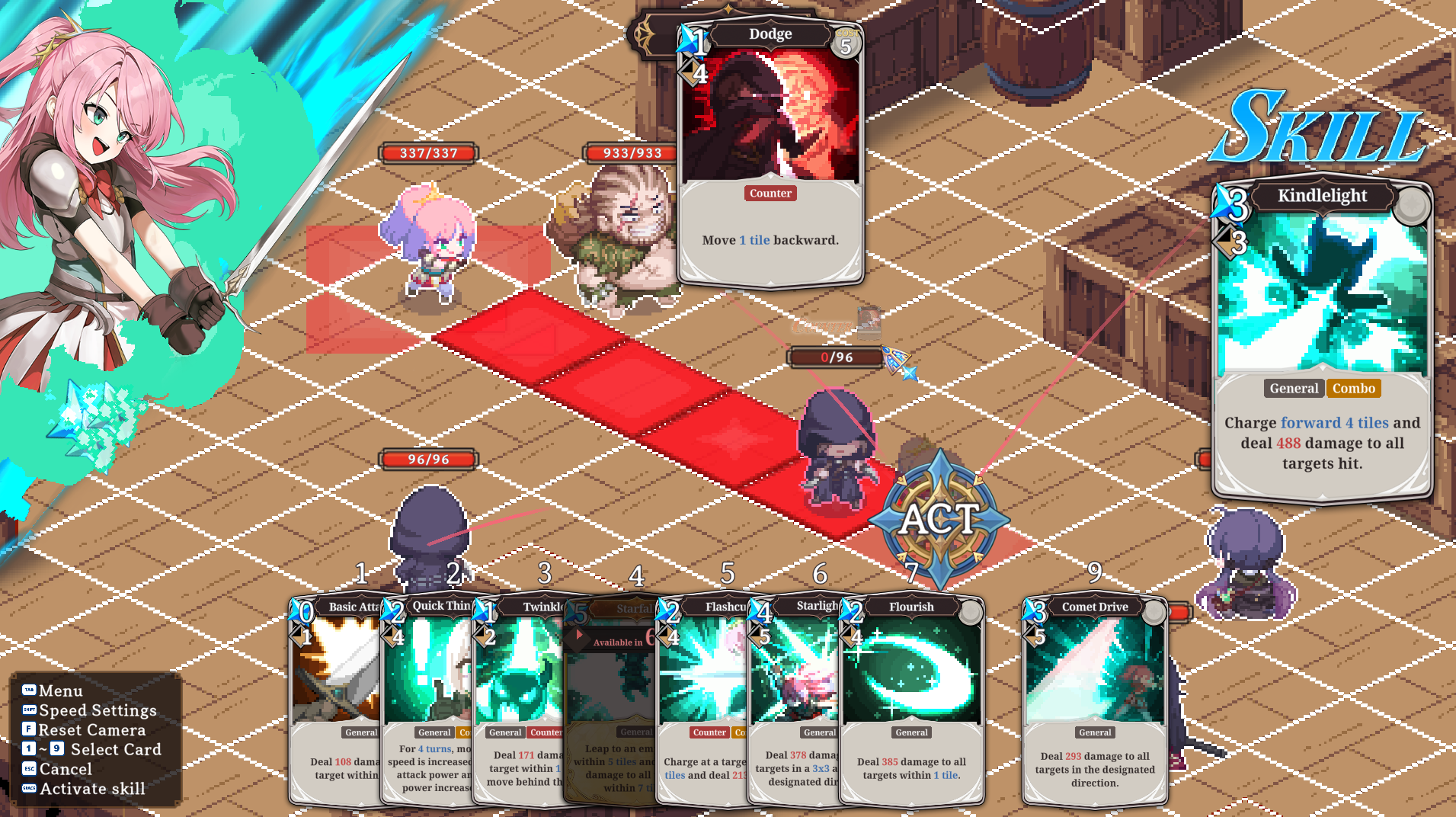
It was hard to tell how far enemies could attack on their next turn, which led to surprise attacks. To improve this, we added an enemy attack range display.
Hover over an enemy to see its movement range (blue) and the range it can attack after moving (red).
Hold the Q key (right trigger on a gamepad) to see the attack range of all enemies. While your movement range is shown, tiles where you can be attacked are shown in dark blue.
When you choose a tile to move to, lines connect it to the enemies that can attack that tile.
Pointing at the tile you are standing on shows lines from the enemies that can attack you if you stay there.
Since attack damage could not be previewed during combat, you had to calculate it yourself while accounting for combos and Defense. To make this easier, we added an attack damage preview.
Before confirming a skill, you can now see the expected damage on the target's HP bar.
Checking enemy counter cards was tedious, and missing them could lead to frustrating surprise counters. To improve this, we added an enemy counter warning.
When the target can counter your attack, a counter warning now appears above its HP bar.
Hover over the warning to see the counter skill the enemy will use.
If an enemy behaves differently from the warning, please let us know.
The damage preview on the HP bar also reflects targets whose counter will block or dodge your attack.
The counter menu could appear even when your character could not counter an enemy attack due to their position. To fix this, we improved the counter selection process for your characters.
When no counter can be used from the character's current position, the counter prompt is now skipped and the message "No position available to counter." is displayed.
When only some counters cannot be used, only those cards are disabled.
Monster Counter Adjustments
Based on feedback that counters from regular monsters interrupted attacks and combos too often, we adjusted counter frequency and evasion distance.
Changed some monster skills from counter skills to regular skills.
Bone Dust Explosion (Skeleton Soldier), Dropkick (Brawler), Eye of Condemnation (Astra Priest)
Removed the Lizardman's Slipping Counterattack and the Sand Lizardman Thrower's Sand Reorganization from their skill sets.
Adjusted the movement distance of some evasive counters.
Dodge (Spy): 1 tile
Startle (Goblin), Snake-like Dodge (Lizardman Thrower), Sand Reorganization (Sand Lizardman): up to 2 tiles
Adjusted monster compositions in some stages from Chapter 2 to Chapter 8 to reduce the proportion of monsters with counters.
Adjusted the Astra Crusader's Unwavering Faith, which felt overly sturdy because it blocked all damage.
Before: all damage taken is reduced to 0 until the Crusader's next turn
After: blocks the countered attack, then all damage taken is reduced by 50% until the end of the current turn
The card description now shows both the effect and the duration.
Adjusted the Gnoll Shaman's Dispel, which also interrupted follow-up Combos despite its card description.
It now only blocks damage from the attack aimed at the Gnoll Shaman itself. Follow-up Combos and other enemies hit by the same attack take damage normally.
In exchange, its Mana cost has been reduced from 3 to 2.
Artifact Improvements
Added new effects to the first Artifacts you can craft after unlocking the Blacksmith, so they offer a more interesting experience.
Added Extra Mana effects to four early-game Artifacts and lowered their unlock ranks to match the Blacksmith unlock timing.
Alongside this, increased the values of two other Artifacts.
Artifact | Effect | Unlock Rank |
|---|---|---|
Marauder Bracelet | Gain 1 Extra Mana when you defeat an enemy. (New) | 3 → 1 |
Broken Sword Ornament | At the start of your turn, a random skill costs 1 less Mana for that turn. (New) | 3 → 1 |
Jeweled Bracelet | Gain 1 Extra Mana at the end of your turn. (New) | 4 → 2 |
Guild Gauntlet | Gain 1 Extra Mana each time you chain a skill with Combo. (New) | 4 → 2 |
Magician's Ring | Magic Power +3% → +5% | No change |
Magic Control Talisman | Gain 1 → 2 Extra Mana when ending a turn with 0 Mana | No change |
The Blacksmith enhancement screen now shows the portrait of the character wearing each Artifact on its icon.

Observatory Enhanced Card Expansion
Most cards obtained from the Observatory only changed values such as skill coefficients and did little to diversify strategy. To address this, we greatly expanded the variety and types of enhanced cards.
Expanded the variety of enhanced cards available from the Observatory from 238 to 556.
Enhanced cards whose Mana cost and Cooldown differ from the original card now appear more often.
Added enhanced cards with different range, movement distance, area of effect, buff duration, or buff stacks.
Added enhanced cards that gain the General, Combo, or Counter attribute that the original card did not have.
Added attributes are shown as icons on the card.
Added card variants with modified Cooldown or Mana cost for some ultimate skills as well.
Enhanced cards you have already obtained remain unchanged.

Card Description and Keyword Tooltip Improvements
Revised the text of skill card and Ability descriptions, since their effects on targets could be hard to understand.
Buff and status effect keywords in descriptions are now colored and underlined, and you can hover over them to see a tooltip explaining the effect.
If a tooltip mentions another effect (e.g. Toxic in the Poison description), a tooltip for that effect is also shown.
Keyword colors and tooltips now also apply to descriptions in the Buff tab of the character details during combat.
Keyword tooltips are also available when using a gamepad.
Select a card and wait a moment to display the tooltip.
Press the right stick button (R3 / RS) to toggle tooltips on and off.
This applies to your hand during combat, the card detail view, and the Skill Deck screen.
As of this writing, the updated text in languages other than Korean uses machine translation. Proper translations are on the way, so please bear with us!
Directional Skill Targeting Improvements
When using a directional skill, the direction closest to the mouse cursor relative to the character is now previewed, even when the cursor is outside the direction arrows.
You can now choose the desired direction much more easily without pointing precisely at an arrow.
Hotkey and Gamepad Control Improvements
The combat action panel hotkeys were scattered across the keyboard and inconvenient to use, so we changed them to number keys.
The number keys follow the order of the menu shown when you select a character.
You can now perform major controls with minimal left-hand movement.
Function | Before | After |
|---|---|---|
Move / Cancel Move | M | 1 |
Skill | K | 2 |
Item | I | 3 |
Character Info | None | 4 |
End Turn | X | 5 |
While choosing a skill, you can now select cards in your hand directly with the number keys 1–9 and 0.
Cancel with the Esc key or right-click. This is also shown in the controls guide at the bottom left of the screen.
Hold the Q key (right trigger on a gamepad) to check enemy attack ranges.
When asked whether to counter, you can now choose to counter with the Space key.
You can now advance to the next line of dialogue with the Space key.
The Space key now also advances to the next step on the quest report screen.
When using a gamepad, it was hard to tell which button activates the ACT button used to confirm a skill. To make this clearer, the corresponding gamepad button icon is now displayed below it.
Skill Deck Convenience Improvements
Adding a different card of a skill that is already in your deck now replaces that card in the same position, instead of showing a warning.
The card is not replaced if the replacement would exceed the maximum Cost.
In the skill card list, cards of skills that are currently in your deck are now shown darkened.
Save Convenience Improvements
You can now delete individual save slots on the save screen.
Press the Delete key while a save slot is focused to delete that save.
The save screen now closes automatically once saving is complete.
Quest Acceptance Convenience Improvements
Accepting a quest now also closes the quest list window and continues straight to the next dialogue.
Other Changes
Combat and Skill Fixes
Fixed an issue where the detailed description of Leon's Turtle Pose displayed a Defense increase value different from the actual effect (1.5x).
Fixed an issue where the detailed description of the Bully Boss's Tactical Order displayed a duration different from the actual effect (2 turns).
Fixed an issue where, when multiple Gnoll Shamans used Dispel against the same attack, the blocking effect remained and also blocked later attacks.
Fixed an issue where the description of the Astra Heavy Infantry's Holy Charge displayed a charge distance different from the actual distance (5 tiles).
Fixed an issue where, on terrain with height differences, tiles that could be reached by going around were missing from the movement range and some skill ranges.
Fixed an issue where some monsters' charge skills could charge up onto high cliffs or in a direction with no targets.
Miscellaneous
Fixed an issue where long quest names overflowed off-screen on the quest report screen.
The report title now uses a more concise "Success: Quest Name" format.
Revised the English titles of some quests to read more naturally.
Added one line to the Credits.
Closing Note
Due to internal circumstances, updates for STARDUST: Wish of Witch had originally come to an end. However, we recently found a way to continue updating the game, which is why we are able to greet you again with this fifth set of patch notes.
As we are preparing other projects, we cannot promise further updates. Still, if the opportunity arises, we plan to keep improving the game.
Thank you to every player who has played Stardust and helped us come this far.
KNIV Studio
[p align="start"][dynamiclink href="https://store.steampowered.com/app/3936730/STARDUST_Wish_of_Witch/"]