This is the biggest update since release, and almost all of it comes from your suggestions on the forum, in reviews and on Discord. Thank you.
Easier interchanges
- Ramps can be crossed. Until now nothing could cross a bridge ramp anywhere along it, which made multi-level interchanges hard to fit. Now a road can pass under the high part of a ramp, and a bridge can pass over its low part.
- You see where. While you drag a road across a ramp, the part that can be crossed is shown in green.
- The ramp tool finds a chain of decks and ramps that fits, where it used to refuse.
- Snapping picks the road under the cursor where roads are stacked on several levels.
Traffic lights
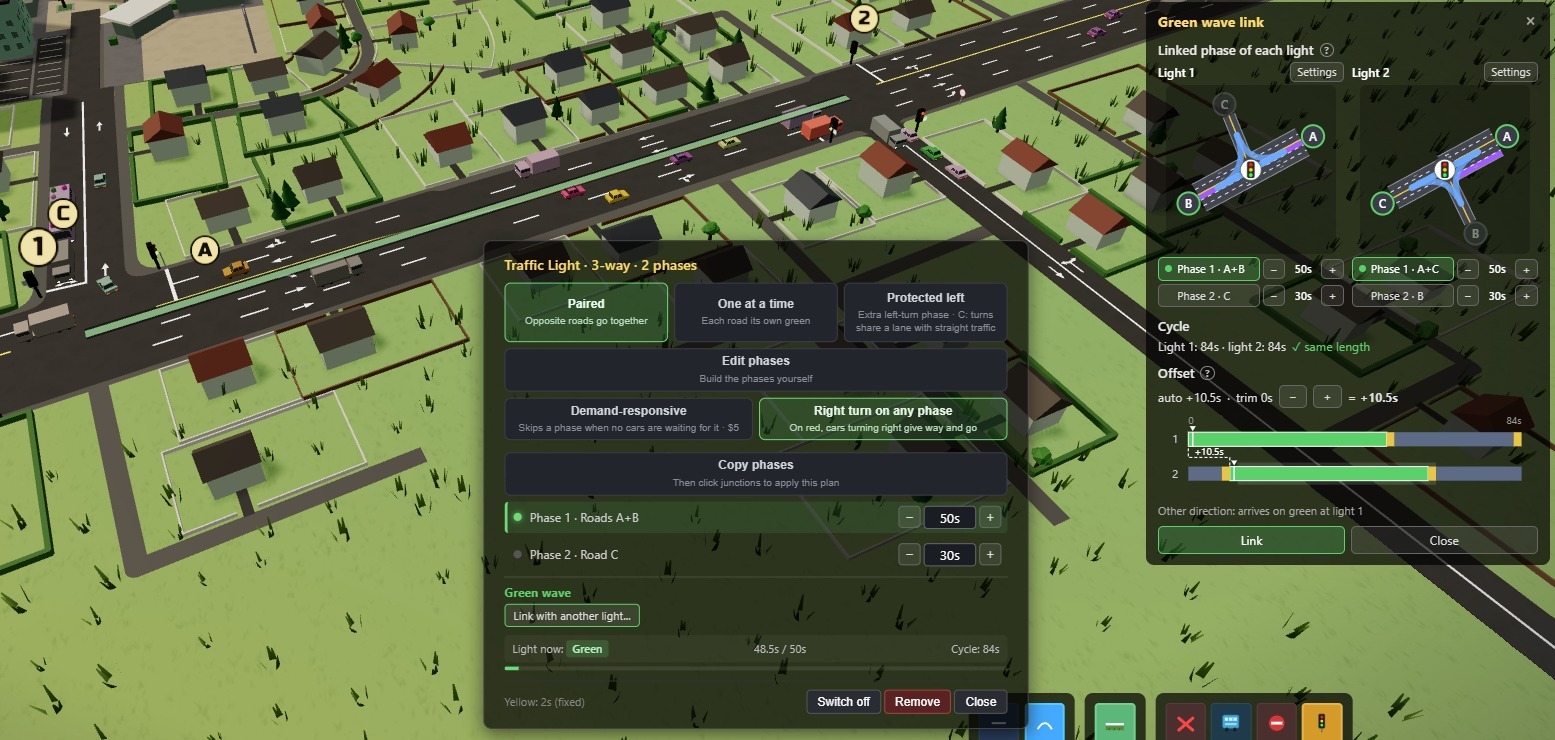
- Green wave. Link a phase of one traffic light to a phase of another, so cars released by the first arrive on green at the second. The link window shows both cycles side by side and lets you adjust green times there.
- Off switch. Switch a light off to see how the junction does on its signs. Phases, timings and links are kept for when you switch it back on.
- Protected left. It can now be picked at any junction with an allowed left turn. A plain 2-Lane Road gives way inside its own phase instead of blocking the option, and the light window tells you when turning cars share a lane with straight traffic.
- The demand-responsive option now says what it does: it skips a phase when no cars are waiting for it.
Traffic behaviour
- Lane changes. Cars change lanes only when they have a reason, and a car cutting in no longer stops the one behind. A long road is no longer driven in one lane from its start.
- U-turns. Cars turn round only at a building entrance or a dead end, not inside a junction, and choose a route with a U-turn less often.
- Buses prefer Bus Only roads and bus lanes.
Traffic Rules tool
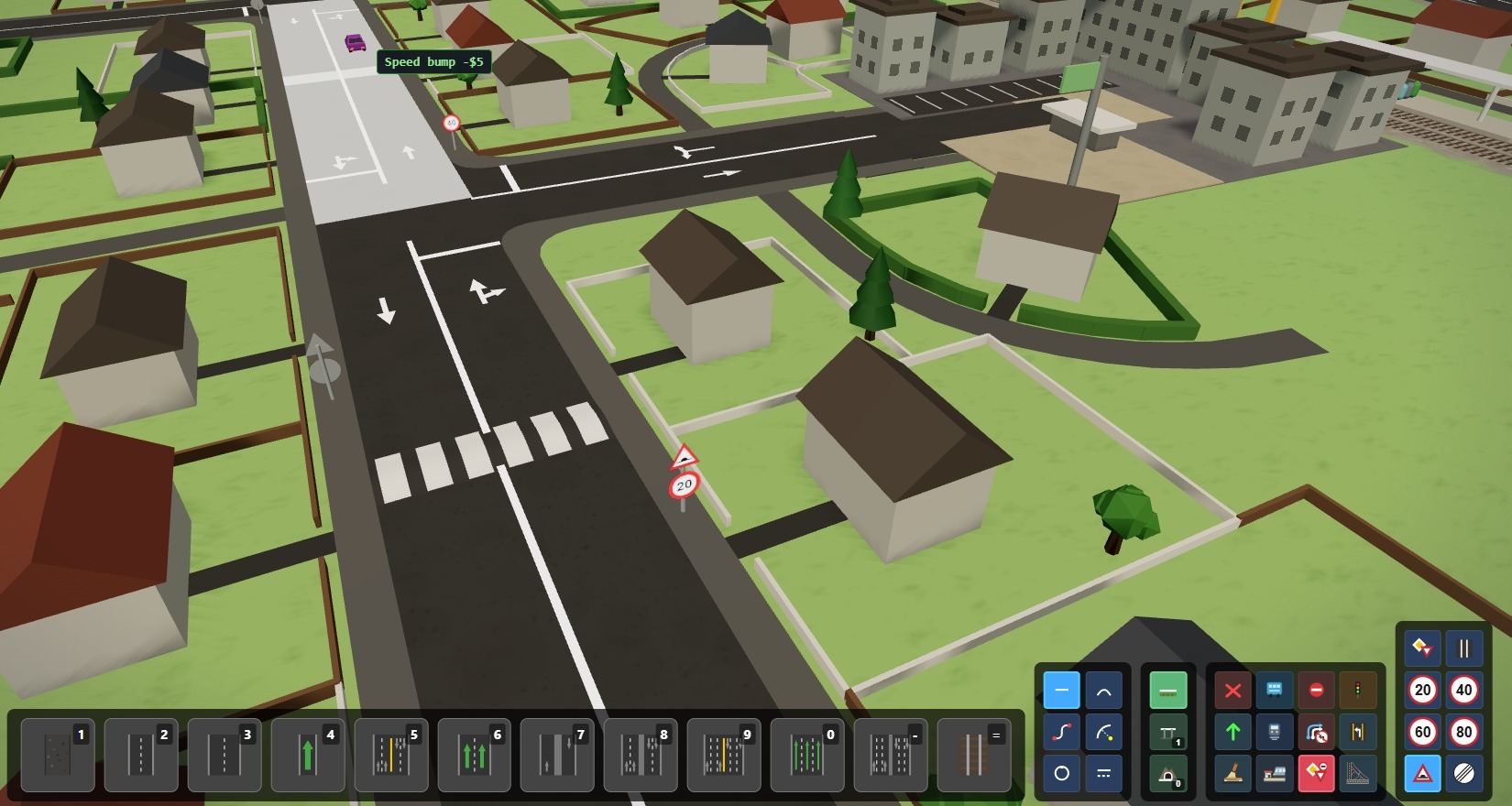
- Speed limits. Slow a road down, for example to keep through traffic off local streets. They work on rail too.
- No lane change. Lane lines turn solid and cars keep the lane they entered in.
- Speed bumps. A slow point on a road.
- The tool is on G, next to the priority signs. The Restrictions map mode shows all of them.
Building and demolishing
- Curve tool, Path mode. Click several points, drag to bend, shape the whole road with handles and press Enter to build it.
- Area demolish. With the bulldozer, press on empty ground and drag a rectangle.
- Undo a demolition. While paused, Ctrl+Z puts a demolished road back, or the whole area. "Pause when building" now pauses before a demolition too.
- Bigger junction corners. A paid corner size in the junction window: cars take the turn faster.
- Auto Bend leaves along the road when started at a road end, has bend levels (Ctrl + mouse wheel) and builds one straight piece across a short gap.
- Arc: change the radius during the sweep. Parallel tool: Ctrl+click marks a start, the next click builds the stretch up to the cursor.
- The bulldoze label shows the length removed, and the build cost label shows the total first, then the road and the trees.
Copy, paste and layouts
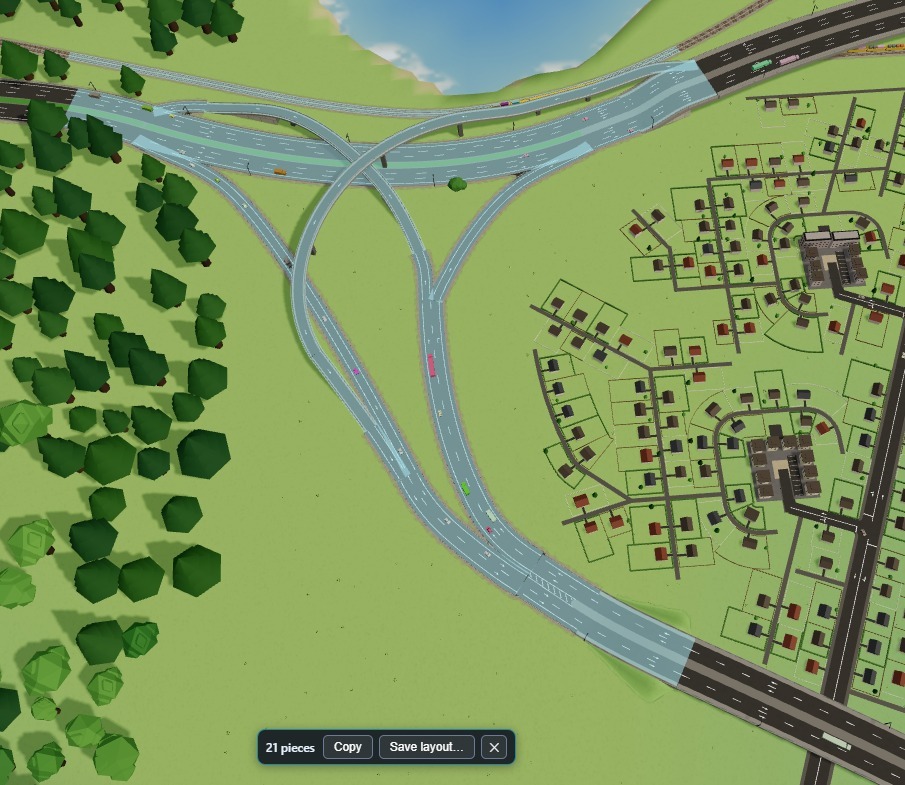
- Copy a build. Drag a box with no tool selected, then Copy. Paste turns with the mouse and can be flipped.
- Layouts. Save the box as a layout and use it in every city, for example your best interchange.
- Junction setups. Copy a junction's lights, signs and lane connections and apply them to other junctions with a click.
- Steam Workshop. Share road layouts and junction setups, and subscribe to other players' ones. Uploading works like a map: a title, a description, then a link to the item.
Transit
- Several lines from one hub, buses and trains.
- Line colours: a palette and a free colour picker.
- Lines are drawn to the stop itself, with a circle for each stop. A train stop can be added by clicking its platform.
- Changing the bus or wagon size refits the vehicles at the hub instead of retiring them.
- Station crowds fit the platform, and landmarks have longer platforms.
Statistics, names and colours

- Junction and road windows. Click a junction or a road with the Info tool to see how many cars use each direction, who uses the road, and its rules. A highlight shows what a click will select.
- Clear rules. Each rule in those windows has an × to remove it, and "Clear all" takes everything off the road or junction. While paused, Ctrl+Z puts them back.
- Traffic volume map mode. Cars per minute on every road.
- Names. Rename districts and roads, and show the names on the map (two settings, off by default).
- District colours. Pick a district's colour in the building window, or copy it from another district with the eyedropper. Its cars, its suburb houses and its transit lines follow.
City
- "Road network has gaps" warning. When a group of districts sits on a road network of its own and its trips can't reach the rest of the city, a new icon says so and shows you the group.
- The game plans the next district ahead and looks for its place all stage long, so a tile with no room no longer costs you the building.
- Complete run. When every end goal is met you can submit the city to Statistics as a finished run and keep playing it.
- Units. Metric or imperial.
- Zoom speed and Pan speed settings.
City backups
- Save backup (Ctrl+S) keeps a copy of the city. Backups lists them and takes you back to one; the city as it is now is saved first.
- After a game over you can load a backup and keep playing from there. The run still counts as lost.
Fixes
- Cars stop at the level crossing barrier, not on the track.
- Buildings no longer appear on water.
- Ctrl+Z no longer removes an older road.
- Esc closes the open window or selection first, then the menu.
- Route lines are easier to see: one style, the same width at every zoom, following the real lanes.
- Placing a road no longer freezes a big city.
- Signs, cones and light posts at a shallow merge no longer stand on the other road.
- A light that can't be placed says why, and the hover agrees with the click.
- A turn lane keeps its sharp turn at a T junction.
- The train lines panel no longer cuts off its details with many lines.
- Cars no longer take the colour of a highlighted building.
- Editing windows take no input after a game over.
Also: new settings (Build info at the top, Render Scale up to 150 %, a longer building detail distance, car horn volume), custom maps get the game rules, an undo button and other fixes for touch screens and Steam Deck.
If Windows blocks the game after this update ("An Application Control policy has blocked this file"), you can keep playing 1.1.1: Library → right-click Traffic Architect → Properties → Betas → choose "1.1.1". The block usually clears within hours as Windows learns the new version; then switch back to "None". A city saved in 1.1.2 loses its road rules and names if you save it again in 1.1.1.
If something breaks or feels wrong, tell me here in the discussions or on Discord.
