You can now choose your battle difficulty! Open Settings and look for Battle Difficulty under Game.
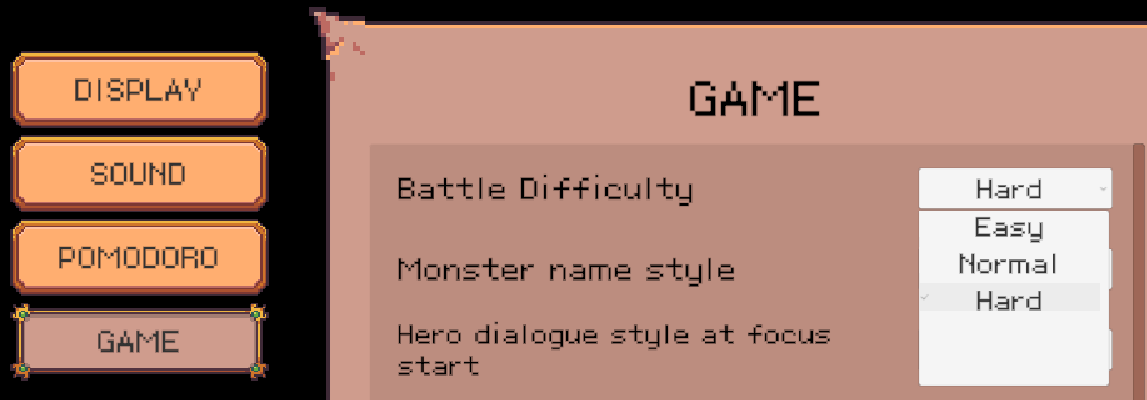
There are three difficulty levels, with Normal as the default. Try the other settings if you’d like a tougher challenge or a more relaxed run. If you press Esc and change the difficulty during Pre-Battle Preparation, the change takes effect immediately for that battle.
Here are the other changes and fixes in this update:
Balance Changes
Reduced the damage multiplier of the Paladin’s Lightning Strike (with Mercenaries available to help, its damage can return to normal levels).
Reduced the damage multiplier of the Wizard Mercenary’s Normal Attack.
Reduced the cooldown of the Ranger Mercenary’s Double Shot.
Increased Mercenary Crit Damage.
Enemies now gain a larger boost in strength when Mercenaries are deployed.
Slightly reduced the EXP earned from exploring routes.
Bug Fixes and Improvements
Fixed an issue where you couldn’t immediately drag an item in the same Inventory slot after opening a small treasure chest.
Fixed a visual issue where the HP bar briefly dropped and then refilled at the start of battle.
Fixed typos and clarified some wording to make it easier to understand.
Fixed audio clipping caused by overlapping sound effects when certain Paladin skills targeted multiple allies.
Fixed excessive camera movement when several critical hits landed in quick succession, such as with the Ranger’s Arrow Rain.
Fixed an issue where the destination on the minimap at the top of the screen still appeared as a question mark in regular windowed mode even after the Raven Adventure Skill was maxed out.
Improved the pointing accuracy of the cursor icon.
Fixed an issue where the cursor obscured the tooltip showing the cost of adding Chronopack slots.
Reduced display issues that can occur at different resolutions in Mini Mode.