Hillshade Farm v0.2.0.0
The Homestead Update

Hey farmers! 👋
Version 0.2.0.0 is the biggest update so far. Your farmhouse can now be redesigned from the roof down to the door mat, water is a real resource that you move around the farm with Irrigation Pipes, and the game speaks five new languages. On top of that there are new sounds and music everywhere, a new journal look for the menus, and a long list of improvements to animals, crafting, tools and building.
Here's everything that changed since the last update!
✨ Highlights
🏡 House customisation. Change the roof, walls, porch, doors and more, add 15 kinds of decoration, and save your own styles.
💧 A real water system. Sprinklers and water towers use real water now, and Irrigation Pipes carry it from a tower to your sprinklers.
🌍 Five new languages. German, Italian, Spanish, Russian and Simplified Chinese, full translation across the entire game.
🔊 Sound and music. Footsteps for every surface, ambience that follows the time and the season, and music that fits where you are.
📖 A new look for menus. Cards and menus now match the game's paper journals, with smooth animations and sounds.
🐄 Kinder animals. Milk, wool and eggs are never lost, and every animal tells you when it will be ready.
🔨 Clearer crafting and better tools. The crafting menu says exactly what you get, and axes and pickaxes hit what you aim at.
🛋️ Furniture in your inventory. Buy furniture into your bag, place it where you like and pick it up again.
💧 Water and Irrigation Pipes
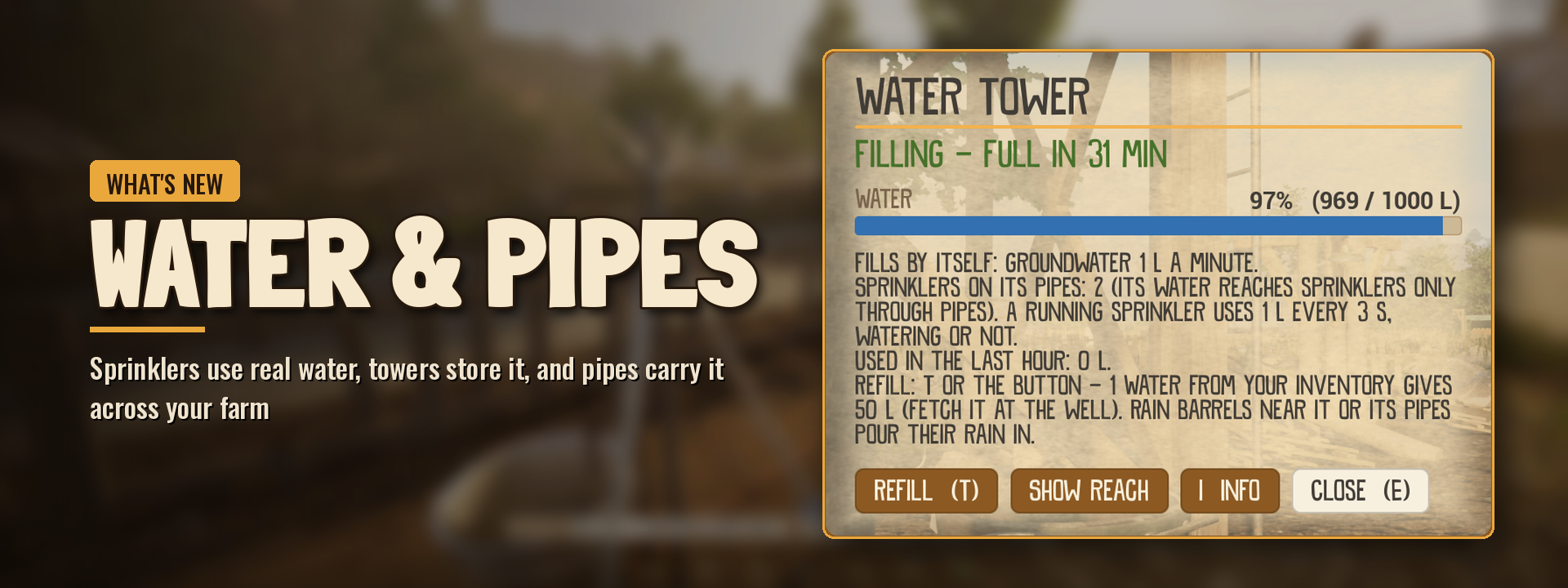
Water is now a real resource. Sprinklers use it, towers store it, and pipes carry it across your farm.
Water that matters
Sprinklers use water. A sprinkler holds 100 L and spends 1 L every 3 seconds while it runs. When it is empty, it stops.
Water towers store 1000 L. They fill slowly from groundwater, faster in the rain, and from rain barrels and water stations standing within 10 m.
The water tower has its own card. Press E on a tower to see how full it is, how long until it is full, and to refill it or show its reach.
Well-watered crops give more. Crops that stay watered until harvest give 10% more.
Seasons matter. Soil dries faster in summer and slower in winter.
Alerts tell you in time. You get a message when a sprinkler runs empty, when a tower drops below 20%, and when a tower is empty.
Irrigation Pipes
Lay pipes from your Hotbar. Select Irrigation Pipes like a tool, click on a water tower, a sprinkler or an existing pipe, and lay the line where you want it.
Piped sprinklers refill themselves. A sprinkler connected to a tower fills up from it after every run. No more carrying water.
Sprinklers without pipes still work. Refill them by hand with T, using Water from your bag (1 Water = 50 L).
Real connections. Pipes join the tower with a riser and valve, connect to the sprinkler with a flange, and get T pieces and end caps where lines meet and end.
Easy to change. R picks up one piece, Hold F picks up a whole straight section. You get every pipe back.
Where to get them. Pipes cost $50 at the shop and stack to 64. There is a starter pile of 30 on the barn floor next to the workbench.
Key | While laying pipes |
|---|---|
LMB | Start a line, then lay it |
RMB | Stop laying |
R | Undo the last piece |
Alt | Free placement without snapping |
Tutorial
The sprinkler quests now teach the new system: you place a sprinkler, fill it up, and connect it to the water tower with pipes. The quest gives you the pipes you need.

🏡 Your Farmhouse
Paint it, renovate it, decorate it and give your farm a name. The farmhouse is finally yours.

Paint and renovate
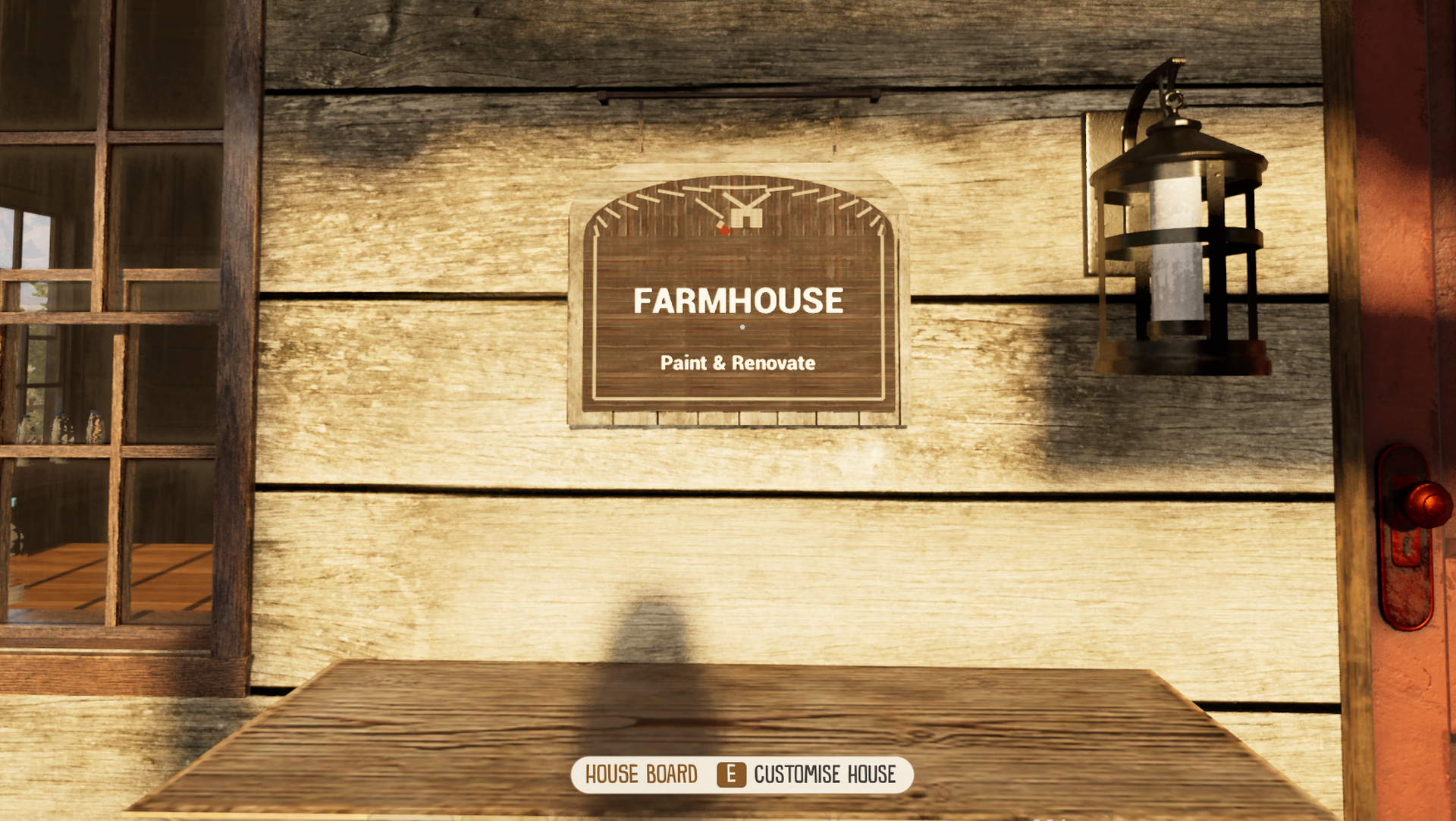
Find the plaque by the front door. Press E on the "Farmhouse: Paint & Renovate" board to open the new house card.
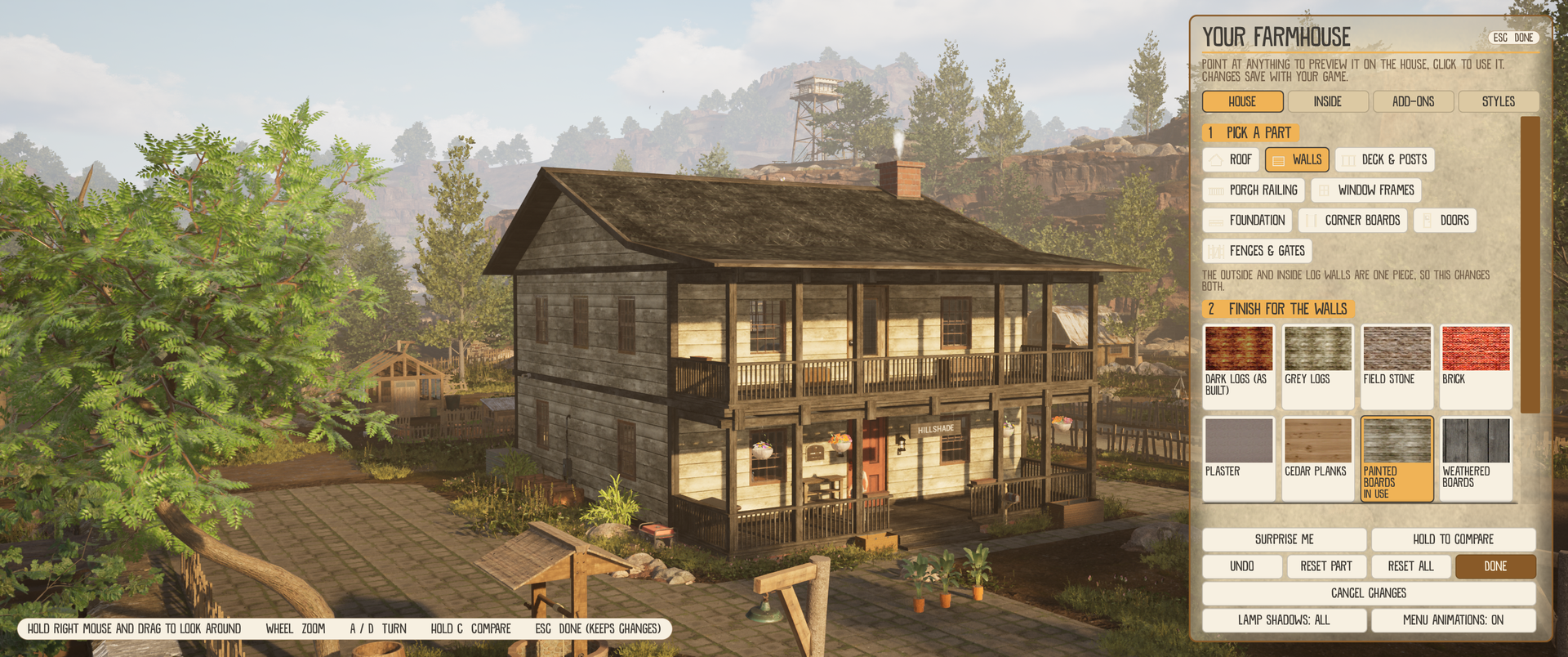
Change every part of the house: roof, walls, deck and posts, porch railing, window frames, foundation, corner boards, doors, and your fences and gates.
Preview before you decide. Point at a finish to see it on the house right away. Hold C to compare with how it looked before.
Nothing is final. Undo, Reset part, Reset all and Cancel changes are always there.
Look around freely. Hold the right mouse button to orbit the house, zoom with the mouse wheel and turn with A / D.
Inside too. The Inside tab moves the camera indoors, where you can pick new finishes for the fireplace and the stairs.
Add-ons
15 add-ons to decorate with: shutters, flower boxes, porch lights, porch seating, pots by the steps, hanging baskets, a wreath, a mailbox, a door mat, string lights, window glow, chimney smoke, a log pile, pumpkins and a name plate with your own text.
Lights follow the day. Porch lights, string lights and window glow come on in the evening and go off in the morning.
Styles and your farm's name
14 ready-made styles change the whole house with one click, and Surprise me picks a look for you.
3 "My styles" slots save your own looks so you can switch back any time.
Name your farm. The name shows on the plaque by the door.
Everything is saved with your game.
Smoother indoors
The house runs at a better frame rate inside, because fewer lamps cast shadows at once. If you prefer every lamp to cast shadows, there is a Lamp shadows setting on the house card.
The stone wall upgrades are sharp now instead of blurry.
🌍 Five New Languages
Hillshade Farm now speaks German, Italian, Spanish, Russian and Simplified Chinese.
Pick your language under Options, Game, Language. It switches right away, without a restart.
First launch follows Windows. If your system is set to one of the new languages, the game starts in it.
Everything is translated: menus, quests, item names, messages, key hints and the lines of the townsfolk.
Subtitles for voiced lines. The voices stay in English, with subtitles in your language.
Pictures too. Around 470 pictures with text in them, such as journal pages, cards and shop pages, were redone for each language.
Spotted a wrong or odd translation? Tell us on Discord and we will fix it.
🎵 Sound and Music
The valley sounds fuller, from the ground under your boots to the music in town.
Footsteps by surface. Grass, dirt, mud, wood, stone, gravel, sand, snow, hay, metal, leaves, puddles, rugs and stairs all sound different.
Ambience that changes. The background follows the time of day, the season and the weather, with a quiet indoor tone inside buildings.
A livelier town. The town and the diner have crowd sounds.
Music by place. Playlists change with where you are and what the day is like, with soft fades and pauses between songs.
Music makes room for voices. It gets quieter while someone is talking.
More animal sounds. Milking, shearing, collecting eggs and petting have their own sounds.
New Ambience volume slider in the sound settings.
Evened loudness. Sounds that were too loud or too quiet were balanced.
📖 A New Look for Menus
Many menus now look like pages from your farm journal, and they feel better to use.
Paper journal style. The house card, animal card, quest log, quest offers and tracker, key bar, power menu, water tower card, sleep overview, upgrade menu, talk card, map, crafting card, horse bar and farm card were redrawn as parchment pages.
Menus move. They open and close smoothly, tabs fade over, and buttons react when you point at them and press them.
Menu sounds. Opening, closing, switching tabs and clicking have soft sounds.
Messages slide in from the side instead of popping up.
Menus remember. The quest log and the house card open on the tab you used last.
Prefer it calm? Set Menu animations to Reduced on the house card.
🐄 Animals, Crafting and Tools
Everyday farm work is clearer, kinder and loses nothing along the way.
Animals
Products are never lost. If your bag or the bucket is full, the game tells you why and the animal stays ready until you come back.
Clear messages. You see what you got, such as "+3 Goat Milk".
Know when it is time. The key bar and the animal card show hints like "Milk in about 6 min". Readiness is saved with your game.
Goats and sheep now follow the same milking rules as cows.
One info card for every animal, with name, age, needs and what it produces. Selling from the card asks you to confirm first.
Hens and ewes. E on a hen opens that hen, and the shears shear ewes directly.
Ponds and hives. Ponds show a summary of who lives there, and beehives show honey progress.
Calmer alerts. Each animal home warns you at most once every 10 minutes.
Crafting
See what you get. The crafting card shows the result before you start, such as "You get 50x Nails (10 crafts), about 9 s".
Needs and Missing lines tell you exactly which materials are short.
Max button queues as many crafts as your materials allow.
Cancel one craft with Backspace and get the materials back.
Finished items always go to your bag, and crafts that were still running when you saved are refunded when you load.
Quests count what you make. 8 quests now count crafted items correctly.
Tools
Axe and pickaxe are more forgiving to aim, and the key bar shows your target and the hits left.
Wrong tool? The game now tells you which tool you need.
More trees to chop. Pines and plain oaks can be chopped.
Safer tools. The hoe and the trimmer no longer hurt animals.
Hold E to pick up
Hold E picks up everything within 3 m that you can see, nearest first, with a ring at the crosshair that fills while you hold.
You get one summary message instead of a long list, and stacks that only partly fit are split instead of left behind.
🔨 Building, Furniture and Map
Placing things is more precise, furniture travels in your bag, and the map shows the whole valley.
Build mode
Key | What it does |
|---|---|
R / Q | Rotate by 15° |
Shift + R / Q | Rotate by 45° |
Ctrl + R / Q | Rotate by 1° |
Z | Grid snap on or off (25 cm) |
Shift + Z | Change the grid size (25, 50 or 100 cm) |
Hold F | Destroy, the same key everywhere |
The key bar is always shown while you build, so you never have to guess a key.
Blocked? A line tells you why a piece cannot be placed there.
Fence paint. 8 colours for your wooden fences, on one fence or on all of them.
Furniture in your inventory
50 furniture pieces are now real items. Carry them in your bag and place them where you like.
Choose at the store. Press V on a store item to switch between "To inventory" and "To farm".
Place and pick up. Click a furniture slot in your hotbar to start placing, and press V on placed furniture to take it back.
Map and more
New valley map. The map now covers the whole valley in paper colours, with place names and your truck on it.
The wind turbine tells you when the wind is too light.
The water tower is easier to aim at with E.
GPS and Smartwatch were removed from the shop, because they did nothing.
🔧 Fixes
Fixed sprinklers and water towers always staying at 100.
Fixed rain barrels showing a wrong amount of water.
Fixed the tool shelf handing out items when you did not have enough money.
Fixed a second batch of the same recipe overwriting the first one in the crafting queue.
Fixed goat milk, wool and machine milk getting lost when your bag or the bucket was full.
Fixed Hold E sometimes pulling in items from far away, and item spots not refilling afterwards.
Fixed pines that could not be chopped, the pickaxe chopping an aspen, and the stump remover missing one kind of aspen stump.
Fixed the heavy pickaxe hit playing the menu error sound.
Fixed a tutorial step about the water range that could not be completed.
Fixed the signs + % and < showing as empty boxes in some texts.
Fixed trucks being lifted or flipped by wild flowers and items lying in the grass.
Fixed the HUD showing on top of the loading screen.
Fixed a Milk button that did nothing on lambs and kids.
Fixed wrong prompts on some switches and toggles.
💾 Your Save
Your save carries over. Nothing is reset.
A one-time top-up. The first time you load, your sprinklers are filled and your water towers are topped up, so the new water system does not catch you dry.
Free pipes to start. If you own a water tower you get 8 Irrigation Pipes, and 30 more are waiting in the barn next to the workbench.
Thanks for playing Hillshade Farm, and keep the feedback coming! 🧡