Hi miners, 😄
Thank you for your continued support, reports, feedback, and suggestions.
This update focuses on making resource tracking, Delivery Train management, and everyday factory interactions more convenient.
Several changes in this update also come directly from discussions with the community, including requests for easier Mining Point tracking, remote Delivery Train control, better employee navigation, and a fix for empty boxes unexpectedly appearing after loading.
The Catalog can now help track Mining Points directly, Delivery Trains can be dispatched from the Tablet, Automated Supply Station coverage can be reviewed after placement, and several additional quality-of-life improvements and fixes are included.
Here is what is available in the latest version.
Main Updates
1. Track Mining Points from the Catalog
This feature comes directly from community discussions, where players mentioned that it could be difficult to remember where certain Minerals were found after progressing through multiple Cave Areas and Mining Points.
The Catalog can now help players locate Mining Points where discovered items can be found.
For supported items, the Catalog displays the relevant Mining Points that are currently available based on the player's progression.
Only Mining Points and Cave Areas that have already been unlocked will be shown.
a. Mining Point Locations
Each supported item can display the Mining Points where it can be found.
This provides another way to check where to continue mining without having to remember the location of each resource manually.

b. Pin Up to 5 Mining Points
Mining Points shown in the Catalog can now be pinned for easier tracking.
Players can pin up to 5 Mining Points at the same time.
A reset option is also available to quickly clear the currently tracked Mining Points.

c. HUD Tracking Indicators
Pinned Mining Points display tracking indicators while exploring the cave.
The indicator uses the icon of the item being tracked, making it easier to identify which Mining Point belongs to each selected resource.
These indicators can help guide players toward tracked Mining Points even when they are outside the current view.

2. Dispatch Delivery Trains from the Tablet
This was also requested through community discussions, particularly for players who prefer to manually control their Delivery Trains but want to do so without having to return to the station every time.
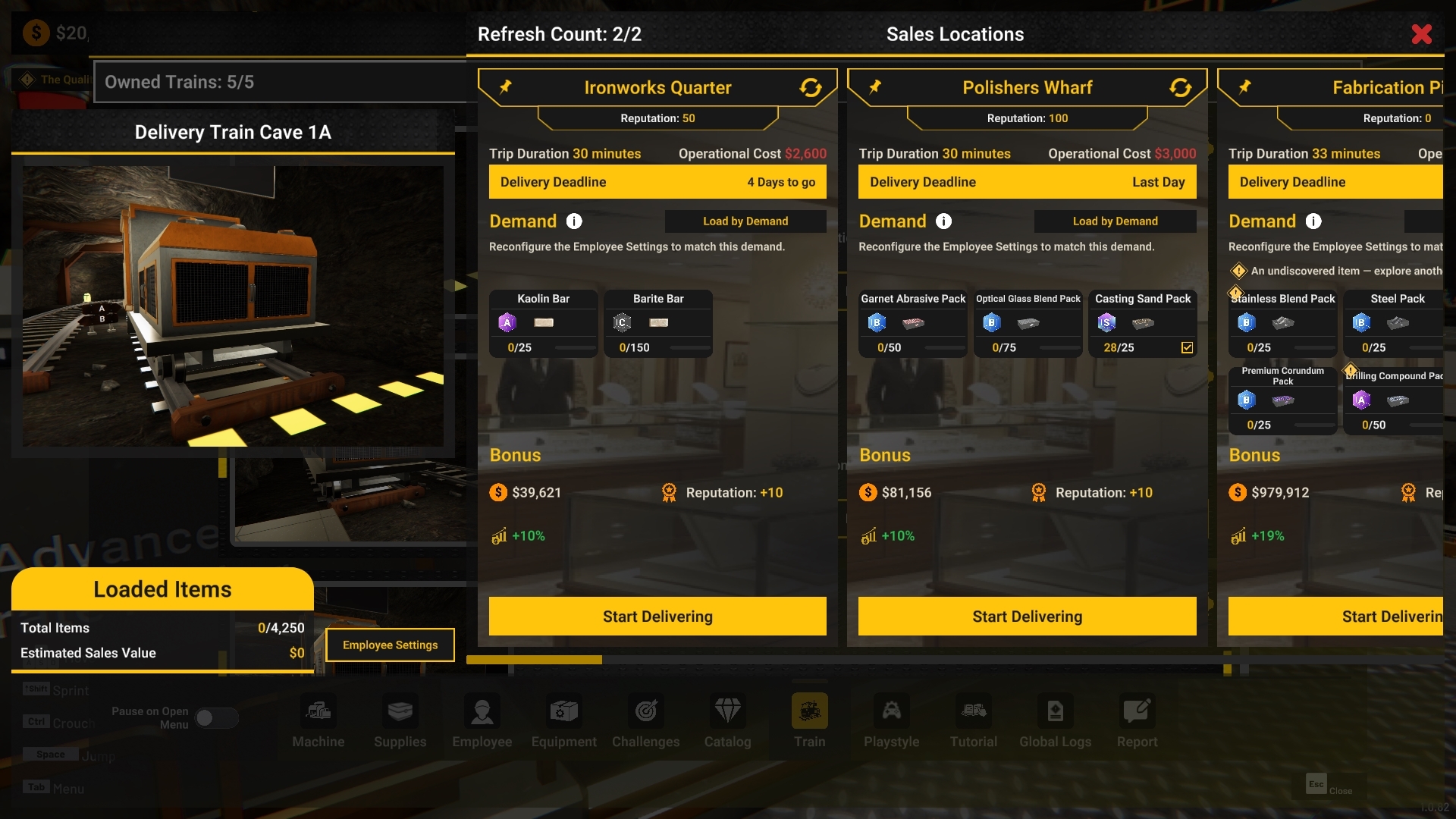
Delivery Trains can now be dispatched directly from their cards in the Tablet.
Previously, the Dispatch interface could only be accessed through the Train Operator at the station.
When an eligible train is parked, a new Dispatch option is available from its Tablet card.
From the Dispatch interface, players can:
Select a Sales Location
Open the related Employee Settings
Remove items from the train's cargo
Dispatch the train
This allows more Delivery Train management to be handled remotely while still giving players direct control over each trip.

Improvements
1. Automated Supply Station Range Preview
The operating range of an already placed Automated Supply Station can now be shown again after placement.
While focusing on the machine, players can use:
RMB on keyboard and mouse
B on controller
to show or hide its range preview.
This makes it easier to review the station's coverage when adjusting factory layouts or deciding where nearby items and storage should be placed.


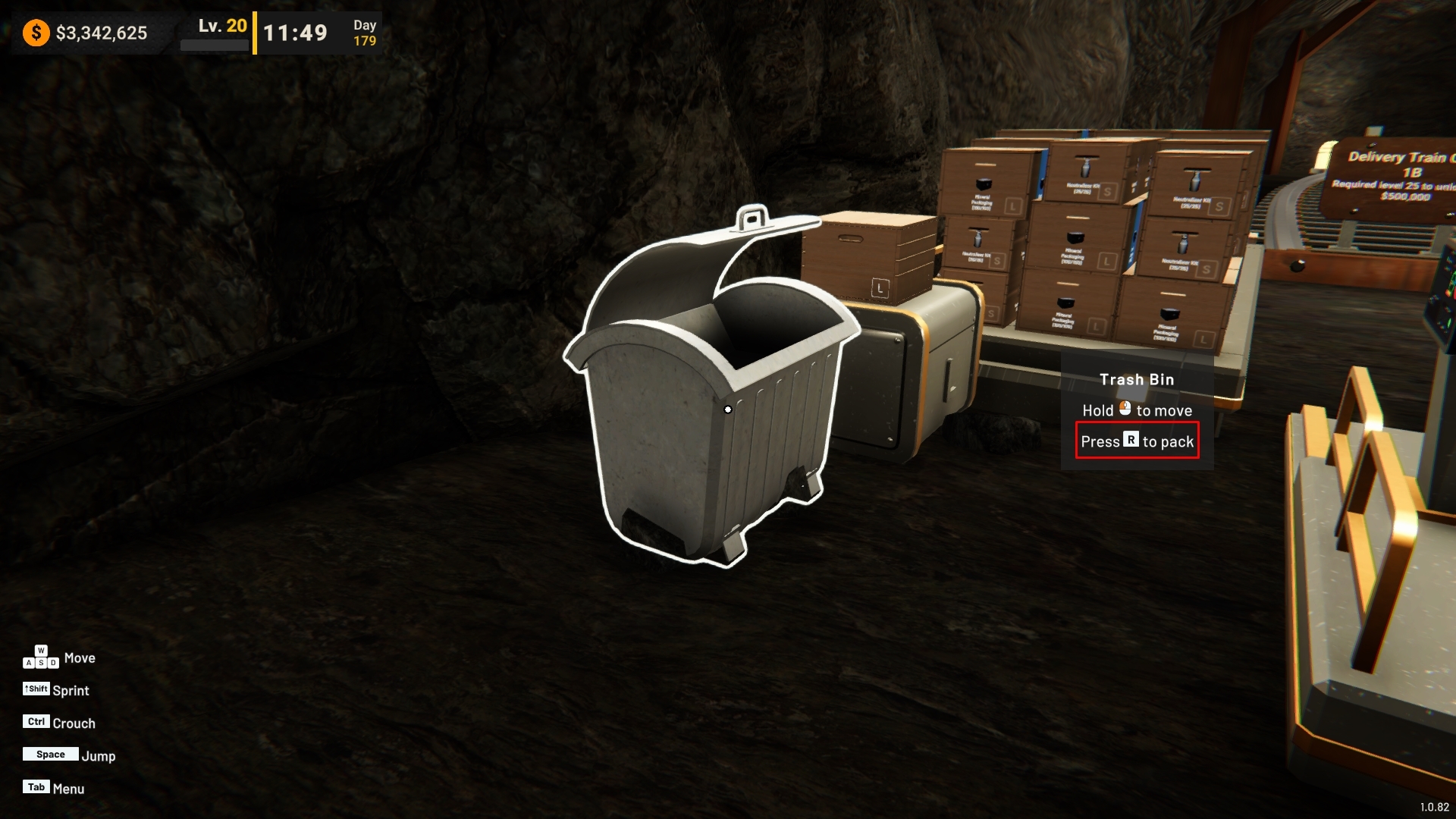
2. Repack Empty Machines Without Confirmation
Machines and equipment that are completely empty can now be repacked immediately without an additional confirmation dialog.
If the machine still contains commodities, stored items, or boxes, the confirmation dialog will continue to appear as before.
This removes an unnecessary step when moving machines that have nothing stored inside them while keeping the existing safeguard for machines that still contain items.

3. Faster Quantity Adjustment
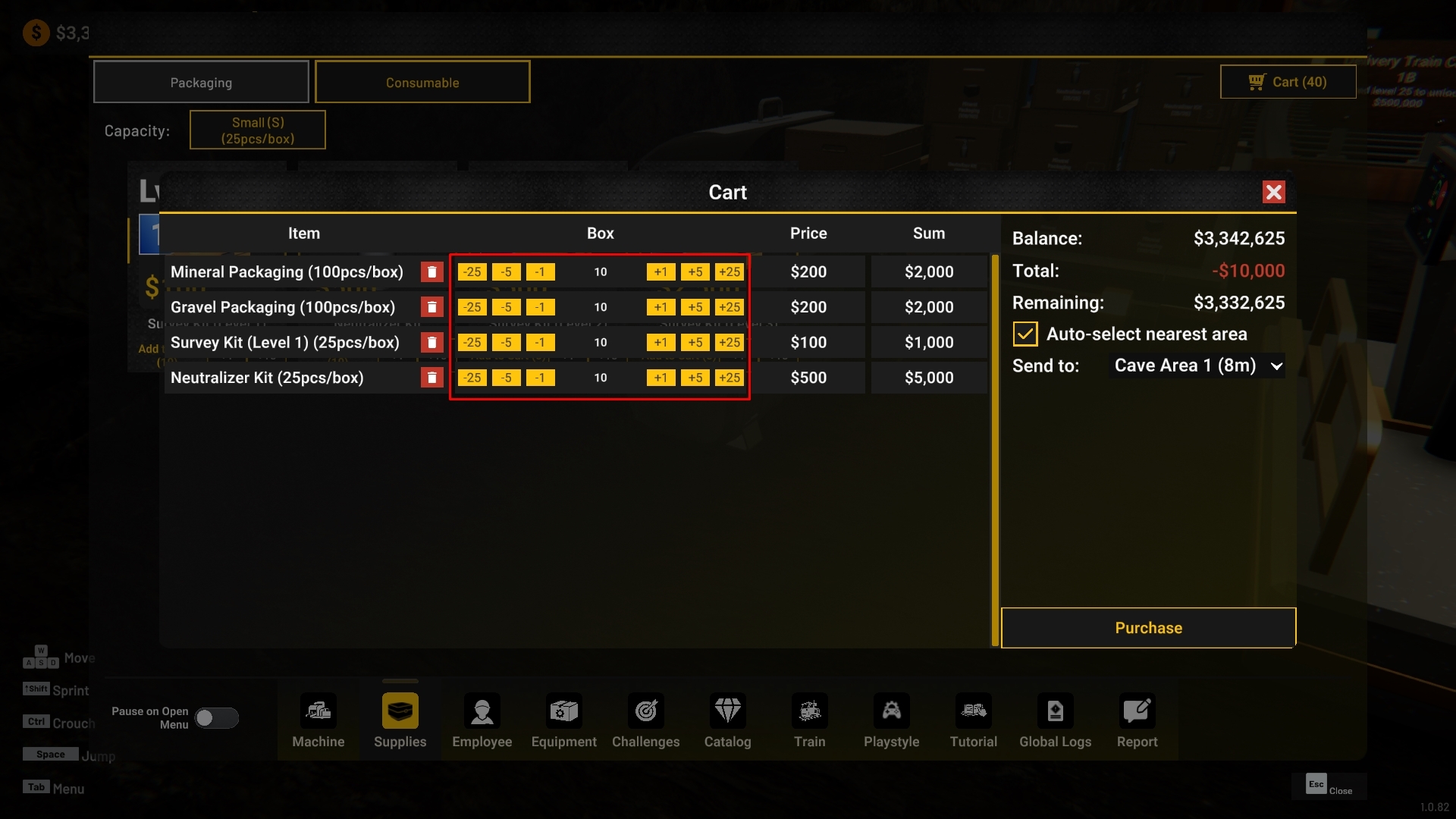
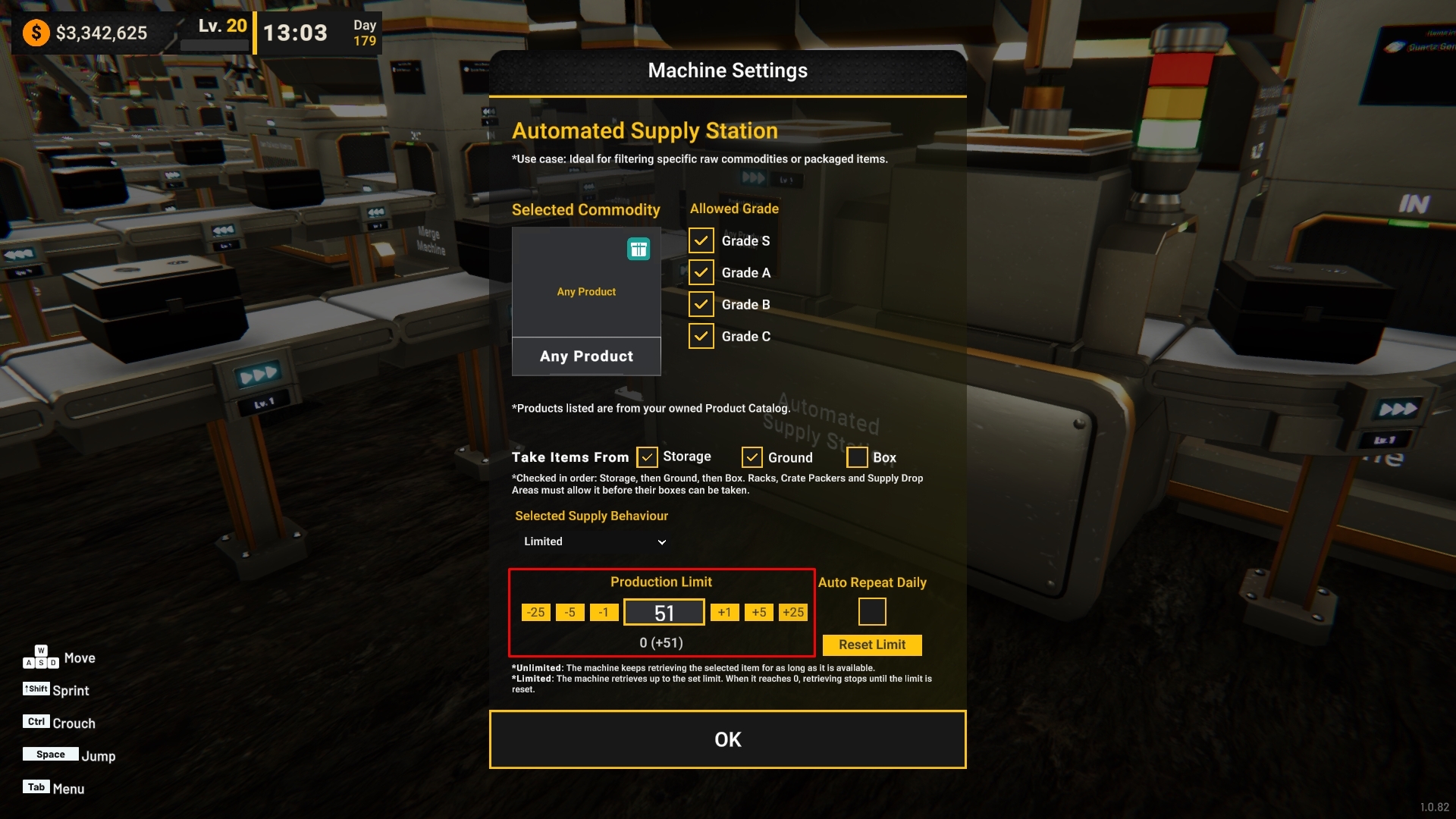
Quantity controls now support larger adjustment steps.
Players can use:
±1
±5
±25
These controls are available in supported interfaces such as:
Tablet purchase cart
Supply Limit settings
Restock Threshold settings
This makes it faster to configure larger quantities without repeatedly pressing the same button.
Adjustment options that would exceed the available minimum or maximum range will not be shown.

4. Visual Improvements
a. Clearer Packaged Product Box Stickers
Stickers on Packaged Product boxes have been adjusted for clearer identification.
The Packaged Product sticker now uses a more consistent turquoise appearance and no longer overlaps with the Packaging sticker.
The related packaging badge has also been updated to match.

b. Individual Delivery Train Icons
Delivery Train cards now use icons that better represent each individual train instead of relying on the same generic train image.
Each train is shown from its own parking position, making train cards easier to distinguish in the Tablet.

Bug Fixes
1. Improved Employee Conveyor Navigation
We received feedback through community discussions that employees could sometimes take unnecessarily long routes around conveyor setups instead of finding a more practical path.
Employee navigation has been improved around:
Regular conveyor layouts
Multiple conveyors placed next to each other
Elevated conveyors
Conveyor Bridges
Employees can now find better paths through these conveyor setups and cross them more reliably instead of always taking a long route around them.
2. Placement on Rotated Mining Points
Fixed an issue where some machines could not be placed correctly on rotated Mining Points even when there was no visible obstruction.
This could affect:
Core Drill Unit
Survey Machine
Toxic Filter Machine
Placement checks now correctly follow the Mining Point's rotation, allowing these machines to be placed when the intended space is clear.
3. Empty Boxes No Longer Reappear After Loading
This fix also comes from a community report about empty boxes unexpectedly appearing on the ground after loading a save.
The issue could occur when an empty box was already being discarded by an employee while the game was being saved.
Boxes that are already in the process of being discarded are now handled correctly during saving and loading, preventing them from unexpectedly returning as empty boxes after loading the save.
4. Player Movement After Day Change
Fixed an issue where player movement could remain locked after changing to the next day while the Tablet shopping cart was open.
Player control states are now restored correctly after the transition so movement can continue normally.
Thank you again for your continued support and for sharing your reports, suggestions, and feedback with us.
Several improvements in this update were shaped directly by the discussions and reports shared by the community, and we will continue reviewing them as we work on future updates.
If you encounter any issues or unexpected behavior, please report them through the in-game report feature or through the Steam Discussions page so we can investigate further.
See you in the next update!
[dynamiclink href="https://store.steampowered.com/app/3972190/Mineral_Mining_Simulator"]