v1.2.0 is here! I've been busy adding some fairly substantial things to Silent Shark: historical radar sets, battleships, a cruiser, and a bunch of improvements for plotting.
There's quite a bit to get into, so let's start with the big ships.
Battleships & a Cruiser
You can now run into the Kongō, Nagato, Yamato and the light cruiser Yahagi. Kongō comes in both her 1942 and 1944 fits, and the recognition book shows the version in service at the time. All four classes also have their own recognition-book pages and are available in the AOB trainer.
 Kongō in the AOB Recognition Trainer, with her recognition-book page.
In the campaign, ULTRA intelligence can send you to a picket station to report and attack a passing battleship or cruiser force. Kongō-class battleships can appear from early 1942, with the wider fleet appearing in 1944. Getting into position for one of these might be tricky since they are usually trucking between 15-20 knots.
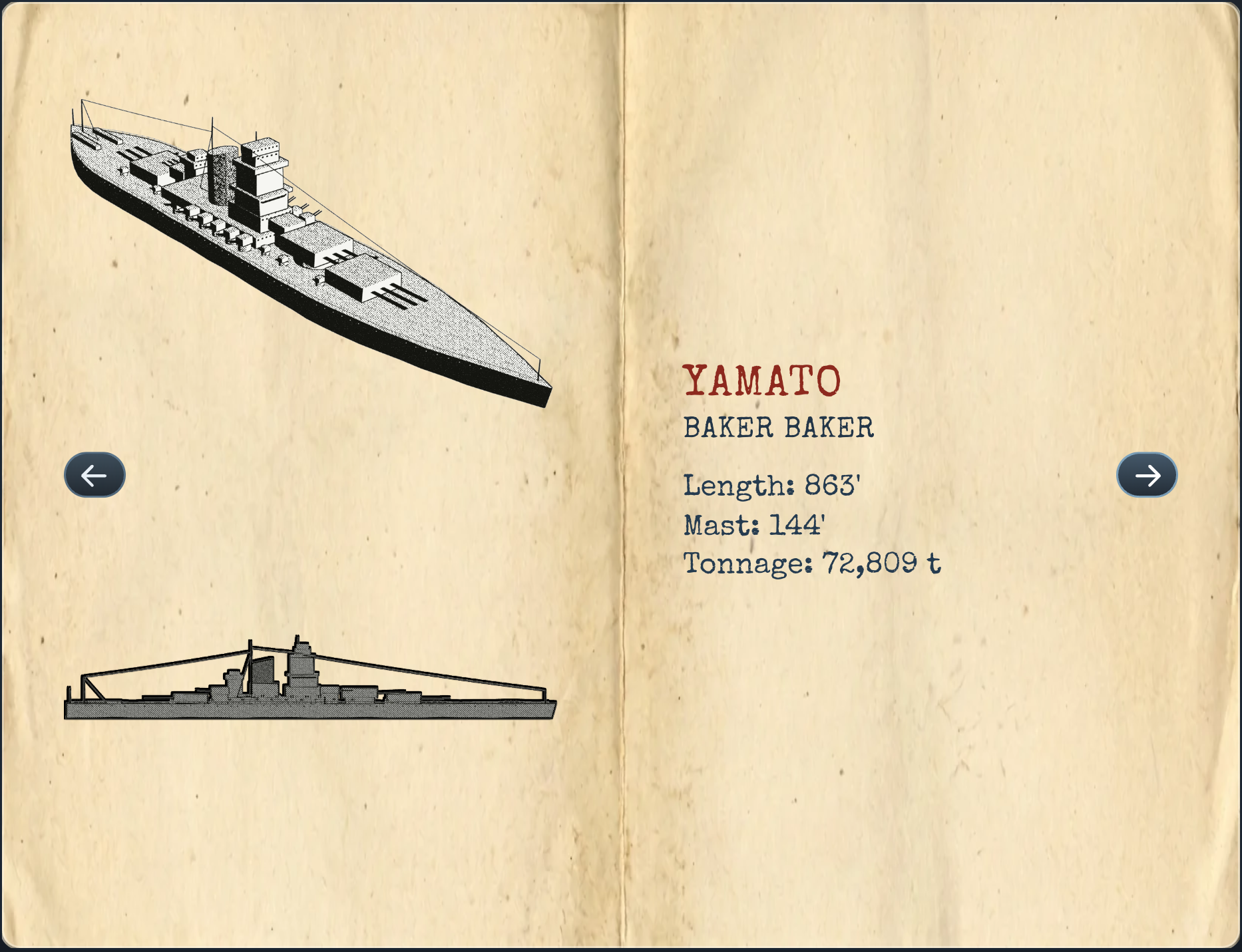 Yamato's new recognition-book page.
There's also a new Sealion achievement for sinking a battleship or cruiser in the campaign. Appropriately named, given what USS Sealion did to Kongō.
Radar
From 1942 onwards, your boat will now be refitted with historical radar when you return to base. SD air-search radar arrives in March 1942, SJ surface-search radar rolls out class by class from October 1942, starting with the Gatos, and SJ-1 adds the PPI display in March 1944.
Once you have radar fitted, the Hydrophone station is named Sensors instead, with tabs for the hydrophone and each radar set. The sets start switched off, so remember to turn them on. They work while surfaced or near the surface.
SJ / SJ-1 Radar
SJ radar gives you a ship's range and bearing, including at night beyond visual range. You still have to work out what you're looking at and its angle on the bow. Train the dish onto a pip, hold it for a fine bearing, and use the TDC button to send range and bearing to the TDC and plot a fix on the map.
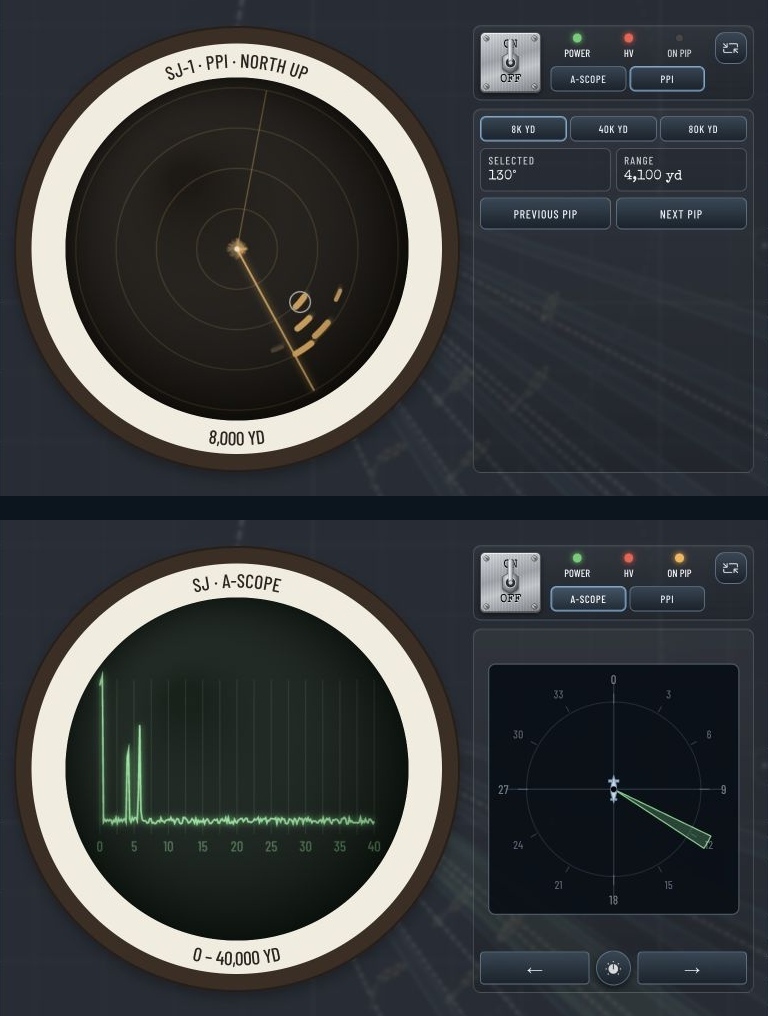 Two views of the SJ-1 radar station: the PPI overview above and the A-scope below.
The SJ-1's PPI gives you the overview; the A-scope is where you take the more precise firing data. On patrol, surfaced radar contacts also appear on the chart and can let you begin an encounter.
SD Radar
SD reports an aircraft's range. It cannot tell you which direction it's coming from, so those contacts appear as rings on the map. In KEY, the crew checks the set every few minutes, and you can hold the key to sweep manually. LOCK keeps it transmitting continuously.
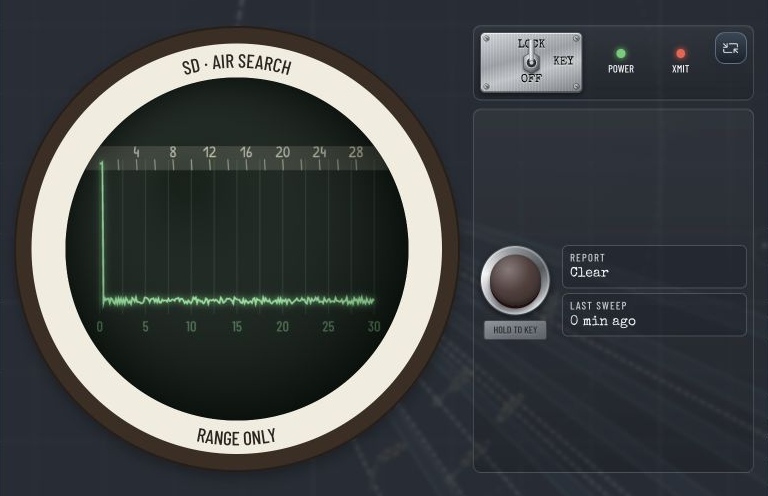 SD air-search radar in LOCK mode.
There's a catch: transmitting on SD makes you easier for aircraft to find, especially from April 1944 when Japanese radar detectors enter service. A red radar lamp on the detection gauge warns you when your radar can be detected. SJ's 10 cm signal does not light it, since the Japanese receivers could not hear it.
Depth-charge shock can also knock your radar out which requires repairs.
Better Patrol Maps
The patrol map now zooms in about eight times further, with sharp, detailed coastlines at close range. Small islands and narrow straits are much easier to make out, which should help when you're picking your way through the East Indies.
 The patrol map zoomed into the islands and narrow passages of the Lesser Sundas.
Long patrol courses are smoother too, and routes through connected deep water should no longer fail with an "Unable to find a continuously depth-safe sea route" message. Double-clicking a destination now sets course for that exact spot.
More Precise Plotting
Map drawing now snaps to many more useful places: intersections between lines, angle arms and compass circles, timestamped points, and the centre bearing of a hydrophone contact's cone. Whole lines snap while you move them too.
 A plotted line snapped onto the intersection of two existing lines.
I've kept the snap distance to five pixels, so you can still draw close to something without the map deciding it knows better. You can also edit a timestamped point's time directly, and the speed on the line between points updates to match.
The circle-diameter tool no longer needs Shift either. Put the centre on a line and size the circle towards a second one; the diameter preview appears automatically and can fit exactly between the two outer lines.
Steam Deck & Other Improvements
A new Text size setting goes from 100% to 150%, with 125% as the default on Steam Deck.
Tapping a text field on Steam Deck opens Steam's on-screen keyboard beside it.
Patrol Zones, Shipping Lanes, Sea State Limits and BT report documents open larger on the Deck, so the printed labels are easier to read.
Controller hints fit better around dialogs and instructions, and tactical tips now name the appropriate controller buttons.
The game starts faster, especially if you've accumulated plenty of saves or mods.
And here's the full list:
New Features
- Radar: in the campaign, boats are refitted with historical radar at their next return to base. SD air-search radar arrives in March 1942, SJ surface-search radar class by class from October 1942 (Gato boats first), and SJ-1 with a PPI scope in March 1944. Once radar is fitted, the Hydrophone station becomes Sensors, with a tab for the hydrophone and for each radar set. Radar sets start switched off at the beginning of a campaign; switch them on at the Sensors station. Radar only works on the surface or decks awash; the station stays on the tab you chose as you surface and dive.
- SJ radar gives range and bearing to ships, even at night beyond visual range, but not ship type or angle on the bow. Train the dish onto the pip, hold it for a fine bearing and MARK to send range and bearing to the TDC and plot a fix; on patrol, surfaced radar contacts show on the chart and can start an encounter.
- SD radar warns of aircraft by range only, never bearing. In KEY the crew keys the set every few minutes and you can hold the key to sweep by hand; LOCK keeps a continuous watch. While the SD transmits, aircraft find a surfaced boat more easily, and more so from April 1944, when Japanese radar detectors entered service; the Detection Risk breakdown includes this. Contacts are reported as they close and shown as rings on the map.
- A red radar lamp on the detection gauge shows whenever your radar can be detected by the enemy. The 10 cm SJ never lights it: Japanese receivers could not hear it.
- Radar can be knocked out by depth-charge shock, works fully with a controller, and is explained in a new Learning Hub article and tactical tips.
- Added the first battleship: IJN Kongō, the only battleship ever sunk by a US submarine, in both her 1942 and her 1944 fit after the Kure refit. In the campaign her identification book page shows the fit in service at the time; both fits can be placed in the scenario editor, custom scenarios and the AOB trainer. Sinking a battleship or cruiser in the campaign unlocks the new Sealion achievement.
- Added the battleships Nagato and Yamato and the light cruiser Yahagi, each with an identification book page and available in the AOB trainer. In the campaign, ULTRA intelligence can now send you to a picket station to report and attack a passing battleship or cruiser force: Kongō-class battleships from early 1942, and the wider fleet in 1944.
- Map drawing snaps to more places: timestamped points, a compass's radius and whole lines being moved now snap too, by their ends or anywhere along the line. A compass circle locks on when its edge passes a snap target, and a line locks on when it crosses one while you drag its end. Lines drawn from your boat also lock onto the centre bearing of a hydrophone contact's cone. A circle's centre lands on a nearby line when you place or move it and there is no snap target. Moved timestamped points also land on nearby line ends. Places where lines, angle arms and compass circles cross are snap targets as well. Every snap now engages within 5 pixels, so you can still draw close to a target without being pulled onto it.
- The patrol map now zooms in about eight times further than before and draws real, sharp coastlines at close zoom, so small islands and narrow straits are easy to see and navigate, without slowing the game down while zooming in. Land now matches these coastlines everywhere: routes pass through straits such as Surigao and San Bernardino, small islands can no longer be sailed across, and convoys and shipping lanes stay off land.
- A timestamped point's editor now lets you type a different time (m:ss or h:mm:ss). The speed shown on lines between timestamped points updates to match.
- The circle diameter line no longer needs Shift. When a circle's centre is on a line and you size it out to a second line, a dashed diameter appears; it turns solid once the far side reaches a third line. Releasing then fits the circle and its diameter exactly between the two outer lines, through the centre.
- Steam Deck: tapping a text field, such as the Crew Reports filter, now opens Steam's on-screen keyboard right next to it.
- Added a Text size setting that enlarges the game's text from 100% to 150%. On Steam Deck it starts at 125%.
- Steam Deck: the Patrol Zones, Shipping Lanes, Sea State Limits and BT report documents now open as large as the screen allows, so their printed labels are easier to read.
Bugs Fixed
- Fixed a rare case where the game could start without your saves and then overwrite them. If saves cannot be read, the game now warns you and leaves them untouched.
- Fixed saving on desktop sometimes freezing or failing without notice when the save folder was busy or the disk was full.
- The game now tells you when saving fails instead of losing progress silently, and automatically tries again.
- Losing your boat now ends the campaign: Continue Campaign no longer puts you back moments before the loss. The debrief offers a loss report with your career record, and on difficulties with Restart Encounter enabled you can restart the encounter instead.
- Long patrol routes, such as from Fremantle to the Sulu Sea or the South China Sea, no longer fail with "Unable to find a continuously depth-safe sea route" while submerged when deep water connects. Destinations that really can't be reached at your depth are reported instantly.
- Torpedoes of a salvo that were still waiting to leave their tubes are no longer lost when you save, quit, or load.
- A submarine resting quietly on the sea floor no longer keeps taking damage, and you can use time compression while sitting on the bottom.
- The game starts faster, especially with many saved games or installed mods.
- Escorts and warships no longer ram each other or ships left dead in the water after a torpedo hit, for example while circling to hunt you.
- Escort destroyers that come close to each other no longer stop dead and get left behind by the ships they are screening.
- A destroyer that has just pinged you cleanly no longer loses track of you when your torpedo hits another ship in the convoy.
- Enemy surface-search radar can now detect a boat running decks awash, at shorter range than a surfaced one, instead of not at all.
- Patrol aircraft no longer take off in the afternoon and fly through the night: they now launch in the morning, between 06:00 and 11:00 local time, and only in daylight.
- Aircraft on the map now follow the ship-position reveal setting while submerged. On the surface, they appear within 1.5 times your visibility range, or at any range with the 10,000-yard or Always setting.
- The deck gun no longer keeps turning or adjusting elevation after you release either controller stick.
- Crew reports now say that their bearings are true bearings, and pointing at a sight or hydrophone line on the map shows both its true and relative bearing. The "Ship sighted" log entry now says its bearing is relative.
- The stadimeter's height scale now goes up to 200 ft instead of 130 ft, so tall masts such as a battleship's can be set correctly and no longer read as too close.
- Pausing at high time compression and resuming at 1x no longer makes the chronometer jump several seconds ahead.
- Double-clicking a destination on the patrol map now sets course for exactly that spot, instead of snapping it to the nearest point on a 5 nm grid.
- A line whose ends sit on two timestamped points now always shows the speed between them, including when a point was moved onto the line's end afterwards or the line was moved onto the points.
- Torpedo hits seen through the raised periscope now show "HIT OBSERVED!", just like hits seen from the bridge, without first taking a periscope mark.
- With a controller, you can now select a patrol hydrophone contact's Follow/Unfollow button with the D-pad and press A, instead of always requesting another sweep. The button guide now shows the correct controls.
- With a controller, pressing Y on the selected depth instrument now switches between the depth meter and the fathometer, and the button hints show it.
- The controller button hints no longer cover tutorial instructions, tips, dialogs or the mission sheet: they move out of the way or shrink when space is tight.
- Long courses plotted on the patrol map are now much smoother, cutting straight across open water instead of zigzagging in steps.
- Leaving base on patrol now centres the map on your boat, so it is visible from the start even when sailing from Australia.
- While paused with the periscope locked on a target, switching to the stadimeter or another tab and back no longer leaves the blue viewing cone on the minimap pointing at an old bearing.
- The crewman in cribbage no longer peeks at your cards.
- Linux: the game now starts in full screen again when the Full screen display mode is selected, instead of opening in a window.
- Steam Deck: touching a trackpad no longer switches button hints to mouse wording; clicking still does.
- With a controller, tactical tips and map tool hints now name controller buttons instead of telling you to click.
- The controller help at the bottom of the Settings controls list no longer hides the last entries.
- Resizing a map note no longer gets stuck when the drag is interrupted.
- A few messages that always appeared in English are now shown in your selected language.
- Leftover temporary save files no longer pile up in the save folder on desktop.
As always, thanks so much for all the reports, suggestions and encouragement in the forums and on Discord. Let me know how you like the radar, and what happens when you run into one of the new battleships!
Good hunting!
P.S. I read every Steam review, and they mean the world to me. If you've been enjoying Silent Shark and haven't left one yet, thank you for considering it!