Hello Wanderers!
Update 1.2.0 is now live! This update focuses on Steam Deck and Major Improvements, including stability, save files, graphics and performance, readability, UI, tutorials, combat, responsiveness / feedback, controller support, and lots more! That's the biggest update ever launched! To celebrate that milestone, Sigilfarer is now 25% off!
Steam Deck Compatibility Trailer

Buy Sigilfarer now with 25% off!
[dynamiclink href="https://store.steampowered.com/app/2436870/Sigilfarer_A_DiceRolling_Roguelite/"]
Steam Deck & Gamepad Support
We can now confirm that Sigilfarer features adjusted settings, improved performance, UI scaling, and Steam Deck button icons enabled by default. Check out the control scheme below.
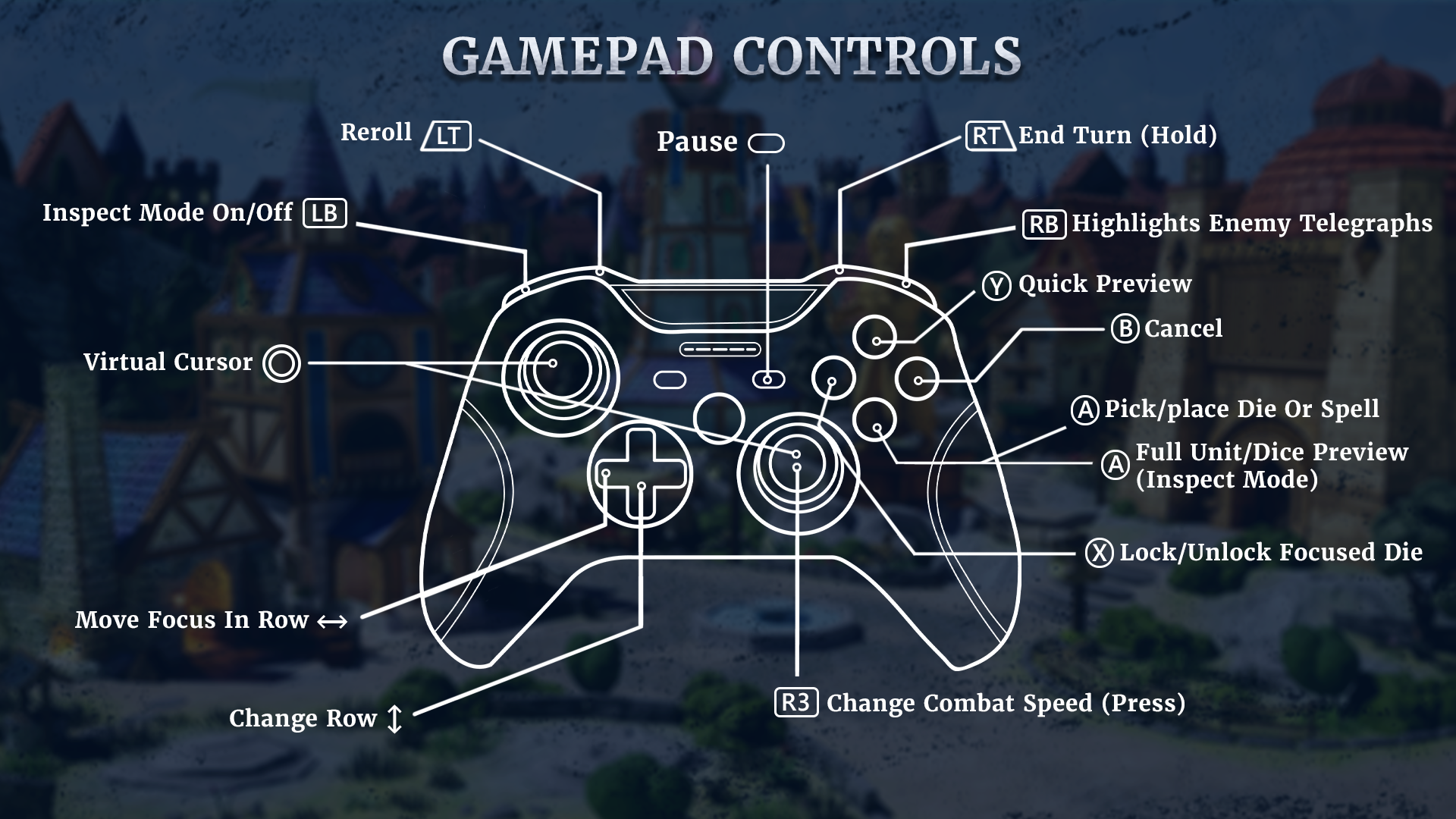
We tested partial gamepad support across combat, loot screens, events, camp, inventory, and other parts of the gameplay. Combat can now be navigated without relying on the virtual cursor, while controller navigation and button prompts have been improved throughout the game. You can also select Xbox, PlayStation, Steam Deck, or Steam Controller icon presets in the settings.
A new UI Scaling option improves readability on smaller screens and is enabled by default on Steam Deck.
Update 1.2.0 - Full Change-log
Stability and Save Files Fixes for crashes:
weighted randomisations no longer return an empty result;
missing classes in loot, trade and finds are ignored;
objects from save files that cannot be restored, and invalid IDs, no longer cause the game to crash;
combat interruptions are checked and end only once;
holding down A/B does not trigger a second click.
Save file:
combat, loot and creature visualisations on the map do not accumulate in the save file;
excessively large save files are not saved;
story chapters load correctly;
the history of event variables is limited to 16 steps.
Memory:
the combat interface and map tile templates are released;
structure fields do not initialise with random values.
Graphics and performance
Ray tracing only with Epic shadows, without bindless, RT shadows and RT sky light (fixes memory leaks and D3D12 crashes).
MegaLights disabled with Low/Medium shadows and on integrated GPUs.
Older Intel HD/Iris GPUs bypass RDG transient heaps.
PSO precompilation utilises a maximum of 4 threads.
Steam Deck and readability
Small text scales up more than the rest of the UI.
Larger text in town: forge filter, guild counters, monument upgrades.
A brighter ‘Epic’ rarity label.
Guild reroll in the second row below the effect counters.
Cards in the Forge display only the effect names when the descriptions would be too small.
Tutorials
A ‘Replay Tutorial’ button in the city tabs and in the inventory.
Combat tutorials take over the controller and lock the dice.
The formation tutorial retains the panel size.
Tutorial events dim the game screen, even in the Shipping version.
UI: movement and feedback
Entering buildings and switching between tabs in the city are animated.
The ‘Buy new items’ window has a dimmed effect, and offers appear one after the other.
The confirmation pop-up and event pop-up appear smoothly.
Counters update values using ‘+N’/‘−N’: shards, resources, guild, HP and shield.
Cards hover and glow when the cursor hovers over them; new background for cards and panels with depth.
Loot and run summary reveal themselves one by one; ‘New’ markers pulse; inventory slots react to the cursor.
‘Begin Journey’ in the town pulses as the next step.
The dice grows as it lands and ticks higher and higher; mana gain is clearly visible.
Combat:
damage trails on HP bars;
the avatar flashes and recoils on being hit;
camera shake depending on the force of the blow;
a brief freeze upon killing an enemy.
Controller
A works, and the game does not mute when the game window is in the background (e.g. after connecting a controller or opening the Game Bar).
Y is disabled whilst selecting loot.
As always, we’d love to hear what you think about the new changes. We’re actively monitoring your reviews and feedback and doing our best to implement improvements based on your suggestions.
Thank you for staying active, sharing your thoughts, and supporting Sigilfarer! / Sigilfarer Team 🎲