Last Update: November 8, 2026
Don't forget to upload your save to the cloud. You wouldn't want to lose your progress. ahem.
[p align="center"]The Corrupted Update - Follow Up PatchSummary
We noticed a lot of concerns regarding the version 4.4.0 release, as it revamped Corruptions in a major way. While we stand by the importance of the mechanical changes, we admit that the rollout was not done in the best way, and a lot of newer changes needed better execution. Our goal for this update was to improve the overall experience for new and returning players, and to alleviate a couple issues brought on by the update.
Improvements
1) User Interfaces
We've essentially redone the UIs to be a lot better for players. A lot of less fluff, while keeping all of the important information available to players when they need it.
Corruptions Stats
The Corruptions Stats subtab has alternating background colored lines, inspired by the Stats for Nerds page + Histories, in order to improve readability.
The Cube Multipliers from Corruptions now explicitly write out the multiplier that Corruptions give instead of the overall multiplier. The \[Current] --> \[Next] format still applies. This is so that the purple title text is consistent with what you're seeing, plus it's consistent with other UIs that show rewards.
We've also added "This Ascension" statistics to this subtab (as well as the others), moving the Cube Bank there.
Finally, information that you don't really need is now hidden from the player in this subtab. For instance, higher-tier Cubes that you need an unlock for (e.g. Hepteracts) don't show until you can possibly earn it. If you can't earn it because of your Corruption Level, but you otherwise have it unlocked, it will show you which level you need.
2) Corruption Tokens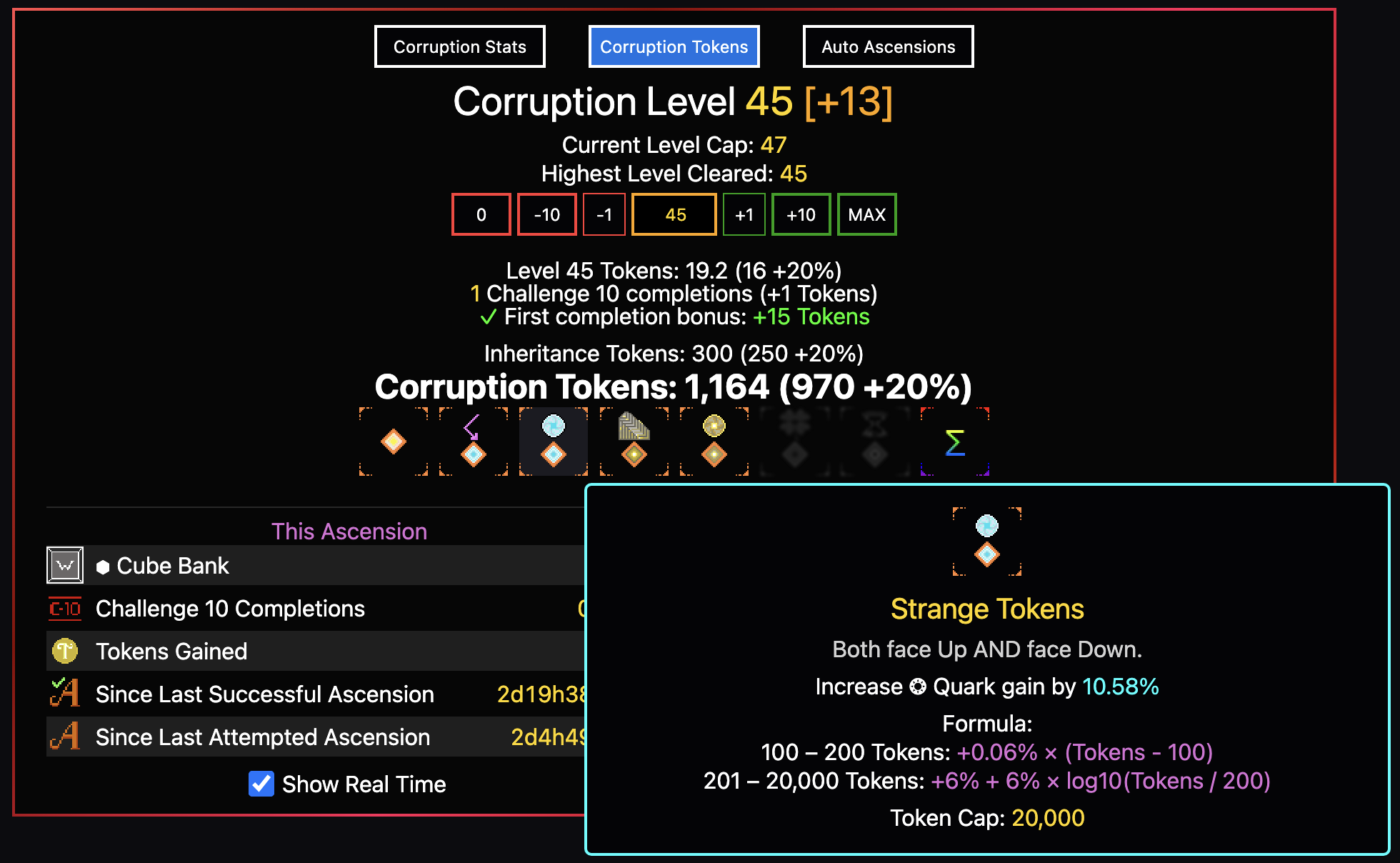
Corruption Tokens Rewards have gotten a nice style revamp! When you hover over a Corruption Token effect, it will display your value, explicit formulae, and a Token Cap.
We've also explicitly written out certain Token modifiers:
Increased Tokens from percentage-based upgrades
Inheritance Tokens (you start with these on Singularity)
As you may have also noticed, a lot of flavor was added to the Token effects to enhance the overall aesthetic.
3) Auto Ascensions
Auto Ascension Rules now have a LOT less fluff. There's a philosophy that a good User Interface does not require excessive text explaining what to do or how to interact with itself. The old UI failed in this regard, but we believe this version is a major improvement.
Corruption Loadouts section is now more concise than before. Ditto with Auto Ascension Rules
The Statuses are consistent with the "This Ascension" column.
Corruption Level + Modifiers are visible on this Subtab, whereas before they were hidden due to space constraints.
4) The Ascension Rule Builder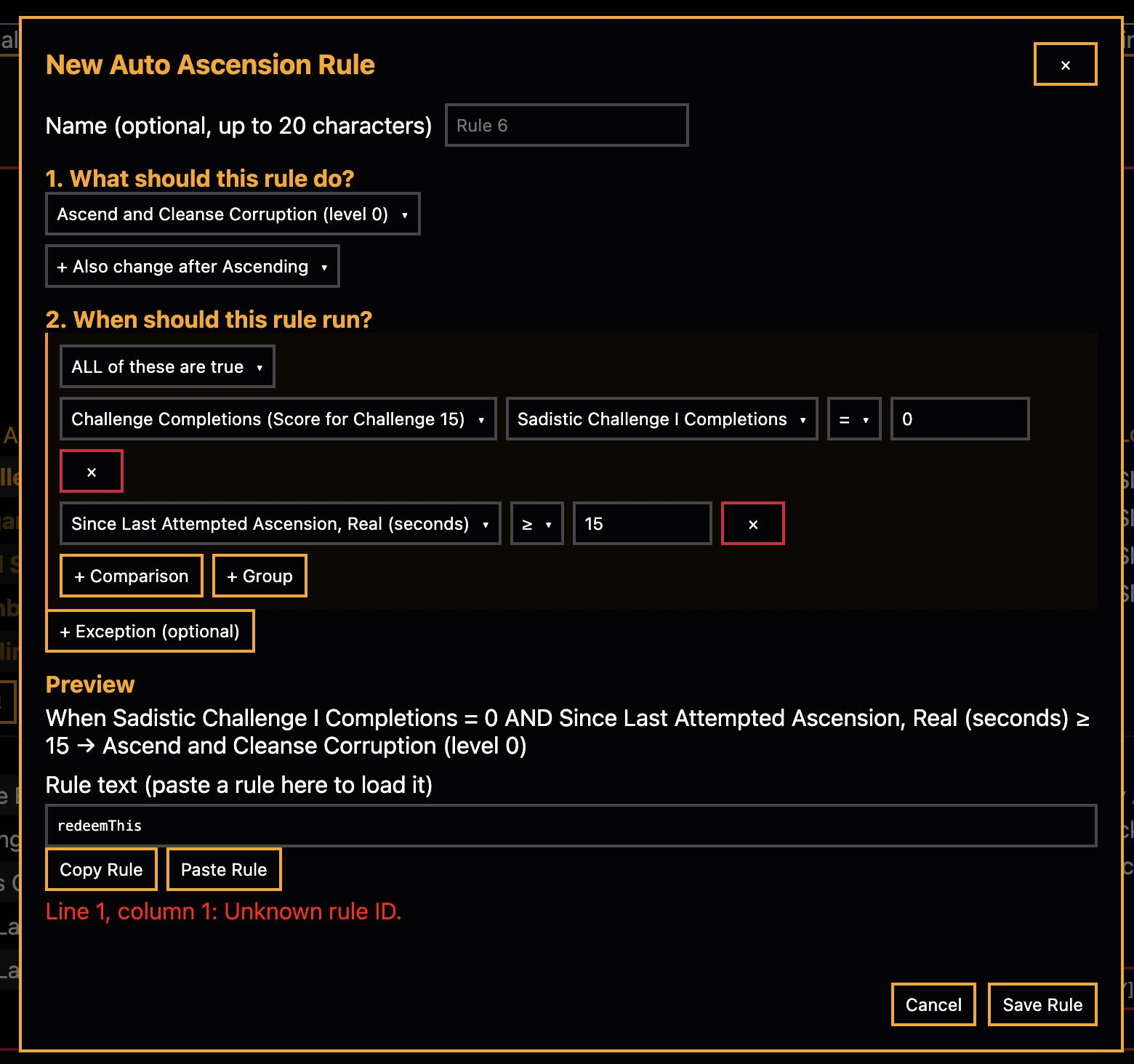
This UI redesign is meant to redeem the Auto Ascension Rule system that we've implemented in 4.4.0. We've made it a lot more streamline: each step only shows up once you've done the previous, and you begin with describing what the rule should ultimately do instead of constructing the conditional expression. We've removed all of the fluff because the improved UI should better explain what's going on. Speaking of Auto Ascensions...
Auto Ascension Rules
We've made a few substantial fixes to Auto Ascension.
Default Auto Ascension Rules
One of the bigger issues with the overall v4.4.0 update is that we've replaced a rather primitive Auto Ascension toggle with an entire mini-language, and didn't give players an adequate introduction to the system. To fix this, we've introduced default Auto Ascension Rules. The entire palette is the following:
"Challenge 10" c10>=1:asc
#"In-game Seconds" c10>=1&at>=15:asc
#"Real Seconds" c10>=1&rt>=15:asc
#"Climb Corruption" c10>=1:l+1
#"Declimb Corruption" c10=0&rt>=15:l-1
However, you don't have to import this set of rules. All new players will get this set of rules by default, and you can always access this default set of rules with the "Reset to Defaults" button!
This rule palette is enough to emulate the old system (for those who want something really basic) and has a skeleton for more advanced behavior, like automatically climbing corruptions!
Rule Templates
When you build a new Rule Using "Add Rule!", you have the option between building your own rule (available in 4.4.0 as well) or the new Rule Templates!
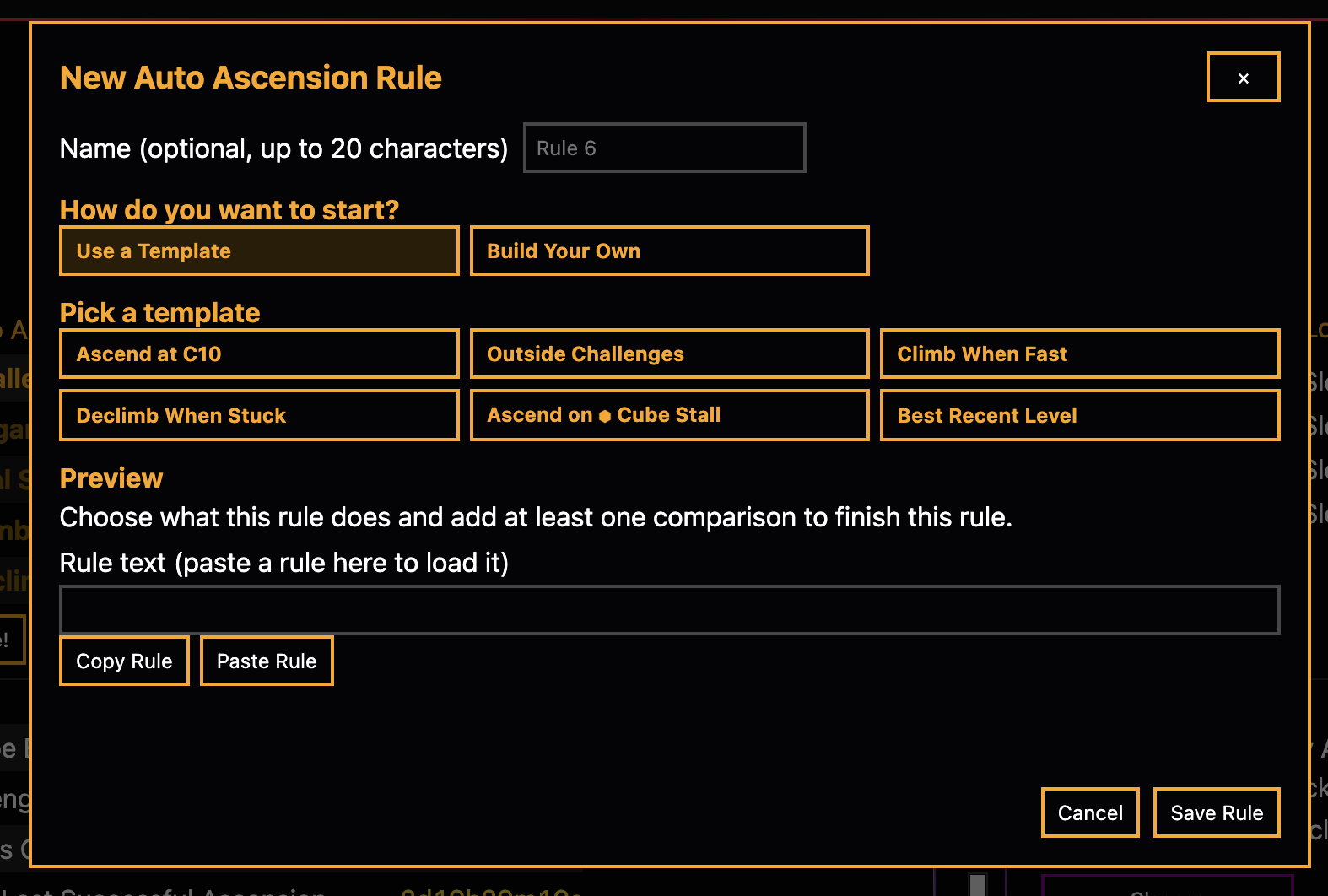
The Templates let you easily load in rules for you to edit before adding it to your Rule palette. The Templates are a middle ground between the default Rules that you're provided and having to set up all of the Rule behaviors yourself.
While the set of Templates provided can build a rather robust Automation suite, it is NOT comprehensive. Let us know if you think a new Template should be added, and how it would be structured.
Rules and Protocols
You'll now be able to do more with your Automator!
We've added the following conditionals:
Antiquities of Ant God Level
Current Corruption Level
Highest Cleared Corruption Level
Maxed Challenges: Challenges 1-9 are now valid inputs
Last Successful Ascension (one with Challenge 10 completion), both real and in-game timers.
And we've also added the following protocol:
Best Recent Run: Ascends and sets the Corruption level equal to the best run in your Ascension History (with a cap of the number of runs that you define), for a given type of Cube.
If you think we should add more, please let us know what you'd want to see added!
Balancing Changes
Corruption Tokens now have a different type of formula for their effects.
In the previous versions, you would get bonuses for types of effects based on a formula that approaches but never actually reaches the maximum value. For example, if you could get up to +100 Ambrosia Luck, it would actually give you something like +99.9991 (an example), even though you've long since exceeded the number of Tokens where your effects meaningfully increase. As of this version, all effects have a Token Cap, and a formula designed with that cap in mind. So, if you have enough Tokens, you get the absolute most you can get from a given Token effect.
Revamped a few Corruption Token Effects.
1) Added Ant ELO as an effect! You get a flat +1 Ant ELO per Token, which is affected by additive multipliers.
2) Removed the Obtainium, Offering, Cube and Octeracts effects.
The bonuses from Obtainium and Offering are compensated by the Ant ELO bonus, since you can get much more from your Ant Sacrifices if you climb a couple stages. As for the Cube and Octeracts effects, it was awkward design to have them be a secondary multiplier to your Ascensions when they feed into the same Corruptions mechanic that directly scales to give you more Cubes. To compensate, climbing Corruptions will give you a bigger bonus to your Cube production per level, for all types of cubes!
Corruption Level Reward Scaling
The following Cube types have a sharper increase per Corruption Level than before. from its unlock level to level 45: Wow! Cubes: 1.10x --> 1.13x
Wow! Tesseracts: 1.15x --> 1.18x
Wow! Hypercubes: 1.20x --> 1.23x
Platonic Cubes: 1.25x --> 1.28x
Hepteracts get an increase from its unlock level to level 36: 1.40x --> 1.45x
These overall changes, plus the indirect buff to cubes from Ant ELO increasing, is intended to provide a more natural progression for each of the cube types. Hepteracts are nerfed to make the progression a little more smooth between late Ascensions to Singularity, since it was previously scaling too quickly, but other Cube types should not be decreased by too much, or maybe even buffed because of the interaction with Ants and Corruption Scaling as opposed to Token scaling.
Bar Charging EXALT -- Infinity Removal
We've decided to remove the Infinity mechanic by making Purple Bar only charge up to 1 time based on your Purple Honey Luck (exponentially scaling towards 100% per 1 fill).
Any players who are beyond EXALT 10x5 will have their values reset to five completions, since the EXALT is now meaningfully more difficult than before.
Singularity Elevator Changes
We're switching to a more consistent Lookahead, so that stuff like Singularity Perks are actually unlocked when you are able to go to a particular Singularity, and not just when you have already cleared that Singularity.
Quality of Life
The Corruptions Tab is renamed to "Ascensions", and is accessible when you've cleared Challenge 10, not Challenge 11.
Auto Ascension now works when you've purchased Cube Upgrade 1x10, and does not have an implicit Challenge 11 requirement. However, some Auto Ascension Rules may still require a Challenge 11 completion, if it involves a Corruption Level, since those don't unlock at Challenge 10.
Unspent Octeracts now individually display their effects in the Octeracts subtab.
We've tried to optimize some more expensive calculations in the game, so that the game runs better for players on older / lower spec devices. Performance is something we will continue to look at and optimize as much as possible.
Special Promocode
Until Version 4.5.0 comes out (unknown date), use code ascensionComp in the promotion codes in Settings tab to instantly claim 24 real-life hours of Ascension Timer! This may only be used once in a Savefile, and is ineligible in EXALTs "The Grand Singularity Speedrun" and "Bar Charging".
Bug Fixes
Maxed Platonic upgrades now list their final level's resource costs instead of showing every cost as 0.
We no longer cache owned buildings, so certain things should be more up-to-date (since Construction retroactively affects the cost curve, caching can lead to some lagging displays or calculations)
Fixed Corruptions not being climbable inside of an Ascension Challenge under some circumstances
Removed a good amount of the header flickering from timers, in particular the Ascension timer.
The Quark Upgrade that grants Ambrosia Luck based on Octeracts now correctly uses your lifetime Octeracts instead of your unspent Octeracts.
Fixed Corruptions not unlocking correctly if you instantly max Challenge 11 when you first unlock it.
Fixed gradient texts (for example, on the Talisman subtab) and the background on the Corruption tab not displaying properly on old browsers.
Changed "bretheren" to "brethren".
Non-ASCII characters are now blocked from the corruption loadout names. Setting them would previously prevent the save from ... saving.
The Steam loading indicator is now cleared on errors.
On logout, the save files are cleared from the account tab and the message indicator is reset (obviously neither would show you a logged out user's messages or save files, this is purely visual).
Fixed a bug where attempting to connect multiple accounts on Steam simultaneously would cancel the first request.
Fixed several PseudoCoin shop bugs:
Upgrades now reload when you log in or out.
The upgrades and consumables lists retry after a failed load instead of staying broken.
Clearing the cart (for example, after a purchase) resets the item counter.
Clicking Buy repeatedly or picking another upgrade mid-purchase no longer updates the wrong upgrade.
Importing or loading a save now resets the auto Prestige, Transcension, and Reincarnation timers instead of carrying them over from the old save.
Auto rune sacrifice picks up speed changes right away instead of only after its next sacrifice.
Fixed several Auto Challenge bugs:
Manually entering a challenge while Auto Challenge is running no longer kicks you right back out.
The sweep no longer gets stuck on COMPLETE while other enabled challenges still have completions left
The Auto Ascension Run toggles for Challenges 11-15, which did nothing, have been removed.
A locked Singularity Elevator now repeats your current Singularity as its text says.
Your selected Blueberry loadout stays selected after a Singularity.
Auto Ascend stall rules no longer use cube rates carried over from a previously loaded save.
Cancelling the prompt to enter an Ascension Challenge no longer kicks you out of Challenge 15.
Pressing a key to rebind a hotkey no longer also fires that key's action.
The Y/N hotkeys now answer text prompts.
Auto Ascend's "last fired" rule stays correct after you reorder or delete rules.
Blueberry loadout hover previews no longer leave leftover styling or turn off Show Levels.
Ambrosia prerequisite highlights clear however the upgrade popup is closed.
If a subtab becomes locked, you're now moved off of it.
Dragging header modules or tabs ignores extra fingers on touchscreens.
Brightened colors that were hard to read on the default dark theme to improve WCAG contrast: reds, greens, blues and purples, active tab and subtab labels, locked rune types, disabled Auto Ascend rules, and several borders and gradients. You might notice some differences in game but we tried keeping them minimal!