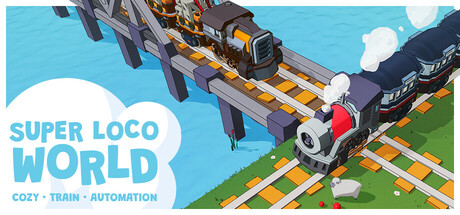
A fresh start for Super Loco World begins today.
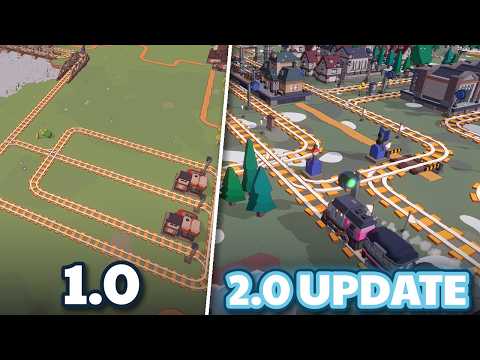
With the Back on Track update, Super Loco World gets a major overhaul: a new campaign, smarter rail tools, a smoother introduction, and lots of improvements across the board. To make this update, I carefully gathered every piece of your feedback from Discord, reviews, and the Steam forums.
Whether you’re returning to your railway or starting a new one, there’s never been a better time to lay the first track!
A new campaign: oil and electronics
This campaign takes you to an oil island and a second town, where you’ll pump oil, produce electronics, and build a shipyard. In this new campaign, bridges also have a length limit, which adds a new challenge to route planning.
Traffic that keeps moving
Trains no longer block each other near junctions and stop signs. Each train now checks for traffic only up to the point where it would stop anyway. When two trains approach the same junction, only one of them waits instead of both getting stuck.
Room to grow on every island
Every island now reserves space for its towns, resources, and factories when it’s generated. New regions always appear in the reserved spots, so you can plan your network around them from the start.
Plan smarter
Hover over a train or a junction to see where it’s heading. The new ‘alternating junction switch’ flips a junction to the next direction whenever a train passes. Rail sign logic now supports inverted conditions.
Take control of your trains
Relocate a stuck train to any spot you choose, sell a train anywhere on the map, clear its cargo, or turn it around in the depot. Mirror buildings while placing them.
A smoother way to play
The tutorial is now clearer, with tasks in a strict order and pointers to what to click or build. You can rebind keys in the new Controls tab, remove a placed island and place it again, follow trains with the camera, and see costs and refunds next to the cursor. Junctions turn back into plain rail when a branch is demolished. There are also tooltips for status icons, edge scrolling, and a refreshed build menu.
Improved performance
Large maps now build without lag, world generation is faster, and I’ve fixed many bugs along the way.
Super Loco World 2.0: Back on Track is a new chapter for the game and a fresh chance to build the railway you’ve been imagining.
All aboard! 🚂
- Andrii
Full changelog
Major features
Second campaign with oil, electronics, a shipyard, an oil island, and a second town.
Campaign unlocks: buildings, trains, and carriages unlock gradually through campaign tasks, and new items are marked with a star.
Trains no longer block each other near junctions and stop signs.
Pre-generated region slots: each island reserves space for its regions when it’s generated.
Train path preview when hovering over trains and junctions.
A new ‘alternating junction switch’: switches a junction to the next direction when a train passes.
Clearer tutorial: tasks in a strict order, pointers to what to click or build, auto-continue, and a collapsed view that shows progress.
Gameplay
Train relocation to a chosen place replaces emergency evacuation.
Sell a train anywhere on the map, clear a train’s cargo, or turn a parked train around in the depot.
Maximum bridge length, with over-limit tiles and a length counter shown in the preview.
Rail sign logic: “else” actions, inverted conditions, and an option to trigger on reversing trains.
Building mirroring during construction.
Junctions revert to plain rail when a branch is demolished.
Two rails after the depot edge sign, so a standard train can turn around in both directions. Depot buffer stops added.
Faster game speeds: x2 now runs as fast as the old x3, and x3 is faster still.
Balance: emergency refuel is free on Casual, demolishing refunds 75% on Hard, and the depot costs 10k.
UI & quality of life
Key rebinding in a new Controls tab in Settings.
Remove Island tool: remove a placed island and place it again (Campaign and FreePlay).
Camera follow mode for trains, with train switching, a hotkey, and a right-click menu option.
Cost and refund shown next to the cursor in build and demolish modes.
Tooltips explain the status icons above buildings, signs, and trains.
Cargo icons above loaded carriages when hovering over a train.
Storage hub shows its cargo input and output sides.
Junction sign locations are highlighted with a turquoise fill.
Clearer junction icons, renamed switch signs, and better descriptions.
Infinity icon for rail sign actions without conditions.
Optional edge scrolling for the camera.
F1 hides the interface for screenshots.
Updated build menu layout and improved backup save restoration UI.
Region slot icons over the new island preview while you choose its place.
Animated arrows in town needs, hidden once a town stops growing.
Visual feedback when clicking trains while the game is paused.
Performance
Faster world generation and ocean spawning.
Fixed build delays and lag on large maps.
Fixed an audio overflow when a big island spawns.
New format for tutorial videos.
Bug fixes
Fixed train jumps and stutters in movement animation.
Fixed the train path stop marker on curved rails.
Fixed the FreePlay goal not completing when the town was already at the required level.
Fixed the demolish animation of mirrored buildings.
Fixed a dark shadow stripe on the ocean beyond shadow distance.
Fixed hotkey labels on non-English keyboard layouts.
Fixed refresh rate showing 143 instead of 144 Hz.
Fixed train outline getting stuck after a cargo change.
Fixed sheep occasionally running a full lap at high speed.