Hey, RV Survivors!
Version V4.9 is now live!
It's been almost a month since our last full patch notes (V4.2.5).
During that time, we've released several updates from V4.3 through V4.8. There's quite a lot to cover, so we've combined everything into one comprehensive update announcement.
Here's what matters most in this update:
The RV Crisis Cycle and Defense System are here! We've introduced a complete survival threat cycle centered around defending and upgrading your RV. The core gameplay now revolves around zombie hordes, environmental threats, and keeping your mobile fortress operational.
Highway Breakout and Fishing have been completely rebuilt.
The entire main story has been rewritten, from the prologue to the finale, with voice acting for the protagonist for the first time.
The main menu and meta-game systems have received a complete visual overhaul.
Meet Feifei, your new companion guide! She'll help you navigate the wasteland with a much more complete tutorial system.
There's also a substantial amount of balance adjustments, tutorial improvements, and bug fixes.
There's a lot to explore, so feel free to jump to the sections you're most interested in!
1. Complete Main Story Rewrite & Full Character Voice Acting
The entire main story has been rewritten, including the Prologue, Acts I–IV, the Highway Chapter, the Lighthouse Chapter, and the Finale.
Character motivations, relationship development, major branching choices, and endings have all been redesigned.
A Complete Rewrite
The opening now features a dramatic two-part sequence: a final look back at the protagonist's death, followed by rebirth.
Each act has been reorganized around a new narrative structure.
The Lighthouse Breakout has been restructured into a five-day progression, with improved buildup and pacing leading to its climax.
The Finale has been completely redesigned.
Choices That Leave a Lasting Mark
The main story now branches based on previous decisions and character affinity.
Choices made in forum posts, chat conversations, and other interactions are recorded and can influence future relationships, side stories, and ultimately the ending.
Reworked Relationship Routes
Romance routes have been retained, but the dynamics of who takes the initiative have been redesigned.
Relationships develop more gradually in the early game, with interactions and conflicts better reflecting each character's background and personality.
Visual Novel Presentation Improvements
Dialogue layouts are now more compact.
Choices are consistently positioned below character portraits instead of covering their faces.
Text and character artwork scale together when the window size changes.
Story-related popups now share a unified cinematic dark theme.
Improved Phone Call Experience
Linear phone conversations now advance automatically instead of requiring individual clicks.
Branching conversations retain meaningful player choices.
Story transitions are now handled by a unified game-level presentation layer for smoother scene changes.
Skipping and Fast-Forwarding
Long-press fast-forward is now supported in chat logs, with playback progress synchronized across different interfaces.
Visual novel scenes support continuous skipping and adjustable dialogue playback speed.
CG cutscenes can be skipped by holding the skip input.
2. RV Crisis Cycle & Defense Battles
Previously, once your RV was fully upgraded, it was relatively safe and isolated from external threats. There wasn't enough ongoing survival pressure to make maintaining and upgrading your vehicle feel essential.
That's changing.
We've introduced a new Crisis Cycle system, making your RV the central focus of both survival and combat.
Regional Threat Accumulation
Almost everything you do in the wasteland can increase regional threat, including:
Ruins, highway, and city exploration.
Cooking, farming, and workshop crafting.
Crew assignments and other daily activities.
The more active you are, the more attention your activities attract.
Crisis Warnings & The Survival Cycle
Once regional threat reaches a certain level, you'll receive an advance warning showing:
The type of upcoming crisis.
How many days remain before it begins.
The direction from which the attack will come.
Each crisis follows four stages:
Preparation → Defense → Settlement → Recovery
Crisis Types & Countermeasures
Threats include:
Zombie Horde Sieges — testing your sustained firepower.
Extreme Cold Night Raids — requiring adequate heating and fuel reserves.
Armored Assaults.
Mutant Sieges.
EMP Storms.
Battle damage carries over between crises. Ammunition, fuel, electricity, vehicle durability, and crew injuries consumed or sustained in one encounter will affect the next.
Defense Battlefield Layout
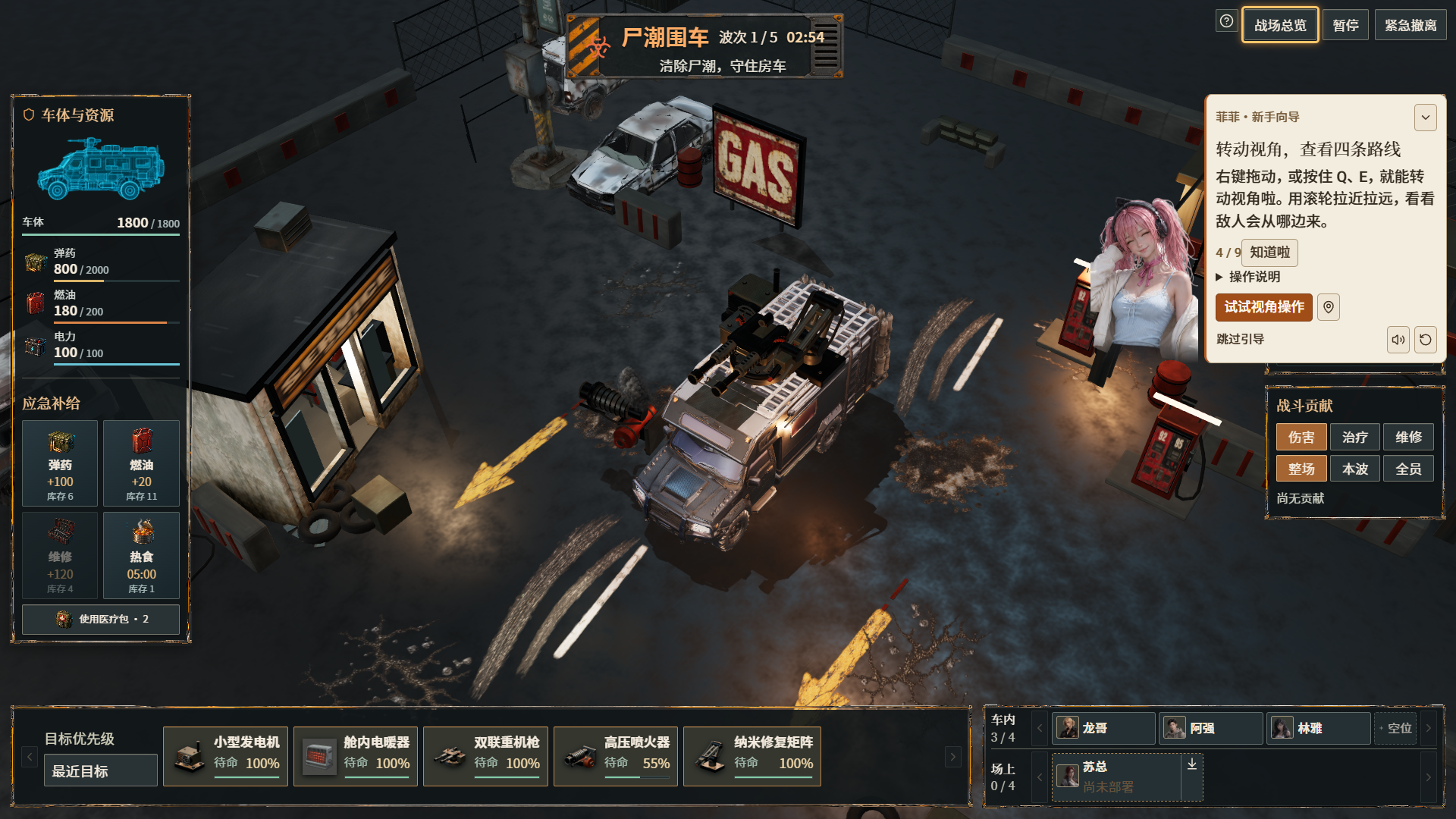
The battlefield features four attack lanes and four cover positions.
Deploy up to four crew members on the battlefield. They'll automatically engage enemies.
Assign another four crew members to support stations inside the RV.
Each crew member can occupy only one support station.
Real-Time Tactics & Tactical Pause
You can pause combat at any time to:
Adjust enemy target priorities.
Toggle vehicle modules on or off.
Issue tactical commands.
Use medkits to rescue injured crew members.
Camera controls are also available:
Right-click and drag to move the camera.
Q / E to rotate.
Mouse wheel to zoom.
Module Mounting System
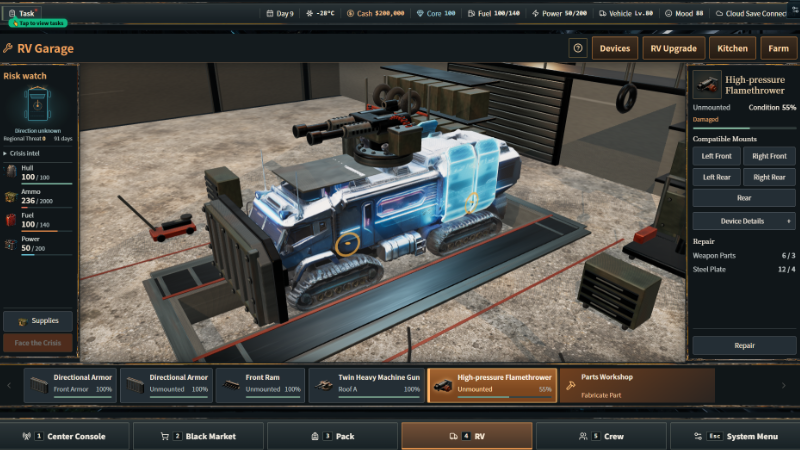
Modules crafted in the Parts Workshop must be installed on specific hardpoints on your RV.
Their effective coverage depends directly on:
Firing range.
Firing arc.
Power consumption.
Weapon orientation.
Where you mount a module can determine which attack lanes it can defend.
Directional Armor
The maximum number of craftable directional armor plates has increased from 2 to 4, allowing you to cover all four incoming attack directions simultaneously.
Post-Battle Settlement
After each battle, you'll need to review:
RV durability.
Module damage.
Ammunition and resource consumption.
Frontline crew members gradually recover after combat. However, injured crew members inside the RV must be treated manually with medkits.
New Player Guidance
The first time you encounter a defense battle, you'll receive an RV Defense Guide covering the entire process:
Reviewing incoming threat intelligence.
Checking available supplies.
Installing defensive modules.
Assigning crew members.
Reviewing battle damage.
Returning to base for repairs.

3. Highway Breakout Completely Rebuilt
Previously, highway sections mainly consisted of basic scenery models moving past the player. Both the visuals and driving experience felt rather limited.
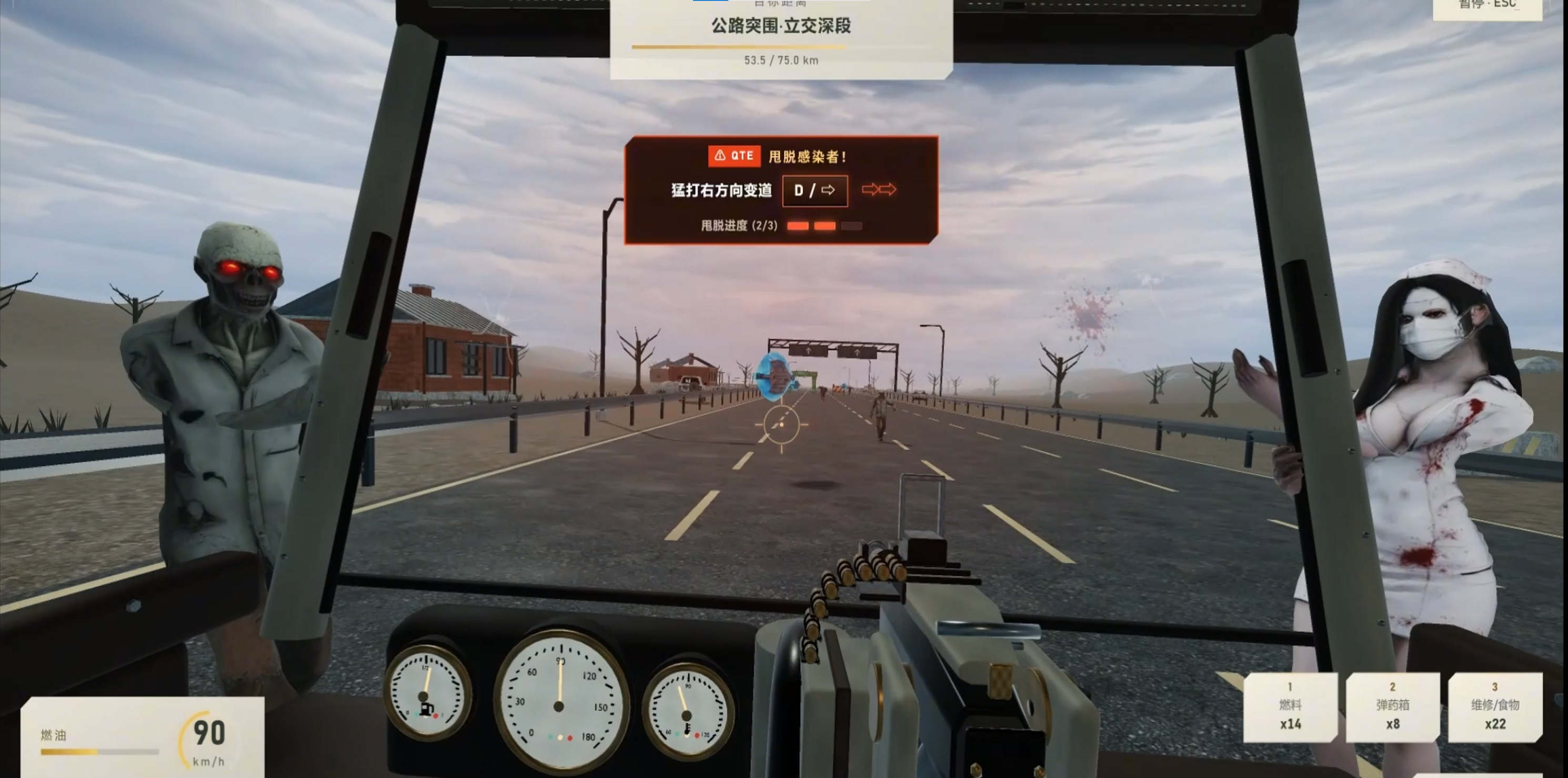
We've rebuilt both the exterior environments and the first-person cockpit.
Three-Stage Wasteland Environments
The highway is now divided into three distinct environmental sections:
Urban areas.
Suburban countryside.
Open wilderness.
We've replaced the old scenery with 12 sets of fully textured wasteland environment assets, including roadblocks, abandoned vehicles, roadside buildings, and distant scenery.
Fully Detailed Driving Cockpit
The first-person cockpit now features detailed dashboard instruments with realistic markings, steering wheel, door panels, A-pillars, wiring, and other interior details.
The heavy machine gun mounted on the passenger side now features a detailed ammunition belt and elevation mechanism.
Aiming and firing also feature recoil feedback.
Improved Infected Animations
Zombies now use the same skeletal animation blending system as RV Defense Battles.
New fast-running infected have been added to highway encounters.
Three types of window-climbing infected have received completely redesigned, high-detail character models and skinning.
Environmental & Combat Effects
We've added or improved:
Dynamic lighting and environmental shadows.
Environmental reflections.
Smoke and atmospheric effects.
Bullet tracers.
Ejected shell casings.
Impact debris.
Tire dust.
The windshield now develops corresponding cracks and bloodstains when attacked.
Flow & Stability Improvements
Battles will no longer start before critical assets have finished loading.
Failed loading can be retried.
Players can exit encounters midway through.
The settlement screen now matches the overall visual style of the game.
Highway Breakout can be accessed through the Map app on your cockpit phone.
The system also supports 2K / 4K resolutions and both Chinese and English.

4. Fishing System Completely Rebuilt
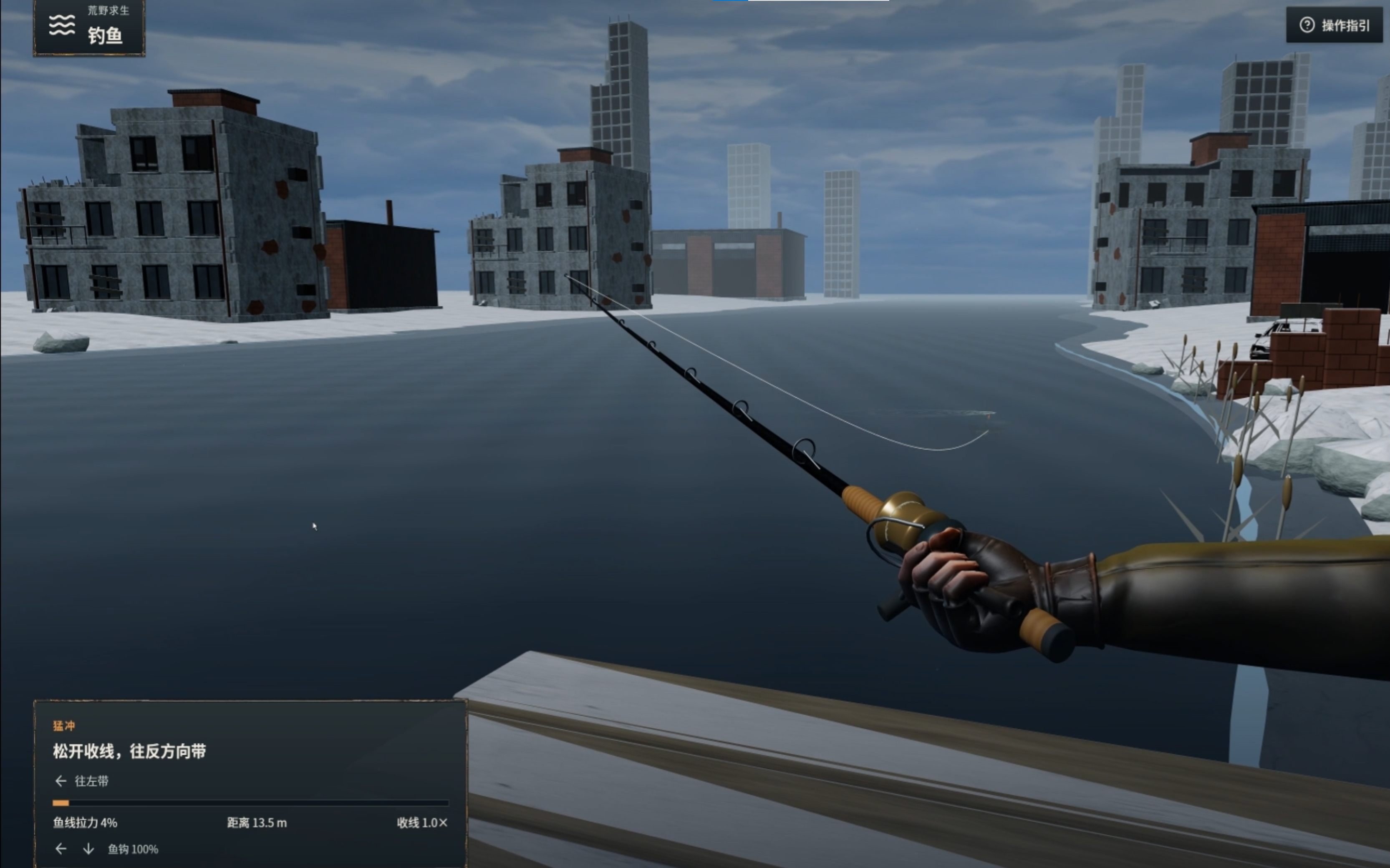
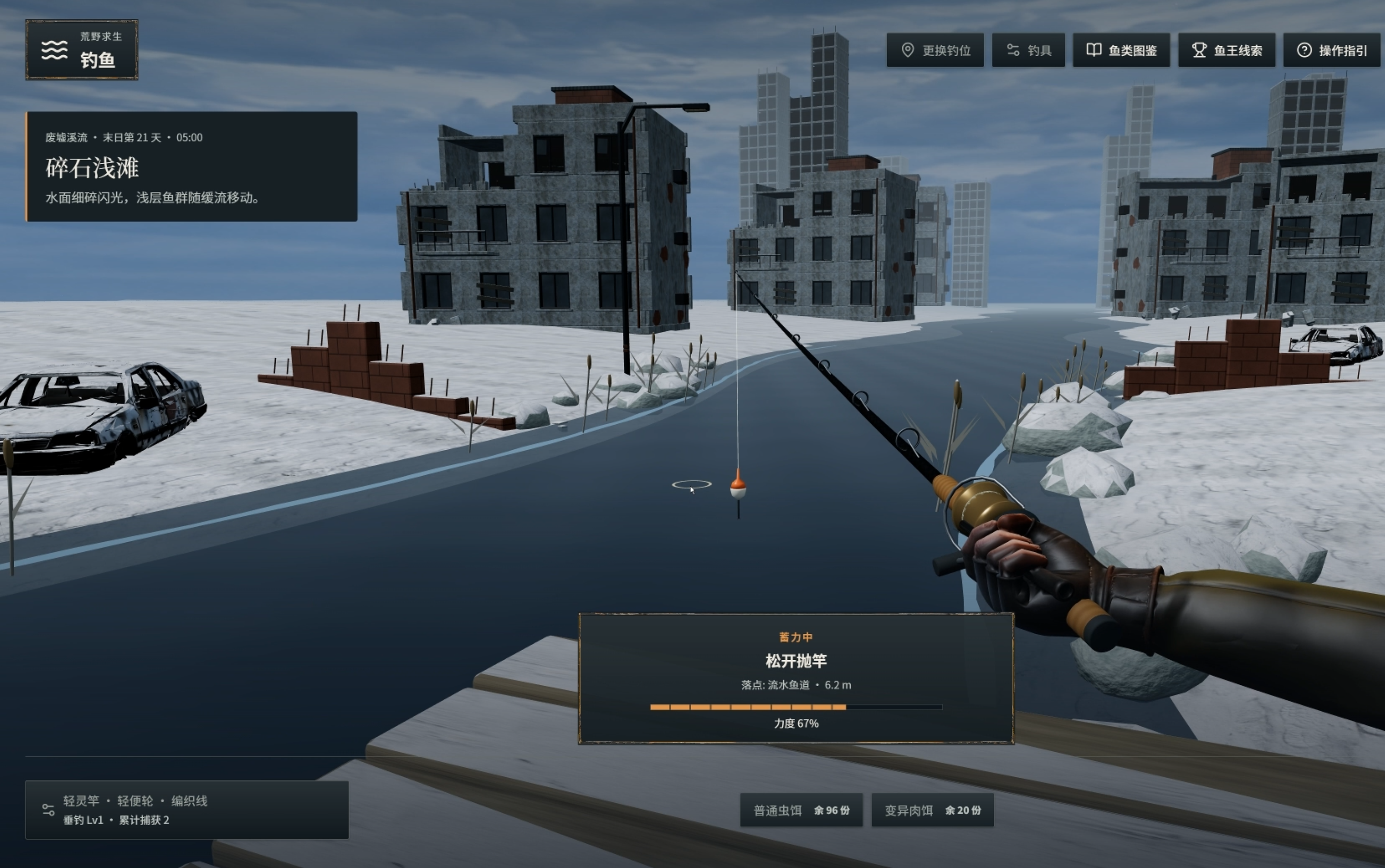
The Fishing System, accessible through the Map app in the driving cockpit, has received a complete overhaul.
Fish Species & Fishing Locations
36 fish species.
6 types of water environments.
12 fishing spots.
3 named legendary fish that require specialized rod control and line-tension techniques.
18 interchangeable pieces of fishing equipment, including rods, reels, and lines.
More Realistic Fish Behavior
Fish now feature seven different struggle behaviors:
Cruising.
Short bursts.
Sustained pulling.
Turning.
Diving.
Diving into aquatic vegetation.
Jumping out of the water.
Improved Fishing Controls
Mouse controls:
Move the rod left or right.
Raise or lower the rod.
Hold left mouse button to reel in.
Use the mouse wheel to change reeling speed.
Keyboard controls:
A / D and W / S.
Arrow keys.
Spacebar.
Additional feedback includes rod vibration, water splashes, and line-tension feedback when a fish struggles or escapes.
Strong pulling vibrations can be disabled in Settings.
Snow-Covered Urban Wasteland Fishing Locations
All fishing locations have been visually updated with a snow-covered urban wasteland aesthetic.
You'll find:
Snow-covered wooden platforms and riverbanks.
Thin ice.
Abandoned apartment buildings and factories.
Snow-buried vehicles.
Ruined skyscrapers disappearing into the cold mist.
Lighting now follows a consistent cool blue-gray palette.
Fishing positions have also been adjusted to align properly with the wooden platforms, and nearby underwater obstacles have been cleared.
Practical Improvements
Caught fish can now be:
Sold for money.
Used in cooking, including as substitutes for equivalent ingredients in existing recipes.
Added to your fish collection encyclopedia.
Only actually casting your line consumes one in-game hour and one piece of bait.
If you exit midway through a fishing session, your progress will be preserved.
5. Unified Combat Skill Presentations & Card Artwork
Previously, Artifact skills played pre-rendered videos in the center of the screen. They looked noticeably low-resolution on high-resolution displays and often interrupted the flow of combat.
We've replaced this system with a unified presentation style.
Artifact & Crew Skill Presentations
All 9 red-rarity Artifact cards have received completely redrawn artwork.
Artifact skills now use a character portrait on the left with a full-width cinematic banner.
Active skills for all 19 crew members have also been migrated to the same presentation system.
The unified presentation is used in both Tower and Siege battles.
Passive skills still take effect immediately without interrupting the screen.
Combat Pacing & Skipping
Artifact skill animations last 1.2 seconds.
Crew skill animations last 0.9 seconds.
Both can be skipped immediately using a mouse click, Escape, Spacebar, or Enter.
Anti-Stall Protection
In Siege battles, skill banners have a minimum trigger interval of 4.5 seconds.
Pending skill animations no longer accumulate in a playback queue.
If an image fails to load, the presentation is automatically bypassed so combat can continue without being blocked.
Unified Card Artwork
The Card Encyclopedia and Ruins combat now use the same two-variant card artwork system.
Cards are visually consistent between the collection interface and actual combat.
6. Meet Feifei: Your New Companion Guide
We've consolidated the scattered, previously anonymous text prompts into a permanent on-screen companion guide: Feifei.
She's here to help you survive the wasteland, one step at a time.
Guide Features
Feifei stays visible in a corner of the screen.
She displays your current recommended objective in real time.
You can expand, collapse, or drag her to a different position.
Click "View Location" to jump directly to the relevant feature.
Full Voice Acting
Feifei comes with a complete voice set.
You can replay her voice lines whenever you like, or disable her voice in the Sound Settings.
Pre-Apocalypse Guidance
Feifei guides you through:
Initial shopping and supply preparation.
Inventory organization.
RV upgrades.
Early-game loans and the stock market.
She also explains the associated mechanics, including credit consumption, time costs, transaction fees, and profit/loss settlement.
Post-Apocalypse Survival Guidance
As you progress, Feifei gradually introduces:
Ruins scavenging and exploration.
Extraction and bringing supplies back.
Resource replenishment.
Daily settlement and resting.
Electricity distribution.
Crew assignments and support stations.
Cooking and farming.
Airdrops.
The Source Crystal Bank.
Equipment progression and upgrades.
We've also added dedicated explanations for the survival supply and morale system, as well as the combat interface.
WeChat Moments Tutorial
A new tutorial explains how to publish posts in WeChat Moments.
We've also fixed the issue where the publishing interface and tutorial overlay could overlap.
Starter Equipment
When you enter the post-apocalypse stage, Feifei will provide a set of green-quality equipment:
Tactical Dagger.
Everyday Outfit.
Lucky Compass.
She'll also point you toward two ways to obtain additional equipment: the Black Market shelves and Ruins exploration.
Tutorial Skip & Reference
Every tutorial step can be skipped manually.
Skipped tutorial tips are stored in Feifei's guide archive and can be reviewed at any time by clicking her portrait.
RV Defense Battles also have a separate tutorial, available in the Help menu.
7. Complete Main Menu & Meta-System Visual Overhaul
We've replaced the long-standing light-colored interface with a unified cinematic dark theme featuring warm orange accents.
Unified Page Layout
The Meta Hub, Resource Center, Daily Check-in, Starting Upgrades, Achievements, Survival Records, and Run Archives now share a unified Key Art layout.
The new design features:
Large main artwork.
Vertical navigation.
A dedicated content area.
We've removed the previous mixture of icon sidebars, horizontal tabs, and grid-based cards.
Larger Run Archive Artwork
Run Archives now use full-screen key art as their main presentation.
The latest run is selected by default, and run records are displayed in chronological order.
PC-Optimized Daily Check-in
The Daily Check-in interface has been redesigned into a two-column layout:
Left: Check-in status panel.
Right: Seven-day reward track.
The Day 7 selectable reward now opens in a dedicated selection popup.
Crew Profiles & Cockpit Applications
Crew profiles have been redesigned around large character portraits.
The main view is more streamlined, with detailed information arranged into three columns.
Cockpit applications, including News, Messaging, Mail, Cards, Airdrops, Banking, Stocks, Loans, and Jobs, now share a unified wasteland operations interface with consistent materials, borders, and visual styling.
RV Customization Loading Screen
The RV customization loading screen now reuses the loading interface from RV Defense Battles.
It displays actual loading stages and resource progress, with a direct retry option if loading fails.
Improved Text Readability
Page tabs and navigation cards now automatically adjust their widths based on their content.
Long English labels such as "Achievement Center" and "Survival Records" are no longer cut off.
All pages have been checked for Chinese and English display at 1920p, 2K, and 4K resolutions.
8. Gameplay & Balance Adjustments
Material Supply Improvements
Materials such as Steel, Titanium Alloy, Ceramics, and Electronic Components no longer disappear from shop shelves after their scheduled removal dates.
Instead, they remain available with daily purchase limits (for example, 10 Steel per day).
The post-delisting price premium still applies.
Increased City Garrison Production
Daily output of rare materials from city garrison crew members has been increased to 5 times the previous amount.
The City interface now displays actual daily production.
Faster Parts Research
Parts research no longer requires real-time waiting.
Research now completes immediately after paying the required materials and Cores, advancing in-game time by an amount based on research level (8–64 in-game hours).
Research queues, countdowns, and research slots have all been removed.
Existing saves with pending research will have their research automatically settled when loaded.
Improved Blueprint Guidance
We've added missing acquisition information and navigation shortcuts for Workshop blueprints, so you no longer have to guess where to obtain them.
Golden Wandering Merchant Guarantee
When the Golden Signal Channel goes without a signal for an extended period, the wandering merchant's appearance chance increases over time:
30% → 50% → 70%.
After 7 consecutive days without a visit, the merchant is guaranteed to arrive.
The waiting card now explains that a new scan takes place after daily settlement.
Stock Market Feedback
Buy and Sell buttons are now disabled when you don't have enough funds or don't hold enough shares.
The reason is displayed directly on the button.
Storage & Construction
Increased item stack limits.
Removed the construction quantity limit for equipment. Actual placement is now limited only by available space inside the RV.
Expanded Workshop slots.
Equipment upgrades now require materials only.
Inventory Organization
The Inventory Organizer is now available from the beginning of the game (P1), instead of requiring a later unlock.
Mutual Aid Station
Interaction counts and trade counts are now tracked separately.
Status messages are clearer.
Managed planting and breeding now automatically select all seeds you currently own, while still allowing you to adjust selections manually.
Save System Improvements
Save slots have been expanded to 10.
Save cards now display your current game stage.
Improved cross-device save deletion handling.
Added compatibility with legacy V2 saves.
Cloud saves now include version protection, preventing an older cloud save from overwriting newer local progress.
New Runs & Settings Persistence
Starting a new run now begins with character portrait selection, followed by name and gender confirmation.
After completing the Prologue, Feifei will guide you into the next stage.
Language selection is now prompted only once, on the first launch.
Graphics quality presets, 3D render scale, shadows, visual effects, environmental details, and camera shake settings are now correctly saved after restarting the game.
Combat & Tower Adjustments
Added Daily Clear to Tower Mode.
"High-Maintenance Shield" now starts each battle with 3 fixed stacks. Once depleted, these stacks no longer regenerate.
Completed the missing True Ending requirements.
Food buffs are now displayed directly on the preparation screen and correctly carry over into RV Defense Battles.
Standardized class skill settlement calculations.
Current active class skills can now be viewed during gameplay.
Locked characters now display their unlock requirements for preview.
Interface Improvements
Equipment and inventory interfaces now use horizontal scrolling layouts.
Expanded the Parts Workshop interface to prevent materials on the first page from being cut off.
Research materials now display both "Required" and "Owned" quantities, with insufficient amounts highlighted in red.
WeChat Moments posts and Mutual Aid records are now persistently saved.
Tower encounter popups have been enlarged and now scale with screen resolution.
9. Creative Mode & Steam Workshop Improvements
Instant Mod Loading into Existing Saves
Mods subscribed to and enabled through Steam Workshop can now be applied directly to existing full-game saves.
You no longer need to create a new save just to test your mods.
The separate test run is still available and remains isolated from your regular saves and achievements.
Custom Character & Model Creation
Added built-in cropping and portrait-positioning tools when creating custom characters.
Streamlined the Mod Editor interface.
Added a 3D rotating preview station for weapon models.
Story Event Dialogue Editor
Mod story events now support continuous dialogue editing.
You can:
Add dialogue lines.
Delete dialogue lines.
Move lines up or down.
After compilation, dialogue is played as a Visual Novel scene.
Player choices only appear after all dialogue lines have finished playing.
The editor also automatically validates blank dialogue lines and invalid speaker references.
10. Bug Fixes
We've also fixed a substantial number of issues reported by players:
Fixed an issue where the RV and workshop scenes could disappear after installing vehicle modifications.
Fixed 180-degree snapping and ghosting artifacts when infected models turned.
Fixed parts research progress being lost after daily settlement saves.
Fixed morale continuously declining due to supply shortages during the first stage.
Fixed incorrect speaker positioning in certain story scenes.
Fixed an issue where skipping the Prologue could unintentionally skip P1 WeChat story content.
Fixed an issue where closing the story window during playback prevented subsequent scenes from continuing.
Fixed overlapping text in the trading interface and mismatches between item names and prices.
Fixed some advanced recipes incorrectly appearing locked when equipment levels were exactly sufficient.
Fixed mismatches between RV battery power and in-game time after crossing midnight.
Fixed missing Awakening reward settlements and certain survival notifications failing to appear.
Fixed item icons overlapping their label text.
Fixed ammunition resupply issues in the Garage and unresponsive item-source buttons.
Fixed Feifei's first voice line failing to play when her tutorial appeared for the first time.
Fixed misaligned arrows in crew profiles and white text on white backgrounds in information popups.
Fixed insufficient contrast in Medical Bay indicators and layout issues in English.
Fixed an issue where pressing Esc on out-of-run pages failed to return to the main menu correctly.
Fixed abnormal recruitment card scaling and unclear crew capacity counters.
Improved notification readability and fixed blurry icons on high-resolution displays.
Fixed misaligned, overlapping, and inconsistent color schemes in reputation information popups and other system windows at 2K / 4K resolutions.
Feedback & Community
If you encounter any bugs after updating, or have suggestions regarding balance, gameplay, or controls, we'd love to hear from you!
When reporting a bug, please include the game version, steps to reproduce the issue, and screenshots whenever possible. This makes it much easier for us to investigate and fix problems.
Steam Community: Visit the Community Hub on the game's Steam page.
Official Player Group: 1038765117 (Click to Join)
Thanks for continuing to support the game, and we'll see you on the road!
Stay alive. Keep your RV running. And never stop preparing for the next crisis.