Hello, this is Team Samoyed.
We'd like to share the details of this patch.
Existing mods may not work correctly after this version update, so if you are using mods, we recommend disabling them or playing on a previous version until the mod creators have updated them for the new patch.

In your Steam Library, right-click Teamfight Manager 2 - Properties - Betas, then select the version you want and play; the game will run on that version.
New Champions
Added a new champion, Gladiator. Gladiator is an AD melee fighter designed to lock a single enemy into a duel and cut off support from their allies.
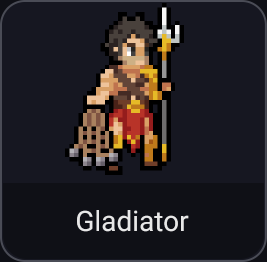
Gladiator
Skill 1 (Cast Net): Throws a net in a cone in front of him, dealing physical damage and rooting enemies hit.
Skill 2 (Trident Flurry): Thrusts his trident forward, dealing physical damage. Hitting the same champion repeatedly within a short time increases the damage of each successive hit. Hitting a different champion resets the stacks.
Ultimate (Duel): Charges at an enemy champion, dealing physical damage and taunting them. The target cannot receive healing or new shields during the duel, and Gladiator takes reduced damage from enemies other than his target. The duel ends if the taunt is cleansed or the target is defeated.
Added a new champion, Ferryman. Ferryman is an AP support champion designed to rescue allies in danger by pulling them to safety and carrying them away.
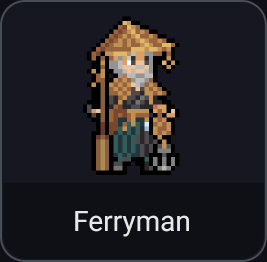
Ferryman
Skill 1 (Lifeline Anchor): Throws an anchor in a straight line, hitting the first champion it reaches. Allies at 50% HP or below are pulled in front of him and gain movement speed; allies above that threshold are passed through. Enemies take magic damage and are slowed.
Skill 2 (River of Souls): Creates a waterway in front of him that lasts for a set time. Allies on the waterway gain movement speed, while enemies are slowed.
Ultimate (Ferryboat): Cleanses one allied champion at 40% HP or below, takes them aboard, and carries them toward the allied base. While aboard, the ally is untargetable, cannot act, and is immune to movement control. On disembarking, they recover HP and briefly gain movement speed.
Added a new champion, Bombardier. Bombardier is an AD ranged champion designed to trade mobility for greatly increased range and firepower by deploying a cannon.

Bombardier
Skill 1 (Deploy Cannon): Deploys or retracts the cannon. While deployed, Bombardier cannot move, but gains attack damage and increased range for basic attacks and Skill 2. Retracting the cannon briefly increases movement speed.
Skill 2 (Lobbed Shell): Fires a shell at a target location, dealing physical damage and slowing enemies in the area. Its range increases while the cannon is deployed.
Ultimate (Carpet Bombardment): Rains down successive shells on a target area, dealing physical damage to enemies within it. Its range increases further while the cannon is deployed. Being crowd-controlled while firing interrupts the remaining bombardment.
Added a new champion, Hypnotist. Hypnotist is an AP mage designed to put enemies to sleep with the new crowd-control effect, Sleep.
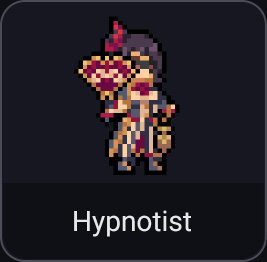
Hypnotist
Skill 1 (Pendulum Arc): Launches a piercing pendulum that deals magic damage and slows enemies. This damage does not wake sleeping enemies.
Skill 2 (Suggestion of Sleep): After a short delay, hypnotizes enemies in a target area, putting them to sleep. Sleeping enemies cannot move or act. Any damage, including damage over time, wakes them, and the first hit that wakes them deals increased damage.
Ultimate (Mass Hypnosis): After a short delay, hypnotizes all enemies in a large area, putting them to sleep. The first hit that wakes them deals greatly increased damage. Cleansing removes both Sleep and the damage increase.
New Features
Added Manager career. Managers now have reputation (0–100), and can move to other clubs or be fired based on results. Manager careers are available only in single-player.
When starting a new game, choose Manager career (Moves only / Moves & firing / Off) and Start (Chosen team / Unknown / Expansion). Unknown managers choose one of three random second-division clubs and start with 5 reputation. Expansion starts at a new second-division club with an empty squad. Existing saves use Moves only, with reputation determined by titles and season records since taking charge.
Added a general manager conversation to the messenger. At the start of a transfer period, the general manager asks you to choose a season target: win the title, reach the final, reach the playoffs, or finish in the top eight. At the end of the season, you are evaluated against that target. Meeting it raises reputation; falling far short results in a warning. With Moves & firing enabled, three warnings lead to dismissal, after which you move to one of the clubs offering you a position.
As your reputation rises, other clubs with vacant managerial positions send offers. Accepting an offer moves you to that club the next day, and another manager takes over the club you leave. Offers also prompt reactions in the squad group chat.
Added manager salaries. Salary is determined by reputation and club size, paid weekly by the club, and supplemented by bonuses for meeting targets, winning titles, and international results. You can request a raise when receiving an offer or renewing your contract, in exchange for a season target one level higher next season. Taking a lower salary increases the club's transfer budget by the corresponding amount.
When your contract is nearing expiry, the general manager offers a renewal on the season evaluation day. Larger clubs may also approach you.
Managers at other clubs are evaluated in the same way and can be fired or take new jobs. Managerial changes in the same region are reported in news articles.
Choosing strong statements in pre-match or post-match interviews raises or lowers your reputation according to the result of your next official match.
Added a Manager tab to Records. View your career, including reputation, salary and contract, titles, clubs managed, and season evaluations, as well as manager reputation rankings.
You can change Manager career (Moves only / Moves & firing / Off) during a game from the Competition tab in Settings. When re-enabled, evaluations and offers from the disabled period are skipped and the career resumes from that day. It cannot be turned off immediately after agreeing to move to another club or while waiting for offers after being fired.

Setting season targets with the General Manager

An offer from another club and salary negotiations

Manager careers and reputation rankings in Records
Added a squad messenger. Open Messenger in the left menu to have one-to-one conversations with players and view the squad group chat. The menu shows the number of unread messages.
Players will message you when something is on their mind. There are ten situations: playing time, contract renewal, fatigue, settling into the team, champion selection, transfer rumors, a decision to retire, reaching a milestone, blaming themselves for a loss, and greetings on joining the team.
Replies are due within two days, or one day for transfer rumors. The inbox reminds you on the final day. Ignoring a message lowers the player's trust, and reading it without replying causes a larger decrease.
Some replies include a promise. Promises are automatically evaluated based on actual actions, such as playing time, renewal offers, rest/language training ratios, champion selection/training assignments, or whether a transfer happens. Keeping a promise greatly raises trust; breaking one lowers it by an even larger amount.
Promises about playing time and champion selection also appear as badges on official match screens. In the starting lineup, the remaining deadline appears beside the promised player's name. The pick/ban player slots and champion list, as well as the swap screen, show the promised champion. Badges turn orange with three days or less remaining, and fill in when you assign the promised champion to that player on the swap screen.
Managers can also initiate conversations: praise, encourage, give advice, discuss a role, or ask how a player is doing. You can initiate up to three conversations per week, with a limit of one per player per week. These conversations have an effect only when there is a reason: praising good form, encouraging or advising tired or struggling players, discussing roles with players concerned about playing time, and asking about hidden concerns can affect trust and morale. Without a reason, you only exchange greetings.
Players aged 25 or younger whose weekly wage is at or below the team median may ask through Messenger for an advance of eight weeks' wages after four weeks at the club. Paying the full amount or half deducts it immediately from the club's balance, then half of the player's weekly wage is withheld for repayment. Any unpaid amount is lost if the player leaves before fully repaying it, and each player can ask only once per year.
Players chat in the group when the team goes on a winning or losing streak, when arguments follow a loss, when a new player joins, when the team wins a title, or when a milestone is reached. Managers can intervene during streaks and arguments.
Each player's trust and the team atmosphere affect loyalty, stress, and morale every week. They do not directly affect match stats.

One-to-one player conversations and promises
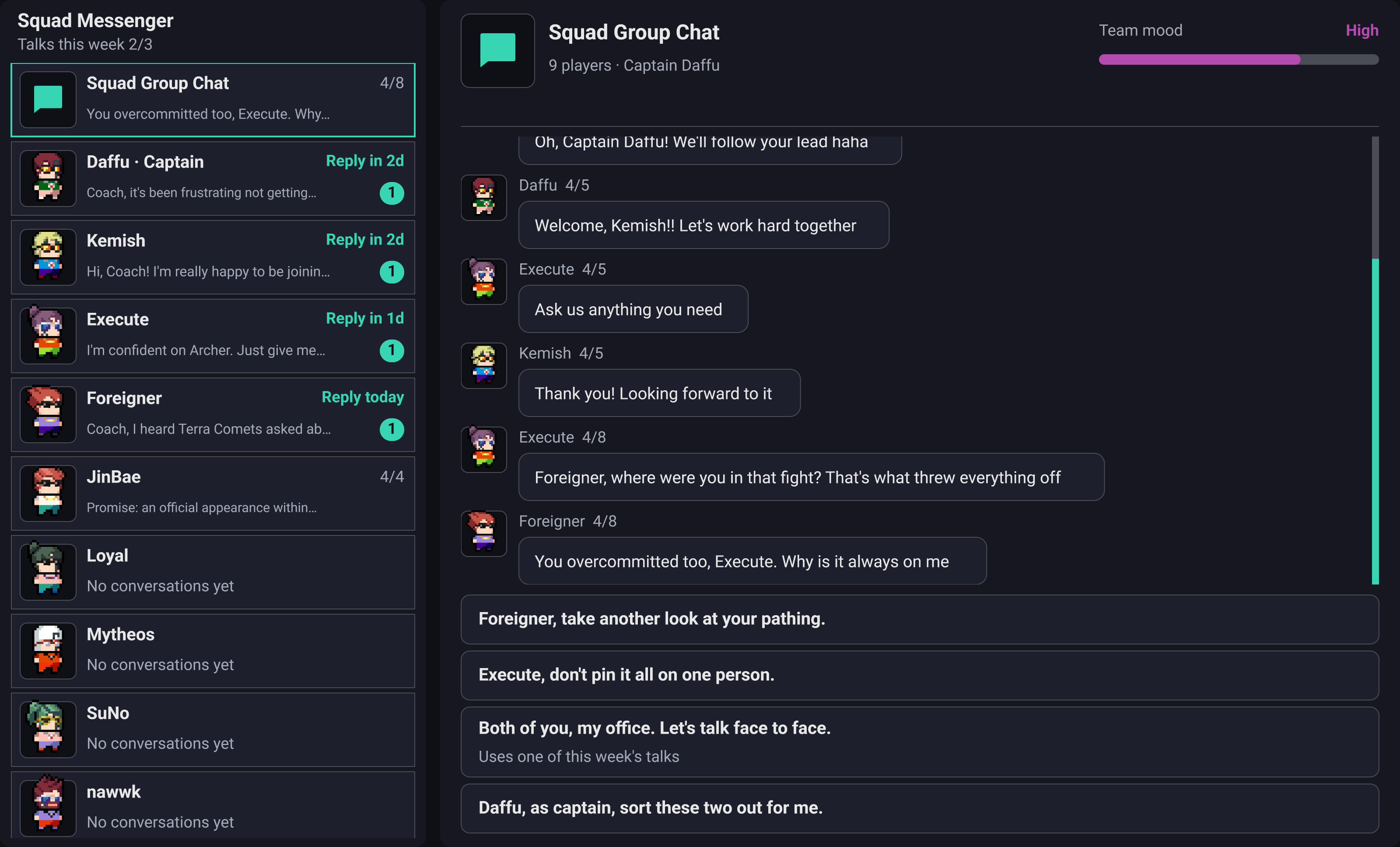
Squad group chat and manager intervention

Promise badges on the swap screen
Added new UI styles. Under Settings → System → UI Style, you can choose Classic, New (Light), or New (Dark). The Classic UI retains its existing appearance; the following improvements apply to the new UI.
Organized the left menu into six groups: Today, Team, Competitions, Market, Club, and Resources. The top title bar brings together the current screen, season phase, date, and advance button. The advance button shows what needs attention next, such as unread news, news requiring a response, or today's match.
The home screen now provides an overview of a weekly board showing the last match and the next seven days starting today; tasks ordered by urgency, including news nearing its response deadline, matches within a week, expiring contracts, stamina and stress warnings, and vacant sponsor slots; league standings and season records; and a financial summary.
Use the name search at the top of the left menu or press F to find and jump directly to menus, players, teams, and staff. Shortcuts are shown next to menu entries, and new shortcuts are available for Home, Academy, Sponsors, and Fan Service. The mouse back and forward buttons navigate between previously visited screens.
Player details show a grade (S–D) for each stat and a bar indicating the player's standing among players in the same league and position. You can also check strengths and weaknesses, effective match stats reflecting condition and stamina, stress, the reasons for changes in status, and position and language training progress.
Switch the squad table between match records and status/contracts views, and sort by stamina, condition, stress, or remaining contract length. The coaching staff list lets you compare each coach's three main stats and contract expiry date.
Added title/sender search, year/month filters, and a view showing only news requiring a response to the inbox, and redesigned news articles.
The pick/ban screen is highlighted only during your turn. The champion information row now shows roles, stats by level, and patch buffs and nerfs together.
In Game Information, the champion list can be filtered by role, position, or tier, searched by name, and sorted by name or tier. In individual training, use A/D to move to the previous/next player. Scrim invitations also show your team's schedule for that week.
Irreversible actions, such as deleting an entire list or releasing a player, now show a confirmation explaining what will be lost. All text has been enlarged to at least 18px for easier reading.
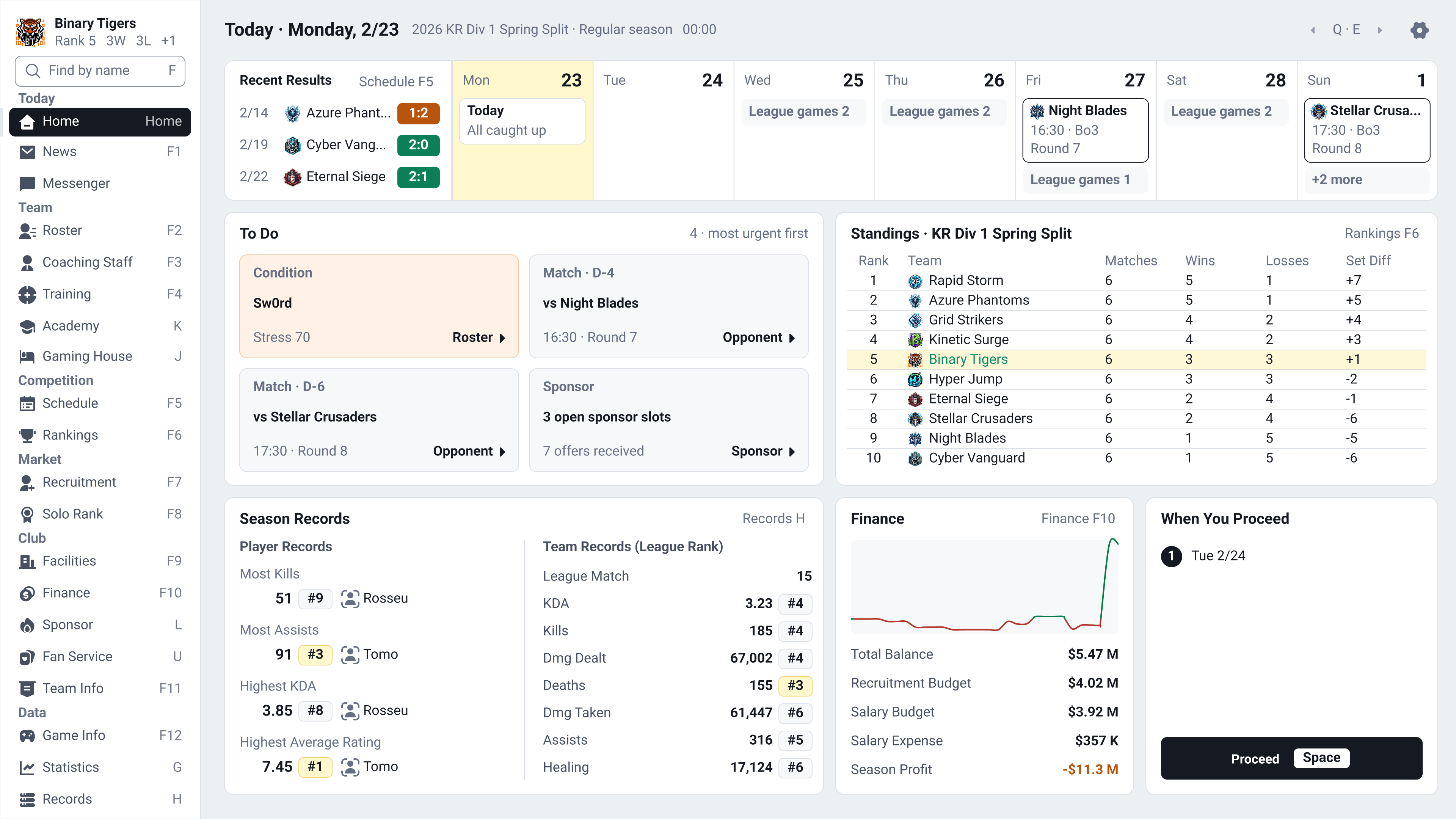
Home screen in the new light UI

Player details in the new dark UI
Added a dedicated console layout for gamepad play. Screens have been redesigned with larger text and controller-friendly controls so you can comfortably play using only a gamepad on Steam Deck or in front of a TV.
Choose Auto, PC, or Console under Screen Layout in the System tab of Settings. Auto switches to the console layout when you use a gamepad and back to the PC layout when you use a mouse or keyboard. Steam Deck always uses the console layout.
Use tab groups (L1/R1) and menus (L2/R2) to navigate. Available button actions appear at the bottom of the screen, with support for Xbox, PlayStation, Nintendo Switch, and Steam Deck button icons.
Rearranged Home, Inbox, Messenger, Squad, New Game, Settings, and the full matchday flow—from Today's Matches through lineup selection, drafting, the match, results, and set feedback—for the console layout.
Both the light and dark themes of the new UI are supported. An on-screen keyboard appears for text entry, or the Steam keyboard on Steam Deck.

Console home screen controlled with a gamepad
Added year-end events. After Champions concludes, the All-Star match and Hall of Fame induction ceremony take place at the end of the year.
Fan voting selects one player per position for the East (Korea, China, and Japan) and West All-Star teams, which play one actual match. If your team has a nominee, you can choose how to encourage voting. Having a player selected increases your team's fans and the player's morale.
Each year, up to three retired players with an induction score of at least 60 enter the Hall of Fame. You can attend the ceremony, and your club gains fans if a former player is inducted. The Hall of Fame tab in Records shows inductees by year and All-Star results.
Added a club hall of fame to Team History. Players qualify by playing at least 100 sets for the club, or by winning a title and playing at least 30 sets. Holding a grand farewell in the retirement preparation decision event honors that player at the club.

All-Star voting campaign decision event

Hall of Fame and All-Star records
Added rivalries.
Meetings in the same competition, series that go the full distance, encounters in playoffs/finals/promotion-relegation matches, direct transfers of star players, and manager moves increase the heat between two teams. Heat cools at the turn of each year.
The opponent with the highest heat becomes your derby rival if the heat is at least 25. Derby days bring preview articles and group chat conversations, as well as increased home attendance and fan movement.
Rival Teams in Team Information now sorts teams by heat and displays the heat level.

Rival teams and heat
Added captains and player reputation.
You can appoint a captain in a player conversation in the messenger, and change captains once every 30 days. The captain speaks first in the group chat. Trust in the captain affects the baseline toward which the team atmosphere returns, and you can ask the captain to handle disputes between players.
The captain is marked with a C badge next to their name. It appears in the squad, the squad list in team information, player details, matchday lineup selection, drafting, in-match details and tactics, match results, award ceremonies, and championship celebrations.
Player details show six reputation levels: Rookie, Rising, Established, Star, Superstar, and Legend. Reputation is determined by career sets, individual awards, and popularity. Players rated Star or higher speak differently in the messenger.

Reputation displayed beside player names

Captain C badge on the draft screen
Added an Academy League. Academies with at least two trainees play regional league matches every Wednesday, with a champion and Season MVP selected for each first-half and second-half season. The Academy screen shows the standings and recent matches.

Academy League standings and warning signs of trainee departures
Added regular league reports to the inbox.
Every Monday, you receive a recap of the previous week (results, standings, and Player of the Week) and a briefing on the coming week (opponents and contract/roster deadlines).
During the season, individual award race updates arrive every two weeks. A season preview arrives just before the season starts, and a review of your team's season arrives after it ends.
A transfer window recap arrives when the window closes; news about notable players who retired in the previous year arrives on New Year's Day; and regional solo-rank standings arrive on the first day of each month.
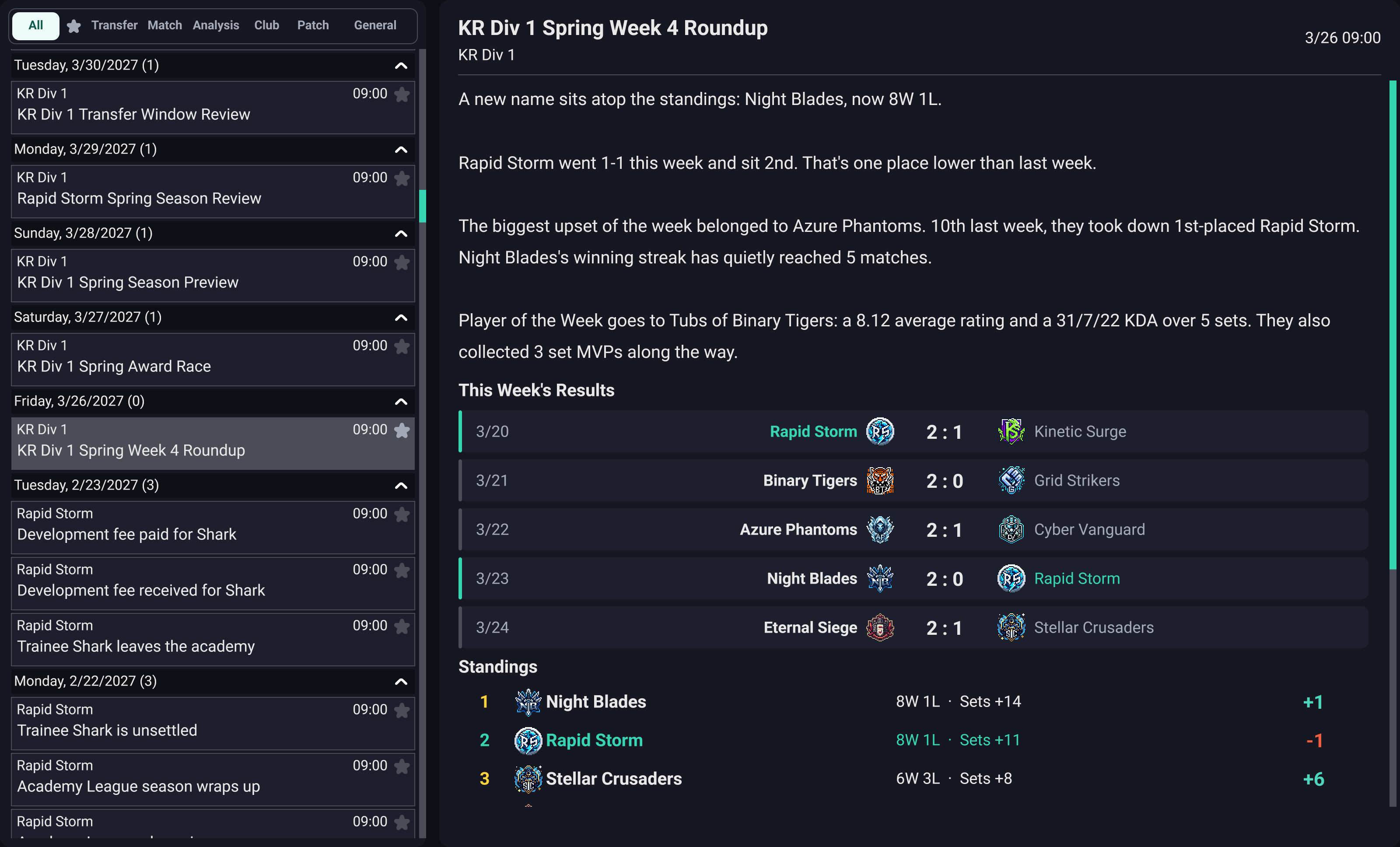
Weekly league recap
Added news articles about players and managers to the inbox.
Articles cover career milestones for sets played, wins, kills, and Set MVP awards; retirement; updates on players who have left for another team; and matches against a former team.
Articles also cover managers' career win milestones and anniversaries of taking charge.
News articles announce new league records: most kills in one set, most team kills in one set, fastest win, longest match, and highest rating in one set.
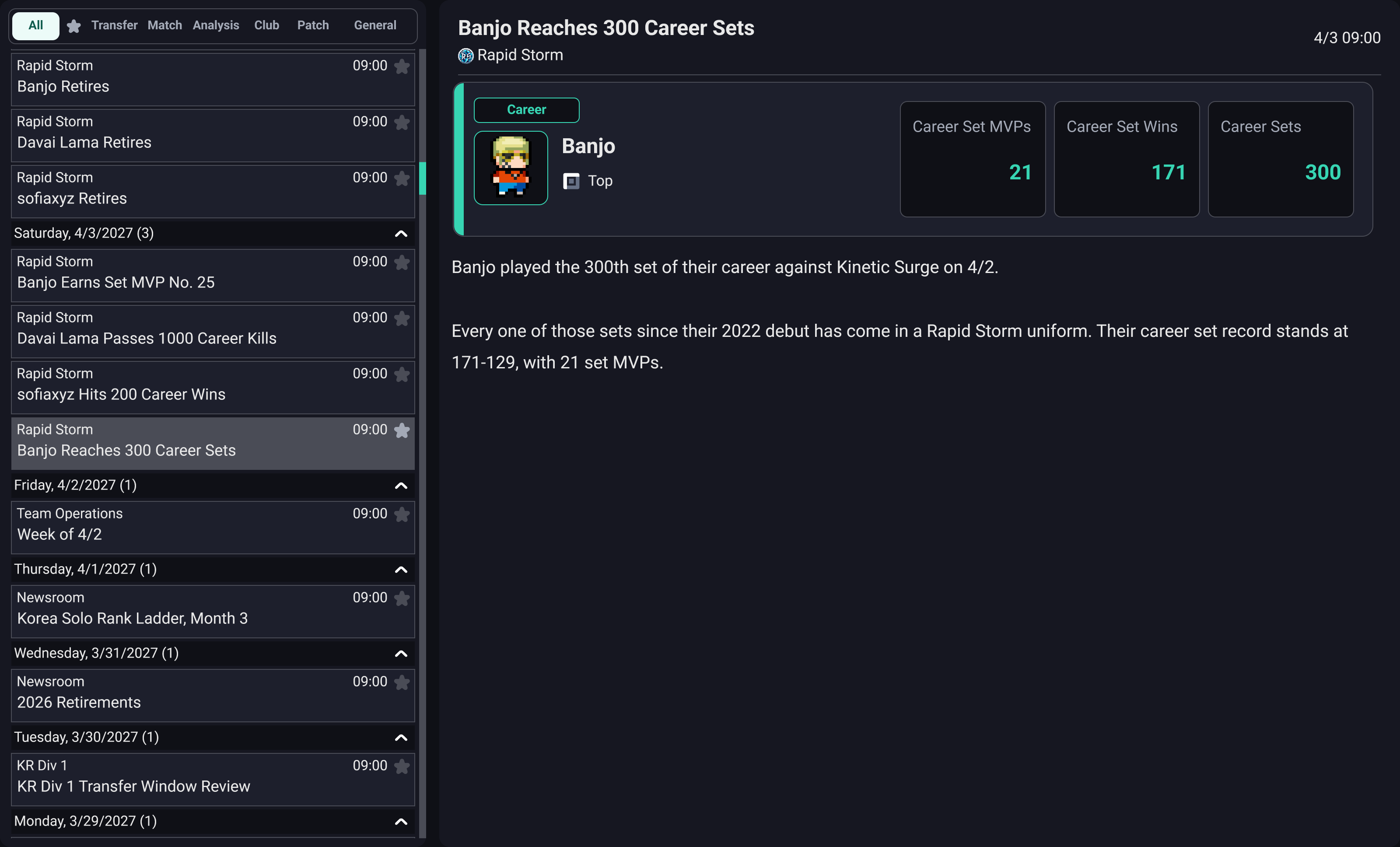
Career milestone article
Added three inbox decision events. You can decide how to prepare for a player's retirement, manage a player ahead of a match against their former team, or celebrate a milestone.

Retirement preparation decision event
Added player overall ratings (OVR). A single number shows the average of the ability stats used in the current mode, making player levels easy to compare at a glance. OVR is shown in both the Classic and new UI.
OVR appears in player details, information popups, squad tables, recruitment lists, other teams' squads, player comparisons, and both starting lineups on match day. Squad tables and recruitment lists can be sorted by OVR.
If Player Stats Visibility is set to Hidden in new-game options, other teams' players show an OVR range based on what you know, or '-' if you know nothing.
The Academy's Current Ability value has been replaced by OVR calculated on the same basis.

Overall ratings in the squad table
Added Help. You can revisit explanations of screens and features at any time after manager training, in both the Classic and new UI.
Open it with the question mark (?) button or the shortcut (I by default). In the new UI, the button sits to the left of the gear button at the top; in the Classic UI, it sits to the left of the power-shaped button at the bottom. The final manager training guidance points it out.
Help opens with an explanation of the current screen. Choose from 26 topics in the left list, covering gameplay basics, the yearly cycle, match day, manager careers, contract negotiations, and individual menu screens.

Help opened from the squad screen
Added a Solo Rank on/off setting to the Competition tab in New Game setup and Settings. It is also available in multiplayer league room settings.
Turning it off skips solo-rank match simulation and greatly reduces loading time when advancing the date. In a test of the same season on the development PC, the average time to advance one day during the season fell by about 65%, with even larger reductions on busy days such as the season opener.
The Solo Rank menu and screens, solo-rank standings in player information, and weekly solo-rank analysis reports disappear when it is off. Champion and item meta changes then rely only on official match results and may develop more slowly.
Solo Rank remains enabled until manager training ends. Existing saves keep it enabled, and re-enabling it during a game resumes solo-rank matches from the following day.
Added the player trait Jungle Invading. Players with this trait prefer invading the enemy jungle when they gain lane priority.
Transfer Market Overhaul
Substantially revised and improved how the transfer market works.
AI clubs now plan their rosters across multiple seasons and make signings, sales, and contract renewals according to those plans. Each club aims to build the strongest team it can within its budget and income.
AI clubs now use the full management system, including changes to facility and academy levels.
Improved how transfer fees and salaries are determined and how negotiations progress. Clubs no longer refuse to sell a player at any price solely because that player is their only option. Each club assigns players an internal value based on its current situation, the player's ability, and its long-term plans, and will always agree to a transfer when an offer meets that value.
Fixed cases where clubs sold key players too cheaply or failed to replace them with strong players, severely weakening their teams.
Players now consider the club's level, playing opportunities, and salary when signing. Young prospects place greater importance on playing opportunities.
Fixed cases where very young players received or demanded excessively high salaries and transfer fees solely because of their high potential.
Rebalanced academy, facility, and other costs based on long-term playtesting.
Improvements
Reworked the scout's role. Each of the scout's three attributes now has a distinct purpose, and scouts provide their own assessments and market information about players they have observed.
Higher Ability Analysis improves the accuracy of current-ability assessments and increases the number of shortlisted players checked each week (2–6). When attributes are hidden, each observation also reveals more information.
Higher Potential Analysis improves assessments of future growth and identifies hidden tendencies that have not yet emerged. Low values can occasionally lead to large errors.
In addition to delegated negotiations, Negotiation determines the depth of market information. The club's willingness to sell is always available; a player's willingness to move is revealed at 35 or above, and negotiations with other clubs at 70 or above.
Growth potential and recommendations for players outside your club, as well as scouting assignment candidates, are determined by the scout's judgment. Assessments of the same player remain consistent and become more accurate with repeated observations. Even when player attributes are set to be visible, growth potential still depends on the scout's assessment and is unknown without a scout.
Scouts check shortlisted players in rotation each week. A Scout Watch Report arrives when something changes, such as the club's willingness to sell, a transfer, an approaching contract expiry, talks with another club, ability changes, or retirement. With hidden attributes enabled, each check also builds up information about the player.
Scouting reports now include the scout's assessment of a player's role in your team, strengths and weaknesses, hidden tendencies, and growth potential, as well as market information. Higher analysis attributes produce more detailed assessments.
In the scouting list, shortlist, and full player list, colored dots show the selling club's willingness as assessed by the scout: green means easy to sign, gray means a major offer may be considered, and red means not for sale. Hover over the growth-potential or recommendation columns, or the scout recommendation field in player details, to read the assessment.
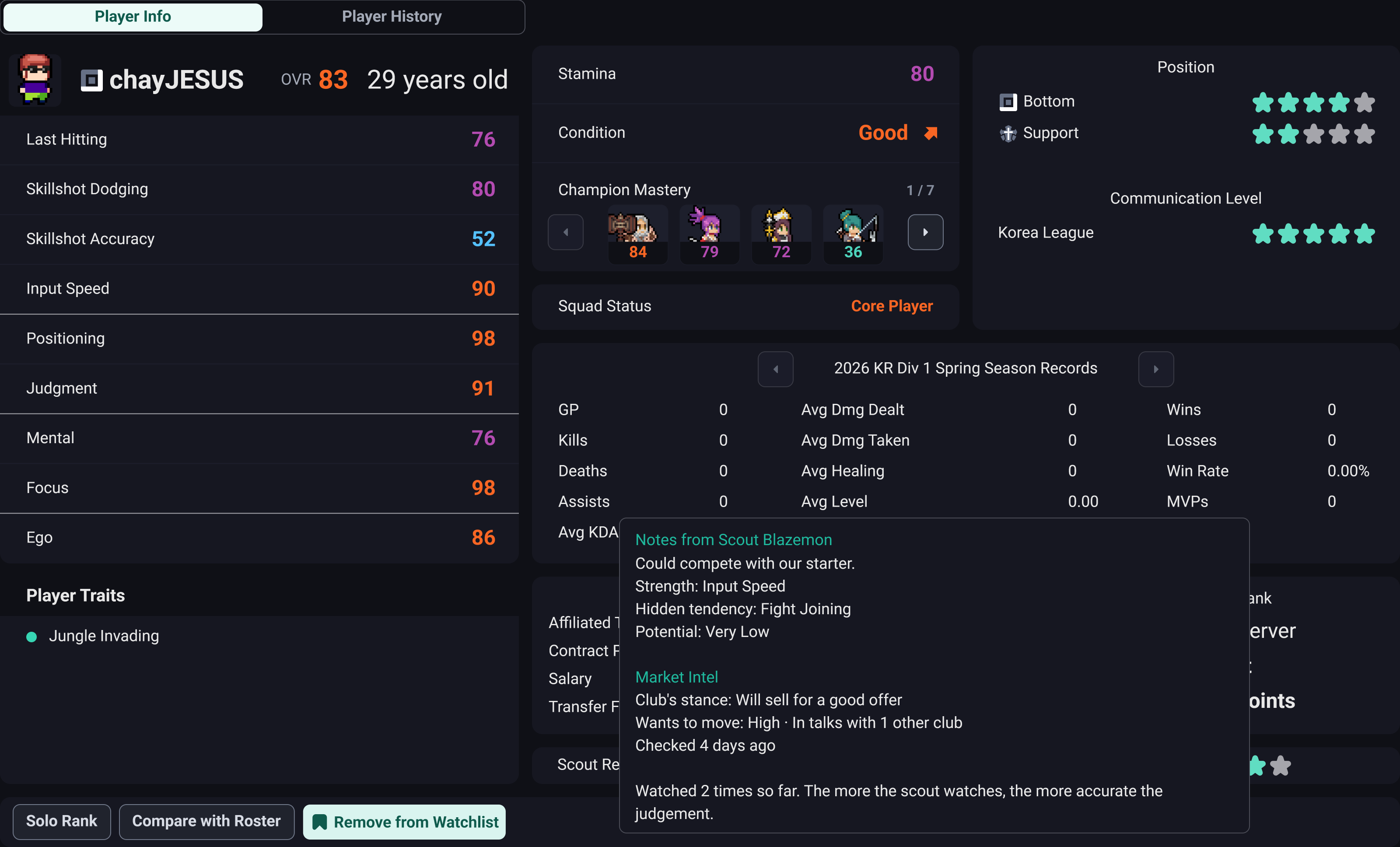
Scout assessment and market information in another team’s player details
Changed the rules for academy trainees leaving.
Trainees no longer leave without warning. If morale drops below 35, you receive news that they may leave. They may leave the academy if morale does not recover to at least 45 within 14 days.
Departing trainees become free agents instead of retiring. If they sign with another club within one year, that club pays training compensation to their original academy club.
The Ego stat is shown again as a personality stat for the squad messenger. Ego does not affect matches. It is visible in player details, player information popups, player comparisons, individual training, scouting filters, and database editing.
Players with Ego of at least 70 blame teammates in the group chat after a loss, causing arguments. When handling a dispute as captain, they take sides. They also speak bluntly about playing time, renewal, and transfer rumors.
Players with Ego of at least 60 push back against the manager's advice when they are in poor form.
Expanded player chat during matches.
Players react to lost team fights, consecutive deaths, the opposing team's growth, aces, and shifts in momentum. Teammates also respond to complaints, apologies, praise, and objective steals, creating conversations.
Added lines that communicate match situations, such as recall notices, sightings of the opposing jungler, enemy positions during the laning phase, reasons for objective calls, and lane clearing.
Chat appears only when it matches the actual match situation and does not affect the result.
When an international tournament involving your team is in progress, the Career and International tabs on the Records screen show that tournament first.
Performance Improvements
Improved save speed and file size. Greatly reduced the slowdown that accumulated with each year of a long-running game, and revised how match replay data—the largest part of saves—is stored. Matches involving your team remain available to replay, while other teams' matches are now replayable only for the most recent three years.
Reduced rendering work by fixing text calculations that were repeated from scratch every frame.
Reduced brief pauses when switching screens through the left menu. This applies to both the existing and new UI.
Greatly reduced pauses when opening Schedule, Statistics, and Recruitment. Fixed unnecessary rebuilding of hidden lists and tabs each time these screens opened.
Also reduced pauses when opening screens that first display player portraits, such as Messenger and Squad.
Fixed an issue on Windows where setting Frame Limit to 60 resulted in only about 30 frames per second. The game now renders at the configured limit, including when Vertical Sync is enabled.
Bug Fixes
Fixed broken text formatting in the Taoist's ultimate description in Brazilian Portuguese.
Fixed an issue where staff were hired without final approval if they immediately accepted an offer.
Fixed an issue where an early contract extension ended before the existing contract.
Fixed an issue where a club rejected its own deal at the final approval stage after negotiations had been agreed.
Fixed an issue where a recruitment counteroffer could be lower than the preceding offer.
Fixed incorrect reply deadlines in the recruitment list.
Fixed various other minor transfer-market issues.
Fixed column headers appearing misaligned with values in player tables, including squad lists, recruitment lists, and starting lineups.
Fixed player ages wrapping onto two lines and being partly hidden in Classic UI player details in English and some other languages.
Fixed the Recommendation column heading in the scouting list breaking in the middle of a word in English and French.
Fixed the focus border not appearing when using a gamepad to select a scrollable reading area, such as Recent Events in Fan Service.
Fixed an issue where the option description panel overlapped the last row of champion options in multiplayer league rooms when changing options or joining as a participant.
Fixed an issue when spectating another match in a multiplayer league where highlights played at only 3x speed for spectators. Spectators now follow the playing team's playback speed, including highlights.
Fixed an issue in multiplayer leagues where two players with the same Steam name could enter the same team instead of their separately selected teams.
Fixed missing stun and airborne effects and status indicators in native mode, and movement continuing while rooted.
Fixed an issue where a champion whose basic attacks or skills were changed by a mod during a match, such as by a range-increasing enhancement, moved back and forth instead of attacking from the modified range.
Fixed long contract-related news text being covered by player information cards. Card positions now adjust to the text length, and long messages can be scrolled to the end.
Fixed an issue where an old contract-renewal message for a player who had left could reappear as requiring a response when that player negotiated a renewal with their new club, preventing the date from advancing.
Fixed in-game patch notes combining distinct values with the same name into one line and displaying incorrect values, such as the damage AP scaling and seal-duration AP scaling of Taoist skills.
Fixed an issue in databases edited with the database editor before 0.4.15 where some patch values appeared in old units, or some interval values, such as bleed intervals, increased rather than decreased when buffed.
Fixed an issue where the Astrologer's skill 1 and skill 2 cooldowns could jump to 20 seconds in a single automatic balance patch and never decrease again. Existing saves with inflated cooldowns return to the normal range when loaded.
Fixed the Harpooner's and Astrologer's ultimate cooldowns changing by more than 15 seconds in a single automatic balance patch, a larger change than for other ultimates.
Fixed in-game patch notes labeling the AP scaling for a Taoist skill's seal duration with the same 'Ability Power Ratio' label as its damage scaling. It is now shown separately as 'AP Duration Ratio'.
Fixed player ratings in simplified matches under the Simple and Moderate Simulation Intensity settings being higher than those in fully simulated matches.
Fixed an issue where players who had left a team remained in a previous starting lineup and could still play in a match.
Fixed an issue where the competition selection from a previous Records tab carried over when switching to the International, All-Pro, or By Season tabs, selecting the wrong competition or league.
If you encounter any problems while playing, feel free to reach us at
anytime.
Thank you.