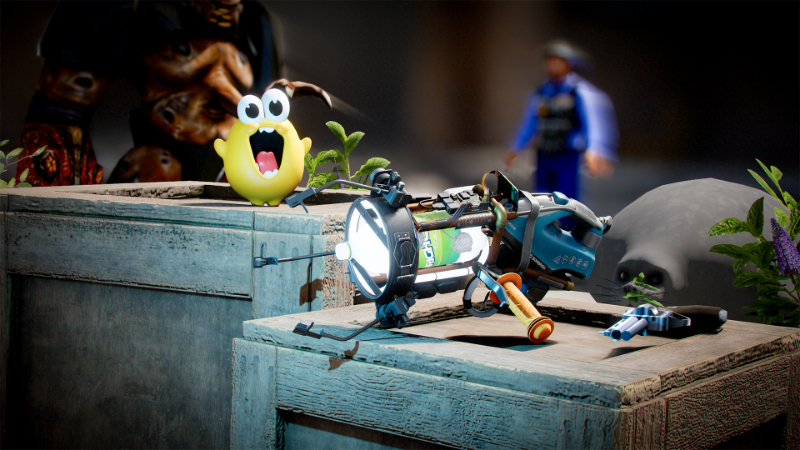
A new update has been released, you can view the full changes on our blog post.
https://sbox.game/news/familar-territory
Steam Workshop for Games

With tonight’s update we’re releasing the first version of Steam Workshop for games. A lot of players missed the familiarity of the steam workshop, with this update we are bringing it back. Discoverability is still backed by our own workshop, it's a gradual process that we'll give developers time to adjust to. Eventually when we migrate fully to the steam workshop, games, and maps that are not yet published will not be accessible. So we encourage developers to republish. Feel free to discuss this more on our forums, where we outline any workflow changes for developers trying to publish to the workshop now.
Reward Changes
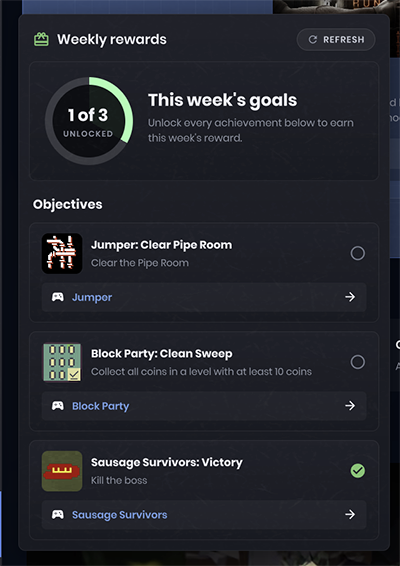
Our weekly item rewards were based on play times and games played. That's in the bin now. In the new system, every week we choose achievements from games on the platform. If you have unlocked those achievements then you get a reward. If you don't unlock them in the weekly period then you don't get a reward. I like this system a lot more. It brings people together in a certain game to get the achievement and encourages people to actually play the games instead of just sit in them. Enjoy!
Source 1 Mounts
Like Garry's Mod, games you own on Steam can be mounted in game and played with in the Sandbox mode. And now we can mount Garry's Mod and other Source 1 engine games - the mount system is engine agnostic, we've already got mounts for Goldsrc, Unreal Engine and others, these can be coded by the community too.
Non Temporal SSR
I've completely rewritten our SSR to be non-temporal, simpler, sharper and 30% faster. 😎
Light Modulators
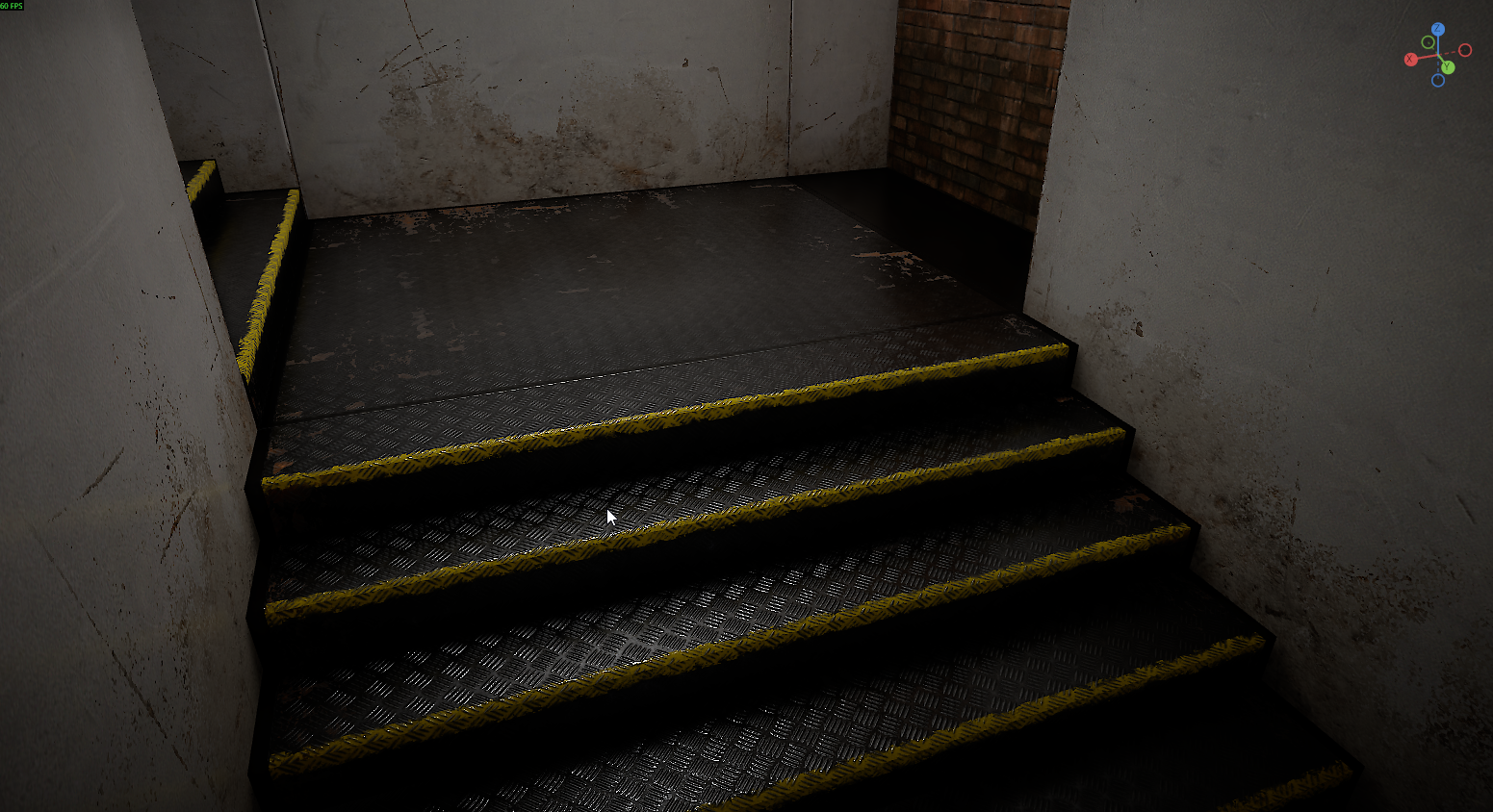
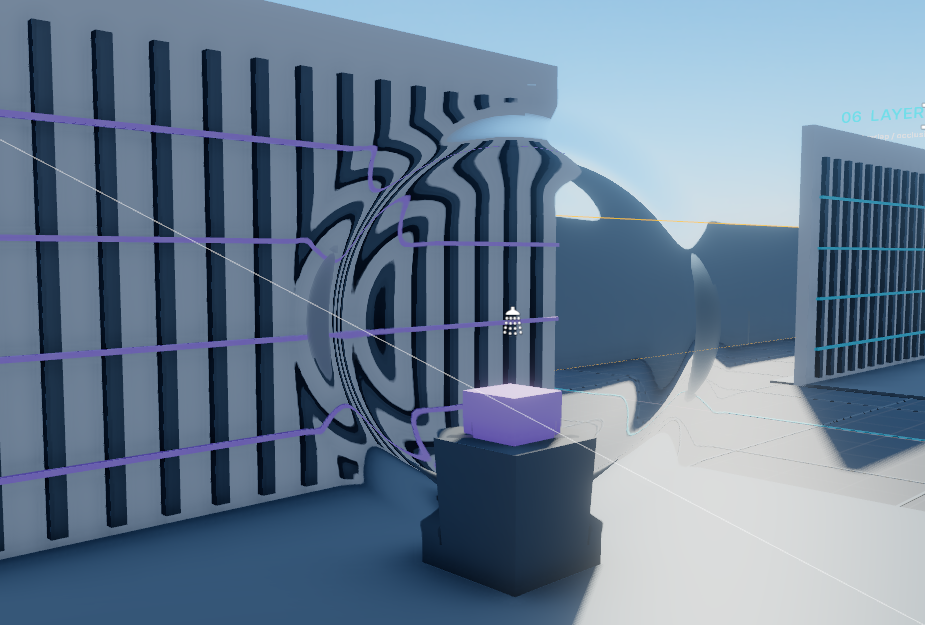
The new `LightModulator` component filters direct light through a textured rectangle. It works with point lights, spotlights and sunlight and it affects volumetric fog.
I added this primarily to make a nice solution to add water caustic effects without any great hacks, and it does that quite well:
But this has other purposes that I think people will find over time. Clouds is an obvious one.
Fog Controls
I've consolidated our fog components to a new single `Fog` component. It adds a few more nice to have functions to tweak the look of the fog, like distance based skybox color blurring, and sun coloring. More importantly, this is refactored so it now works via a PostProcessVolume - so different parts of a map can have different fog settings, and they can be blended between.
Sprite and Particle Refraction
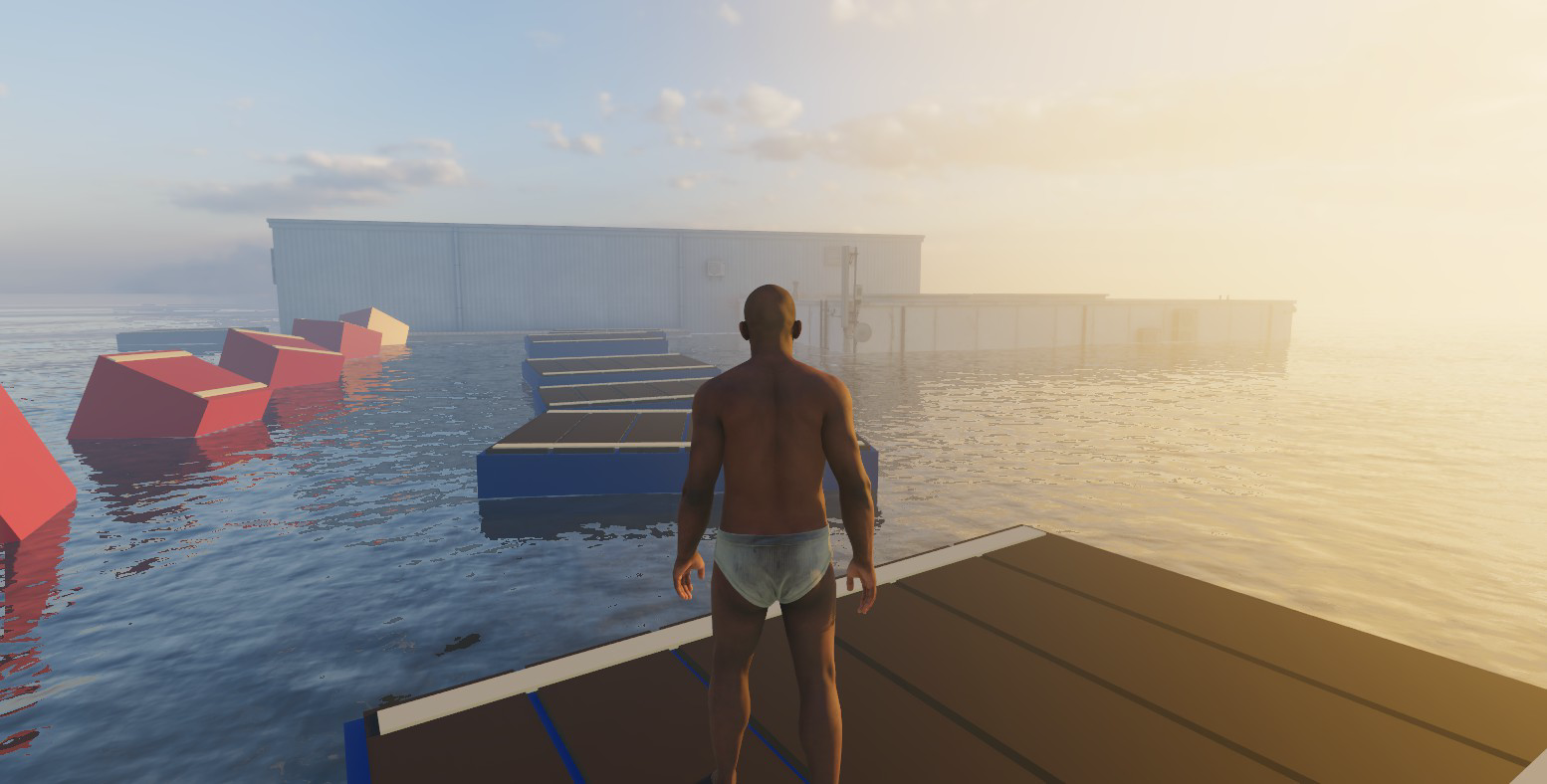
Sprite and particle renderers now support normal-map refraction, so they can distort the scene behind them. This provides another option for effects such as heat haze and shockwaves.
Light Temperature and Animation
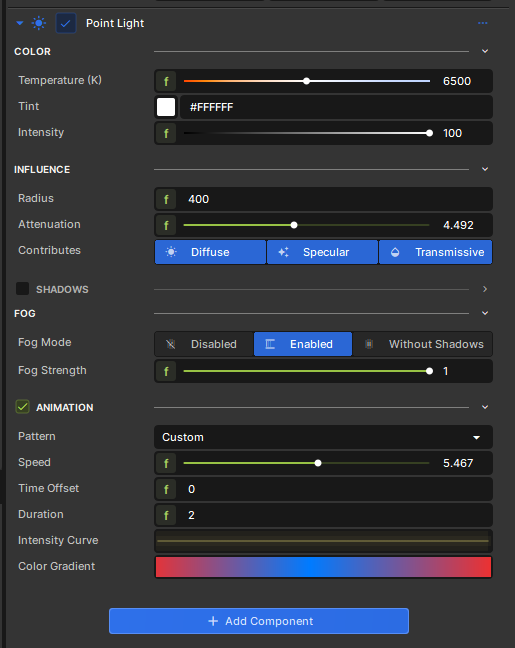
Lights now have separate temperature, tint and intensity controls. Temperature uses a Kelvin slider with neutral white at 6500K, while Tint behaves like the previous light colour setting. Existing lights retain their appearance.
All light types can also animate. There are twelve built-in patterns, including the classic Quake and Half-Life styles, plus custom looping intensity curves and colour gradients. Speed, duration and time offsets let you coordinate lights or keep their flickering out of sync. The animation previews in the editor and can be recorded in movies.
Passworded Servers
Servers and lobbies can now require a password, set through the classic `sv_password` or with `LobbyConfig.Password`. This is in addition to lobbies having friends only or private invite only modes.

More Human Heads
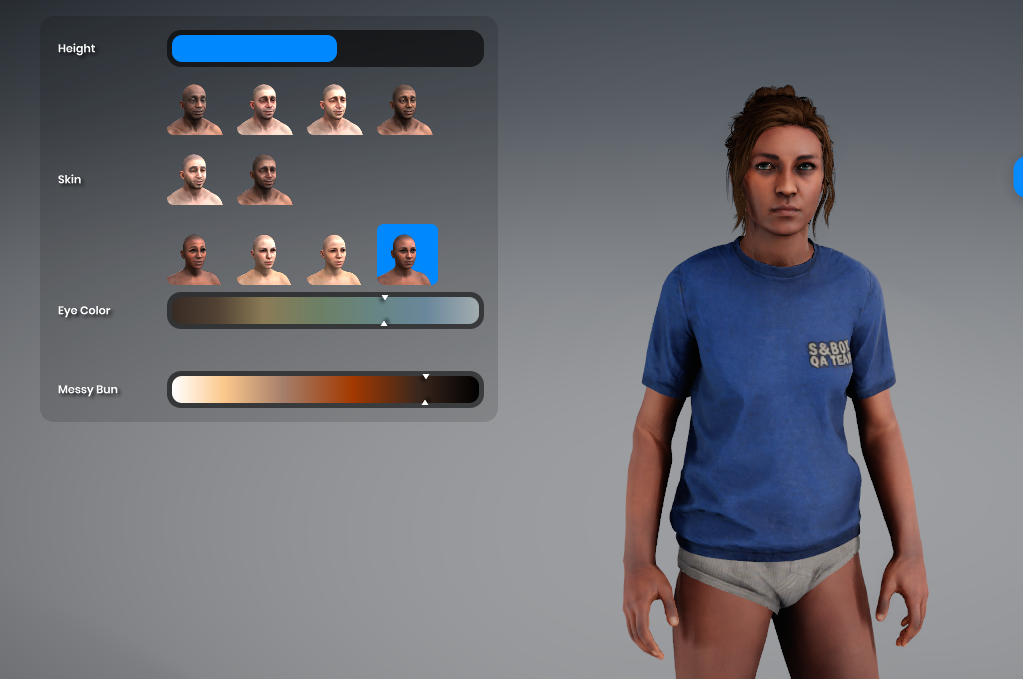
We have added two more feminine heads and another masculine head to the human models. The avatar menu also groups the skin thumbnails into feminine and masculine options.
This is the initial release of these heads, with further adjustments to both new and existing options planned.
Outdated Shader Updates
A big limitation we had blocking improving our shaders, rendering features and performance was how scared we were to break existing UGC. Games and maps could use their own custom shaders and anything we changed had to be very meticulous in order to prevent custom shaders breaking or crashing. The only way to fix them would then be requiring the creators to update and republish their work for the new version. We now do two things:
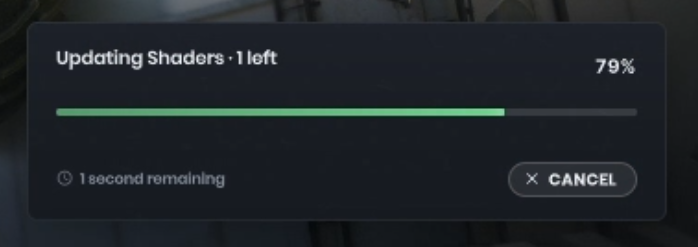
When a breaking shader change is pushed and the shader version is increased, the backend recompiles and serves new shaders in place of the old ones.
If we can't find it on the backend yet or you're offline, we'll update the shader locally so it continues working, this can take a few seconds to a minute depending on the shader complexity, they'll be cached to disk.
We can now make more drastic changes to the renderer without worrying about the fragility of breaking UGC 💪
Runtime Shader Compilation
A bonus of doing the above is games can now procedurally create shaders at runtime outside of the editor with the `Shader.CompileAsync` API. Which unlocks some fun sandboxy stuff at runtime like this shadertoy demo.
Crashes & Stability
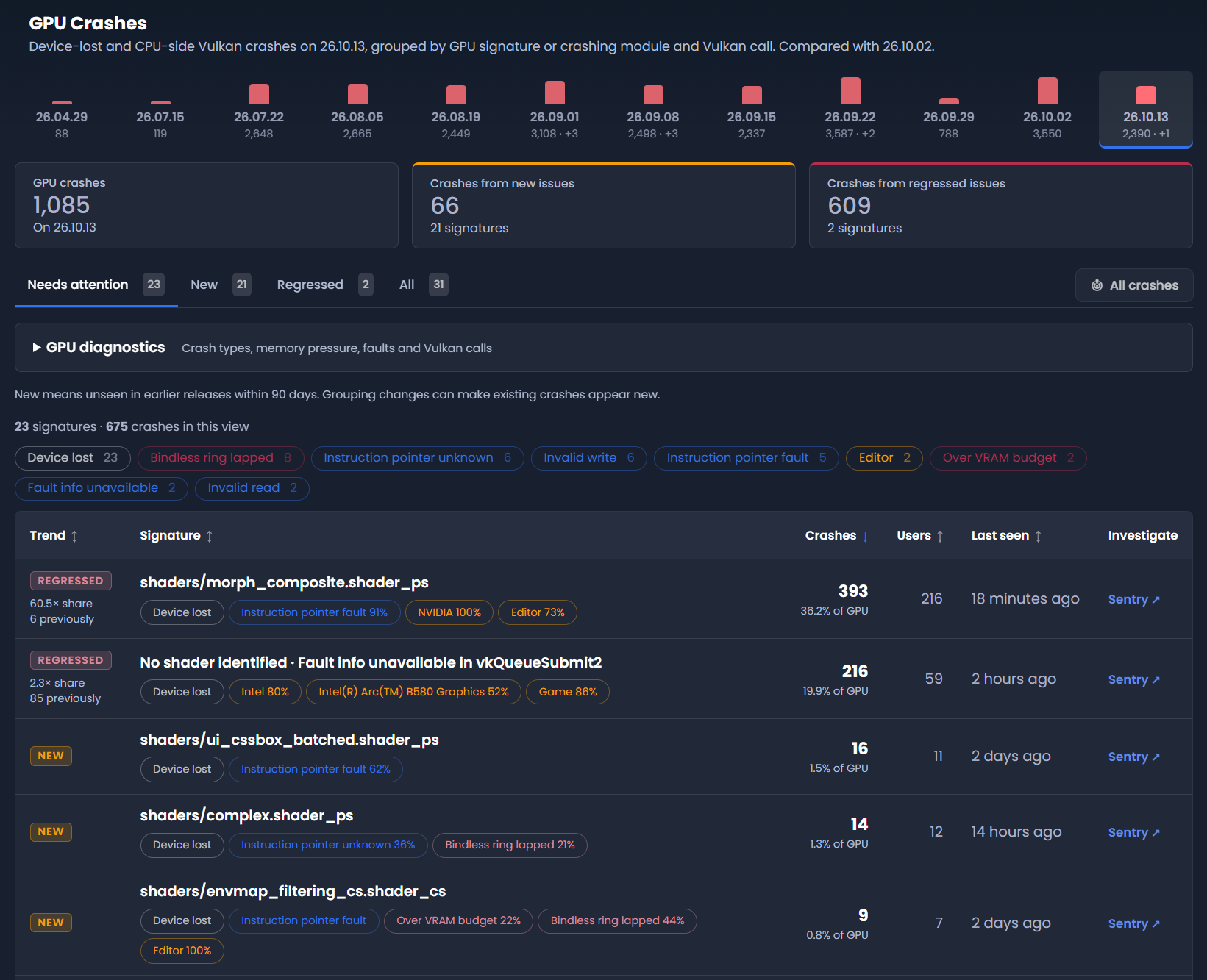
We've always been fixing crashes, but lately new ones were showing up faster than we could fix them. Some went unnoticed for too long because they were buried among the older ones. So we improved our crash reporting and filtering, and crash reports now collect more data. New crashes stand out as soon as a release goes out, which lets us act on it much sooner.
F11 Developer Tools
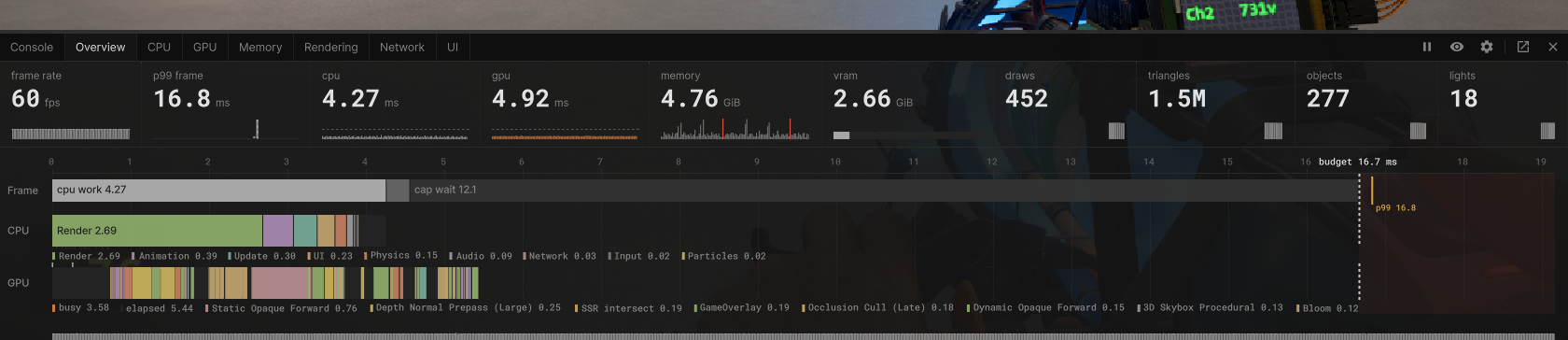
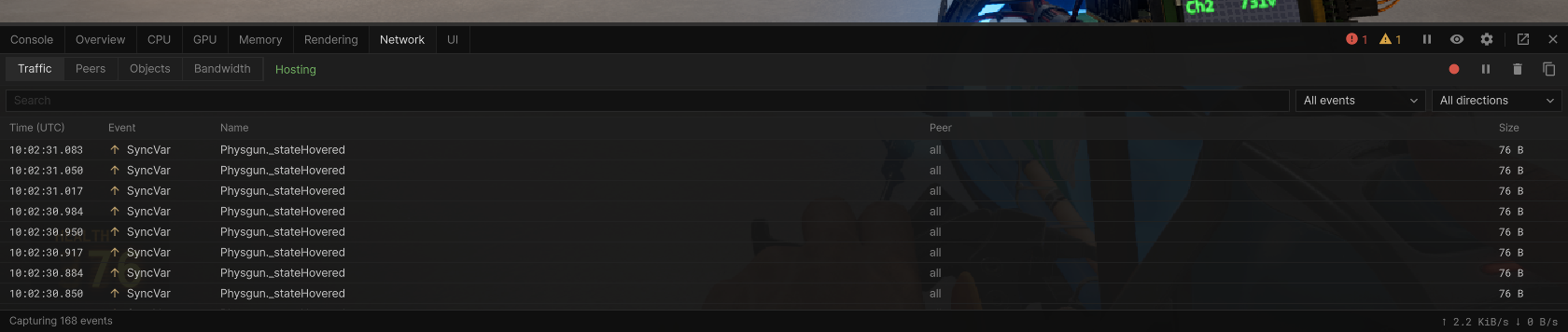
The dozens of overlays we had locked behind convars are now in a single consolidated place called dev tools. F11 now opens a dock at the bottom of the game, with an option to pop it out into a separate window, the editor also has a dock for it too.
Alongside CPU, GPU, memory and rendering information, it brings together the console, network traffic and UI inspection. You can inspect synchronized-variable traffic, peers and bandwidth, or drill into frame timings without switching between separate overlays.
Cheaper Anti-Aliasing
We've added CMAA2 as an anti aliasing graphics setting, which is also used in CS2. This is a good compromise between performance and quality from MSAA whilst still being non temporal.
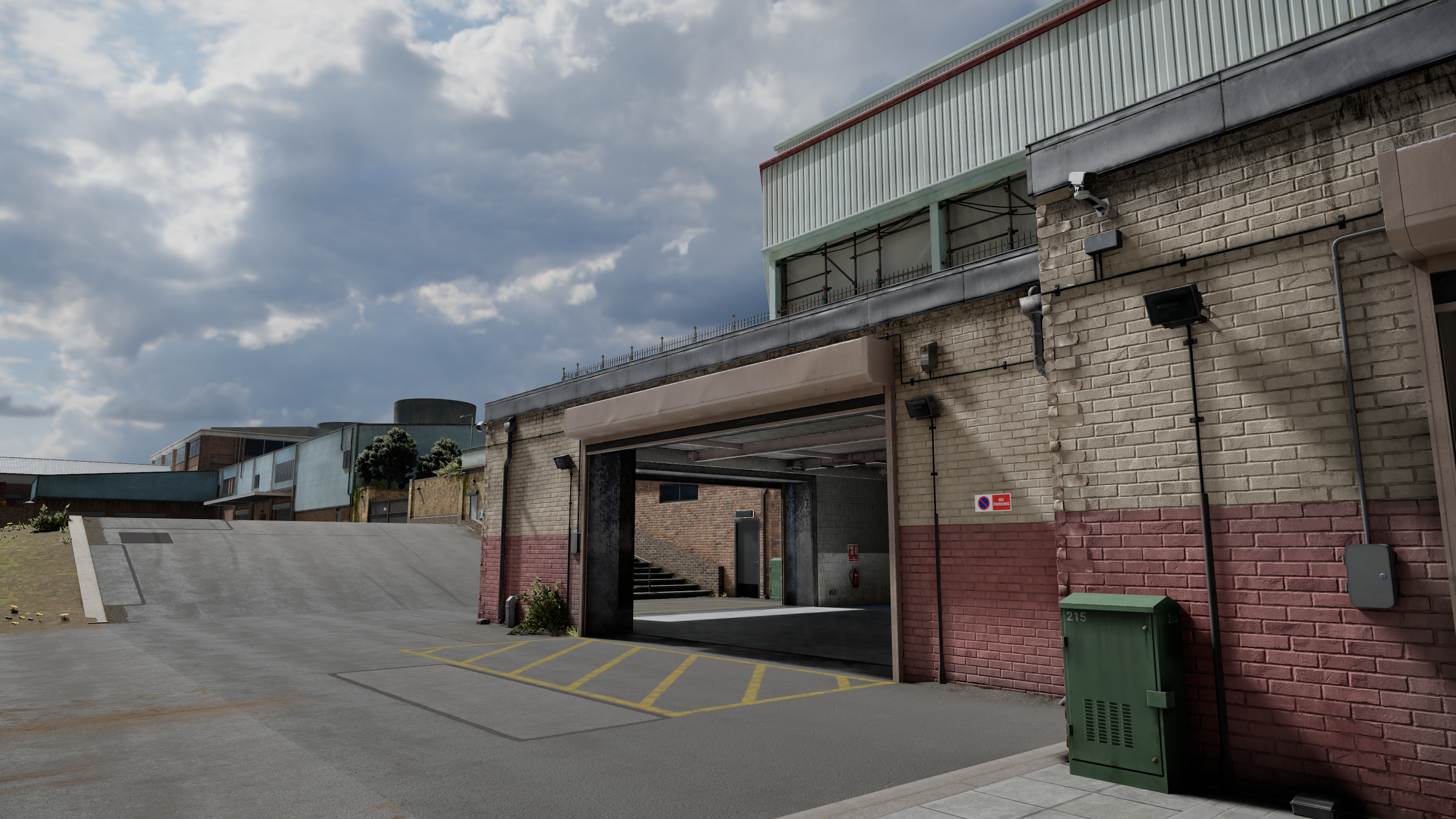
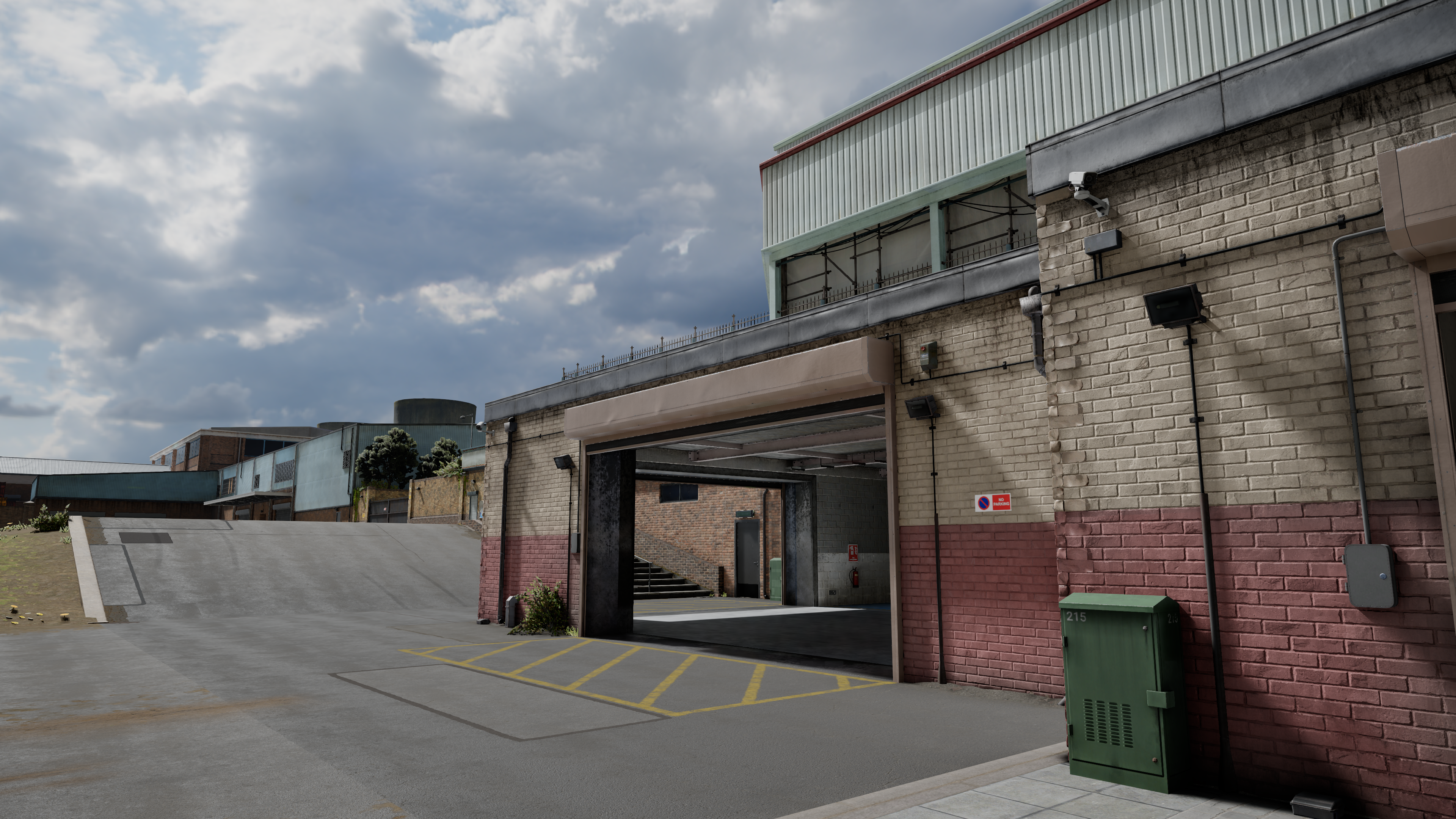
We also never default to 8x MSAA anymore, and have adjusted the quality presets.
GPU Occlusion Culling
I've added GPU occlusion culling, which means skipping drawing objects behind other objects that you can't see. You're probably thinking "that wasn't already a thing?", no it wasn't, obviously we had frustum culling but occlusion culling is a tricky problem to get right, but we've landed on a great solution that works in most scenarios.
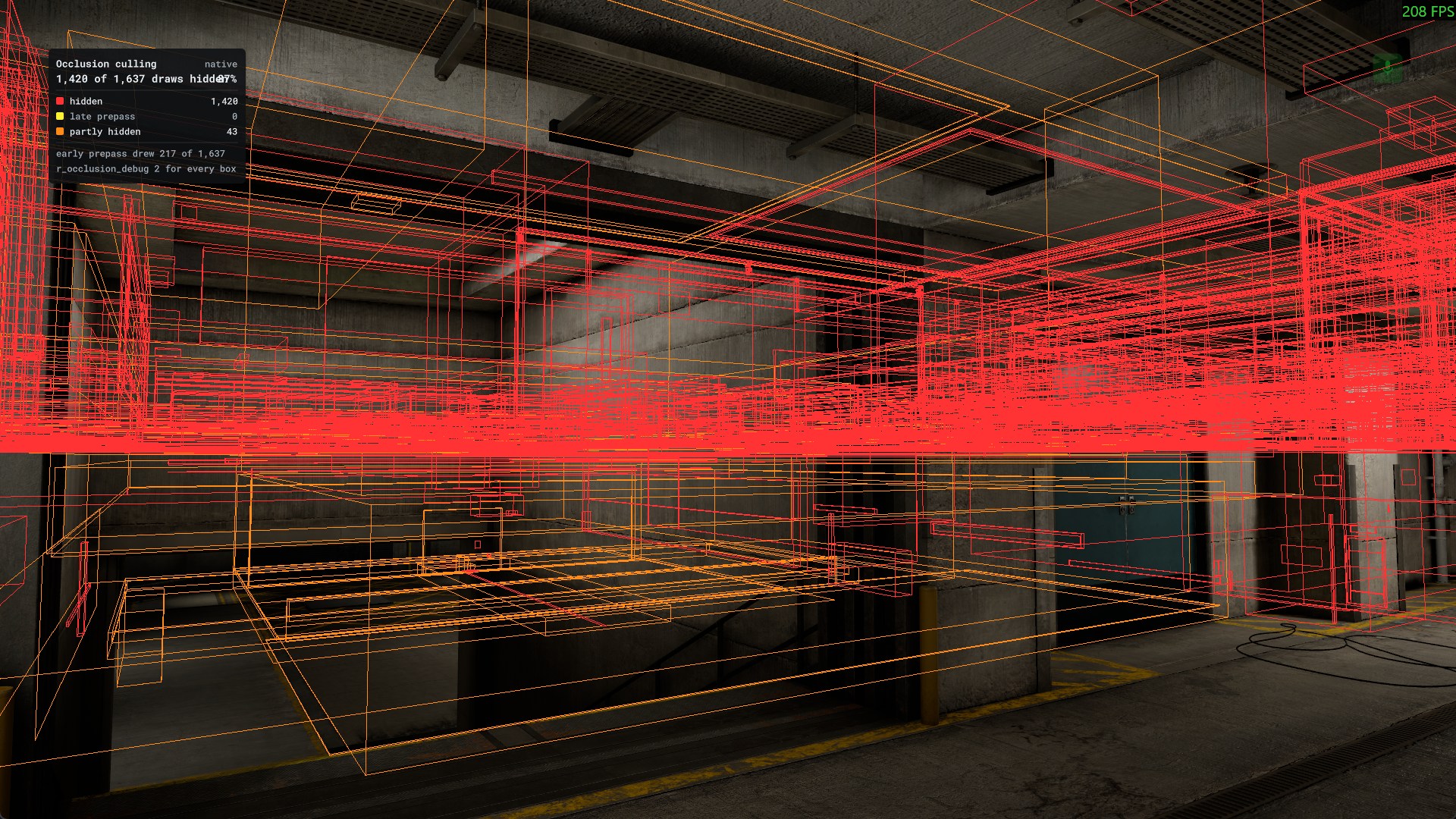
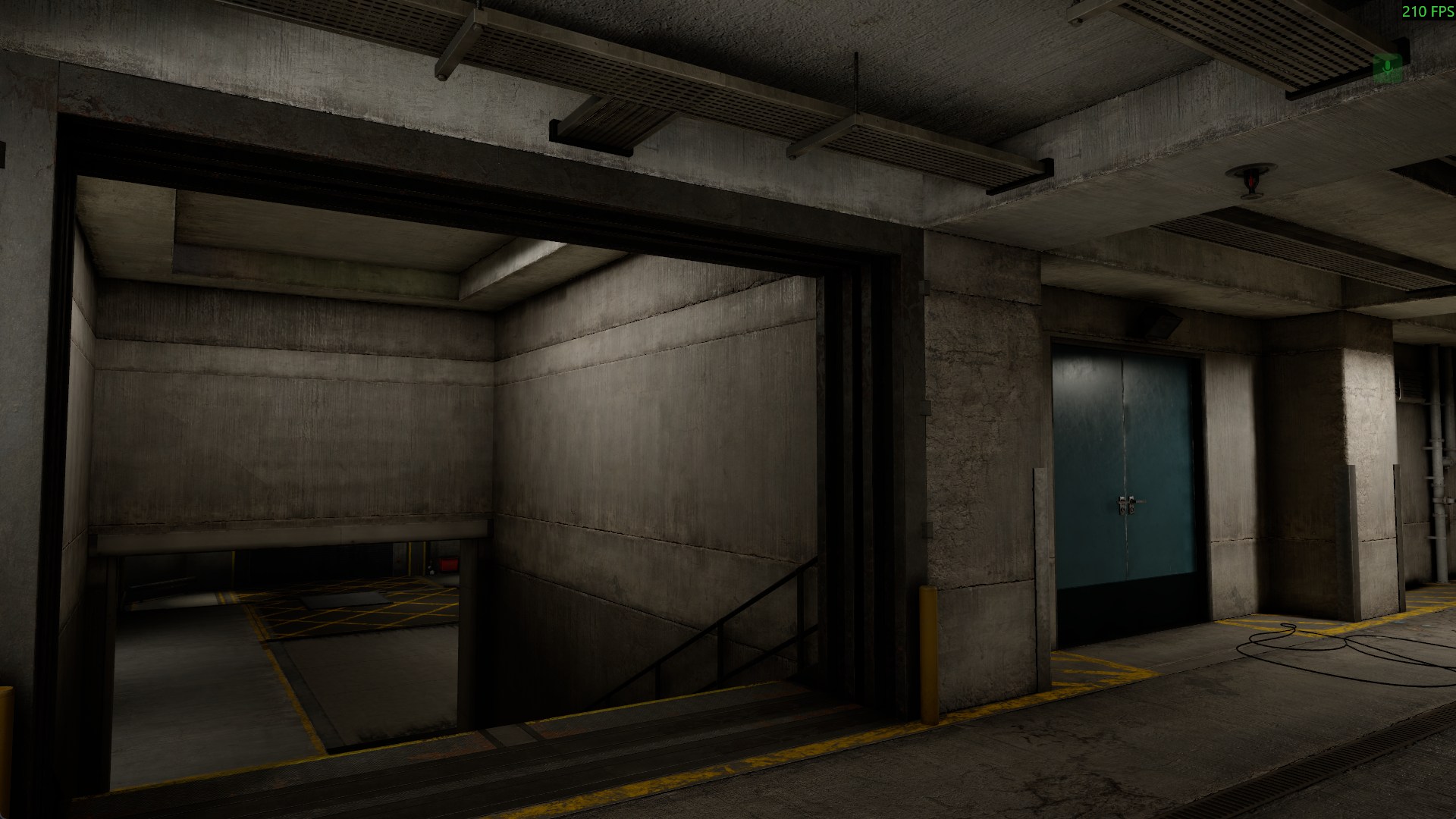
On Construct this leads to a 15-20% FPS improvement in areas with a lot of occluded geometry. Some games might get larger or smaller varying results. Occlusion culling is on by default, if you want to compare or debug it there are these convars:
`r_occlusion_culling` - toggle skipping objets hidden by the occlusion
`r_occlusion_debug` - draws occlusion culling boxes
`r_occlusion_freeze` - freezes the culling to the current camera position
Smoother Shadow Transitions
Our shadows had a horrible hard transition between cascades - so I've made it so that the transition is feathered.
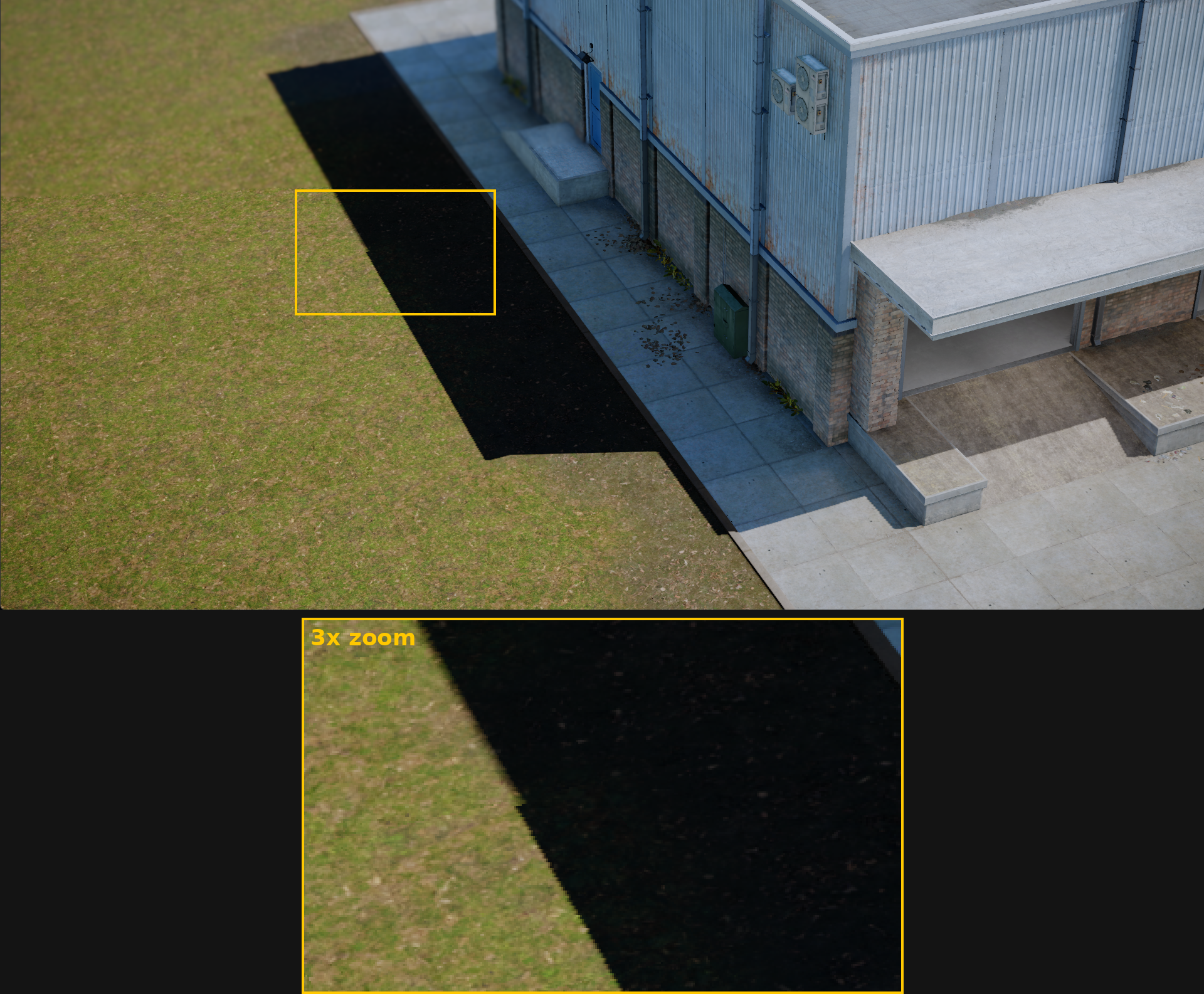
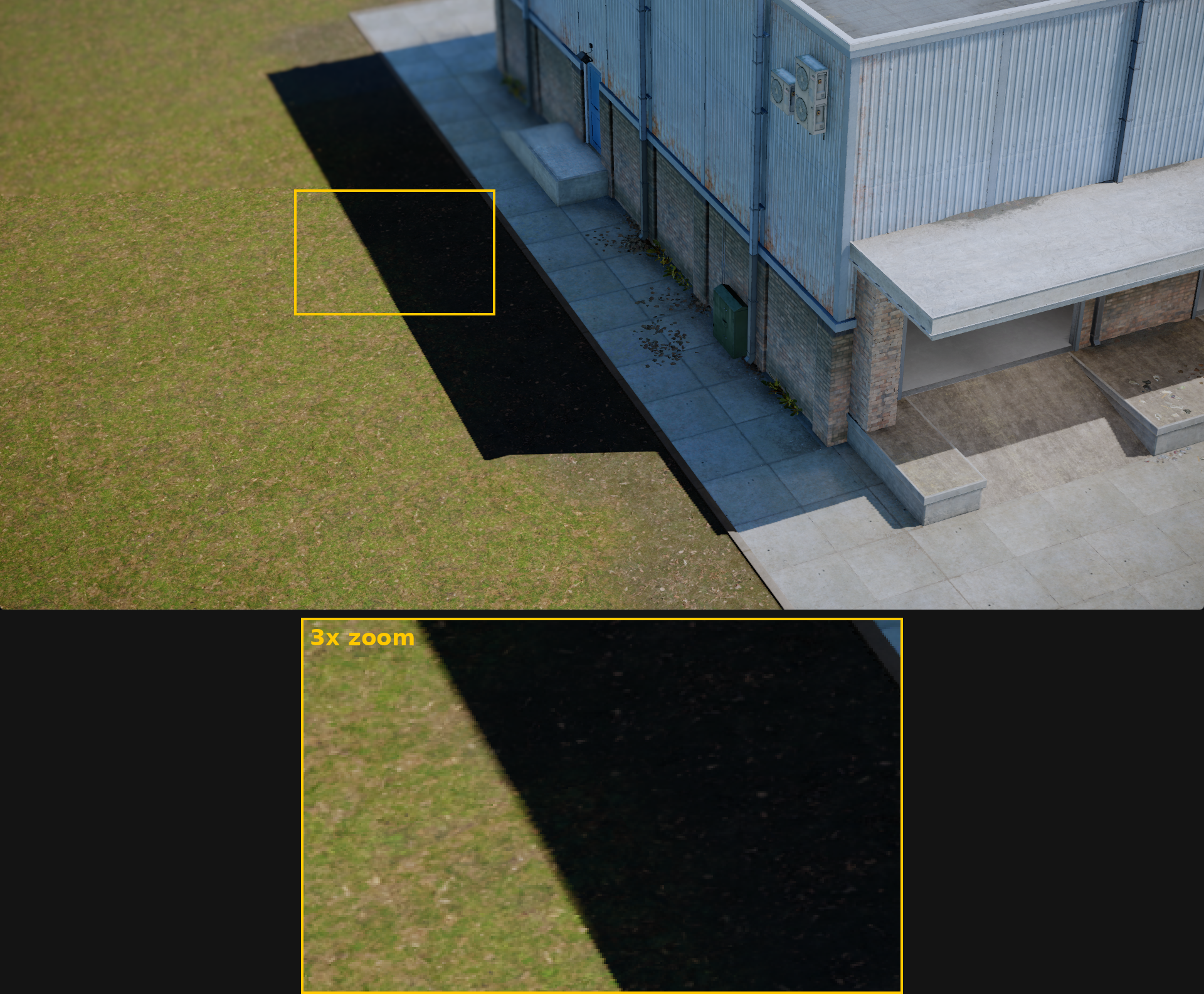
There's no performance cost to this, it's implemented as efficiently as possible.
Faster Lighting
We rewrote part of our clustered sorting and shader traversal so lights, envmaps and decals share work across pixels, biggest gains on AMD.
Light culling on steam Steam Deck fell from ~4 ms to 0.1–0.16 ms; on RX 580 forward pass was 36–52% faster in many-light tests, these are measurements of specific rendering work in test scenes, rather than a promise of the same improvement to every game.
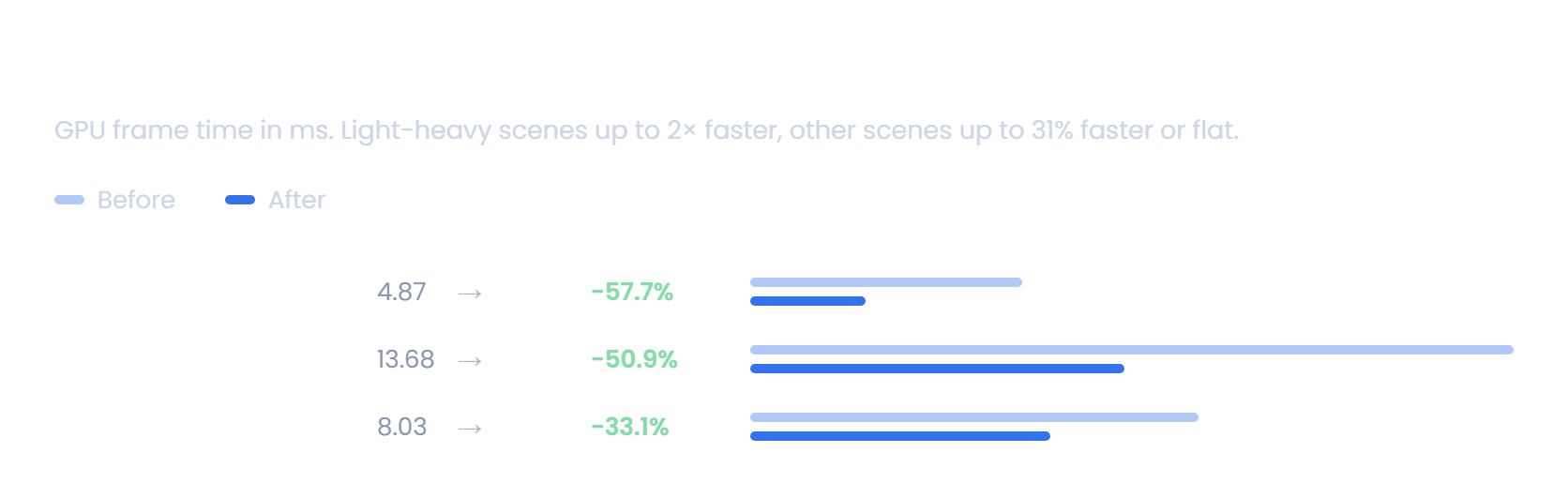
Clustered API is also simpler for custom shadingmodels: use `ClusterForEach()` for most optimized access to any Light, Envmap or Decal in a cluster.
Less Wasted Rendering
We cut down on rendering work that doesn't contribute anything to the final image. In most games that should translate to slightly higher framerates and lower memory use.
Cameras that don't use post-processing no longer render buffers nobody reads.
Colour adjustments, colour grading and chromatic aberration are skipped when their settings don't change the image.
Ambient occlusion and contact shadows also got cheaper with MSAA off.
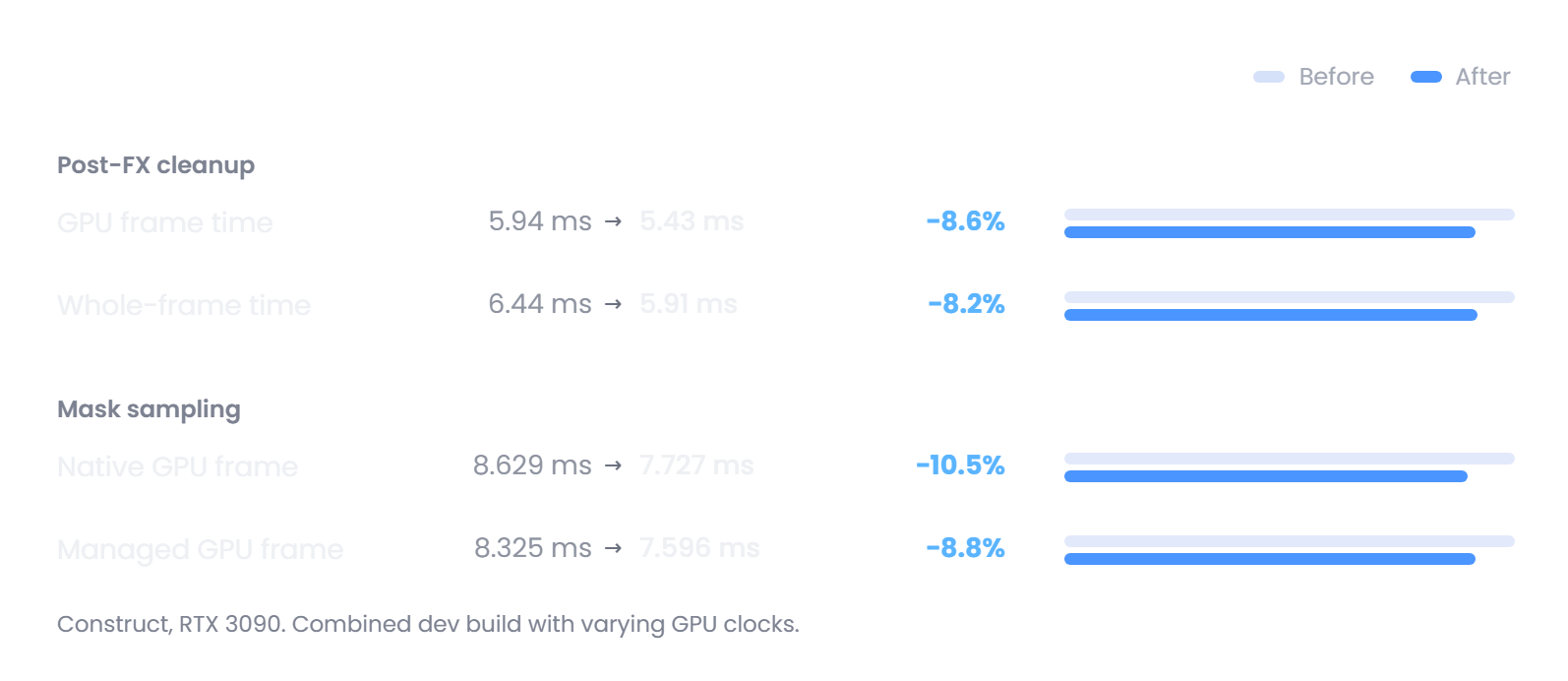 sbox-gpu_frame_timings-new-style.png 94.68 KB
Faster Startup, Again
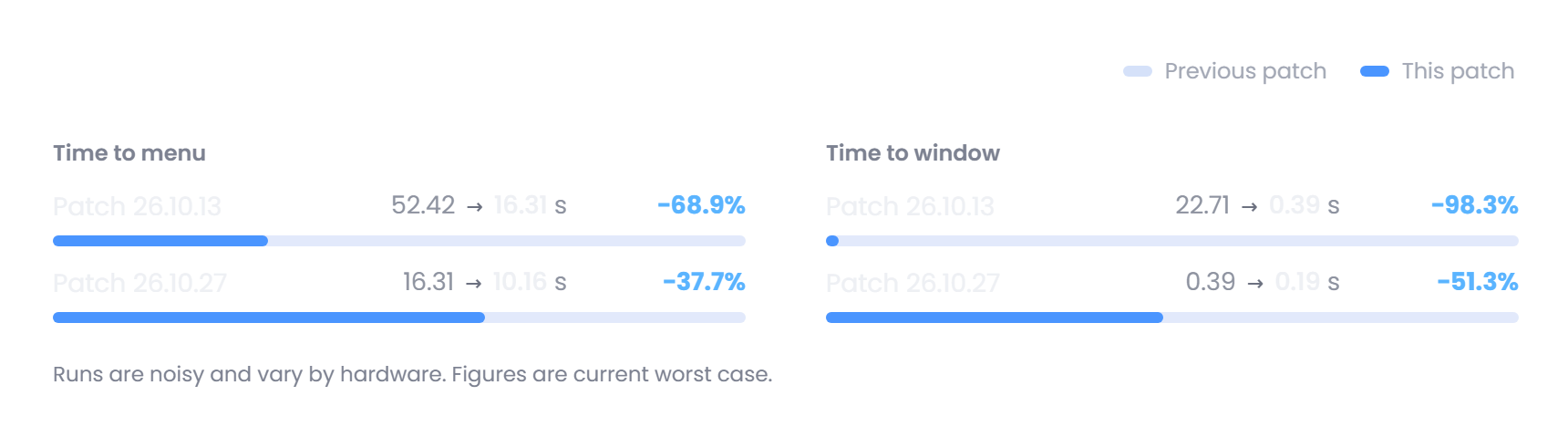
We have continued cutting work from the startup path. Type-library preparation and the resource database scan now begin earlier, overlapping other startup work instead of making the menu wait for them.
Our average startup comparison (on my machine) went from 16.31 seconds to 10.16 seconds to launch into the menu.
Networking Performance
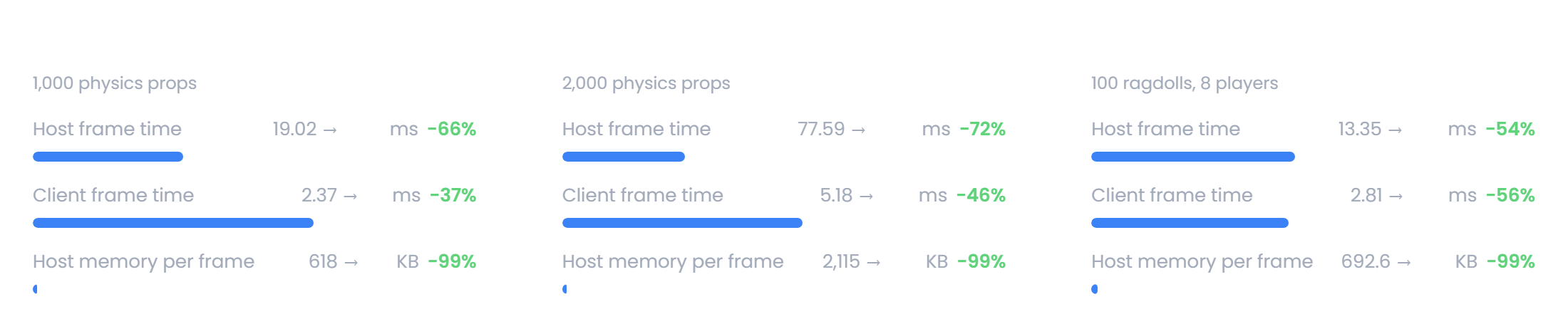
We went through the entire networking stack and cleaned up a lot of allocations and redundant work.
Now our networking hot paths are now essentially allocation free and the reduced redundant work frees up some frame time.
Publish Only What you Use
About 30% of the assets published in the Top 50 Games are actually unused.
Making users download files their game never uses is obviously a waste.
We made it easier to only publish with the assets that are actually used in your game, so you can stop shipping dev assets and unreleased content.
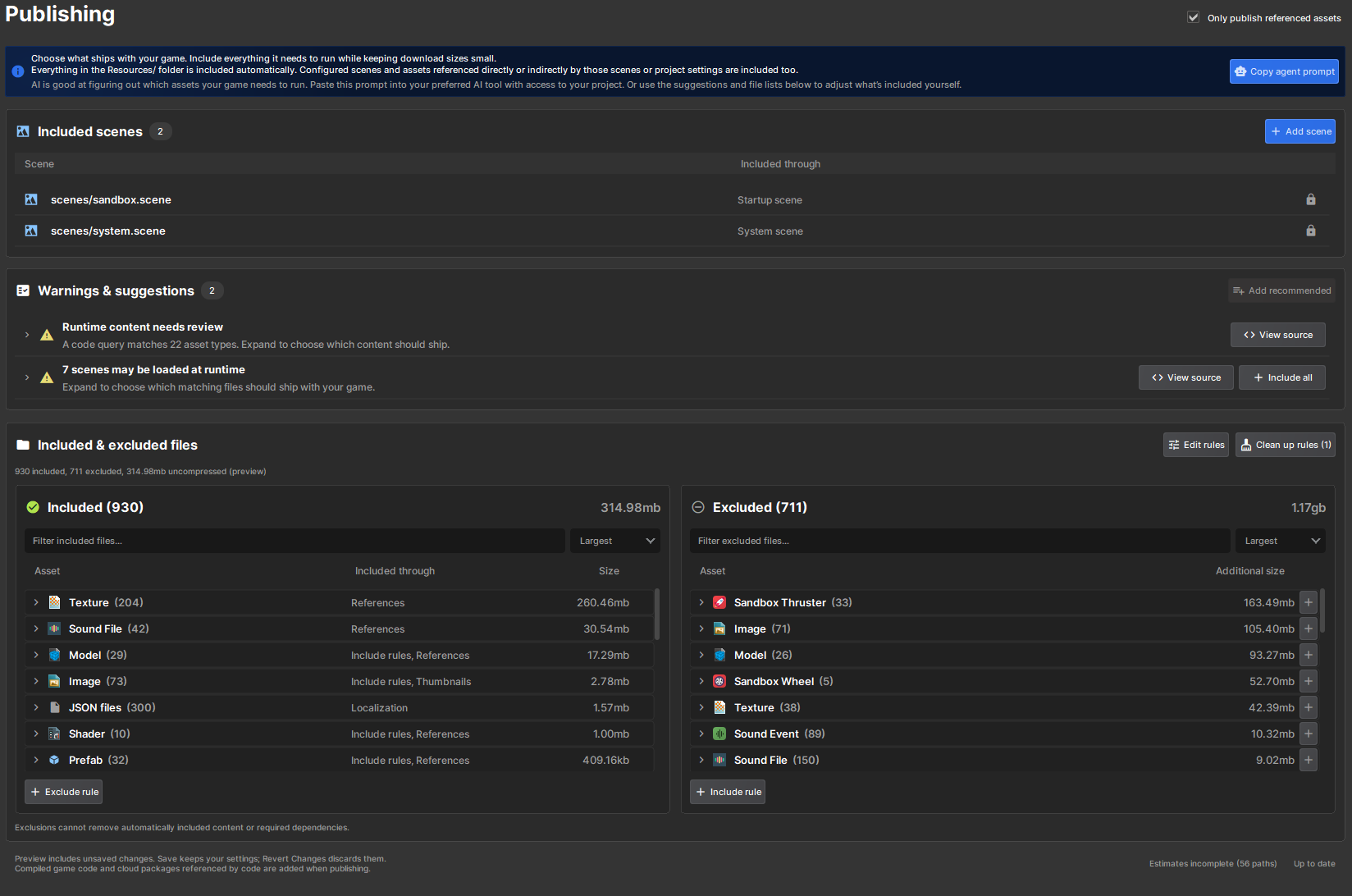
Read more about this feature here
In order not to break existing projects this option is only on for new projects,
for existing games you will have to enable it manually in the project settings.
We really encourage you to enable and use it to optimize your game for size.
Faster Transforms
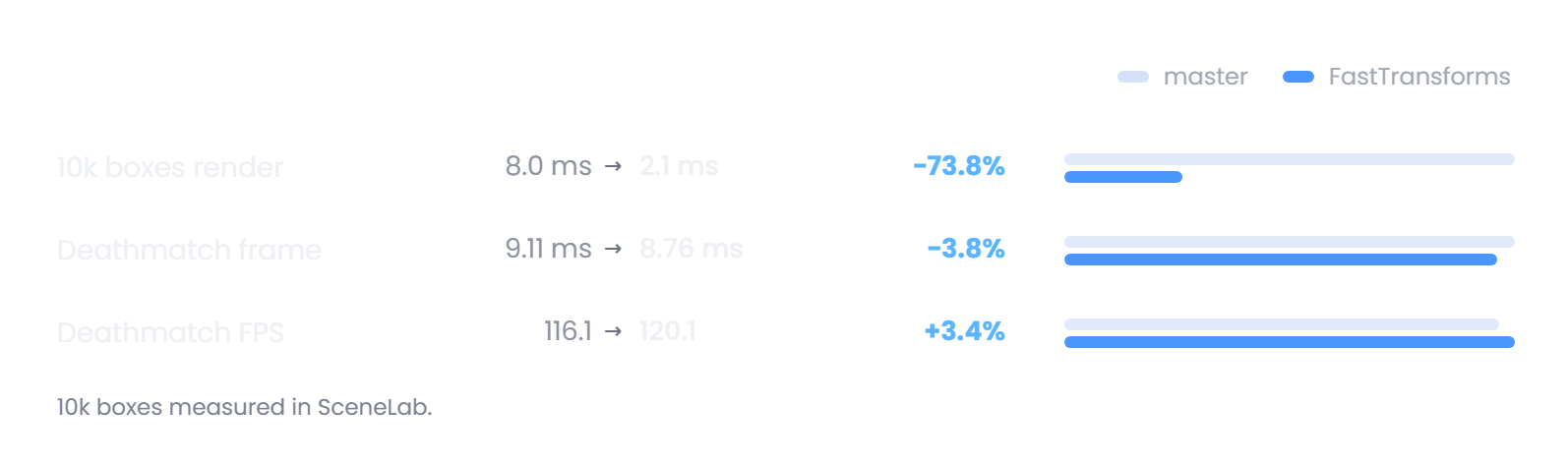
We're are now keeping transform buffers within cache lines and removed unnecessary locks during transform slot allocation. This means drawing a lot of objects on the screen is now a bit faster.
Community Contribution: Network Object Dormancy
Community Contribution by DeadMonstor
Networked objects were doing work every tick even when they had nothing new to send. Each update captured, hashed and compared them again, so large scenes full of idle props were paying for state that never changed. Deadmonstor kindly contributed an automatic network dormancy system, inspired by Unreal Engine. Networked object can now go to to sleep and skip the per-tick snapshot work.
On the `community_bowling` map with 563 networked objects and 32 peers sitting idle, network time per tick dropped from 0.47 ms to 0.09 ms (-81%).
Summary
This was a big update. We tried to stick to the highlights for the blog, the changelog below has the full list of changes with a massive amount of crash fixes, bug fixes and performance updates. A lot of great work from the team and our community contributors. 💖 A lot of our work has been making s&box feel more familiar. Steam Workshop, Source 1 mounts and the Sandbox game all feed into that. We want people to be able to jump in, find things they recognise and know what to do. I know the Steam Workshop move is controversial among our developers, but it's also something players have consistently asked for and we need to strike a balance between what's convenient for developers and what is appealing for players. Neither side can work without the other. The tooling around performance and stability is well established now, our crash rate is below 1%, the dev tools make it much easier to diagnose performance problems and the shader compatibility removes a huge roadblock for improvements. I feel like we're still sometimes chasing our tails making benchmarks faster rather than making the games and maps people actually play run better on the hardware people actually use. But we're making progress. Lots more to come still, so please keep with us. 🤝
Changelog
🎁 Added
Rendering & Shaders
CMAA2 - added post-process anti-aliasing, with optional combined MSAA, alongside clearer anti-aliasing/upscaler controls facepunch/sbox PR #6155 by @xezno
Light modulators - filter point lights, spotlights and sunlight through textured rectangles or infinite planes, affecting surfaces and volumetric fog facepunch/sbox PR #6193 by @garrynewman
Light modulation effects - added scroll, caustics, cloud shadows, rotation, kaleidoscope, chromatic split, ripple and pulse effects, with world-sized UVs and appearance controls facepunch/sbox PR #6193 by @garrynewman
Fog - added independent distance and height layers, fixed or sky-derived colours, camera targeting and post-process volume blending facepunch/sbox PR #6185 by @garrynewman
Sprite refraction - added normal-map refraction to SpriteRenderer and ParticleSpriteRenderer facepunch/sbox PR #6190 by @garrynewman
Camera depth targets - render camera and command-list views into caller-owned depth textures; view/reflection/refraction draws return ViewHandle projection, viewport and depth metadata facepunch/sbox PR #6154 by @garrynewman
Render-pass dependencies - added declared resource inputs/outputs and async-compute scheduling for independent GPU passes; managed overlap is automatic when supported, native SSR/GTAO overlap is opt-in facepunch/sbox PR #6071 by @antopilo
Depth/normals requests - custom material consumers can request the prepass output through NeedsDepthNormals facepunch/sbox PR #6166 by @antopilo
GPU memory warning - warn when GPU memory exceeds its budget facepunch/sbox PR #6151 by @antopilo
Content Mounting
Source 1 mounting - ship engine support for Source 1 models, ragdolls, materials, textures, decals, sounds and surfaces facepunch/sbox PR #6114 by @aylaylay
Imported lighting - allow mounts to supply ambient probe textures, constant/linear light attenuation, baked-light indices, mixed shadows and static shadow-caster settings facepunch/sbox PR #6159 by @aylaylay
Gameplay & Effects
Impact splatters - surfaces can specify decals projected behind weapon impacts, with flesh blood splatters configured initially facepunch/sbox PR #6219 by @wheatleymf
Decal fade-in - added height-coverage fade-in for impact decals facepunch/sbox PR #6219 by @wheatleymf
Water exit - help swimming players climb reachable edges and prioritize ladders over swimming facepunch/sbox PR #6148 by @garrynewman
Dry-fire animation - weapons now set a dry-fire animation parameter facepunch/sbox PR #6200 by @solwllms
Editor & Diagnostics
Range sliders - added min-max slider support for Vector2 properties and refreshed inspector group headers facepunch/sbox PR #6185 by @garrynewman
Network simulation - added repeatable host/client simulations with latency and packet loss, performance measurements and message-ordering tests facepunch/sbox PR #6176 by @lolleko
Networking
Password-protected games - add sv_password, LobbyConfig.Password, setup/password prompts, protected-server indicators and host-migration support; quickplay skips protected games facepunch/sbox PR #6248 by @handsomematt
Rendering & Gameplay
Runtime shader compilation - add Shader.CompileAsync and Shader.CompileFileAsync outside the editor, including dedicated servers, with local-project hotloading facepunch/sbox PR #6246 by @handsomematt
Explosion scorch marks - exploding props place a networked scorch effect on nearby ground facepunch/sbox PR #6201 by @solwllms
Creator Tools
Chart skill - ship an AI skill for producing consistently styled chart images facepunch/sbox PR #6252 by @xezno
Network collection warning - recommend NetList/NetDictionary for synchronized ordinary collections that require per-tick polling facepunch/sbox PR #6249 by @lolleko
Developer Tools
F11 Dev Tools - expand the performance hub into a dockable console, frame/CPU/GPU/memory/rendering, network and UI inspection toolkit facepunch/sbox PR #6272 by @handsomematt
Rendering & Characters
GPU occlusion culling - add two-phase GPU visibility tests for opaque meshes in native and managed rendering facepunch/sbox PR #6217 by @xezno
Aggregate occlusion - cull individual aggregate fragments, with bounds/depth visualization, freeze controls and expanded statistics facepunch/sbox PR #6263 by @xezno
Human heads - add female heads 03/04 and male head 06, with grouped avatar skin thumbnails facepunch/sbox PR #6164 by @danduwfp
Networking & Gameplay
Network dormancy - remove acknowledged unchanged objects from per-tick snapshot work and wake them automatically on relevant changes facepunch/sbox PR #6271 by @deadmonstor, @lolleko
Jump boost - optional, default-off sprint-jump momentum setting on PlayerController facepunch/sbox PR #6171 by @carsonkompon
Weapon hit force - add virtual BaseCombatWeapon.GetHitForce for game-specific force rules such as prop protection facepunch/sbox PR #6296 by @wheatleymf
Creator APIs & Tools
Painter filtering - expose texture filter mode, including point filtering for pixel art facepunch/sbox PR #6304 by @handsomematt
Asset browser folders - support renaming/deleting sidebar folders with protected roots and Windows Recycle Bin deletion facepunch/sbox PR #6371 by @handsomematt
Lighting & Creator APIs
Light colour controls - add Kelvin temperature and separate intensity, rename Light Color to Tint and preserve existing light appearance facepunch/sbox PR #6387 by @garrynewman
Light animation - add twelve built-in patterns plus custom looping intensity curves/colour gradients, speed/time offsets, editor previews and movie recording facepunch/sbox PR #6387 by @garrynewman
Gradient sliders - add reusable SliderGradientAttribute and full gradient tracks for temperature/intensity controls facepunch/sbox PR #6387 by @garrynewman
External web links - add Game.Overlay.OpenUrl with player confirmation and HTTP/HTTPS links opening in the system browser facepunch/sbox PR #6275 by @handsomematt
🧼 Improved
Rendering & Shaders
Clustered lighting - rewrote light culling and made light, environment-map and decal loops share uniform data loads across shader waves facepunch/sbox PR #6057 by @sampavlovic
Screen-space reflections - replaced temporal-amortized tracing with per-frame Hi-Z cone tracing and roughness-aware GGX filtering; removed the old AMD reflection denoiser facepunch/sbox PR #5873 by @sampavlovic
Quality presets - cap SSR at half resolution and reduce the cost of higher volumetric fog presets facepunch/sbox PR #6147 by @sampavlovic
Anti-aliasing presets - Low/Medium use CMAA2, High/Ultra use 4x MSAA, and no preset uses 8x MSAA; render scale works with off, MSAA and CMAA2 facepunch/sbox PR #6155 by @xezno
Depth prepass - skip unused normals/roughness output for cameras without post-FX or custom command lists facepunch/sbox PR #6166 by @antopilo
Neutral post-FX - skip unchanged colour adjustments, disabled grading/curves and zero-offset chromatic aberration facepunch/sbox PR #6166 by @antopilo
Non-MSAA mask sampling - read full-resolution AO and contact-shadow masks directly instead of performing unnecessary depth-matched gathers facepunch/sbox PR #6079 by @antopilo
GPU profiling - skip timestamp queries for discarded layers that have no resolve work facepunch/sbox PR #6195 by @antopilo
Light cookies - use more appropriate compression and colour-space settings for core cookie textures facepunch/sbox PR #6205 by @wheatleymf
Startup & Packages
Startup - remove the old Vulkan splash-rendering path and continue reducing startup waits facepunch/sbox PR #6125 by @xezno
Startup preparation - prepare type libraries and scan the resource database earlier, overlap work and retain the software splash until rendering is ready facepunch/sbox PR #6150 by @xezno
Startup telemetry - record time to startup window and menu initialization facepunch/sbox PR #6150 by @xezno
Package code - request backend-compiled DLLs for the current engine version, cache successful responses and fall back to local code archives when available facepunch/sbox@72ed059 by @handsomematt
Networking
Serialization - serialize value types without boxing and use typed RPCs without temporary object arrays facepunch/sbox PR #6176 by @lolleko
Packet handling - pool packets, encode multicast messages once and reduce per-tick send/receive allocations facepunch/sbox PR #6176 by @lolleko
Delta snapshots - pack clusters by encoded size so each fits a single Steam packet facepunch/sbox PR #6176 by @lolleko
Physics & Movement
Sleeping props - skip per-step managed work for sleeping rigidbodies and avoid joint-scale updates when scale is unchanged facepunch/sbox PR #6214 by @lolleko
Transforms - avoid change-callback setup for transforms without listeners facepunch/sbox PR #6214 by @lolleko
Prop creation/deletion - remove redundant broadphase updates, reparenting and repeated mass rebuilding when spawning or destroying physics bodies facepunch/sbox PR #6216 by @lolleko
Scrape sounds - evaluate scraping for active bodies rather than iterating every physics body facepunch/sbox PR #6130 by @aylaylay
Player controller - update Box3D and rework step clearance, landings, uneven terrain, platform motion, dynamic supports and surface friction facepunch/sbox PR #6181 by @aylaylay
Ladders - improve tilted-ladder movement, attachment handling, jumping off and transitions back to walking facepunch/sbox PR #6181 by @aylaylay
Editor & Workshop
Workshop publishing - select an existing item from a matching-type dropdown instead of entering its ID manually facepunch/sbox PR #6132 by @devultj
Workshop downloads - record download timing breakdowns for comparison with backend downloads facepunch/sbox PR #6157 by @devultj
Probe debugging - show imported probe centres and stored lighting, with sphere/cube views and corrected visibility/depth handling facepunch/sbox PR #6159 by @aylaylay
Mouse documentation - clarify input modes, cursor sensitivity, custom cursors and UI cursor overrides facepunch/sbox PR #6172 by @ryleigh
Stability & Diagnostics
Shader lookup tables - force constant-index lookup resolution in affected shaders, avoiding local-memory GPU faults seen on NVIDIA facepunch/sbox PR #6189 by @lolleko, @clemixo
GPU crash reports - wait for Aftermath dumps, attach device-fault data and record the crashing thread, Vulkan call and shader facepunch/sbox PR #6163 by @lolleko
VRAM crash diagnostics - include more detail for video-memory allocation failures facepunch/sbox PR #6222 by @lolleko
KV3 saves - size binary save buffers up front to reduce allocation pressure facepunch/sbox PR #6139 by @lolleko
Mac development build - update KosmicKrisp, reduce memory use, disable problematic GPU profiler timers and fix splash-screen hangs facepunch/sbox PR #6199 by @sampavlovic
Engine Development
Managed builds - make code generation incremental, preserve unchanged outputs and avoid redundant generator/cache builds facepunch/sbox PR #6128 by @handsomematt
Native builds - improve precompiled-header coverage, batch Qt moc output, parallelize dependency downloads and remove redundant editor builds facepunch/sbox PR #6145 by @handsomematt
Tests - run projects concurrently, split integration work, share expensive setup and remove unnecessary fixed waits facepunch/sbox PR #6129 by @handsomematt
CI - simplify build/test steps, improve logs and job summaries, and make zero-allocation checks more resilient facepunch/sbox PR #6160 by @handsomematt
Shader builds - seed compiled shaders from published artifacts to avoid rebuilding unchanged outputs facepunch/sbox PR #6122 by @handsomematt
Build uploads - parallelize artifact packaging/uploads and add a minimal compile-only archive facepunch/sbox@2ecf079 by @handsomematt
Sentry uploads - retry API failures and allow CI to continue after persistent upload failures facepunch/sbox@2af6ead by @handsomematt
Shaders & Publishing
Shader upgrades - recompile incompatible package shaders at install time and cache the results alongside backend shader upgrades facepunch/sbox PR #6254 by @handsomematt
Shader loading progress - show updating-shader progress and include preprocessor/parser errors in compiler output facepunch/sbox PR #6259 by @handsomematt
Publish verification - request backend compilation during editor publishing, display compiling status and report compiler errors facepunch/sbox PR #6239 by @handsomematt
Package DLL lookup - fetch engine-version DLLs from the backend rather than the package manifest, with code-archive fallback facepunch/sbox PR #6239 by @handsomematt
Rendering & Physics
Descriptor batching - submit cubemap faces together, generate morph atlases in the caller setup context and skip empty-batch descriptor rotation facepunch/sbox PR #6245 by @lolleko
Descriptor diagnostics - report initial ring growth and subsequent growth every ten sets facepunch/sbox PR #6231 by @lolleko
Contact recycling - enable physics contact recycling for stacked bodies while keeping player-controller contacts fresh facepunch/sbox PR #6230 by @aylaylay
GPU crash context - distinguish core/game shader crashes and attach recently bound shaders and textures as diagnostic context facepunch/sbox PR #6256 by @lolleko
Fast transforms - use cache-line-aware transform storage, atomic slot allocation and opaque rigid-model instancing facepunch/sbox PR #6265 by @sampavlovic
Shadow cascades - feather between adjacent sun cascades over their outer 10% facepunch/sbox PR #6269 by @xezno
Physics creation - initialize 2D/3D bodies and shapes with final creation settings instead of changing them afterward facepunch/sbox PR #6273 by @aylaylay
Native physics - consolidate the implementation and collision building; fix surface-property leaks and authored Hammer material handling facepunch/sbox PR #6283 by @aylaylay
Light probes - allow materials to opt out of probes and remove probe debug objects when volumes are deleted facepunch/sbox PR #6251 by @aylaylay
Polygon mesh memory - release temporary render vertices after building and defer paint caches until first use facepunch/sbox PR #6281 by @handsomematt
Editor allocations - cache toolbar/tool/selection state and avoid repeated per-frame gizmo delegates facepunch/sbox PR #6329 by @handsomematt
Scope allocations - use internal struct scopes in per-frame Gizmo, Scene, networking and Paint paths without changing public signatures facepunch/sbox PR #6286 by @handsomematt
Object traversal - use a single descendant snapshot for GetAllObjects facepunch/sbox PR #6382 by @deadmonstor
Startup & Resources
Resource rescans - fingerprint .meta and compiled files and skip unchanged files instead of reopening/reparsing them facepunch/sbox PR #6227 by @solwllms
Splash scaling - improve logo and progress scaling for smaller displays, including Steam Deck facepunch/sbox PR #6255 by @xezno
Steam runtime - update bundled Steam client libraries to the October 2026 versions facepunch/sbox PR #5967 by @github-actions
Publishing & Resources
Selective asset publishing - follow configured scenes, settings, Resources folders and explicit rules; default on for new games and opt-in for existing projects facepunch/sbox PR #6072 by @lolleko
Publish review - improve asset previews and rule controls and avoid implicitly including source files for compiled assets facepunch/sbox PR #6363 by @lolleko
Metadata cache - reuse parsed .meta files until their timestamp or size changes facepunch/sbox PR #6324 by @handsomematt
GUID persistence - read native GUID data once and only write newly generated or changed GUIDs facepunch/sbox PR #6228 by @solwllms
Shader checks - share include reads within each shader MD5 check and remove redundant filesystem existence checks facepunch/sbox PR #6285 by @handsomematt
Networking & Menu
ModelPhysics networking - use change-tracked NetList body/joint collections and automatically upgrade legacy List-dependent code facepunch/sbox PR #6258 by @lolleko
Discover shelves - give featured games another row, use square Continue Playing thumbnails and delay hover previews facepunch/sbox PR #6381 by @lolleko
Party invites - automatically create a party when inviting a friend facepunch/sbox PR #6381 by @lolleko
Loading updates - show a newer changelist when it is more recent than the latest news post facepunch/sbox PR #6303 by @handsomematt
Diagnostics & Engine Development
Crash diagnostics - add command-buffer/query lifetime checks and report driver memory budgets plus raw pools on Vulkan allocation failures facepunch/sbox PR #6392 by @lolleko
Public sync - parallelize LFS pointer reads, reuse artifact hashes and skip already-published artifacts facepunch/sbox PR #6267 by @handsomematt
KV3 memory - pre-size owned binary save buffers facepunch/sbox PR #6262 by @lolleko
Rewards & Graphics
Achievement rewards - show weekly achievement objectives, progress and links to their games in the rewards menu, replacing playtime/game-count goals facepunch/sbox PR #6390 by @garrynewman
Light inspector - organize colour, influence, beam, shadows, fog and animation controls; allow manually entered values beyond slider limits facepunch/sbox PR #6387 by @garrynewman
Shader compile parallelism - restore one shader-combination worker per core instead of capping by free memory; ShaderCompiler -j remains available facepunch/sbox PR #6397 by @handsomematt
🪛 Fixed
Rendering & GPU Stability
Morph compositing - update bindless data before submitting new morph textures and retain textures while used, fixing GPU crashes during character/clothing changes facepunch/sbox PR #6191 by @sampavlovic
Bindless descriptors - reuse only GPU-finished descriptor sets and grow the ring when necessary instead of overwriting in-flight sets facepunch/sbox PR #6143 by @lolleko
Screenshot targets - key pooled render targets by the sample count actually used, fixing screenshot GPU faults and editor hangs with highlights facepunch/sbox PR #6133 by @ryleigh
Resource lifetimes - fix stale UI material state and mesh override registrations when materials/meshes reload facepunch/sbox PR #6135 by @lolleko
Environment-map baking - fix GPU crashes with the Quality filter, including RTX 50-series reports facepunch/sbox PR #6189 by @lolleko, @clemixo
UI shader bounds - clamp gradient-stop and scissor-clip counts facepunch/sbox PR #6189 by @lolleko
3D skybox meshes - retain scene blob data until deferred deserialization completes so mesh components keep their geometry facepunch/sbox PR #6212 by @aylaylay
3D skybox lifetime - avoid calling into a deleted parent world facepunch/sbox PR #6138 by @lolleko
Subview lighting - stop reflection/refraction views sampling the main camera's AO and SSR facepunch/sbox PR #6162 by @garrynewman
Sun shadows - fix speckling and cascade shimmer far from the world origin facepunch/sbox PR #6202 by @polepie
Depth of field - handle zero-normal surfaces without producing invalid pixels that spread through bloom facepunch/sbox PR #6192 by @wheatleymf
Texture clears - correct clears affecting screen-space shadows on skyboxes/translucency and subsurface rendering facepunch/sbox PR #6101 by @sampavlovic
Highlights - handle model backfaces correctly to prevent excessive glow on hollow props facepunch/sbox PR #6203 by @wheatleymf
Reflections - fix near-camera tracing, self-intersections, dark fringing and overbright values contaminating SSR facepunch/sbox PR #5873 by @sampavlovic
Cluster shading - preserve backface transmission, correct overlapping cloth envmap blur and decal mip selection, and bound cluster reads facepunch/sbox PR #6057 by @sampavlovic
Volumetric fog - fix sampling without environment probes facepunch/sbox PR #6193 by @garrynewman
Light modulators - fix stale candidates after small rotations and reversed baked-sun rays applying the filter on the wrong side of a plane facepunch/sbox PR #6193 by @garrynewman
Moving text - use interpolated world positions for text renderers facepunch/sbox PR #6146 by @wheatleymf
Physics & Gameplay
Ragdoll joints - map joints to bodies by physics part so skipped parts do not shift the connections facepunch/sbox PR #6215 by @lolleko
Joint validation - normalize joint frames and allow joints whose ends reference the same body without throwing facepunch/sbox PR #6215 by @lolleko
Prop gibs - inherit overridden material and surface from the broken prop facepunch/sbox PR #6187 by @wheatleymf
Ragdoll skins - include attribute-based material overrides when copying model renderers facepunch/sbox PR #6165 by @solwllms
Explosion damage - correct occlusion trace tags so props can block explosions, ignore the originating weapon and carry weapon attribution facepunch/sbox PR #6197 by @solwllms
Seated players - forward explosion damage from chairs to their occupants facepunch/sbox PR #6188 by @solwllms
Audio & UI
Sound hotloading - fix an Opus decoder overrun when reloading an in-use sound facepunch/sbox PR #6134 by @lolleko
Sound boxes - update bounds with WorldPosition so sounds follow their objects facepunch/sbox PR #6180 by @solwllms
Panel ticking - snapshot children to handle deletion or reparenting during tick without an out-of-range exception facepunch/sbox PR #6175 by @solwllms
Editor & Resources
Viewport cursor - restore cursor locking after opening panel windows facepunch/sbox PR #6223 by @devultj
Hammer lighting - skip unbaked probes instead of showing a black All Lighting view facepunch/sbox PR #6221 by @devultj
Hammer tint - preserve tint on compiled aggregate fragments facepunch/sbox PR #6126 by @devultj
Bounds debugging - fix scene-object bounds flickering facepunch/sbox PR #6131 by @aylaylay
DDGI debugging - restore LPV debug support for DDGI volumes facepunch/sbox PR #6196 by @sampavlovic
Resource compilation - keep native-sensitive resource work on the main thread while moving suitable texture work to workers facepunch/sbox PR #6152 by @garrynewman
SVG hotloading - snapshot SVG textures before reloading them facepunch/sbox PR #6141 by @lolleko
Removed resources - remove deleted assets from the recent-assets working set facepunch/sbox PR #6142 by @lolleko
Bitmap disposal - fix warnings/errors when compiling projects in Visual Studio facepunch/sbox PR #6161 by @garrynewman
Workshop & Mounting
Workshop images - stop uploading the first frame of sbox.game videos as item images facepunch/sbox PR #6132 by @devultj
Workshop downloads - fix a stall loop when a download fails partway through facepunch/sbox PR #6157 by @devultj
Source materials - parse dx90_20b shader variants to restore missing mounted materials facepunch/sbox PR #6158 by @aylaylay
Garry's Mod addons - fix GMA discovery and loose addon material resolution facepunch/sbox PR #6168 by @aylaylay
Linux
Multiplayer - fix Linux editor multiplayer launches, lobby creation and joining facepunch/sbox PR #6097 by @aidencurtis
Metadata paths - fix case-sensitive native Linux path handling facepunch/sbox PR #6218 by @solwllms
GUIDs - match Windows GUID byte ordering on Linux facepunch/sbox PR #6211 by @handsomematt
Wayland startup - continue startup when the window cannot be positioned facepunch/sbox PR #6140 by @lolleko
Rendering
SSR editor crashes - propagate the main camera depth/normals requirement to the editor camera, guard missing roughness input, size indirect tracing storage per view and fix non-MSAA normal sampling facepunch/sbox PR #6229 by @sampavlovic
Shader compatibility - restore DoAtmospherics as an obsolete wrapper over Fog::Apply and Fog::Transmittance facepunch/sbox PR #6236 by @handsomematt
Nested skyboxes - validate skybox content before enabling it and reject nested Skybox3D scenes before their callbacks run facepunch/sbox PR #6226 by @aylaylay
Networking & Tools
Connection retries - do not silently abort retrying on temporary Server closed responses during map-change/rejoin flows; report final failure after retries facepunch/sbox PR #6242 by @solwllms
Standalone engine path - exported games no longer overwrite the user-level FACEPUNCH_ENGINE environment variable facepunch/sbox PR #6233 by @metapyziks
Retail solution generation - stop native error-reporting workers before unloading DLLs to avoid exit crashes with -generatesolution facepunch/sbox PR #6238 by @handsomematt
Networking & Loading
Fixed-update jitter - transmit the position the owner displays at send time so snapshot positions and timestamps match facepunch/sbox PR #6264 by @lolleko
Dormancy wakeup - wake objects before snapshots and transmit changes are processed facepunch/sbox PR #6271 by @lolleko
Networked meshes - retain blob data through deserialization during NetworkSpawn and descendant refresh facepunch/sbox PR #6279 by @handsomematt
Dedicated-server identity - provide the server Steam ID through the handshake instead of returning zero from Connection.SteamId facepunch/sbox PR #6353 by @handsomematt
Dedicated-server resources - finish installing referenced and nested package resources before startup facepunch/sbox PR #6362 by @handsomematt
Package loading - load DLLs in dependency order and use the correct menu context for console overlay logging facepunch/sbox PR #6276 by @handsomematt
Cross-branch publishing - prevent different Steam branches interfering with package publishing facepunch/sbox@c4a13c1 by @handsomematt
Publish whitelist - block publishing with Disable Whitelist enabled and explain the restriction instead of showing false success facepunch/sbox PR #6297 by @handsomematt
Party rejoin - skip reconnecting to the leader when already in the same game facepunch/sbox PR #6288 by @handsomematt
Website Play links - handle Steam relaunch callbacks when s&box is already running facepunch/sbox PR #6323 by @handsomematt
Launch metadata - fetch complete package details so dedicated-server-only games open the server list facepunch/sbox PR #6322 by @handsomematt
Integrated GPU detection - use Vulkan device type rather than adapter-name heuristics for presets facepunch/sbox PR #6270 by @lolleko
Window overrides - preserve -sw/-w/-h while applying first-run graphics presets facepunch/sbox PR #6292 by @handsomematt
Startup failure - retain the original error instead of masking it with Function Pointer Is Null during shutdown facepunch/sbox PR #6334 by @handsomematt
Rendering & Lighting
Painter binary compatibility - restore the original Painter.Texture signature so already-published code keeps loading facepunch/sbox PR #6393 by @solwllms
Foliage edges - calculate alpha-to-coverage derivatives before clipping to avoid clear-colour fringes facepunch/sbox PR #6282 by @handsomematt
SSR normals - avoid bindless lookup for screen-space reflection normal reads facepunch/sbox PR #6383 by @sampavlovic
Vulkan startup - retry without DLSS extensions after device-creation failure and add -vulkan_disable_dlss facepunch/sbox PR #6294 by @handsomematt
Material hotloading - preserve textures and constants on Material.Create materials through shader reloads facepunch/sbox PR #6308 by @handsomematt
DDGI residency - request full detail for active volume textures so streaming retains or reloads them facepunch/sbox PR #6340 by @handsomematt
Atmospheric sky - cap density exponents so invalid sky pixels do not contaminate indirect-light bakes facepunch/sbox PR #6344 by @handsomematt
Volumetric fog - avoid pow(0,0) corruption on AMD with zero falloff exponent facepunch/sbox PR #6314 by @handsomematt
Bake exclusions - exclude Hide In Game meshes, mapping face highlights, viewmodels and overlays from relevant cube/lighting captures facepunch/sbox PR #6359\