Sandbox, Workshop & Map Selection Update
Update - v1.4.0
It’s time to build something of your own.
With this update, Sandbox Mode arrives in Brick by Brick, giving you a full set of tools to design custom buildings, share them through Steam Workshop, and build them together with friends.
Before we get into everything new, we also want to say a huge thank you.
75,000 copies sold in just one week!
We honestly can’t believe it. In only one week, more than 75,000 players have picked up Brick by Brick.
Seeing so many of you rebuilding the town, playing with friends, sharing clips, leaving reviews, streaming the game, sending feedback, and recommending it to others has been absolutely incredible.
This milestone means a lot to our small team. We’re incredibly grateful to every single person who has supported the game and helped Brick by Brick reach this point so quickly.
And we’re only getting started.
This update is a huge step forward for Brick by Brick, and we’re so excited to finally put the building tools into your hands with Sandbox Mode.
Alongside Sandbox, we’ve also added new map selection options, improved Blueprints and autosaves, updated building terminology, and fixed several gameplay and replay issues.
Thank you for 75,000 copies in one week. Seriously. You’re amazing.
Design Your Own Buildings
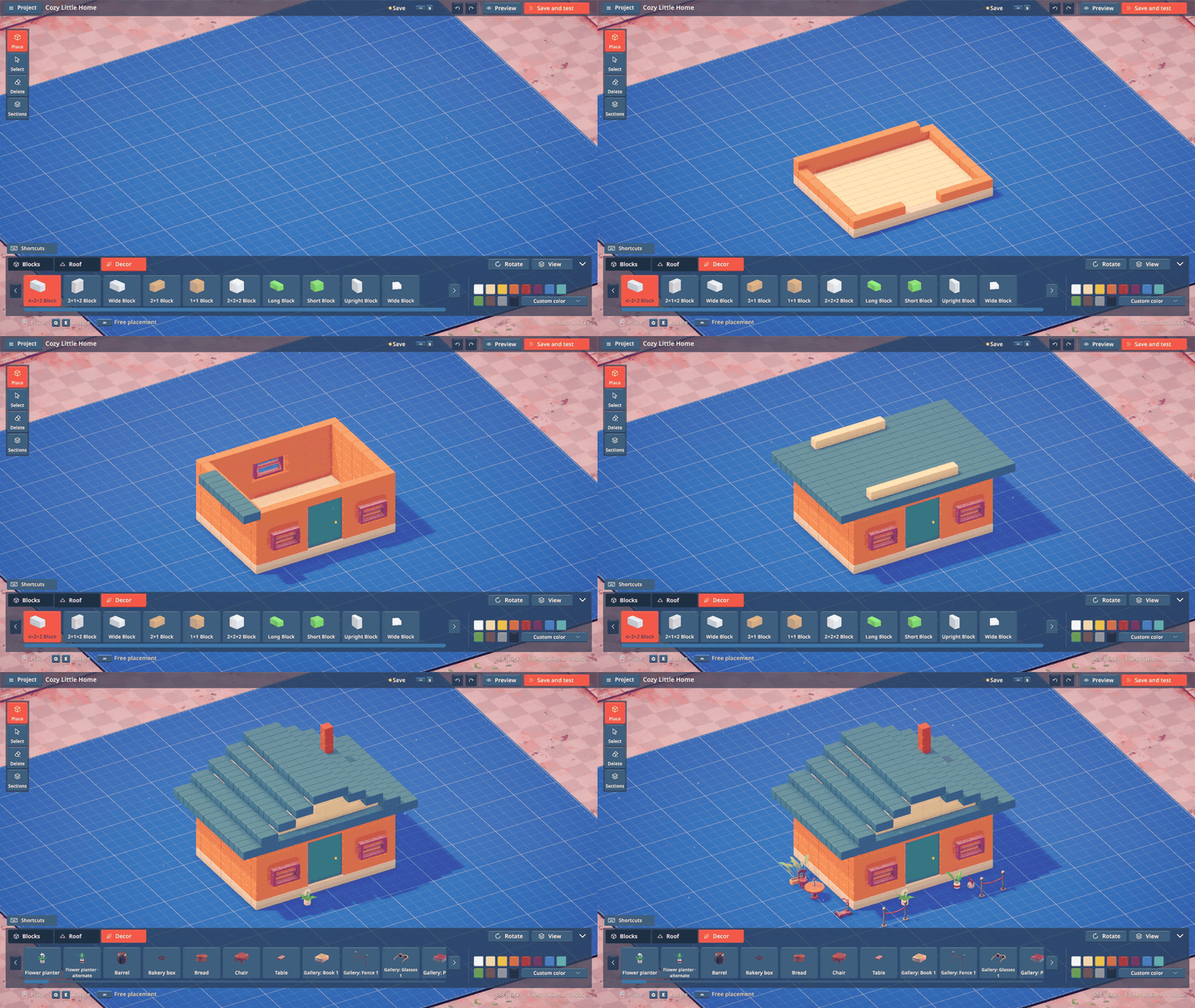
Open Sandbox → Create Map from the Main Menu to enter the building editor.
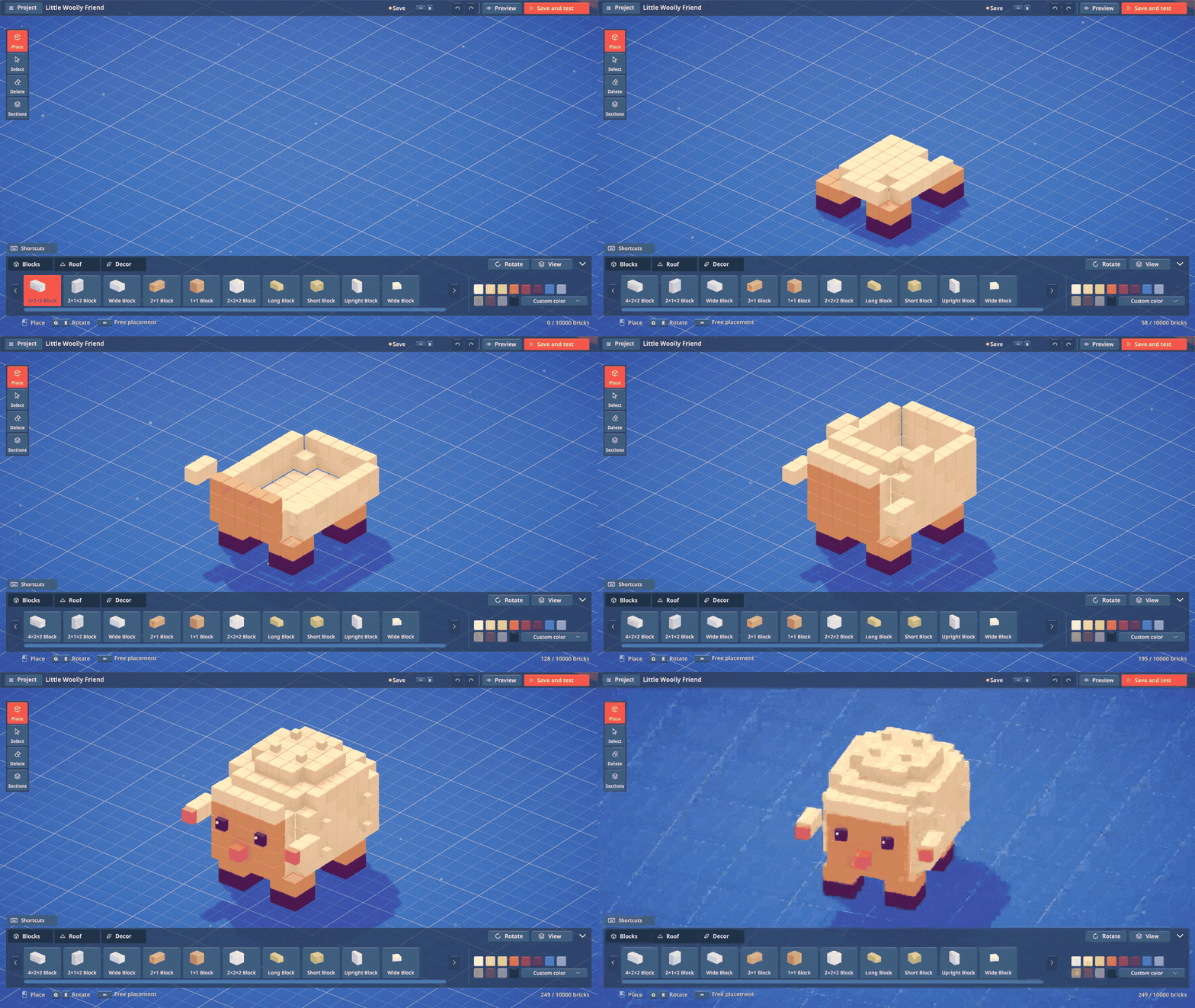
Start with an empty design and build your structure using bricks, roof pieces, and decorations.
Place bricks individually or drag to create full rows.
Shorten rows by dragging them back.
Select, move, copy, and delete multiple pieces at once.
Rotate and tilt pieces, or reset their rotation.
Duplicate selected sections upward to quickly create additional floors.
Use Undo and Redo while experimenting with different designs.
From the first wall to the final roof piece, the entire structure is yours to design.
Start From 7 Building Templates
If you don’t want to start from an empty map, you can create a new design based on one of the existing buildings:
Bakery
House
Library
Pharmacy
Tavern
Factory
Tower
Templates create a separate editable design, so the original buildings remain unchanged.
Rebuild the Bakery into a completely different shop, add a new wing to the Library, or redesign the Tower’s silhouette.
Colors, Roofs & Decorations
Customize your buildings beyond their basic shape.
Choose from preset colors or create your own using the custom color wheel.
Recolor individual bricks or larger selections.
Build repeating roof sections and tower roofs with dedicated roof tools.
Add decorations to finish your design.
Use Preview to inspect the completed structure.
Use Save & Test to turn your design into a playable map.
You can also hide upper floors, adjust the visible building height, and focus on selected pieces when working on larger structures.
Steam Workshop
Share your creations with the community through Steam Workshop.
From Map Management, select Publish to Workshop, then add a title, description, and cover image.
You can also update an existing Workshop item whenever you make changes to your design.
Browse Workshop creations, subscribe to maps you like, and open downloaded designs directly from your Map Library.
Your own maps and subscribed Workshop maps are displayed separately to make them easier to manage.
Build Custom Maps With Friends
Sandbox isn’t only an editor.
Open Play Map and choose one of your own designs or a map downloaded from Steam Workshop.
You can build it alone or select Play With Friends to create a lobby and invite other players.
The structure created in the editor becomes the construction project your group completes together.
Manage Your Maps & Progress
The new Map Library makes it easier to manage created and downloaded content.
Browse maps using cover images.
Search maps by name.
Rename your own creations.
Continue editing existing designs.
Resume construction progress or restart a map.
Remove maps you no longer want.
Choose whether associated gameplay progress should also be deleted.
Gamepad & Editor Improvements
Sandbox menus and editor tools have been designed with gamepad support in mind.
Improved navigation between panels and confirmation screens.
Improved focus restoration when returning to previous menus.
Added on-screen keyboard support for text fields.
Added gamepad support for the custom color wheel and brightness controls.
The piece catalog can be collapsed for additional workspace.
Shortcut panels can be hidden when you need more room.
Project, rotation, view, roof, and color tools can be opened as needed.
Added Save & Exit when leaving with unsaved changes.
If your design has not been named yet, you can name it during the save flow.
Rendering and editing performance has also been improved for Sandbox maps containing large numbers of bricks.
Town & Castle Map Selection
Added Town and Castle buttons to the Main Menu.
Castle, our upcoming Halloween map, now displays a Coming Soon message.
Improved loading screens when switching between maps.
Blueprint Improvements
Improved Blueprint browsing.
Use the arrows to move between pages.
You can now type a page number to jump directly to the materials you need.
Updated the default Blueprint viewing angles for:
Tower
Factory
House
Pharmacy
Regular Autosave Setting
Added a Regular Autosave toggle under Settings → Gameplay for games you host.
Regular Autosave is enabled by default.
Disabling it turns off regular autosaves only.
Exit saves and critical checkpoint saves remain active even when Regular Autosave is disabled.
Building Part & Terminology Updates
Renamed the Library tower roof pieces to make their placement clearer:
Base
Lower Section
Upper Section
Cap
Updated these names across all 31 supported languages.
Fixed inconsistent naming between the tutorial and control settings.
The cart is now consistently called Hand Truck.
Controls & Interaction Improvements
Fixed the unclear “Delta” rotation prompt.
Rotation instructions now show the correct mouse or gamepad controls.
Prompts update automatically when:
Switching between mouse/keyboard and gamepad.
Rebinding controls.
Replay Improvements
Updated replay camera angles for:
Pharmacy
Tavern
Factory
Library
Adjusted these shots to prevent the Tower from appearing in the background.
Movement & Collision Fixes
Fixed an issue where characters could become stuck while climbing building stairs.
Updated stair collision across all buildings.
We can’t wait to see what you build.
Open Sandbox from the Main Menu, choose Create Map to start designing, or Play Map to build one of your own creations or a Workshop map.
Share your creations, screenshots, and ideas with the community — and keep the feedback coming.
Once again, thank you for helping Brick by Brick reach 75,000 sales.
You’re the architect of the next building. Happy building!