Hello, Guild Masters!
Today, we're back with an update focused on quality-of-life improvements.
Along with the Guild Grounds Expansion, whose postponement we announced in our previous notice,
we have added Production Control, which lets you manage production order and quantities in one place,
and Tracked Goals, which lets you pin the things you want to discover to your screen.
Please check the details below!
🏕️ Guild Grounds Expansion

Added 3 expansion plots on the right side of town. The number of expansion plots available for purchase has increased from 7 to 10, giving you more space to place buildings and production facilities.
Along with this, we adjusted the price tiers of the later plots. If you previously purchased a plot at the 250,000,000 Gold tier, then the first time you load your save after the update, you will get 200,000,000 Gold back, which is the difference from the adjusted price.
With the Guild Grounds Expansion, we also adjusted the cost of building additional Mines.
🏗️ Production Control
Added Production Control, which helps you produce the items you need first and see more easily why production has stopped.

You can check and manage production status for each profession: Herb, Alchemy, Cooking, Blacksmithing, Enchanting, and Engineering. Open it with the default hotkey X or the shortcut in the Resources tab.
三 buttons can be dragged to change the order, or you can use the Move to Top and Move to Bottom buttons to set production Priority. Among items that meet their production conditions, the ones higher on the list are produced first.
In addition to the existing “Target Production” mode, which maintains a set stock level, we added the “Fixed Count” mode, which lets you set how many more times to produce, separately from your current stock.
The maximum production quantity you can set has been raised from 1,000 to 10,000. You can adjust it by entering a number, with the + / − buttons, or with the + / − keys on your keyboard.
Select multiple items with Ctrl + Click, or select a range with Shift + Click. Pressing Ctrl + A selects all discovered items shown in the current category. You can change the production mode, Quantity, Sale Lock, and Priority of the selected items all at once.
For each item, it shows the amount in stock, the target and in-production quantities, the required materials, and the level required to produce it. You can also see production statuses and their reasons, such as “Not enough materials”, “No Eligible Member”, and “Waiting”.
You can check the work status of Guild Members in each profession and see which Guild Members are currently crafting. Items locked from sale are marked “Not for Sale”.
Items that have reached their target also keep their assigned position in the list. Newly discovered production items are placed at the top of the list, and undiscovered items are grouped separately so you can check their discovery conditions.
You can set a Keep in Stock quantity for each item. You can set it on the “Keep in Stock” row below Owned Quantity in the resource info window by entering a number or with the + / − buttons.
🎚️ Resource Info and Quantity Controls
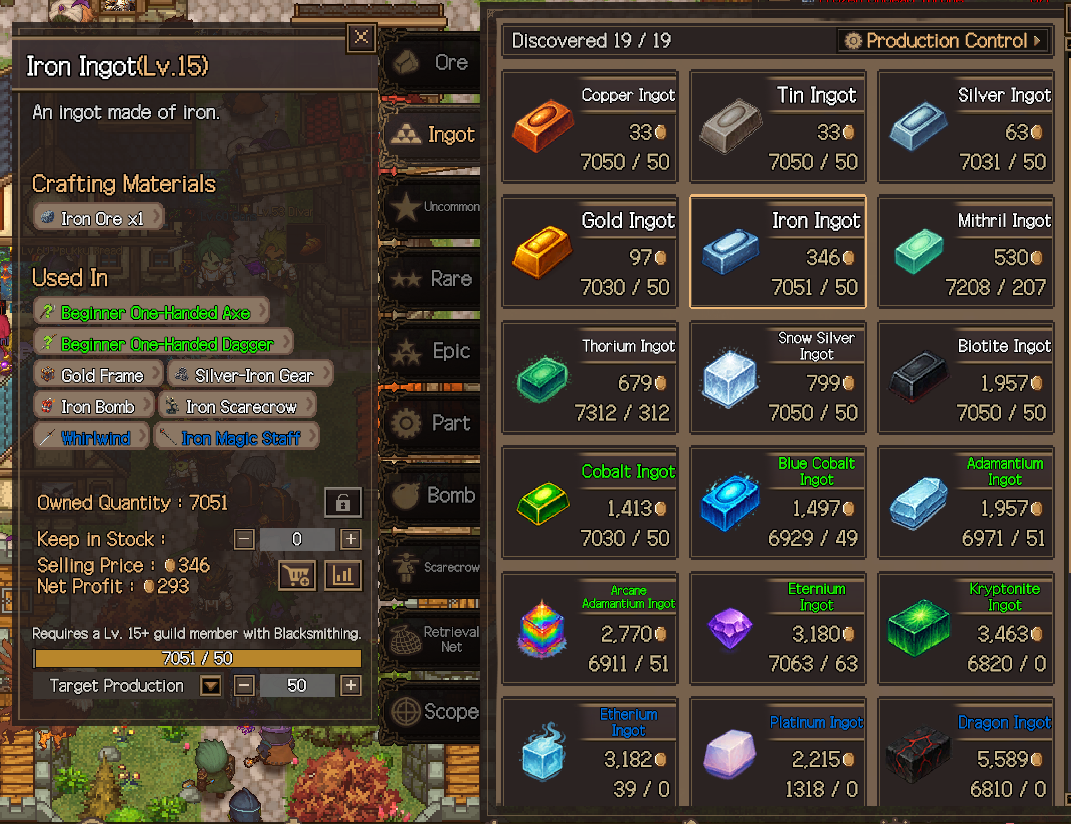
Improved the resource info window so that you can also set the production mode and quantity there, and check your stock and production progress.
Added “Used In” to the resource info window. It shows the icons and names of the items that can be made with that material, and clicking one takes you to that item.
Added the number of discovered items and a Production Control shortcut to the top of the Resources tab.
Reduced the delay before repeat input begins on buttons that can be held down, such as quantity controls.
🎯 Tracked Goals
Added Tracked Goals, so you don't have to keep looking up the conditions for the buildings, Guild Members, dungeons, and crafted items you want to discover next.

Right-click an undiscovered target to add it to the Tracked Goals list on your screen. You can track up to 8 goals. To remove one, right-click the target again or press the X button on its entry.
You can track entries from the Build list and the Dungeon list, Guild Members in Contacts, and materials and crafted items in the Alchemy, Cooking, Blacksmithing, and Enchanting tabs.
Progress on the materials and conditions required for discovery is displayed. Once all conditions are met, the goal is marked “Discoverable”, and targets you actually discover are automatically removed from the list.
Clicking a tracked goal takes you to the window where that target is found. Clicking a required material line takes you to that resource, and undiscovered materials are highlighted in the list to show you where they are.
You can drag the title bar to move the list wherever you like, or collapse the list. Even when collapsed, you can still see each goal's name and a summary of its condition progress.
Tracked goals are saved, so you can keep following them even after you load your game again.
👾 Other Changes and Fixes
When sorting with “Combine Bags” in the Guild Warehouse, locked equipment is now also sorted across all bags. Locked equipment on later pages also moves forward according to the sort order. When bags are viewed separately, locked equipment is sorted within its original bag.
The Affinity effect description of No. 96 Yudam now shows the number of Guild Members currently in town with Mood above 70 and the resulting bonus. Yudam is excluded from the count.
The Affinity effect description of No. 81 Ttasi now shows the raid dungeon entered most recently.
Clarified the description of the “Special” Affinity effect of No. 43 Minimu to state that it is based on Mood being 70 or higher when entering a dungeon.
Added a note to the description of the “Special” Affinity effect of No. 94 Unfilial Son explaining that the accumulated period resets upon entering a dungeon.
Fixed the positioning in the final boss section of the “Hall of the Four Elements”.
Fixed an issue where an item's highlight could incorrectly remain when closing the tab right after jumping to an item in the Auction House.
Fixed an issue where No. 66 Seongsan was not discovered even after reaching 200 dungeon clears and was only discovered from the 201st clear.
Fixed the progress display for No. 26 Neolban to follow the same criterion as the actual discovery check (the Gold a Warrior holds when clearing a dungeon).
Fixed an issue where the Warehouse condition line disappeared from the Tracked Goals entries of No. 72 Riley and No. 95 Royal Guard.
Fixed an issue where the progress display for No. 106 Rinus and No. 107 Mairin could show incorrect numbers when the Gold amount was very large.
When you reach the “Special” stage with No. 17 Folstring, the Guardian of Light skill is unlocked and discovered without a Skill Book. While Guardian of Light is applied automatically because a 2H Sword is equipped, it is shown as selected in the Change Skill window.
Fixed an issue where, under the “Dice Roll” Loot Strategy, Guild Members who did not get equipment lost Mood once for every piece of equipment. This issue also caused Tavern conversations meant for Guild Members who lost an auction to appear after a Dice Roll, which has been fixed as well.
Changed the Tavern “News” list to sort unread conversations to the top and read conversations to the bottom.
A sound effect now plays when the dungeon First Clear notification appears.
Guild Member donation logs now show the member's portrait and their name in their class color, and Gold is now shown as an icon, matching the format of the other Guild Member logs.
Added a note to the end of the description of Main Quest 46 “Clear any raid dungeon”, suggesting that if your party fell, you check the Boss Fight Records in the Dungeon Chronicles to see which boss wiped your party and after how many minutes.
Replaced the guide videos for Main Quests 7, 11, 12, 20, 22, 30, 35, 36, and 45 with videos showing the updated resource info window and the Production Control screen.
Fixed an issue where, if save data failed to load, the notice window did not appear and the game got stuck on the start screen.
Shortened tab and button text that was cut off or became too small in several languages (Town Buff, Herb, Guild, Production Control, the Guild Member tab in Contacts, Controls in the Hotkeys window, the game speed reward row in the Achievement Log, the Production Control legend, 18 tabs and buttons in Thai, and more).
Improved some sentences, such as those for hotkeys and the role filter, to read more naturally.
Performance and Storage Space
Reduced the processing load of displaying the Party Preset list when opening the dungeon preparation window.
For new installations, the default number of battle records kept has been changed from 10 to 5. Settings you have already saved are kept, and you can change the number of records kept in Settings.
Place facilities in your newly expanded town, decide your production order and next discovery goals, and build up your guild.
If you have any questions while playing or find anything that needs improvement, please let us know on Discord or in the Steam Discussions. We will keep going through the feedback, strategies, and experiences you share with us, and continue to improve the game.
Thank you to all the Guild Masters who are with us!
\[Upcoming Update] Affinity Gift Adjustments
Separately from this 1.19 update, we would like to give you advance notice of the Affinity gift adjustments that will be applied in a later update.
Based on the feedback from our players, we went back and reviewed the favorite items of 120 Guild Members one by one from scratch, and as a result, we have decided to adjust the favorite items of 78 Guild Members. These changes are planned to be applied around the end of this month.
We found the following issues.
Excessive quantities: Some Guild Members wanted things like 10 material-heavy flasks at a time or 1,000,000 Gold at once, which in practice made it difficult to raise their Affinity through gifts.
Items that don't fit their personality: Some Guild Members wanted items that didn't suit their personality or concept.
Wanting both a crafted item and its material: For example, No. 5 Serran wants both a Lesser Healing Potion and Peacebloom, the material used to make it. Because it is easier to gift Peacebloom as it is than to craft the potion and gift that, there were cases like this where the potion effectively became a useless entry on the gift list.
Only one gift: 27 Guild Members have only one favorite item. If you can't obtain that item, there is no way to raise their Affinity through gifts.
We apologize for not refining the gift lists enough before launch and for the inconvenience this caused in raising Affinity.
Here is what we plan to change.
Gift quantities so high they are hard to achieve will be reduced to realistic levels. For the 6 Guild Members who wanted 10 flasks at a time, this will be reduced to 1 flask or changed to a different item, and the Gold that No. 94 Unfilial Son wants will be lowered from 1,000,000 to 50,000.
Items that don't suit a Guild Member's personality will be replaced with items that match it.
Slots where a crafted item and its own material are both wanted will be changed to a different material. No. 5 Serran's Peacebloom will be changed to Mugwort.
Items will be added for the 27 Guild Members who have only one favorite item, so you will be able to choose from at least 2 items when giving a gift to any Guild Member.
This adjustment changes the favorite items of 78 Guild Members. Among slots that keep the same item, the quantity will decrease in 69 and increase in 8, so most changes reduce the gift burden. Of the 8 slots whose quantities will increase, 5 are materials gathered through fishing or herb harvesting, and the increases bring them in line with the same Guild Member's other gift slots.
Having different favorite items and gift burdens for each Guild Member is intentional. We kept the progression where Guild Members you meet later want more valuable items, and focused on correcting, within each Guild Member's list, slots that were a losing deal and quantities that were excessive.
Good to Know
Until the adjustment is applied, the current gift lists will remain as they are.
Affinity and stages you have already raised will remain unchanged after the adjustment.
Items you already have will also remain. 23 Guild Members have items being removed from their lists, which you can find in the Before column of the table below. If you have been collecting these items, you can keep gifting them as you do now until the adjustment is applied.
Planned Changes by Guild Member
The table below shows each Guild Member's Before and After. Items in bold in the After column are items being changed or newly added, and items that appear only in the Before column are items being removed in this adjustment. If any details change before the adjustment is applied, we will let you know again when it is applied.
Guild Member | [th colwidth="286"]
|---|
No. 3 Jolram | [td colwidth="286"]
No. 4 Confidence | [td colwidth="286"]
No. 5 Serran | [td colwidth="286"]
No. 6 Kamji | [td colwidth="286"]
No. 7 Dominix | [td colwidth="286"]
No. 10 Earthy | [td colwidth="286"]
No. 15 Vera | [td colwidth="286"]
No. 16 Du Bo-rae | [td colwidth="286"]
No. 17 Folstring | [td colwidth="286"]
No. 20 Kwangsoo | [td colwidth="286"]
No. 22 Coving | [td colwidth="286"]
No. 25 Mara | [td colwidth="286"]
No. 27 Crown Prince | [td colwidth="286"]
No. 28 Divaren | [td colwidth="286"]
No. 29 Warner | [td colwidth="286"]
No. 30 Simson | [td colwidth="286"]
No. 35 Simri | [td colwidth="286"]
No. 39 Sobek | [td colwidth="286"]
No. 41 Jungle | [td colwidth="286"]
No. 42 Neria | [td colwidth="286"]
No. 44 Nightsong | [td colwidth="286"]
No. 48 Daeman | [td colwidth="286"]
No. 49 Triana | [td colwidth="286"]
No. 50 Popsy | [td colwidth="286"]
No. 55 Goldie | [td colwidth="286"]
No. 57 Nanro | [td colwidth="286"]
No. 58 Ppukku Bread | [td colwidth="286"]
No. 60 Allthing | [td colwidth="286"]
No. 64 Danmi | [td colwidth="286"]
No. 68 Calveria | [td colwidth="286"]
No. 69 Chief | [td colwidth="286"]
No. 70 Jjaman | [td colwidth="286"]
No. 71 Healingmon | [td colwidth="286"]
No. 72 Riley | [td colwidth="286"]
No. 73 Rex | [td colwidth="286"]
No. 74 Rastian | [td colwidth="286"]
No. 75 Praise | [td colwidth="286"]
No. 76 Demon | [td colwidth="286"]
No. 77 Gons | [td colwidth="286"]
No. 78 Eagles | [td colwidth="286"]
No. 79 Violin | [td colwidth="286"]
No. 80 Jagi | [td colwidth="286"]
No. 81 Ttasi | [td colwidth="286"]
No. 82 Red | [td colwidth="286"]
No. 84 Spoon | [td colwidth="286"]
No. 85 Hamjji | [td colwidth="286"]
No. 87 Ponzi | [td colwidth="286"]
No. 88 Garlic | [td colwidth="286"]
No. 89 Be Quiet | [td colwidth="286"]
No. 90 Kongsooni | [td colwidth="286"]
No. 91 Namiri | [td colwidth="286"]
No. 92 Gogi | [td colwidth="286"]
No. 93 Ecoris | [td colwidth="286"]
No. 94 Unfilial Son | [td colwidth="286"]
No. 95 Royal Guard | [td colwidth="286"]
No. 96 Yudam | [td colwidth="286"]
No. 97 Enchanter | [td colwidth="286"]
No. 99 Pain | [td colwidth="286"]
No. 100 Adelion | [td colwidth="286"]
No. 101 Byeonggwan | [td colwidth="286"]
No. 102 Sugary | [td colwidth="286"]
No. 103 Gonjang | [td colwidth="286"]
No. 104 Shudil | [td colwidth="286"]
No. 105 Joy | [td colwidth="286"]
No. 106 Rinus | [td colwidth="286"]
No. 107 Mairin | [td colwidth="286"]
No. 108 Bonjumma | [td colwidth="286"]
No. 109 Sseoryu | [td colwidth="286"]
No. 110 Kkuku | [td colwidth="286"]
No. 111 Wanpi | [td colwidth="286"]
No. 112 Malka | [td colwidth="286"]
No. 113 ZeroG | [td colwidth="286"]
No. 114 Juuki | [td colwidth="286"]
No. 115 Mouse | [td colwidth="286"]
No. 116 Lala | [td colwidth="286"]
No. 118 Dan | [td colwidth="286"]
No. 119 Pippi | [td colwidth="286"]
No. 120 Hiryx | [td colwidth="286"]
We will keep carefully reviewing every piece of feedback you send us, one by one, and keep refining the game so that growing closer to each and every Guild Member is a joy, not a burden. Thank you!