Hello mates!
Craftomation 101 1.0.13 is here! In the last post I admitted that we didn't make it in time with the hardcore difficulty. Well, now we did. We spent almost this whole patch on game modes, and at the last moment we squeezed in one more small thing you asked for. Plus a few fixes and one thing that lives not in the game, but in your browser. Let me tell you about it in order.
"Difficulty: zero"
Our players are very different. Some see visual programming for the first time and don't understand how to connect two blocks. For them, we added an easier difficulty in 1.0.9 and new tutorials in 1.0.12.
Others, on the other hand, get bored. Recently Stefland played for 23 hours and left a negative review. It has this line: "Difficulty: zero (if you find it hard, my sympathies)". I won't hide it, that's not pleasant to read. But he's not the only one: people regularly tell us the game is too easy. And for someone who writes code every day, that's probably true.
We never forgot about these players. It's just that helping the ones who get stuck came first. Now it's the turn of those who find it too easy.
Hardcore
The new Hardcore mode is for those who want the planet to finally fight back:
- Robots spend 150% of the usual charge.
- Bonfires burn half as long, so the cold comes much faster.
- A big deposit holds only 500 resources instead of 3000. Every stone counts, and you'll have to think about what to spend it on.
- The Rocket Forge and the Volcano ask for one and a half times more parts and batteries. The Volcano, for example, needs 30 batteries instead of 20.
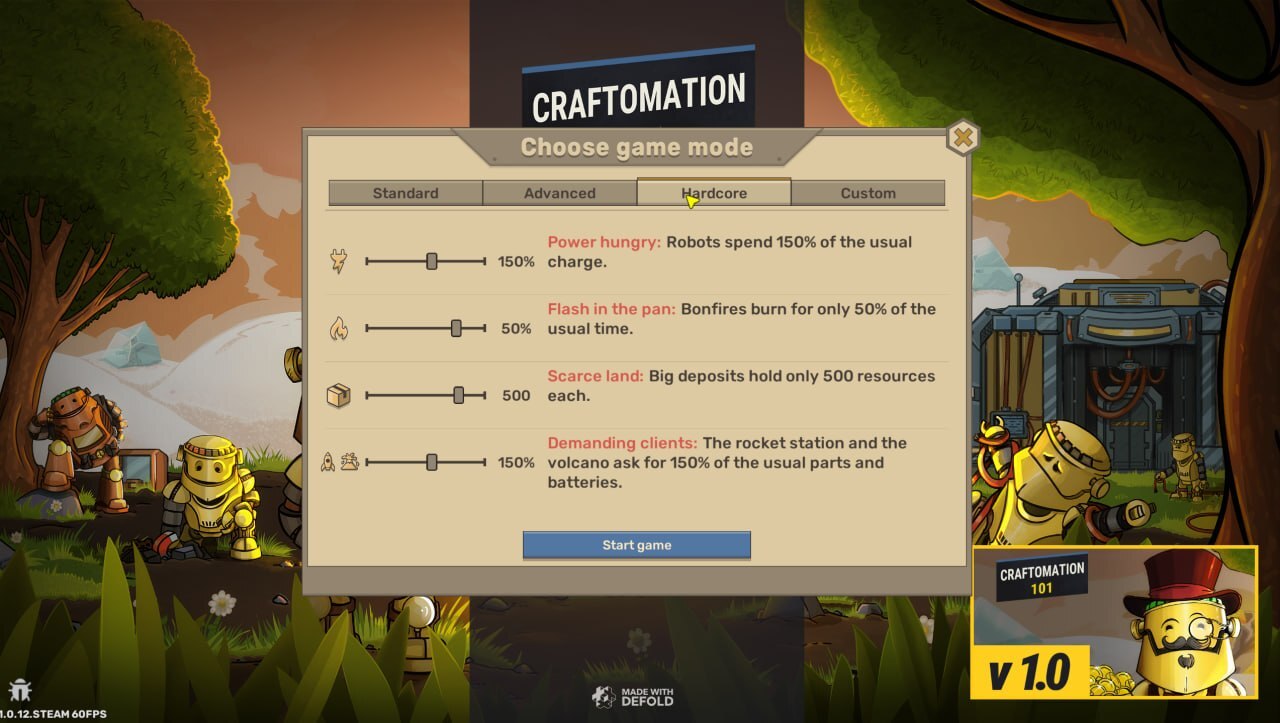
The last point is a new difficulty setting, and it works in all modes. In the Standard game, the Rocket Forge and the Volcano now ask for half as much (10 batteries are enough for the Volcano), in Advanced everything is as before, and in Hardcore they ask for more. We wanted Hardcore to give you one more reason to automate the finale completely.
Honestly, I'm not sure we got the numbers right. Hardcore might turn out too harsh. Or, on the contrary, Stefland will beat it in one evening. If so, let us know and we'll tweak it.
Custom difficulty
On Discord and in the Steam discussions, people have asked us more than once about rather unusual combinations. For example, endless resources, but everything freezes very fast. Or few resources, but bonfires burn almost forever. We realised we'd never guess it for you anyway, so we made the Custom mode.
It has four sliders, the same four settings all the other modes are built from:
- robot charge consumption, from 25% to 300%;
- bonfire burn time, from 25% to 400%;
- resources in a big deposit, from 100 to 9000 or endless;
- parts for the Rocket Forge and batteries for the Volcano, from 25% to 300%.
You can push everything to the extreme. A hundred resources per deposit, and you'll have to think through every program down to the last detail. Or robots that hardly ever need charging.
The funny thing is that these four numbers used to be our internal "tuning knobs": we set them ourselves for the Standard and Advanced games and never showed them to anyone. Now the exact values are visible right in the game mode window, in case you want to see how the balance works.
If you put together an interesting combination, tell us on Discord or in the comments. I'm really curious what you come up with.
How not to scare new players
Valera made the game mode window, and in the first version the player saw all four sliders right away. It looked great. But then we pictured someone launching Craftomation 101 for the very first time. They don't know yet what a deposit is or why robots need charge, and they're already asked to set up four settings. Most likely, they'd just get lost.
So at the start of the game you still choose between two: Standard or Advanced.

And if you press More game modes..., the full window opens with Hardcore and Custom.

Those who want it harder will find that button, I'm sure. And I hope we won't scare off new players.
And you can choose the mode not only for the usual map. In the Explore Worlds window, other maps now have a Game mode row too: pick a map, then the difficulty.

CargoMates can now tear down deposits
Under the last post, Ossaker asked: "Can we get a way to remove patches of resources in softcore? Sometimes resource nodes are placed where they hurt more than help, so maybe using dynamite or something like that would destroy them."
And he's right. In the Standard game, deposits are endless and never go away. We placed them so that it looks nice and there's enough of everything. But after a few hours, when your factory grows, they just take up space you want to free. Another player in the Steam discussions suggested giving this job to the big robots, the CargoMates. Valera said new commands are quick to add, and we decided not to put it off: we made it right into this patch.
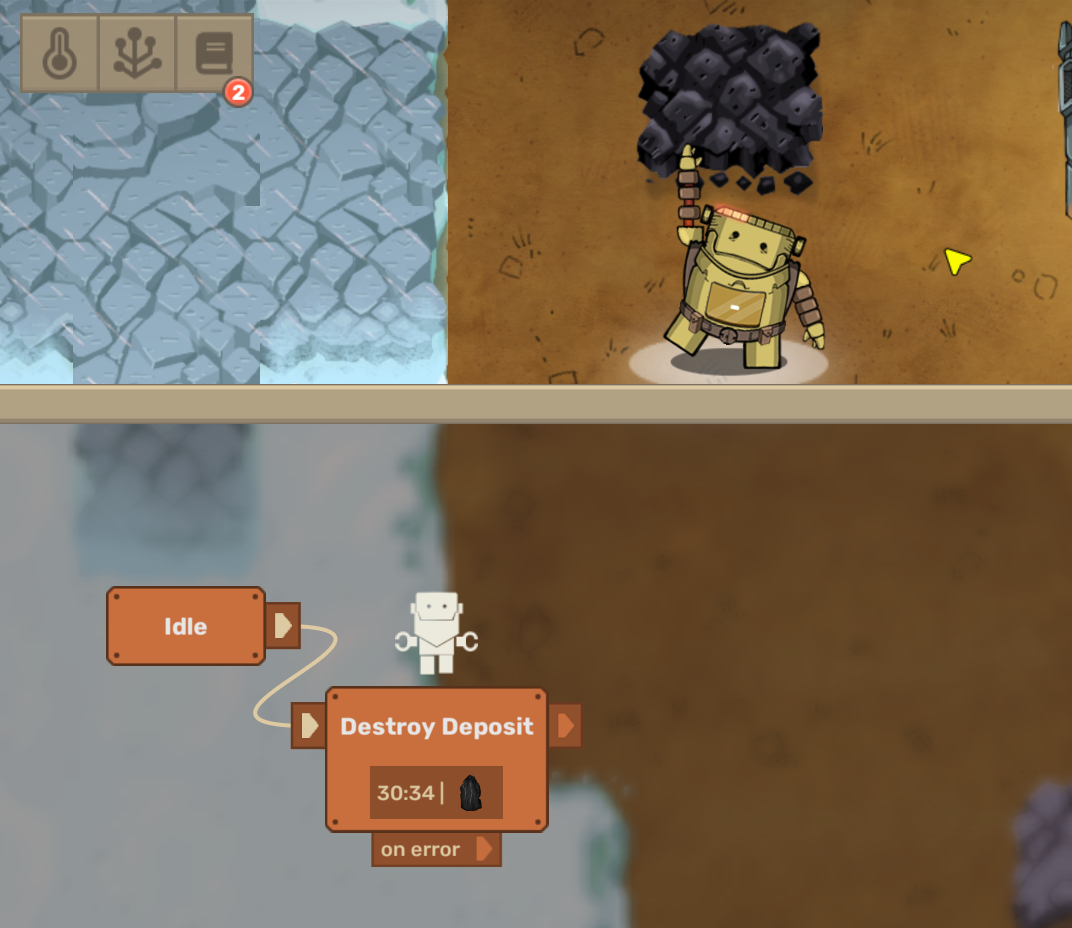
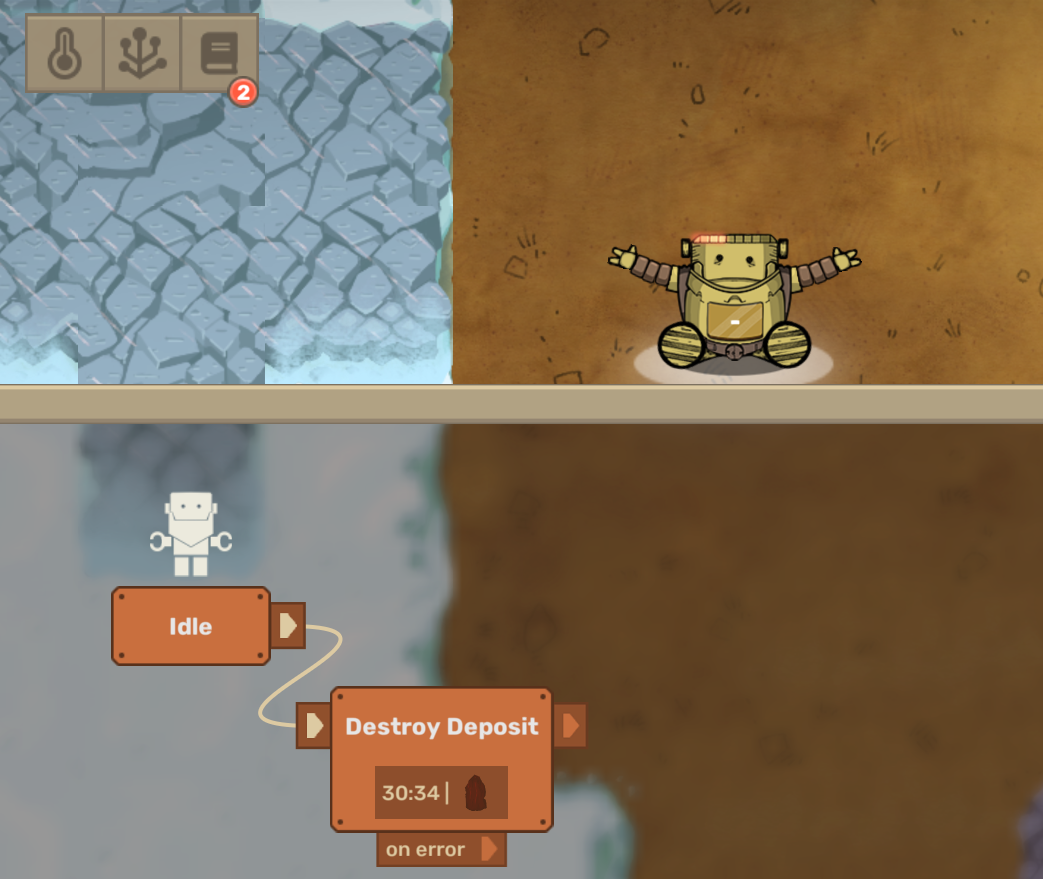
Now the CargoMate has a Destroy Deposit command. You point at a tile, the CargoMate walks over and destroys the big deposit, and the tile is free. The remaining resources don't drop: the deposit is torn down, not mined, so think twice. The command is available to the CargoMate right away, without the tech tree, and works in all modes and in old saves.
Fixes
There aren't many bugs this time, but I'll tell you about each one.
The Rocket Forge was highlighted strangely when you hovered over it: every tile separately. Now it gets one outline, like all other buildings. Before and after:


In rare cases the Brewery stopped brewing if you threw a lot of items into it. Fixed.
Also, our tester Sasha noticed an extra battery lying right in the pile of starting resources. It shouldn't have been there. We never figured out where it came from: the positions of the items the player gets are written in the code, and they seem to be written correctly. Maybe we moved the resources at some point and forgot about it. Anyway, the battery is gone.
Craftopedia is now in your browser too
Another negative review, in German from kochy25, made me think. He writes that without programming knowledge the game gets hard closer to the end. The new tutorials from the last patch show a lot ("I don't want to say 'explain', because explaining is something different to me"), but that doesn't make it better. And at some point you simply lose the overall picture. He'd like something like a "database" with a "function list", online or something like that.
At first I was surprised: the game already has the Craftopedia with all the commands and their descriptions. But he asked for something outside the game, and honestly, we never thought about that. We believed the Craftopedia inside the game was enough. And he's right about "shows, but doesn't explain": a command's description in the game is often a single line, and that really isn't always enough.
So we made a web version: Craftomation 101 Craftopedia. It has all the visual programming commands, items and buildings with recipes, the basics, and search. And every command has a detailed explanation of how it actually works. The detailed explanations are in English and Russian for now, everything else is in the game's languages.

kochy25, I hope this is what you were missing. If not, tell me what else should be there. And I ask everyone else the same: if you find a mistake or an unclear explanation on the site, please write to us.
By the way, it turns out players sometimes make such guides themselves. On our Discord, one player drew a big chart of all the crafting recipes, here it is (the link opens if you're on our server). When I saw it, I was really touched: someone spent so much time and effort on our game.
About the lag
Under the 1.0.12 post, Тринитротолуол put it bluntly: "modes are all nonsense, with 100+ CraftoMates it lags SO much!" It hurts, but it's fair. And he's not the only one: people have been writing to us about performance for a long time and often.
We've been working on this for several weeks already. Our programmer Kolya is digging into optimisation from different sides: he found a lot in the pathfinding algorithm, including how not to run it when it isn't needed, and a bunch of other technical things. We even invited the folks from SuperWEIRD, our other game that's in development now, to tell us how they optimise theirs. Optimisation didn't make it into this patch: we didn't want to release it half-done. We're planning a big package for the next update. I really hope that after it, big factories will stop lagging.
If the game doesn't launch
And one last thing that worries me. One player wrote in a review: "The game is great, BUT it stopped launching." We don't know why yet. That's probably the worst part: you see the problem, but you can't reproduce it.
Please check after this update. If the game still doesn't launch, write to us on Discord or in the Steam discussions and tell us your system and graphics card, so we have a chance to find the cause. This goes for everyone with a similar problem.
Thank you for playing and writing to us, even when you write unpleasant things. Without your reviews, half of this patch simply wouldn't exist. Try Hardcore and tell us if we overdid it.
By the way, a little more Craftomation 101
If you'd like a bit more Craftomation 101, these extras are available too:
Soundtrack — the game's music by Arman Mkhitaryan, in FLAC and MP3.
https://store.steampowered.com/app/2795680/Craftomation_101_Soundtrack/
Art Pack — more than 90 images from development: never-before-published art of every robot, the very first sketches, and wallpapers.
https://store.steampowered.com/app/2795690/Craftomation_101_Art_Pack/
Mega Map of Self-Replicating Machines — a big printable poster about the history of self-replicating machines, from Full HD to 16K and in PDF. You can hang it in a computer science classroom or set it as your desktop wallpaper.
https://store.steampowered.com/app/2832980/Craftomation_101_Mega_Map_of_SelfReplicating_Machines/
How can you join the development?
- Share your ideas and feedback on our Discord server
- Help us translate the game into your native language
- Subscribe to our YouTube channel and follow the studio news
- Follow Craftomation 101 on Twitter
- Tell your favourite content creators about the game
- Sign up for our newsletter