Greetings, tactics fans! I'm back with yet another exciting free update to Together in Battle.
Before I get to the update, I just want to share this little thing I created...a tips video! As far as I'm aware, no one has yet made a tips video for Together in Battle, which is a shame. I want to make sure you all have the support you need for a great experience, and I especially want to help Fire Emblem fans get to grips with TIB's systems. That said, the advice contained here should be helpful for just about anyone!
Now, enough of that--on to the improvements...
⏩ Fast Forwarding ⏩ is now a thing!
A shout-out to the TIB players who've been tapping the Escape key during enemy turns all this time, wanting things to go faster, only to be met with the "nuh uh" sound effect. I have heard your pleas!
As of now, holding down the keyboard's Escape key (or the B button on your gamepad) during a computer turn will initiate fast-forward mode while it remains held down.
In order to avoid timing bugs, you can't start fast-forwarding in the middle of a move or attack; just keep Escape/B held down and fast-forward mode will kick in at the first opportunity. Similarly, if you release, the game will take note and fast forward mode will end as soon as the current move/attack does.
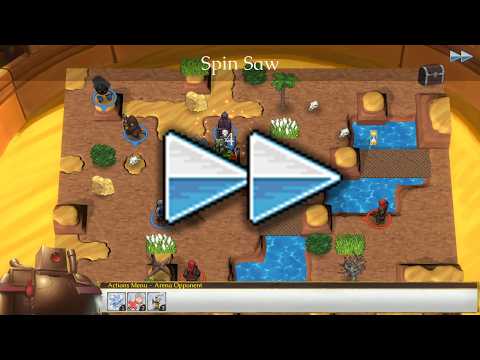
Fast forwarding cuts the delay between enemy unit moves down to almost zero, causes character movement to occur 3 times faster, and makes skills play at a speed level 4 above whatever you've selected as the default. As you can see in this little gameplay snippet, even with move and skill speed set down at their default levels, fast forwarding is very snappy:
Truth be told, I've wanted to add this feature for quite some time--but with last month's code changes to support customizable skill animation speed, I finally had the technical scaffolding in place to implement it. I hope you enjoy! (And as always, if you run into an issue, please capture a log file and tell me about it.)
A couple of other, general-purpose speed improvements:
optimized the way the game calculates and stores AOE patterns for different skills. This should help speed up AI calculations (particularly for units with big AOE attacks).
reduced the built-in delay before the AI starts its turn after closing the new turn box from 1.5 seconds to 1 second.
New cross-class advancements!
In our last update, I mentioned that I wanted to add more cross-class advancements--and after receiving a bunch of fun suggestions from you all, I've done just that! This time around, my efforts were focused on kineticists hybridized with physical units:
new cross-class advancement: kineticists who cross-class with axefighters now get +1 maximum range on Grappler Stance, allowing them to lock down movement through a space at range; and get +1 knockback on attacks with throwing axes, allowing them to do tremendous ranged physical damage under the right conditions.
new cross-class advancement: kineticists who cross-class with barudit get a 50% chance to caused Disarmed with Bonebreaker (in addition to its existing chance to cause Weakened), and get +25 accuracy with Throw Net.
new cross-class advancements: kineticists who cross-class with bowmen and crossbowmen get +1 maximum range on all Bow and Crossbow skills, respectively.
new cross-class advancement: kineticists who cross-class with cavaliers get +1 maximum range on Charge.
new cross-class advancement: kineticists who cross-class with assassins get +1 maximum range on Leap and Throw Knife.
new cross-class advancement: kineticists who cross-class with wachikit get +1 maximum range on Clamber.
new cross-class advancements: kineticists who cross-class with dark, frost, golden, and red spriggats learn the skill Dive 2.
new spriggat skill: Dive 2. Range 2, Cost 5. The user flies into the target and delivers a heavy strike with knockback. (Unlike the regular Dive skill, Dive 2's damage scales partially off of Psy, making it work better for spriggats with high Psy growth!)
new cross-class advancements: kineticists who cross-class with swordsmen, spearmen, and gasul now get +1 maximum range on both Shove and Pull, giving them expanded knockback options that scale off of Strength instead of Psy.
new cross-class advancement: kineticists who cross-class with engineers now cause Weakened status with their caltrops in addition to the normal Slowed status.
also, a buff to the elemental weapon effects: boosted the damage bonus from Heat Weapon, Cold Weapon, Light Weapon and Shadow Weapon from 67% of the user's Psy to 75%.
New avenues for customizing your custom characters!
Yes, that's right: you can now customize your characters in even greater detail! The additions here are aimed at making it so you can get much more specific with your characters' custom dialogue without having to worry about the game filling in details that contradict that dialogue. To that end, we now have:
a new bio details page! This lets you specify a character's hometown, chosen deity (if any), likes, hobbies, who raised them, and what kinds of siblings (if any) they were raised with.
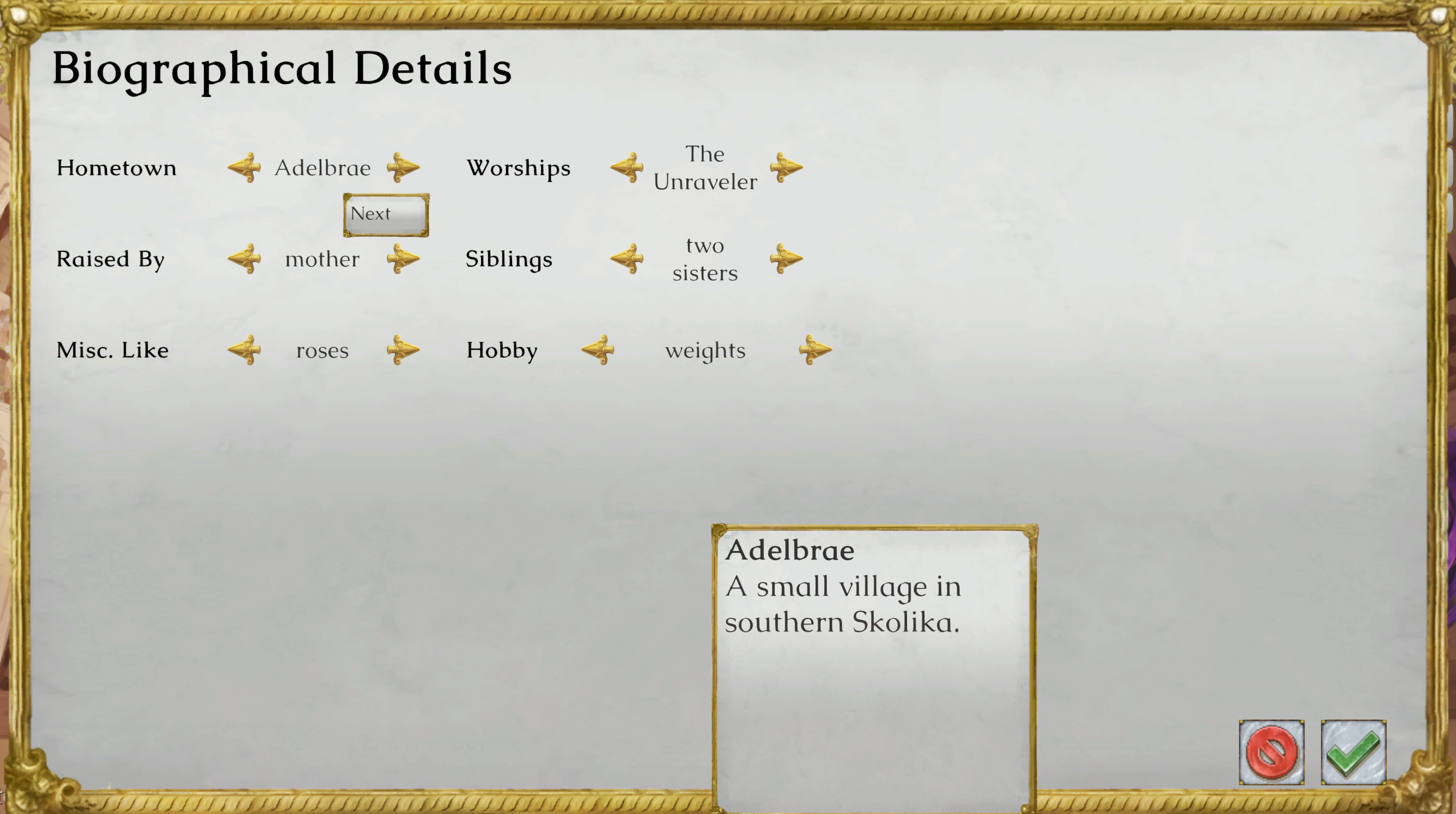
new custom dialogue types have been added for custom characters: Background 2 and Background 3 (discussing the character's hometown and family, respectively), as well as Miscellaneous Like and Hobby (discussing the character's favorite thing and favorite hobby, respectively).
Is your O.C. from the mainland, a devotee of Nelis, and vegetarian? You need no longer worry about the game deciding they're from Kalkerapur, making them worship the Watcher, or making their favorite thing meat! Was your character an orphan? You need no longer worry about the game making their mom show up in a random event! It's a small thing--but small things are the bricks suspension of disbelief is built from.
We have a bunch of new gamepad improvements (particularly for item management)!
Yes, that's right: another round of gamepad improvements! This time around, I was especially focused on streamlining shopping and item management with the gamepad. There's no way it'll ever be as convenient as the drag-and-drop controls of mouse and keyboard, but these changes should make the gamepad experience a lot better!
Here's what's new:
gamepad improvement: when moving the gamepad cursor over each character button in the reserve supplies screen, the game now automatically previews that character's current inventory at the bottom of the screen without you having to select them! (This makes it much faster and easier to decide who to give which items when playing with gamepad.)
gamepad improvement: when selecting Give on a piece of equipment in the reserve supplies screen, the game now automatically jumps the cursor over to the first character who actually wants that piece of equipment. (Before, the cursor would always jump to the first character in the roster and force you to move over to characters who might want it.)
gamepad improvement: in the reserve supplies screen, you can now press the X button on an item to immediately enter Give mode without going through the item options submenu. (Meanwhile, the shortcut for Sort in the reserve supplies has now been remapped to the Y button.)
gamepad improvement: in the reserve supplies screen, after you give an item to a character and the recipient's inventory subwindow opens, the gamepad cursor now automatically jumps to the newly given item so you can see it without the thing getting covered up by another item's tooltip.
gamepad improvement: in the shop interface, the X and Y buttons now act as shortcuts to immediately open the reserve supplies screen.
gamepad improvement: within the actions bar in battle, the Y button now acts as a shortcut to the inventory popup window; and within the inventory popup window itself, pressing Y now closes the window, giving it a sort of toggle control.
gamepad improvement: within the inventory popup window in battle, you can now press the X button on an item to immediately enter Give mode without having to go through the item options submenu.
gamepad improvement: within the character screen in battle, you can now press the X button on an item to immediately enter Give mode without having to go through the item options submenu.
added visible button shortcut indicators to the Sort button in the reserve supplies screen, to the Inventory button within the actions bar, and to the reserve supplies in the shop screen. (These appear only when playing with gamepad.)
fixed: when playing with gamepad, selecting the amount of a bulk consumable to buy in the shop would cause the gamepad cursor to appear in the wrong place onscreen.
fixed: when playing with gamepad, buying consumables in the shop could cause the gamepad cursor to disappear.
While I was at it, I improved the gamepad experience elsewhere as well:
gamepad improvement: gamepad button input is now read on press instead of on release, making button presses feel a bit more snappy and responsive.
gamepad improvement: when the calendar window appears, the gamepad cursor is now automatically moved to the cell for the current day.
gamepad improvement: within the calendar window, the X, Y, and Select buttons are now treated as shortcuts for the Save Game button.
gamepad improvement: within the deployment window, the X button is now treated as a shortcut for the Recall button.
gamepad improvement: within the deployment window, the Y button is now treated as a shortcut for the Supplies button.
gamepad improvement: within the deployment window, the shoulder buttons now flip the current page of units.
gamepad improvement: within the actions bar, the shoulder buttons now flip the current page of skills.
added visible button shortcut indicators for the Actions Bar in battle; to the Save Game button in the calendar screen; and to the Recall and Supplies buttons in the deployment window. (These appear only when playing with gamepad.)
fixed: when playing with gamepad, the game inappropriately positioned the cursor over the Export button for each character while browsing custom characters on the title screen.
fixed: when playing with gamepad, the gamepad cursor was misaligned when changing Skill Animation Speed in the settings menu.
fixed: when playing with gamepad, using the Right Trigger shortcut to increment weapon if the selected character had no weapons could result in the game throwing a null error.
fixed: when playing with gamepad, the Load Game window could sometimes fail to become visible on the title screen under certain circumstances.
fixed: when playing with gamepad, hitting the B button within a custom cutscene menu (such as while you're in town, at the jobs board, or first arriving in camp) would cause the dialogue menu to inappropriately gain gamepad focus despite not being onscreen.
fixed: when playing with gamepad, if you hit the B button during an enemy turn, it could inappropriately display move tiles on the battlefield.
We have other bug fixes, too!
fixed: the movement speed setting had ceased to apply to enemy units.
fixed: in roguelike mode, if two characters both leveled up at the same time and one was given the option to pick an advancement, the pick would instead accrue to whichever character leveled up first.
fixed: in rare circumstances, an enemy trapped behind destructible objects and attempting to determine what to attack to use to free itself could have no options with an internal score above 0, in which case the game would throw a range error when checking the spaces the non-existent skill hits.
fixed: promoted wachikit were inappropriately retaining the ability to use Books of Power.
fixed: the game was showing the counterattack indicator for hold-creation skills like Hold or Grappler Stance even though these skills do not provoke a counterattack.
fixed: the game was missing messages explaining why giving an item in combat couldn't proceed (there were no adjacent recipients, the item was used this turn, or the item is currently equipped).
fixed: when reloading a mid-battle save in gamepad mode, the battlefield selector would initially appear off the edge of the battlefield.
fixed: a range error could occur when attempting to initiate dialogue if the game passed along attack data without a full set of targeting coordinates.
fixed: during one of the interrogations of Malatose, you could effectively lock yourself out of the Wailling part of the investigation by confronting her with Prince Ajit's accusation instead of contradicting her alibi.
fixed: after using Juxtapose, you could hit Undo and it would cause the user to revert to their previous spot but would not cause the target's position to revert, resulting in them occupying the same space.
fixed in version 1.1.25a: the LearnCampActivity script (used by items like the books "Cooking: From Mediocre to Master" and "Bambi Must Pay: A Guide to Hunting") was inappropriately calling the LearnSkill script action, resulting in a blank, unusable skill showing up when that character is selected in combat and the character not learning the corresponding camp activity.
fixed in version 1.1.25a: with all the speed settings cranked up to maximum, a character dodging a MoveToTarget-type attack (such as Charge or Lunge) could result in the game attempting to end the combat exchange before it had a chance to check for a counterattack, at which point it would softlock.
fixed in version 1.1.25a: with all the speed settings cranked up to maximum, the game could experience a range error when attempting to average the coordinates for a unit fleeing the map (as with civilians during the revenge battle event).
fixed in version 1.1.25a: characters with a Psy stat of 0 could be taught psy powers that solely applied a status effect (e.g. Blinding Cloak or Frost Armor).
fixed in version 1.1.25a: the Hobby Response line type was not being loaded for characters that had been saved to XML.
fixed in version 1.1.25a: the text field displaying the current portrait's facial expression would display the character's default facial expression even when it was being used to select other facial expressions for particular lines of dialogue in the custom character creator.
fixed in version 1.1.25a: the MoveFirst unit tag didn't work on smaller-scale fights where the AI considered the moves for every character at once.
And of course, we have new goodies for the campaign creation suite!
Yes, that's right: I want to make it as convenient as possible for you to make your own adventures, and that means I'm just going to keep improving this thing! (Besides: I still use the creation suite myself, so you're going to benefit from the improvements I want it to have one way or another.)
Speaking of which:
there's now an entirely new editor in the campaign creation suite: the Object Editor! Located within the map editor's New Object window, this allows for quick and easy creation of new destructible objects for immediate placement within your current map (or indeed, within any map appearing in your campaign). The Object Editor lets you create objects from scratch using the game's existing object sprites, or--if you prefer--using custom sprites of your very own.
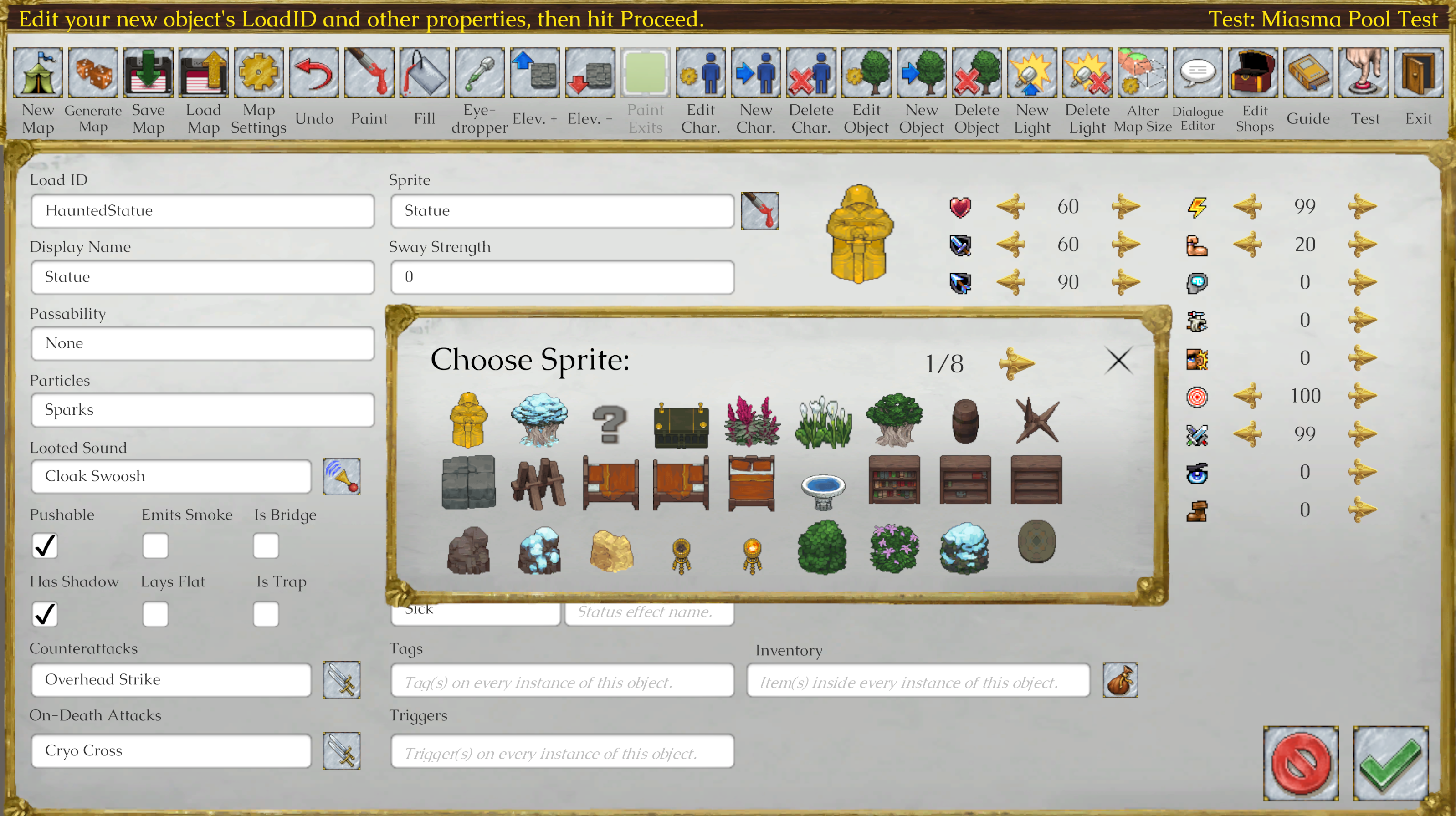
all objects in the map editor's New Object window now have a Clone button that you can click to instantly create a new object within the Object Editor pre-filled with properties identical to the cloned object. This lets you very quickly create variants of existing objects with properties you can tweak to suit your needs (including 3D objects like walls, bridges, caravan wagons and tables).
UI improvement in the skill editor: there is now a dedicated UI for customizing skill AOE! (Previously, you had to customize AOE by typing it into a text box using an obscure syntax.)

UI improvement in the map editor: when adding tags or triggers in the unit properties window, there is now predictive text! Clicking a predictive text result here not only auto-completes the last tag or trigger in the field, it also auto-supplies that tag or trigger's parameters as well.
UI improvement throughout the campaign editor: when clicking predictive text outside of the dialogue editor, the game now auto-restores focus to the relevant text field so you can immediately edit it (or hit Tab to move on to the next field).
UI improvement throughout the campaign editor: when clicking buttons in an editor submenu to populate text from a chosen skill, item, sound, etc., the game now auto-restores focus to the relevant text field so you can immediately edit it (or hit Tab to move on to the next field).
new script action: AddLike. This gives a character a new hobby or miscellaneous like. The game will try to find something that already exists in CharAttributes.xml to match the Thing Liked parameter; if it fails, it will create a custom like. (Custom likes are unsupported with proc gen dialogue and gift events in the main campaign.) Two parameters: Character Name and Thing Liked.
new special characters usable in dialogue and scripts: -SKILLNAME- and -CREATES-. These reference the name of the skill currently being used and (if it's a Create skill) the name of the thing the skill creates, respectively.
new object usable in custom battles: DyingMaharaja.
fixed: the Dying Cavalier object was pointing to an outdated image name, causing it to not show up as intended.
fixed: the Show Units button in the skill editor was inappropriately showing "Clone Effects" instead in its tooltip.
fixed: the previous page button in the map editor's New Objects window was being blocked by invisible collision from the Draw Walls checkbox.
fixed: submenus within the campaign editor were consistently displaying one page too many (inevitably, a useless blank one).
added an optional third parameter to the SwapSpaces script action: Instantaneous (true or false). If set to true, it causes the swap to occur instantaneously.
...and that's all for now!
I hope you all are happy with the new features and content; I now need to buckle down and focus on the Unnamed New Game for a while so I don't end up falling behind on its (admittedly entirely self-imposed) development schedule.
Expect more details in 2027!
Tactically yours,
Craig
