Patch #8: New Flight Models, Gate Networks, Localization, and Optimizations
Good day, Starminers!
Patch #8 has officially landed on the main branch! This update brings together all the highly requested features we have been testing in Beta Patches 6 and 7, alongside with massive under-the-hood changes for smoother gameplay and better compatibility, new mechanics and more UI improvements to round out the release.


We know many of you had troubles with the original flight mechanics and cryptic learning curve, so a key focus of this update is easier onboarding for new players. To achieve this, we have introduced an alternative set of optional flight and realism settings, integrated revised and updated tutorials, and added a comprehensive first edition of a new Codex (an in-game information hub accessible via F1) to make getting into the game smoother and more intuitive than before.
See more in this brief overview video:
[dynamiclink href="https://youtu.be/FsqD7aehi1c"]
A sincere thank you to everyone who jumped into the Beta branch to test and report bugs. Your feedback directly shaped this update.
Here is everything included in Patch #8 (includes patch notes from beta patches #6 and #7).
Major Highlights
Assisted Flight: We have introduced a new opt-in arcade flight model with presets for Arcade, Assisted, and Simulation. You can now fly directly with camera-relative WASD/QE, cursor steering, obstacle assist, a reworked autopilot system, and a handy flight cue showing your predicted stop point and direction. A warning and a counter-force is applied when you're too close to another object, helping prevent collisions (optional setting).
These new mechanics exist entirely alongside our original, true-to-life Newtonian simulation model, which is preserved for purists who prefer a realistic physics challenge in flight and ship design (meaning Newtonian preset is the same as before).
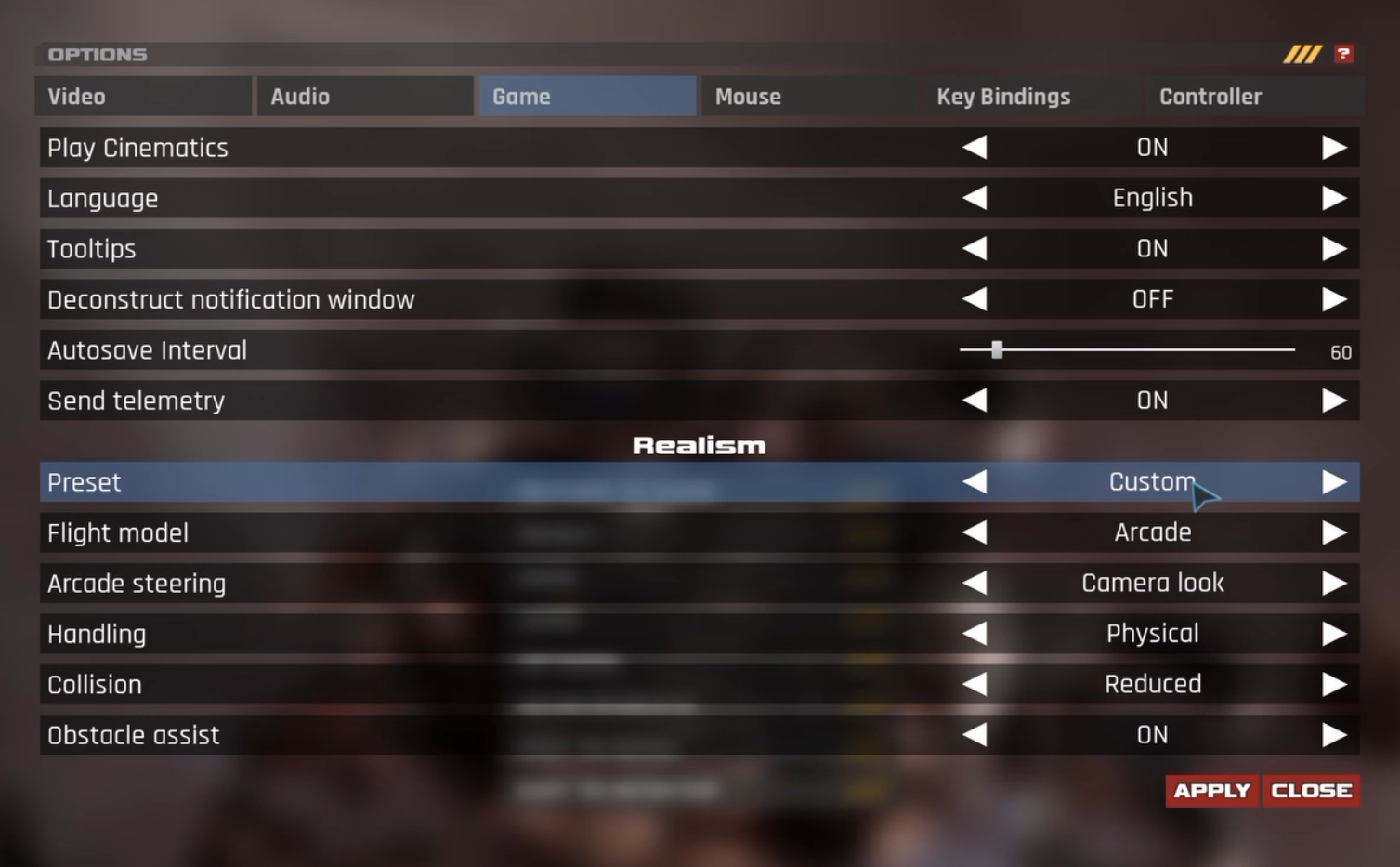 You can change the flight realism settings at any time in the game options. New flight aids are available only in non-Newtonian modes.
Revised Tutorials & In-Game Codex: Paired with the new flight systems, we have focused heavily on an easier onboarding experience for new commanders taking the helm. We have fully integrated revised and updated tutorials and introduced a brand-new Codex (a fully searchable in-game information hub accessed by pressing F1) to make learning the ropes smoother and answer any questions on the fly.
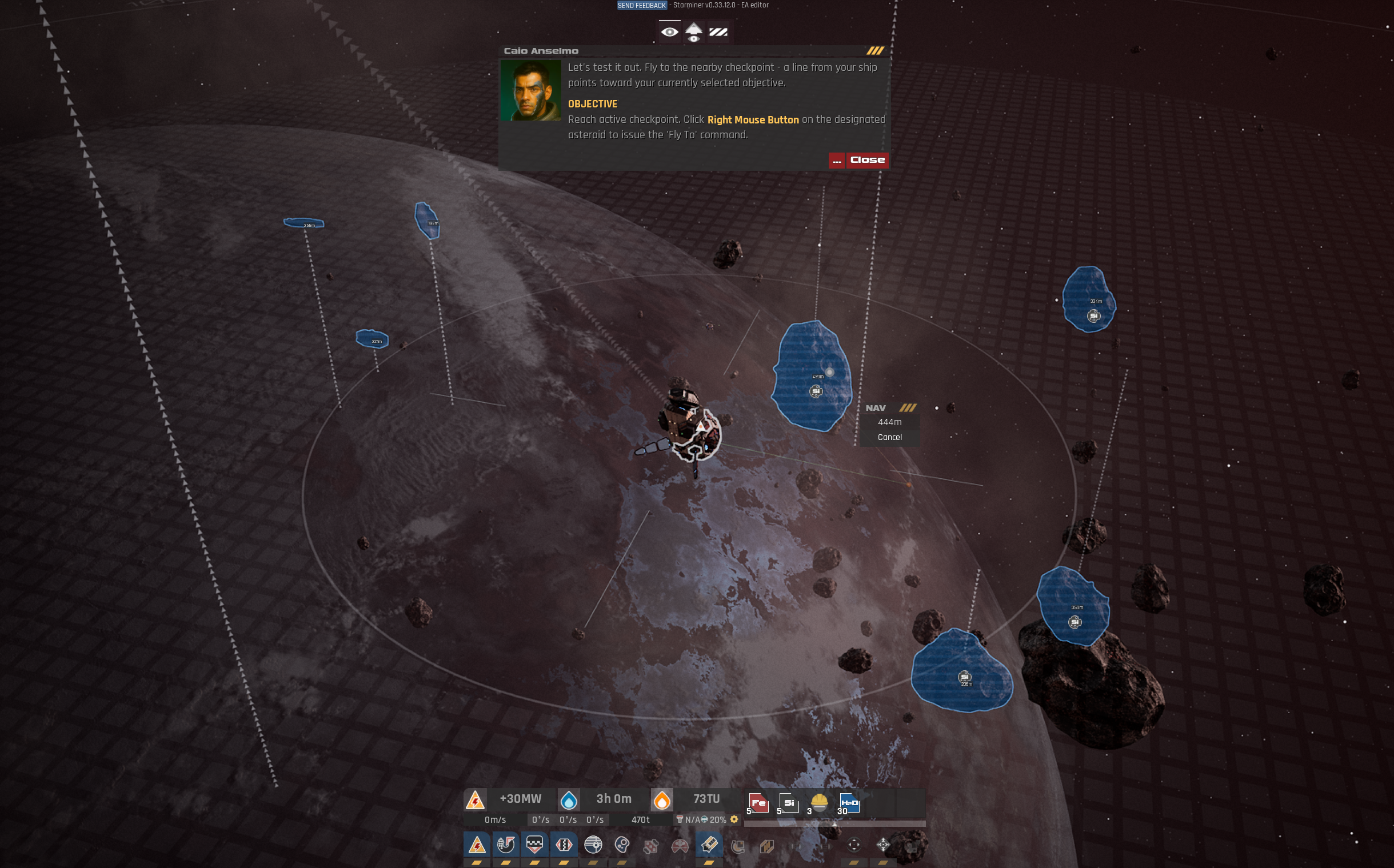 Play through several new and revised tutorial modules for a more intuitive learning experience. We're still adding more modules and improving existing ones.
Global Localization: Play in 8 new interface languages (Russian, French, Spanish, Brazilian Portuguese, Japanese, Polish, Italian, and Korean). The language option now shows each language's native name, how much of the game is translated and whether the translation is machine or human.
Build a Gate Network: You can now construct a T1 Gate in each sector to optionally connect them together. Once your gate network is established, you can seamlessly travel your active station between these connected sectors! Plus, new Station Stores at Hadfield Shipyard and Jupiter Gate allow you to purchase stations directly.
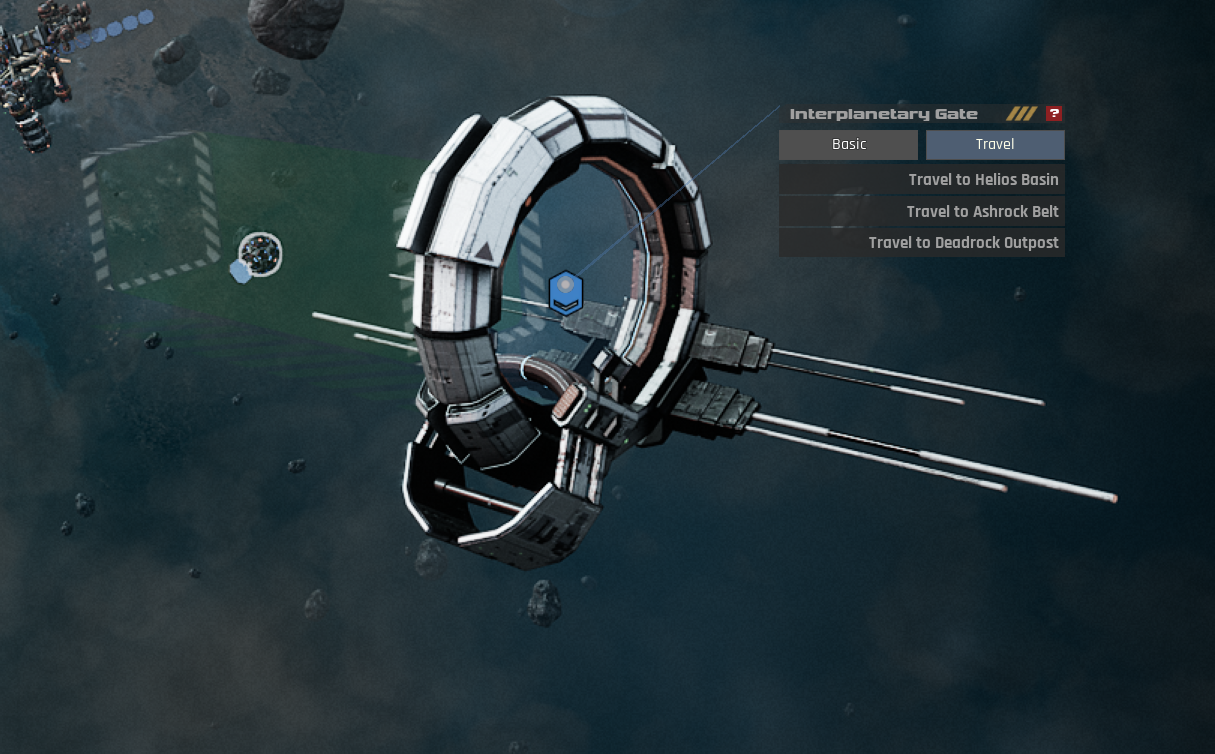 Park in the designated area (size doesn't matter) to travel to other gate locations. But you'll need to build them first.
Performance, QoL and UI Scaling: Enjoy significant framerate improvements in large battles, up to 50% lower CPU workload (meaning massive stations perform much better), upscaling support (AMD FSR 2.2), and UI scaling is now available.
Stability & Bug Fixes: We have implemented dozens of bug and crash fixes across the board. Most notably, the dreaded station wobble is fixed.
Full Patch Notes
STARMINER 0.33.12.0 - PATCH NOTES
ADDITIONS
- Flight Realism: A new opt-in arcade flight model with Arcade / Assisted / Simulation presets and a custom mix of flight model, handling, collision consequence and obstacle assist. (The original Newtonian simulation model is the same as before, fully preserved and optional) - Eight new interface languages, machine translated: Russian, French, Spanish, Brazilian Portuguese, Japanese, Polish, Italian and Korean - Gate travel: Right-click a T1 Gate to travel your active station to another T1 Gate site in the same solar system; park inside the gate's parking box (it turns green as soon as any part of the station reaches into it) and the station arrives in the same position relative to the destination gate. The station menu of a T1 Gate station has Basic and Travel tabs, and a travel row explains why it is disabled
- Station stores: Hadfield Shipyard and Jupiter Gate now sell stations, including the new Longbow and Nut Cracker
- Missions in Sandbox mode: Foundations and Handyman Can can now be played and completed in Sandbox, and the new Gate Network mission asks you to research the Gate blueprint and build a Gate in another sector
- AMD FSR 2.2 upscaler: Added to Video options beside DLSS, with Quality, Balanced, Performance and Ultra Performance modes; it runs on any graphics card under DirectX 11 and 12, and only one upscaler is active at a time
- UI scale option: Added to Video options (50 to 150 percent), applied on Apply and kept for the next start
- Veteran ore-miner achievements: Six new achievements (iron, silicate, cobalt, thorium, ice, eonite), unlocked on Steam after 1,000 mined chunks of that ore
- Help buttons: Added to every window title bar and in the right-click menu; opens the help article for that window or for the clicked object (modules, asteroids, gates, station markers, hulk nodes)
- New help articles: Saving and loading, usage data, obstacle assist and collision warnings, flight path cue, perspective helper, station blueprints, sending feedback, UI scale and upscaling
- In-game help codex (F1): 48 searchable articles across 10 categories
- Arcade cursor steering updates: Holding the left mouse button now draws the aim line and the hull-forward line from the station centre, with the angle and the time to turn
- New right-click context menu: Right-clicking any object opens an action menu with the full operations panel, plus "Mine here" for asteroids and "Attack" for enemies
- Group selection: double-click a selected module to select every module of that type on your station, and hold Shift and click a module to add it to the group or remove it
- Selected Group panel: shows the module count, the type and the power and process figures of the group, with Start and Stop buttons that switch the whole group at once; the Camera & Selection help article covers it
- New missions in the Saturn and Earth systems
- Autopilot in-flight panel with distance readout and Cancel now shows for every Fly To / Rotate To command
- Station markers are now clickable and open the right-click context menu
- Context menu station rows: Select, Hail, Trade, Trade automation, Donate and Possess, with live distance and an "Owned" status
- "Mine here" on a spot beyond mining range now flies the station there first and starts mining on arrival
- Asteroids highlighted by the perspective helper are now marked as detected and stay outlined map-wide
- Station donation now has requirements and a confirmation popup. Number of gate connections is now shown
- Right-clicking empty space now arms the autopilot destination picker directly
- Drill nodes now have a Mining Speed modifier
- Loading screen now shows real loading progress
- Third-party software notices now ship with the game next to the license agreement
- Usage data opt-in: On first reaching the main menu you are asked whether to send anonymous crash and usage data (can be changed anytime in Options)
- Hangarship: A DOCK button now sits on the highlighted parking box; it greys out with the reason when docking is not possible and docks the station on click
- The mission log can be opened from the dialogue window
- Load/save window updates: A search box filters saves by name, character or game mode. Saves are grouped under collapsible game-mode headers. Typing a save name in save mode shows the saves it would overwrite
- Camera rotation on the arrow keys (rebindable in Options)
- The end user license agreement can now be read from the main menu
TWEAKS
- Station modules are now welded into one physical body per station, greatly improving physics performance and stability on large stations
- Smoother performance in large battles: Enemy ships, station guns, engineers and the physics scene do far less work per frame with hundreds of enemies on screen
- Big-station frame time improved: idle stations sleep, timers are batched, sun-tracking panels and debris tick less often
- Revised and updated tutorials, including extended Basic, Navigation, and Combat Training modules
- Physical handling: A held rotation key keeps the turn rate growing for as long as you hold it, a reversed key slows through zero and builds the other way, and opposing keys cancel so the spin coasts; Simplified handling keeps its fixed-rate feel. Manual flight now turns and accelerates on your station's real mass, inertia and thruster thrust
- Obstacle assist: Pushes less; the nudge now scales with how close the nearest obstacle is, and caps at 10% of the commanded speed instead of 50%
- Arcade flight tweaks: Releasing thrust or a rotation key now coasts at the current speed and spin unless the matching autobrakes are on or Space is held. Reversing or changing a rotation key slows the spin to a stop before rotating the other way. Arcade rotation thrusters fire only when the turn rate changes. Simplified movement model no longer draws thruster power
- Asteroid build menu: The first click opens the menu and the next click sets the socket position; an unresearched module shows greyed with its reason, and the info box follows the hovered entry
- Asteroid mining: A mined asteroid now shrinks smoothly with each chunk instead of snapping to its new size. Asteroid mounting now uses a smooth, eased approach and no longer explodes on unmount
- UI Updates: Station control buttons show a tooltip with the operation's description and shortcut. The info window scrolls when a module has several upgrades. Trade window list rows show the same item tooltip as the icon slots
- Perspective helper: Scanned objects and objects under scan take the detected highlight, so unscanned asteroids and space junk stand out
- Context menu updates: Asteroid, enemy and location menus now carry a Nav title, and the narrow menu keeps the wide menu's position so its connector line no longer stretches
- Right-click autopilot hold: the progress bar appears later and the hold is slightly longer, so a brief press no longer arms a destination. Space (manual brake) cancels a running autopilot before braking
- The loading screen now ends as soon as the game settles instead of waiting out a fixed timeout, and reads "finalizing" while it waits
- Blueprint UI: The save button reads "Save as new" or "Overwrite \". Module lists are sorted by tier with counts and a difference tint
- Deleting a saved blueprint or a saved game is now a single click into a confirmation. Saving over an existing game asks for confirmation first
- A new game gets its first autosave 15 s after start so it appears on Continue
- Objective location markers stay visible at all ranges while their beacon is up; objective beacon effects updated
- Increased cost of T1 and T2 array nodes. Default voiceover audio level lowered
- Loose debris now drifts to a stop and settles instead of tumbling forever. A station left drifting by enemy impacts now comes to rest and settles
- Docking and undocking reworked: approach and push speeds now derive from the station's thrusters and mass, with a smooth final glide
- Station splits are now physically real: detached parts keep their momentum
- Hangarship gun attack speed lowered. Reduced the smoke lifetime for drilling particle effects
- Improved shield control toggling. Merge objective now shows which stations should be merged
- Added 500 Eonite fuel to the Deadrock outpost. Removed level requirements for survival mode
- Hauler and constructor exhaust effects updated. Navigation tool visuals updated
- Losing your current station with no substation left now switches you to the nearest remaining station instead of the first one in the list
- Achievements: Every Steam achievement now has its own icon and its description from Steam; achievements that are not on Steam are hidden
FIXES
- Trade accounting overhaul: Deliveries at a full destination return the overflow to the origin instead of destroying it. Cancelling or removing a trade route now refunds exactly what is outstanding. Natural trade route completion no longer counts as a cancel
- Hauler and trade ship partial loads no longer strand or overwrite cargo; a fully locked order now dispatches. Fluid-only shortfalls keep a dock route open instead of removing it without refund. One dock trade no longer blocks every package route behind it
- Route progress and deposit/gather objectives now count what actually landed
- Station parts no longer drift, stay behind or stop tracking the sun when a station moves, builds or turns: every part is woken before the thrusters fire, a station sleeps only once every part has come to rest, and a welded solar panel keeps tracking the sun in flight and takes its hull parts with it
- Stations rebuilt from a saved blueprint no longer spin uncontrollably with stacked T2 solar panels. Same-station solar modules no longer fight each other's collision (station wobble on load)
- Station guns and lasers no longer sit idle for seconds after their target dies, leaves range or cannot be fired at; they rescan within a second and keep a live target between scans
- Station guns and lasers recalculate their lock-ons correctly now, preventing states when they wouldn't fire at or mine larger objects
- Mining lasers no longer stall the game in long sessions while searching for a rock, and they re-search a lock they cannot fire at instead of holding it
- Loading a large base no longer takes minutes, and the ~10 s freeze a few seconds after the loading screen is gone. The loading screen now fully covers the HUD and is no longer held open by solar panels that never snap
- Loading a save whose stations were placed overlapping no longer destroys them on load. Clicking a module or spinning an actuator on a very large station no longer stalls the game
- Fixed frame rate collapse from rotating turrets, thruster gimbals and solar panels on welded stations
- Arcade flight now consumes thruster energy; a station whose thrusters run dry loses thrust and control until energy recovers. A station with no thruster energy no longer brakes or spins down; it holds its speed and spin with no plume until energy returns
- A spinning station with its autobrakes off is no longer slowed down through a jointed solar panel. Fixed Navigation Overlay in Arcade Mode activating thrusters when pressing WSADQE
- Fixed docking issues: cross-station collision damage from dock teleports, clusters unable to dock, big-module dock deadlock and tow stalls
- Engineer crafts no longer stay stuck in the hangar behind the ramp gate. Engineer pathfinding no longer stalls on a large station, and the first path after a load is correct
- A drill built from the asteroid menu no longer loses its asteroid lock when the next module is built
- A T1 Gate can be built at a second location again; the one-gate limit now counts only gates at the current location. An NPC gate station inside transponder range shows its station marker again
- Right-click menu rows show their hint tooltips again, and a blocked row explains why on hover. Menu boxes now move away from dialogue windows, notifications, and the build menu instead of overlapping
- Grid slots show their tooltips again, the officer tooltip shows the officer's face and name, and an officer slot no longer shows a mass row
- Officers: Start Training greys out within a second of the SAT balance dropping below the training cost, and a click with no SAT no longer leaves the card stuck in training. The character tab perk list works again and lists the commander's own perks before any research
- Rank progression: entering Sandbox with no modifiers no longer skips three ranks. The survival score readout no longer stops at 20000; it shows the session score instead of rank experience
- The feedback form draws above every window and closes no popup, so the screen stays for the screenshot; a second form can no longer open
- Options: the display confirmation countdown now runs only when the monitor, resolution or window mode changed, and its button reads CONFIRM with the seconds left
- The perspective helper switches off on return to the main menu, so a new game starts with it closed. The perspective helper no longer detects or highlights asteroids around the camera when you pan or focus it; range is measured from your station
- Achievement progression fixes: the I CAN PLAY achievement now unlocks on Steam, and the in-game achievement popup no longer doubles Steam's own notification
- T2 solar panels no longer drift off their sockets after a hangarship dock or undock, and saves with displaced panels are repaired on load
- Hangarship dock box: a station parked inside the box no longer reports it cannot dock when another station sits beside the box, the dock walls keep clearance from the station surface, and the enter/leave transition fires once
- The detach-module and save-blueprint windows show the station name field again and Confirm works
- Towing a sleeping station compound no longer leaves it behind while loose panels ride along
- Camera look, aiming and selection follow rebound keys instead of physical ones. Rebinding fixes for shared defaults and numpad keys
- The main menu Continue button no longer disappears after a relaunch following an overwrite save. The load window now shows the saved picture for autosaves
- Hovering a resource patch on a scanned asteroid no longer leaves it highlighted or punches a hole in the asteroid's outline
- Esc now reliably cancels the autopilot or jettison point picker
- Fixed the location marker icon rendering with zero width and hanging below its beacon. Location marker distance no longer shows the wrong unit
- Fixed guns never firing on big maps. Enemy Monarchs now move. Fixed the loading screen getting stuck when starting a sandbox
- Fixed T4 solar panels not occupying build slots and having build slots. Mega Solar panels can no longer be disassembled into unusable parts. Fixed the Solar Array UI not updating when panels get destroyed
- Fixed scanners turning on while the scanner operation is off. Disconnected shield modules now turn off. Fixed NPC enemy station projectiles passing through shields
- Fixed the drill finding no resources on a never-scanned asteroid. Fixed jettisoned modules not depositing into station storage after being collected. Fixed asteroid self-mining in specific cases
- Fixed modules not completing when the construction efficiency modifier is taken mid-build. Fixed optimized construction protocols showing the wrong price for Engineers
- Added a campaign fallback to prevent a mission softlock when no new mission was selected. Fixed seeded mothership destruction not counting towards achievements
- Fixed the mismatch between actual sector bounds and their visual. Fixed the radar range material not displaying correctly
- The game no longer starts in VR on machines with an XR runtime installed. Fixed the DX12 opt-in not persisting from the confirmation dialog
- Mining lasers no longer stop when a hauler, fighter, shuttle, trade ship or cargo package crosses the beam; only enemy units, modules, rocks and the hangarship block it
- Enemies with charging off resume patrolling their spawn area after loading a save instead of holding one spot, and an enemy without a spawn area patrols around its own position instead of flying off to the world origin
- Dozens of crash fixes
What's coming?
And if you've made it this far, a quick insight of what we're working on and is coming up next:
- Sector Development Milestones Mechanic (completed) - Dynamic Economy (almost there) - NPC Station UI and behaviors (almost there) - More modules and factory products (almost there) - Revised Campaign and progression (implementing) - New UI (implementing) Thanks for reading and more soon! --Starminer dev team