Build 0.0159
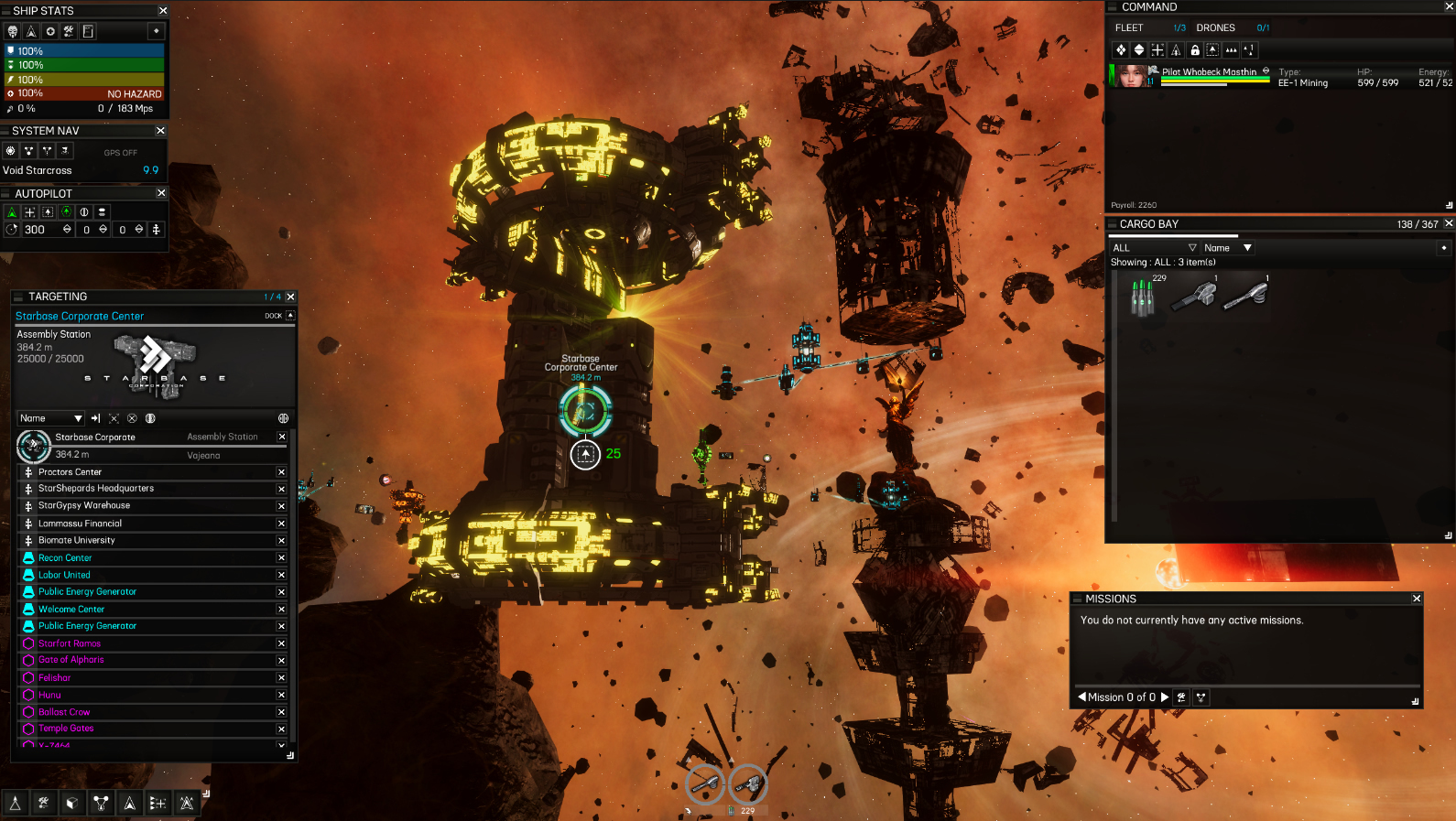
- Fixed bad texture scripts on 2 of the derelict ship sector prop models.
- Fixed a number of soft code errors, unused variables mostly, still around 70 to go.
- Fixed bug with negative boxcollider size component, causing issues with collider mesh generation when building the ships.
- Fixed bug when dragging market items with overlapping hit areas causing a bad qty parameter when calculating price.
- Adjusted and optimized the audio code for Title screen music loader.
- Fixed NPC ship generation and optimized ship memory requirements by removing unused meshcollider from ship parts.
- Fixed Mission panel log text clipping off the first few pixels on the left hand side of the content display window.
- Fixed bug causing an error when opening fleet panel at the station with abandoned merc still listed in the fleet array.
* Worked on Title screen panels and main camera scene.
- Added new code driven post processing effects title screen and for intro.
- Added title screen dynamic depth of field to the camera that changes with focus (Better text visiblity).
- Added improved 'Continue' panel, pilot saves now show background, name, level, credits, time played, sector, and docked station.
- Added mouseover scrolling to the continue saved games panel, adjusted default scroll speeds and clamped the view in frame.
* Worked on detaching all main game panels, with drag and drop capabilities for each panel. Some panels like Cargo, Fleet, and Targeting will have resize capabilities.
Each panel will return to it's original position when closed, and the small toggle arrow for that panel will become visible again.
- Added persistence to all main panels, when reopening the panel, it will return to it's last position and size.
- Major changes and adjustments to the Targeting panel. Addition info is now displayed as the targeting panel is resized horizontally.
- Added Drag and drop ability to the targeting panel, alone with the ability to resize the panel. Adjust the list elements to scale and mask properly when viewport content is adjusted.
- Added ability to drag and drop System Nav panel, added a button to close this panel.
- Added ability to drag and drop the Ship Cargo panel, added a button to close this panel as well as resizing the panel display.
- Added functionality to the Mission panel so that it now functions independently from the Stats Panel. Removed the reset button from this panel as it is now redundant.
- Added ability to drag and drop Ship Stats panel, added a button to close this panel.
- All panels will show and hide the small toggle arrows as the visibility of each is toggled.
- Adjusted code for new cargo system, to prevent duplicated items exploit when dragging cargo panel over-top of all station inventory panels. (Please Bug report anything I may have missed).
- Added drag and drop functionality to the Fleet panel, also added resizing and adjust the list elements to expand with the panel window.
- Added back the Commands panel for individual mercs on the fleet panel list. This allows for quick commands to the merc without opening up the merc panel.
- Adjusted UI layout for ship stats panel for better readability in Station Garage.
- Adjusted layout of options panel and removed the Reload and Self Destruct Ship options. (They were more for testing anyway.)
- Adjusted the default player options file for hotkeys to allow for R and F to be used for vertical steering with the keyboard.
- Added These hotkeys to the Hotkey panel under player options. This will only save with new pilots who have the updated player_options_file containing the KEY_OPTIONS_up;R and KEY_OPTIONS_down;F lines. These can be added manually to old pilot saves if you want to change them.
- Added Ship control code to allow keyboard vertical steering on ships, Using R and F will point the ship up and down during manual flight.
- Added 2 new extra options for testing, one allows the arrow tabs to be hidden, forcing the use of the quick-bar to open main panels. The other introduces a new drag-able button bar exclusively for the main panels. Both options found in Options, extra options.
- Adjusted the option 'Remember panel states' to include the position and size of the main panels.

- Added 7 new option data lines to the player_options file in the pilot save folder. These lines store the vector4 data, x,y,w,h of each main panel. If you rearrange your panels and want them to stay that way when you reload your save, just open the Extra options panel under options and click save. This will lock in the positions and sizes for your new layout.
Existing saves can copy these line from the saves/newplayer_options.txt and paster them into your saves/pilot/player_options.txt file. All newly created pilots will NOT have to update their player_options.txt file for the changes to stick.
OPTIONS_hide_arrow_tabs;False
OPTIONS_show_btnbar;False
OPTIONS_panel_system_position;0,0,0,0
OPTIONS_panel_cargo_position;0,0,0,0
OPTIONS_panel_mission_position;0,0,0,0
OPTIONS_panel_stats_position;0,0,0,0
OPTIONS_panel_autopilot_position;0,0,0,0
OPTIONS_panel_targeting_position;0,0,0,0
OPTIONS_panel_fleet_position;0,0,0,0