Hello all!
Version 0.6.2 is now live on the Stable branch.
First, your scope. The session now comes in three skins: Generic, Spain (SACTA) and United States (STARS). It is the same session in each one, and every feature is in every skin. In Settings > Skin you can pick one skin for all airports or one per airport, or leave it on Realistic, which uses the real interface where there is one. Skins can be modded, so you can make your own.
The rest of the interface was redesigned too: the Main Menu, New Session, Load Session, Settings, the Escape menu, the top bar and the panels. The radio strip shows RX, TX, BLOCKED and PARSING. Hover any cell of an aircraft label to see what it means and what to say. Text is drawn at your screen's real pixels, so it stays sharp at any size, and a bigger window shows more radar instead of stretching the picture.
New players get four tutorials: the essentials of the ATC job, the interface (UI), the radio, and a short shift at Ibiza on its real sector, with the terms explained. A coach shows what to SAY and what to DO. You find them under Tutorials in the Main Menu. Your first three sessions start with relaxed traffic that you can change.
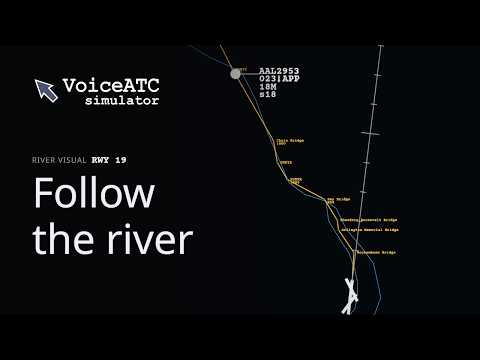
Then the approaches. You can ask a pilot to report the runway or a landmark in sight, and then clear a visual approach. Any suitable arrival runway can be flown as a generic visual. At selected airports there are also charted visuals that follow their published route, like the River Visual runway 19 and the Mount Vernon Visual runway 01 at Washington National (KDCA). On the River Visual, ask the pilot to report "the Potomac River" in sight. Visuals show as V plus the runway on the label (V19, V01), and major rivers are drawn on the map.
The charted visuals come from the community data, so they download the first time you play online. Without it you still get the generic visual. The pilot never takes over separation, that stays with you.
Not every approach works out, so there are go-arounds. Say "go around" and the aircraft climbs and flies the published missed approach of the approach it was cleared for, drawn on your radar. You can also give your own heading and altitude in the same call. A visual has no published miss of its own, so on a visual you tell the pilot where to go. Aircraft also go around by themselves when an approach becomes unsafe, and about once in 500 approaches a pilot just decides to.
Other key stuff:
A new speech model, LainoaASR 1.0. It understands accents, radio audio and airline names far better, and voice commands no longer need the extra AI model.
The download is about 590 MB smaller, and sessions use about 1 GB less memory and start faster.
Voice recognition also uses the fixes, headings and approaches that other controllers use at each airport, and the Learned Voice panel shows them beside your own.
Departures are more realistic: they roll down the runway, lift off where PROCS draws the SID and call you passing 1,000 ft. The ones you still own ask for the frequency change once they have left your airspace.
Choose your workload by aircraft in your sector or by hourly traffic, with Auto or Custom starting traffic.
Load Session shows the airport, runways, sector, traffic and a radar snapshot before you load, and a damaged save falls back to the automatic backup from your last quit.
The Escape menu lists the routes on your scope, draws the one you pick and reports it in words. If it is wrong, you can suggest the correct route there.
More approach types: GLS, GPS, localizer, LDA, VOR and NDB.
You can see what is next on the roadmap at https://voiceatcsimulator.com/roadmap/. The commands for visuals and go-arounds are in the wiki: https://voiceatcsimulator.com/wiki/.
For the complete compact changelog and discussion, join the Discord: https://discord.gg/v4uRbPFyyB
Thank you for the feedback. Enjoy!