Esteemed Artisans,
Another patch for The Artisan of Glimmith is now live.
Our goals
In this update, our goal was to address the most important technical and gameplay problems that were impacting players.
Earlier this summer, we went through every bug report and every Steam review of the game (including many positive ones that nonetheless contained constructive feedback). From these, we produced a list of changes that we could feasibly make and identified those that would be the most impactful.
This update contains a number of improvements reflecting those priorities. While there aren't any new puzzles or gameplay features in the patch, there are many quality-of-life changes that should prevent the most common technical problems and improve everyone's experience with the game.
You'll find the list of changes below, but first...
The Tiger Lake crashes are (probably?) gone!
Buckle up for this one, because it's one of those weird debugging stories that makes your hair stand on end a little.
In our last patch, we made a one-line change to our compiler optimization settings, with the goal of improving performance by a tiny smidge for CPU-bound players. We expected that this change would go largely unnoticed.
It turned out to have an unplanned but very beneficial effect: it stopped a persistent and devastating crash for hundreds of Glimmith players!
We've been getting severe crash reports from a certain tiny fraction of players (roughly 1 in 300) for the last several months. These crash reports have a weird pattern, namely:
They only occur on laptops
They only occur on machines with 11th-gen Tiger Lake CPUs such as i5-11300H, i7-11700H, i5-1135G7, i7-1165G7, or i7-1185G7
They don't only result in Glimmith crashing, but often result in the entire operating system becoming unstable (i.e. yielding a blue screen of death or crashing the whole PC)
They happen randomly after a few minutes of gameplay
The crash logs show the game crashing in different random parts of the code every time, usually deep within CPU-intensive Unreal Engine code such as hash functions
After some research, we learned that this type of crash sounds a whole lot like a crash caused by a hardware flaw called TGL031. A tiny batch of Tiger Lake CPUs shipped with a problem that causes them to use the wrong voltage under a very specific condition, resulting in loss of system stability. For whatever reason, it seems like Glimmith was causing that very specific condition to happen. The problem can't be fixed with a driver patch, instead requiring a full BIOS update.
Once we became aware of this, we racked our brains to find a way to prevent this crash from happening. Unfortunately, we had no way of avoiding the triggering conditions, since they happened in all sorts of places, including in various Unreal Engine data structures that we relied on heavily for our puzzle-checking and error-handling code.
However, the conditions that trigger this problem seem to be quite rare (both rare enough that Intel's engineering team didn't discover the problem before Tiger Lake shipped, and rare enough that affected users weren't typically crashing in other games or software). Apparently the problem can come and go across different versions of the same piece of software due to changes in memory setups or different instruction orderings. And indeed, we were seeing this in Glimmith: the 20260326 build was stable, but 20260421 and later were not.
Because of this, we were not too surprised when a new build with adjusted compiler optimization settings seemed to make the problem stop happening. A compiler settings tweak is the exact type of thing that would shuffle the game's instructions around, bypassing the specific condition that triggered the problem. Indeed, we haven't seen a Tiger Lake crash since the July 24th patch went live, and several users with the problem reported that the game now seems stable. So we're 99% sure that it's gone.
Of course, we'll be vigilant in case there are any reports of it again in the future!
Thanks to everyone who reported this bug, shared their crashlogs with us, and helped us test different versions of the software!
Now, onto the notes from today's patch...
Performance improvements
Glimmith's performance and optimization are a frequent topic in Steam reviews and discussions. While the game has been optimized quite thoroughly, our environments contain highly detailed scenes and lighting that can be demanding on many systems, especially on older or less capable machines, large resolutions, high refresh rates, or epic graphics quality.
Many other cozy games or puzzle games use much simpler graphical styles, and a huge portion of Glimmith's audience has an expectation that Glimmith will be just as performant as those other games.
We want to meet those expectations while still preserving the high-end look of the game, and this required us to go back to the drawing board and find even more optimizations that we had previously overlooked.
We got our programmers, artists, and VFX staff to profile the game on a variety of systems and identify everything we could think of to improve the game's CPU and GPU performance. And we came up with a pretty good set of changes:
Particle systems: We reverted many particle systems from GPU-based to CPU-based. This was a massive discovery for us, and a bit of an unusual and surprising optimization. Typically, GPU particles are much faster than CPU-based ones. However, Glimmith's VFX tend to be handled quite well by the CPU—they contain small numbers of particles, so the GPU's ability to parallelize doesn't yield value relative to the overhead of making more GPU calls per frame. In some test scenes (e.g. zoomed out looking at hundreds of unsolved puzzles and dozens of torches), this saved over a third of the frame time! Ironically, this change actually saved CPU time, as the CPU took less time to do the particle calculations than it did to prepare the GPU calls, execute them, and process the results.
Shadows: We adjusted our shadow settings on all quality levels. We removed distance field shadows entirely on Low quality, as they were mostly making shadows less accurate than the existing baked shadows. On High and Epic quality, we adjusted our depth settings for cascading shadow maps (the most high-quality dynamic shadows) and tweaked a number of shadow settings on individual meshes. The result is a noticeable improvement in shadow accuracy and better performance (especially on Low quality).
Shaders: We optimized our terrain and light ray shaders to reduce their instruction counts.
Geometry: We reduced the triangle counts of a number of meshes in the game, particularly where there was internal or downward-facing geometry that was not visible in our scenes. Some of the trees got additional LODs (levels of detail) to prevent drawing needlessly many triangles on trees that are very far away from the camera.
Post-processing: We created a new version of our main post-processing shader for use on Low quality settings. This is the shader that gives everything on the screen a bit of a sketched look and adds thin, dark lines around the borders of objects. The Low quality version trades away a bit of accuracy in where outlines get added, but it runs substantially faster as a result. We think this is a very good tradeoff for players on the weakest machines, and you likely won't notice any difference in appearance.
Foliage: We improved the look of a number of grasses and small bushes. We set them up to inherit shadows from the terrain they are planted on, which fixed a number of issues with glowing foliage in dark areas on Low quality settings.
Lighting: We converted a number of dynamic lights (the torches) into static lights, which enabled us to bake their contributions to the scene and prevents them from disappearing when zoomed out.
Programming: We fixed a small inefficiency in how our puzzle lights were toggled, saving a tiny bit of frame time whenever you're inside a puzzle.
Many of these changes yield only a minor efficiency gain, but they really do add up. Overall, we achieved a noteworthy performance boost on all quality levels, with substantial improvements on Low quality and in VFX-heavy scenes. Despite this, the overall appearance of the game is almost completely identical, with several notable improvements.
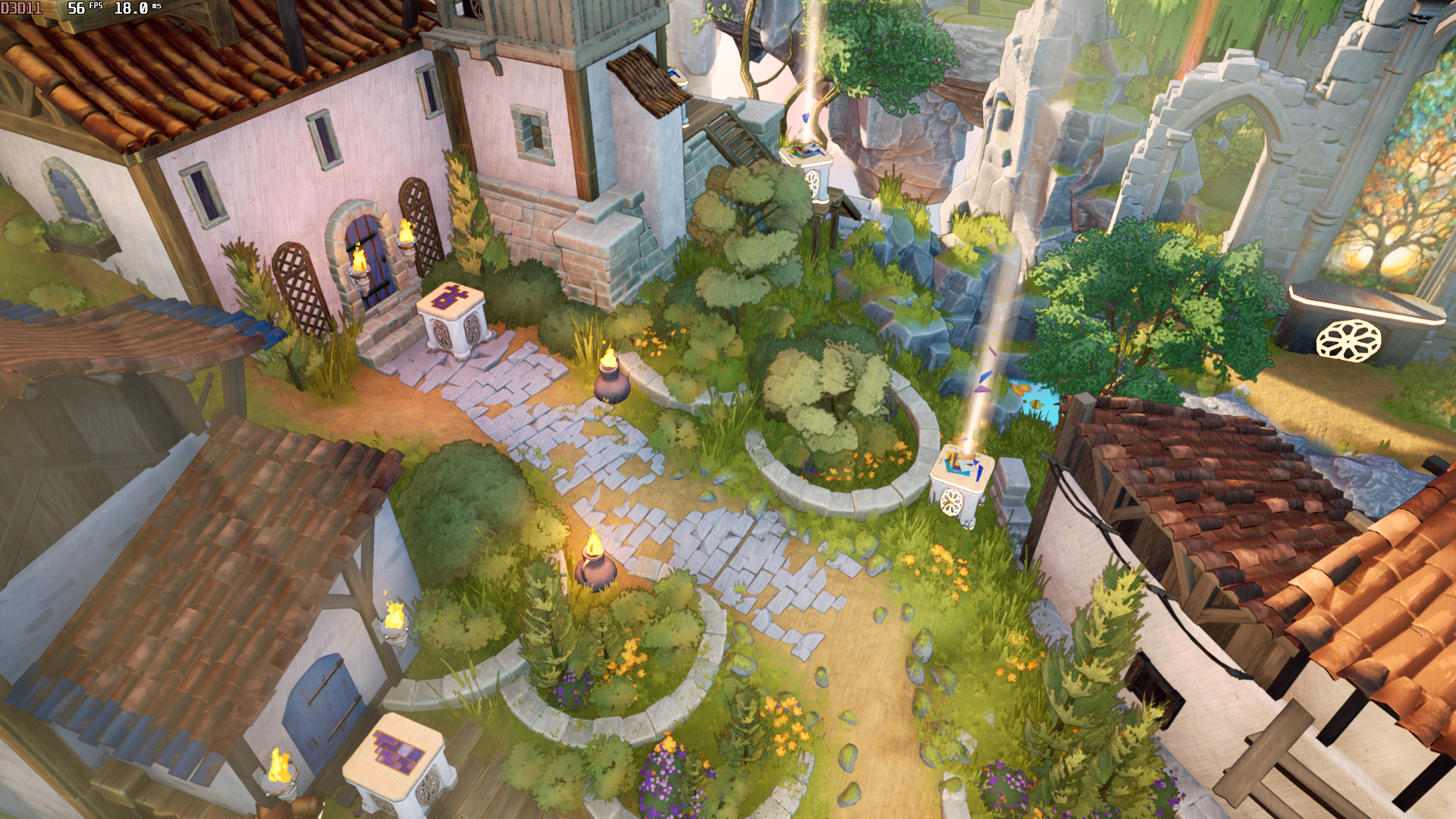
Here's an example scene on medium quality, taken on a 2019 laptop with an NVIDIA GTX1650 GPU. Before the changes, it took Unreal Engine 18 milliseconds to render this frame:
 After the improvements, the same scene renders in 10.9 milliseconds, saving almost half the frame time:
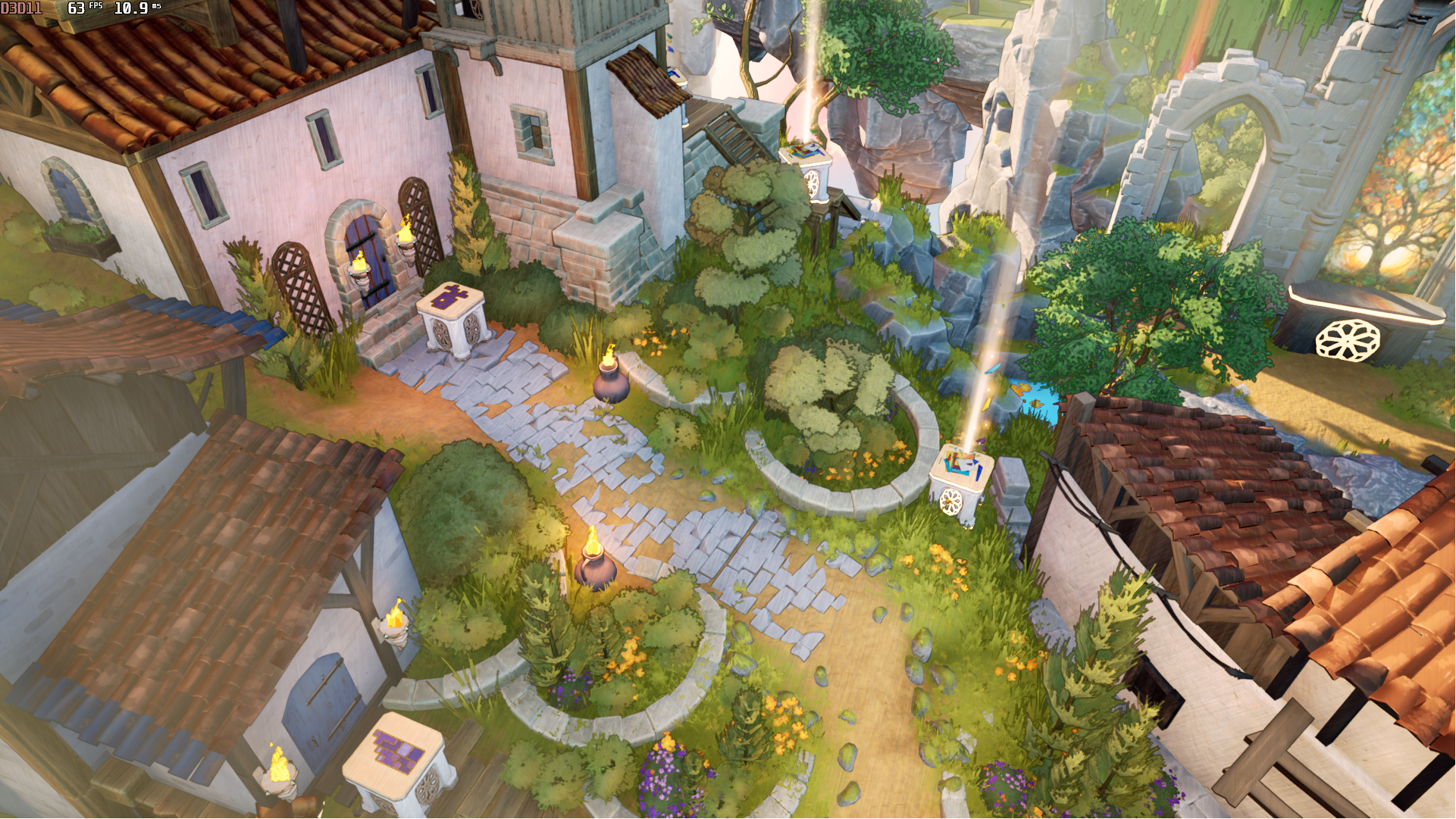
This results in an increase from 55.5 FPS to 91.7 FPS, a 65% improvement.
Of course, this particular laptop's screen can only display 60 FPS, so you won't actually get 92 FPS of output (that's why the capture above only shows 63 FPS). Instead, you'll get smoother performance, more responsiveness, and longer battery life.
New Loopy tutorial
Glimmith's Loopy mechanic currently has a bit of a notorious reputation. In Steam reviews, it receives more than twice as many complaints as any other puzzle rule in the game. In the Steam achievement stats, we observed a larger decrease between Bricky completions and Loopy completions than we did among other pairs of rules in similar prerequisite chains, meaning that a larger fraction of players were stuck on the Loopy section or had chosen to prioritize different areas first.
But Loopy has also been praised by a large number of players, many of whom ranked it among the best rules in the game in tier list posts.
We wanted to know why this discrepancy in player experiences existed.
So, we watched as many Twitch and YouTube VODs of this section as we could find, and we concluded that our early tutorials just weren't doing a good job of teaching some players the tricks they needed to confidently get through the area. Loopy puzzles contain a number of really interesting techniques and deductions, but many players weren't getting to experience those eureka moments because they hadn't yet fully mastered the basics of the rule.
So we decided to completely revamp our approach to teaching players the consequences of the Loopy rule by adding a sequence of illustrated tutorial panels that explain the basics much more explicitly:
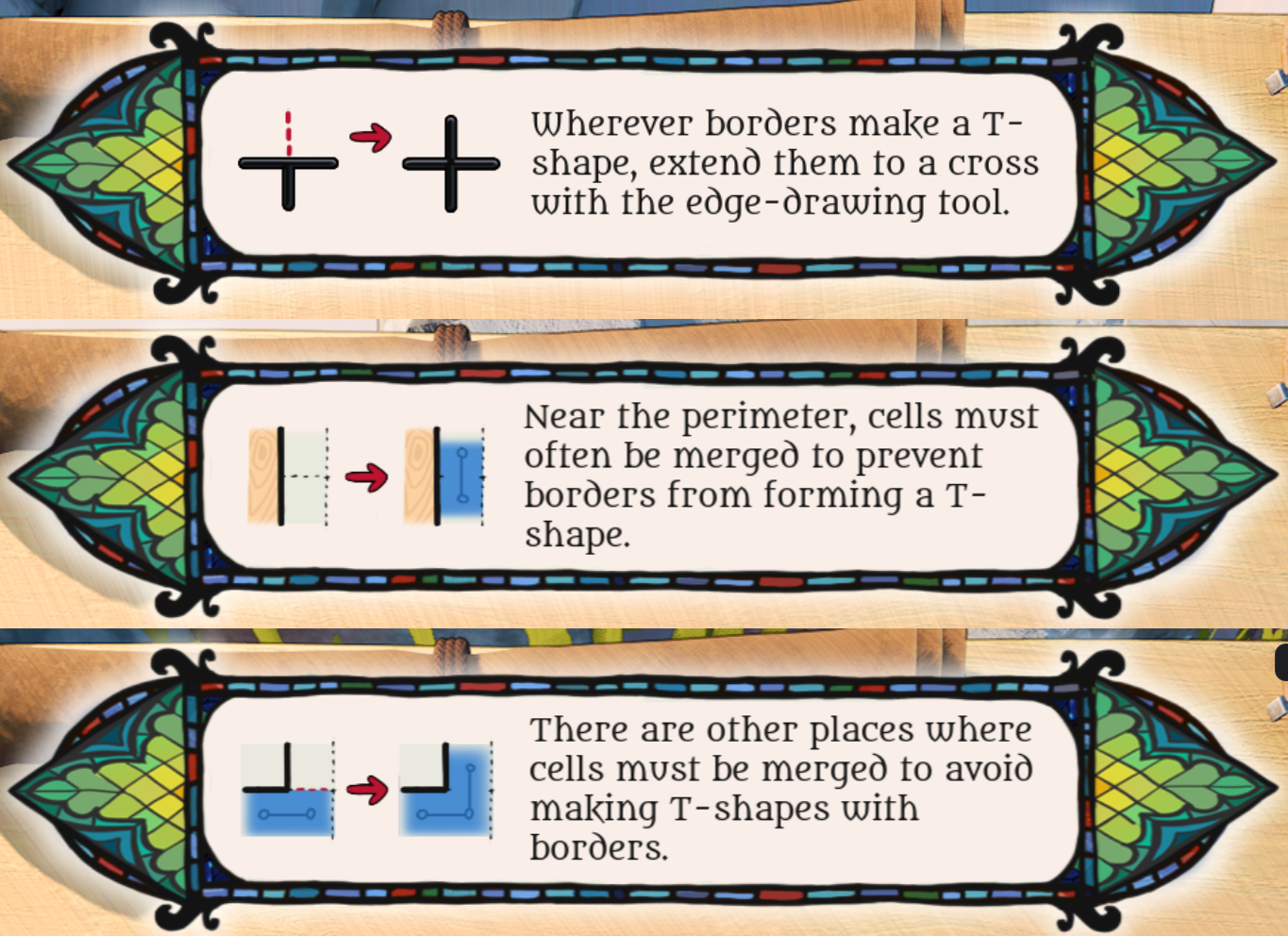
Including these is always a bit controversial for us. On the one hand, we want to preserve the ability for players to discover these deductions on their own. On the other hand, we've seen many players have negative experiences with the later Loopy puzzles if they get through the tutorial without really fully understanding these basic steps. Being explicit about these steps tends to help tremendously with those players.
Our compromise is usually to put these panels a bit later in the tutorial sequence. That way, players who discover these steps on their own have typically already discovered them by the time they are revealed, and players who need a small nudge still get it in time.
Later in the area, we also added some tutorials that hint at some of the deeper conceptual ideas in Loopy puzzles. These don't necessarily help players immediately, but our goal is to help get them thinking in the right direction on some of the more challenging puzzles.
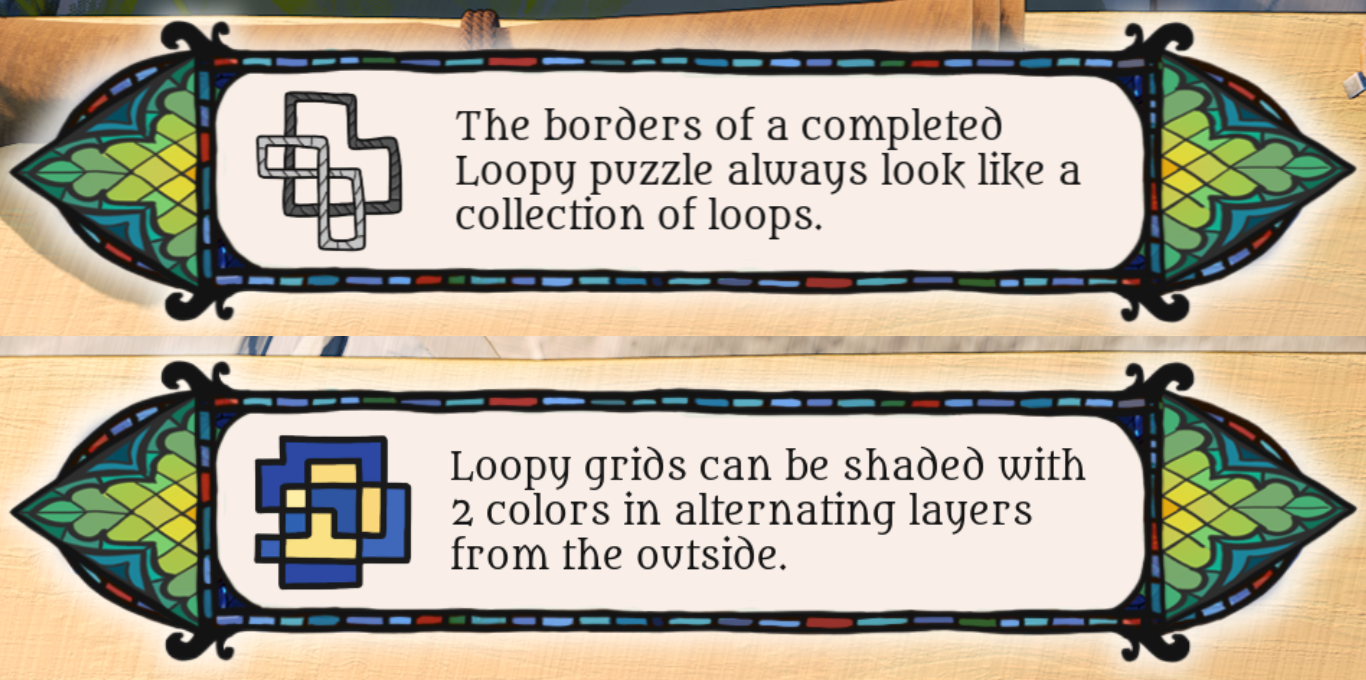
We're very interested in feedback on these new tutorials, so please let us know if they are helpful!
Hardware cursors
Glimmith's mouse pointer previously used an in-game shader to support the hue shift that occurs when you switch colors while solving puzzles. Unfortunately, this adds a bit of lag to the mouse movement, since the shader required a software cursor (effectively hiding your actual mouse and replacing it with one faked by the game). The game samples the mouse's position at the start of a frame, but then has to wait until the frame is fully rendered before the cursor's location on the screen is updated, and that lag reduces click accuracy when solving puzzles. It also makes the mouse feel less responsive if you've lowered the game's FPS to conserve your device's battery.
We decided to swap out this software pointer for a hardware cursor. With this change, Glimmith now uses the exact same mouse pointer that the rest of your operating system uses, and it simply swaps out the graphic when you change colors. We had to manually recreate the colored mouse pointer art that was previously rendered by a shader, but you shouldn't notice any difference. We hope you enjoy the snappier and more accurate input.
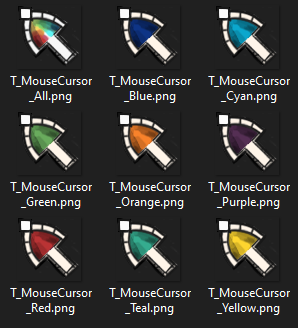
A note for content creators: you may need to update the settings in software like OBS to capture the new cursor correctly in video recordings, livestreams, and screenshots.
Warnings and popups
Many of the biggest complaints about Glimmith come from misunderstandings about how the game works or how the settings should be configured. For example:
Some players would set their frame rate to Unlimited and disable V-Sync, and then observe that their fans were blowing too loudly without realizing that the game was trying its hardest to use all available resources to generate as many frames as possible!
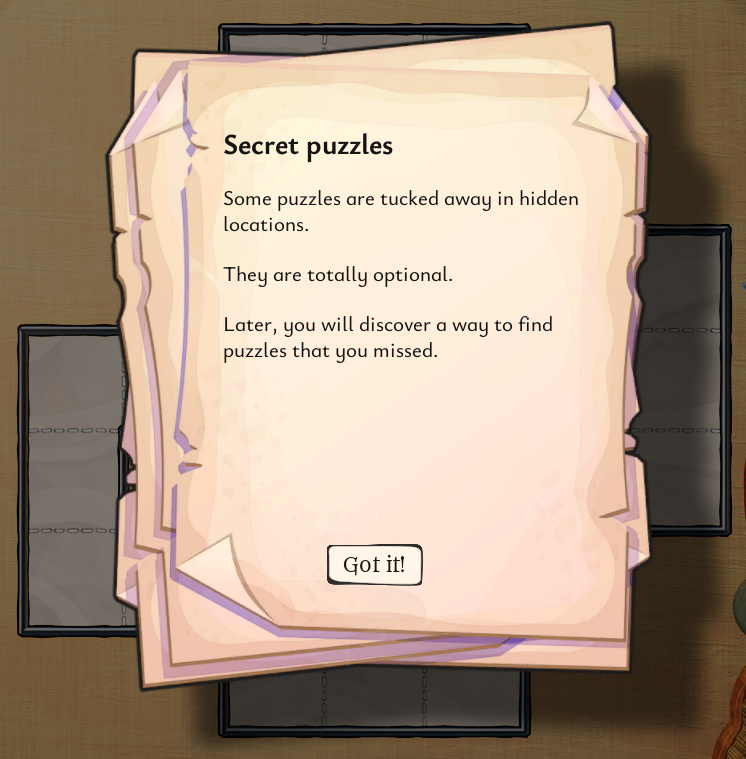
Some players were frustrated by not knowing the exact number of puzzles in each area. However, those players were unaware that we reveal this information later in the game (we wait to avoid spoiling a certain surprise).
We added a few new popups and prompts to help inform players about these kinds of issues. Here's an example:
Automatic restoration of backup saves
Sometimes, if your drive storage becomes full or the system crashes or loses power right at the exact moment that the game is being saved, it can cause a save file to become corrupted. This can happen with almost any video game, and it is the reason why so many games warn you against turning off the power while the game is being saved.
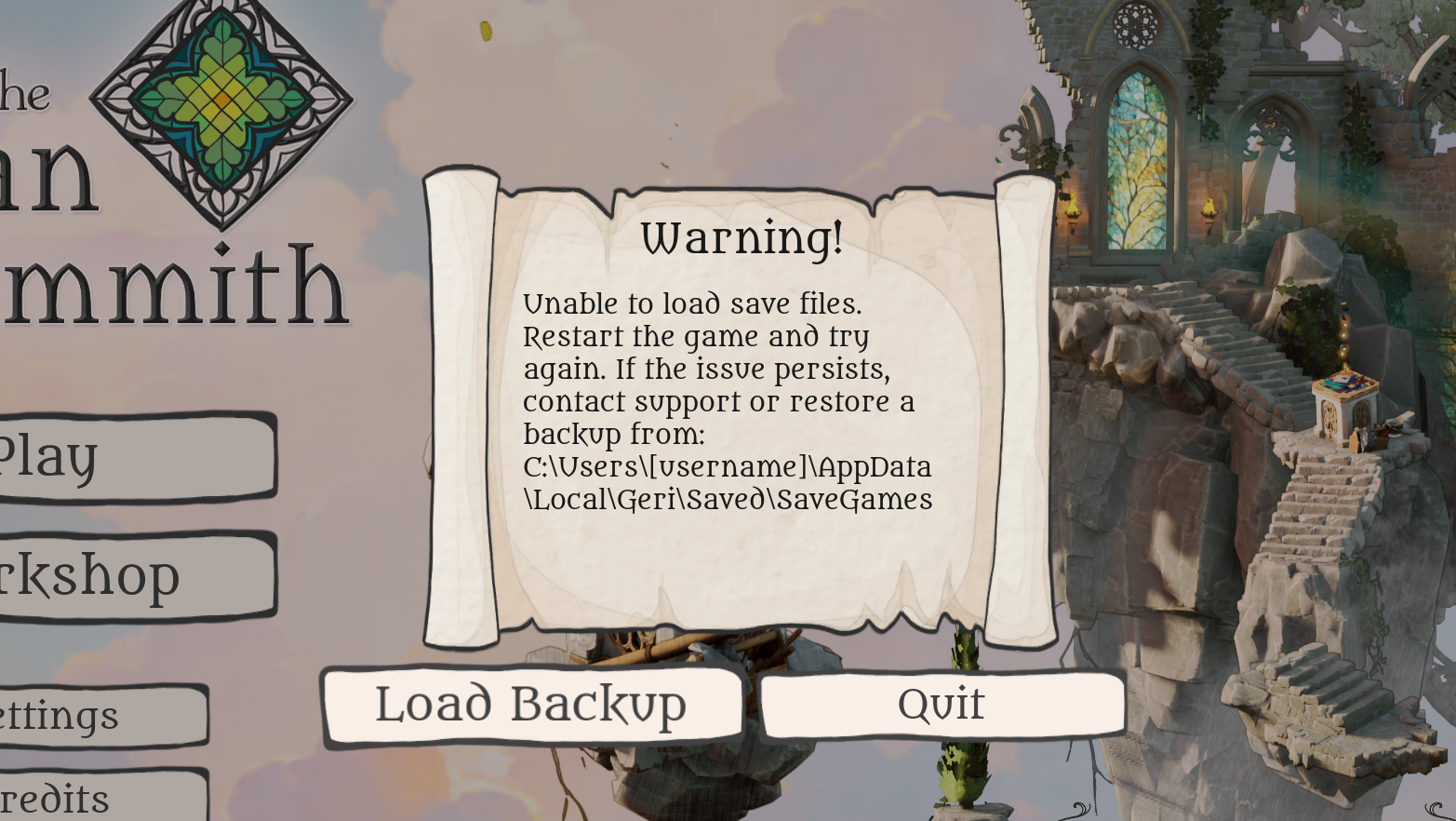
In Glimmith, we create backup saves every few minutes in case this happens. But until now, you had to manually restore your progress from a backup if your save file became corrupted. Now, we've added a new "Load Backup" feature that automatically loads from the latest backup in the event that the main save file couldn't be loaded.
We hope that this allows all affected players to get back into the game immediately without having to mess around with AppData files or submit a support ticket!
Bugfixes and minor tweaks
Fixed a bug where error highlights would sometimes be missing after resizing a grid in the editor.
Fixed a bug where trees were not blowing correctly in the wind.
Fixed a very rare bug where players could get trapped outside of the map boundaries and not get back in.
Fixed a few meshes in the castle area that allowed puzzles to be clicked through them.
Fixed a number of meshes that were not casting shadows correctly on some quality levels.
Fixed a compression setting on the crystal glass texture that was causing an unintended pixelation artifact.
Thanks again
To everyone who gave us feedback or wrote a review, thank you! That information is invaluable in helping us make Glimmith the best game it can be.