Steel Century Groove Update 1.7 is available now! 🎉
This update introduces the ability to import .osz or .osu files, allowing you to have more manual control of custom music charts. You can create Steel Century Groove specific charts that precisely identify each stem, or you can import an already-made chart designed for osu!, osu!mania, osu!taiko, etc. and the game will use that as a guide to improve its automatic charting. You can customize all this in the Fine Tune menu for each track, but the defaults are set up such that you can just download a .osz (such as from here), drop it in like any other song, and start playing!
The update also introduces a new Monument Arena level with destructible skyscrapers, playable in Arcade Mode, endgame modes, and the Cassie Spectacular boss battle. And of course, lots of other improvements, polish, and bug fixes.
Thank you to everyone who's played the game and left feedback or reported bugs! And especially those who helped test this update on the beta branch.
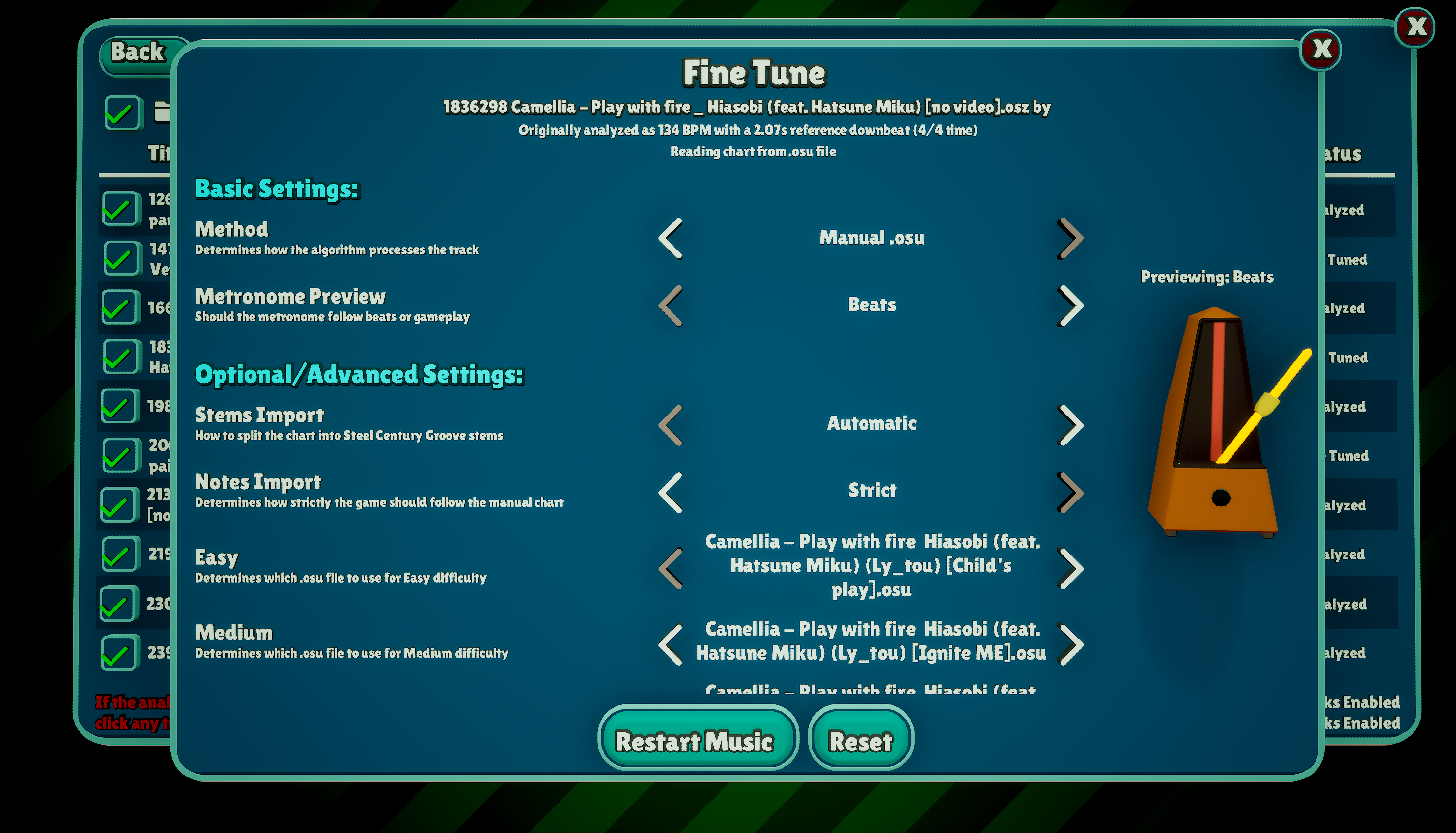
Instructions for .osu/.osz import
.osz (easiest & best):
Add the .osz file to a folder that you have set up for Custom Music
In the Custom Music menu, check the box next to the track
Allow it to analyze, and you're ready to play!
.osu:
Add the .osu file into the same folder as the music file you would like to use it for
Make sure to name it the same thing as the music file, but with the .osu extension
To specify that it should be used for a particular difficulty, add an underscore and the name of the difficulty, e.g. "mymusic_veryhard.osu".
Fine Tuning .osu/.osz tracks
Stems Import: Use "Automatic" for non-Steel Century Groove specific files. The other two options will allow you to use Combo Starts or Finish Hit Sounds to indicate exactly where stems should start or end. Either option is sufficient. You don't need to specify both start and ends. A stem still cannot exceed 12 notes. Technically, stems can overlap, but it doesn't feel good to play!
Notes Import: "Automatic" will try to intelligently pick a subset of the notes in the chart to match the density allowed in Steel Century Groove for your difficulty level. "Loose" will import only the tempo data and use the regular Steel Century Groove algorithm for the rest. "Strict" will try to import every note that it can. This is the best option if you're using a Steel Century Groove specific file.
Extra Allowed Density: Use this to increase the amount of note density from the Automatic/Loose import setting, compared to the normal baseline for your difficulty level. There is also a new setting for this in the options menu, which will add on top of this track-specific one. And you can now also specify this added density even for non .osu tracks.
Difficulty Assignment: For .osz files, the game will automatically try to map the included chart versions to each Steel Century Groove difficulty, but you can also manually assign them here.
Full patch notes:
Music
Added the ability to import .osu and .osz files for more manual control of the game's charts.
Added a new option in the Custom Music Fine Tune menu and the Options menu to increase the allowed note density in custom music. These two options add together, and the global option can be applied separately for automatic vs. .osu custom tracks.
Corrected the track Shine (ft. Andie Nora) by Steam Phunk, which had the title and artist swapped. Made the use of ft. vs feat. more consistent in track titles. Updated the credit on the track Mechanism Bass.
Added the ability to import .FLAC files as custom tracks.
Gameplay
Added a new Monument Arena level with destructible skyscrapers in endgame modes, Arcade Mode, and the Cassie Spectacular boss battle.
Added a new free camera option in Practice Mode and Rematches. With this enabled, right click and drag to move the camera, and use the mouse wheel to zoom. On gamepads, use the left and right sticks. This mode works best with the "No Gameplay" option enabled, but you can also use it without that.
Added a new Auto-Play option in Practice Mode and Rematches. You will not earn XP with this option enabled.
Added a new visual effect when one of your Tenzerks levels up mid-battle.
Added the Brutidon as an option in Practice Mode (Arthur Hayes boss). Allowed the Blaspire (Gigi's Tenzerk) to appear in Quickplay battles.
Cleaned up how input is routed to notes to improve precision in higher density charts.
Increased the Siphox's Absorption Pulse move's base duration to 12 turns so that it can always last at least a full stem.
The intro dialogue for the Goggle Guys now more explicitly mentions Endless Mode (when playing on a save where you did not meet them in the demo).
Rematches with No Gameplay or Auto-Play enabled no longer trigger Rhymery posts or count toward unlocking moves.
Adjusted how cooldown reduction applies to avoid some large breaks in the scaling.
UI
Added a Custom Music tab to the Options menu, allowing you to see how much data the game is using for music cache files and unzipped .osz files. You can use this tab to clear unused cache files or wipe the entire custom music cache.
Added the ability to preview the gameplay notes on the metronome in the Custom Music Fine Tune menu.
Changed the wording to refer to the music time indicator as the "ball" rather than the "cursor" to avoid confusion with the mouse cursor.
Removed the ball/cursor cutout effect and instead reworked the UI so that the gameplay can render over the bottom parts of the HUD.
Slightly increased the amount of UI rotation that occurs from gamepad navigation or using the right stick. Cleaned up which screen gets this effect in a variety of menus.
When selecting music for the final battle, selection now stays on the focused track when advancing to the next selection.
The HUD now hides when the No Gameplay option is selected in Practice Mode or Rematches.
The number picker widget in the Custom Music Fine Tune menu and elsewhere now supports keyboard text input.
The reduce motion accessibility setting now also turns off UI rotation from selection or moving the gamepad right stick.
Animation
Added new dance animations and removed a few lower quality ones.
Reduced the number of idle steps at the start of battle choreography.
Added some new lower to the ground camera angles that can appear in battles.
Audio
Improvements to hit sound/footstep sound sync and scheduling.
Added a separate category in the Audio Options menu for footstep and destruction sounds in battle.
Adjusted the volume of some performance sounds, including slightly increasing the volume of hit sounds.
Added show/hide sounds on the Arcade Mode Tutorials menu.
Bug Fixes
Improved the clearing of props around the battle camera to reduce situations where the camera becomes blocked and enable lower camera angles.
Fixed an issue where the "Early Only" hit sounds mode would play the early sounds as "immediate" rather than sample scheduled to the note timing.
Fixed an issue where rematches that were set to "Filled Acclaim" would not allow you to make Rhymery posts.
Fixed an issue where the transition effect would get temporarily stuck on screen if a custom track with a very abrupt ending looped.
Fixed an issue where the !Important! VFX would disappear from the opponent move list after opening a menu.
Fixed an issue where replica cooldowns would be one turn longer than stated in their description.
Fixed an issue where the Petallion could, in rare circumstances, let you plant a weed before the Uproot ability is unlocked.
Fixed a reply from Seny's dad that could have incorrect grammar depending on the pronoun used.
Fixed an issue where the Practice/Quickplay mode music selection screens would default to the wrong track after playing a built-in track.
Fixed an issue where the continue button could sometimes disappear and reappear on the rewards screen.
Fixed an issue where the clicking the close button on the Arcade Mode Tenzerks menu wouldn't work (vs pressing Esc).
Fixed an issue where the Temportus' move can last a stem longer than expected if the stems are very close together.
Fixed a rare crash when analyzing custom music.
Fixed an extra visual effect that would appear with Lavatch's Sunder move.
Fixed an issue where the Opponent Difficulty option would wrap incorrectly on the Rematch menu.
The Adagion Slomo ability no longer upgrades fully failed hits to passes.