We have noticed that some players are experiencing issues where the game fails to launch properly. Our team is currently investigating this urgently.
If you encounter crashes or a black screen, please try the following steps first:
Please select the “OpenGL3” option in the launch options.
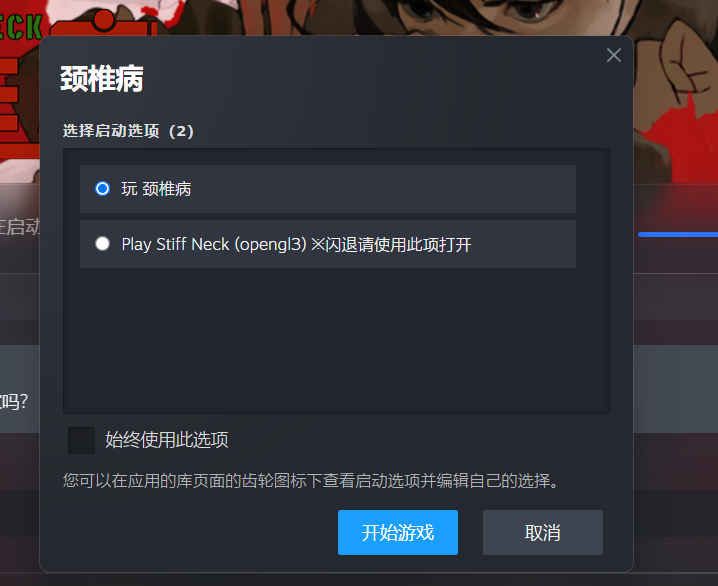 If the issue persists after using this option, please try the methods below.
If the problem still occurs, please try the following:
Outdated graphics drivers are a common cause of crashes or performance issues. We recommend updating your drivers first:
NVIDIA users: Update via GeForce Experience, or download the latest drivers from the NVIDIA website
AMD users: Use Adrenalin software, or download the latest drivers from the AMD website
Intel users: Use Intel Driver & Support Assistant to check for updates
Make sure your system has enough available memory. If not, please free up memory and try again.
Run the game as administrator: Locate the game installation folder, right-click the .exe file, and select Run as administrator.
Disable Windows Smart App Control: Go to Settings → Privacy & Security → Windows Security → App & Browser Control → Smart App Control, then switch it from On to Off (do not select Evaluation mode). Restart your computer and launch the game again.
Verify the integrity of game files: In your Steam Library, right-click the game → Properties → Installed Files → Verify integrity of game files.
Disable your display adapter (temporary test): Go to Device Manager → Display adapters, then right-click your device and select Disable device.
