This one aims to catch up on a number of outstanding bug fixes and smaller feature requests. There's more in this release (new game settings, part behaviour options, Lua scripting API changes) than I'll discuss here, so as always please check out the release notes for the full list.
Linker Tool Improvements
In a previous update I made an attempt to save and restore links that were lost when moving a part selection. This partially worked, but there remained two cases when links were still being lost:-
- Between multi-selected parts when moving them.
- When moving or resizing a part that the linked parts are attached to.
Rather than trying to hack in further fixes, I decided to rethink the problem and implement a simpler and more robust solution.
Now, the game allows for links between parts that don't belong to the same construction to exist temporarily. Such links are invalid but will only get removed if they still exist when the construction is unfrozen.
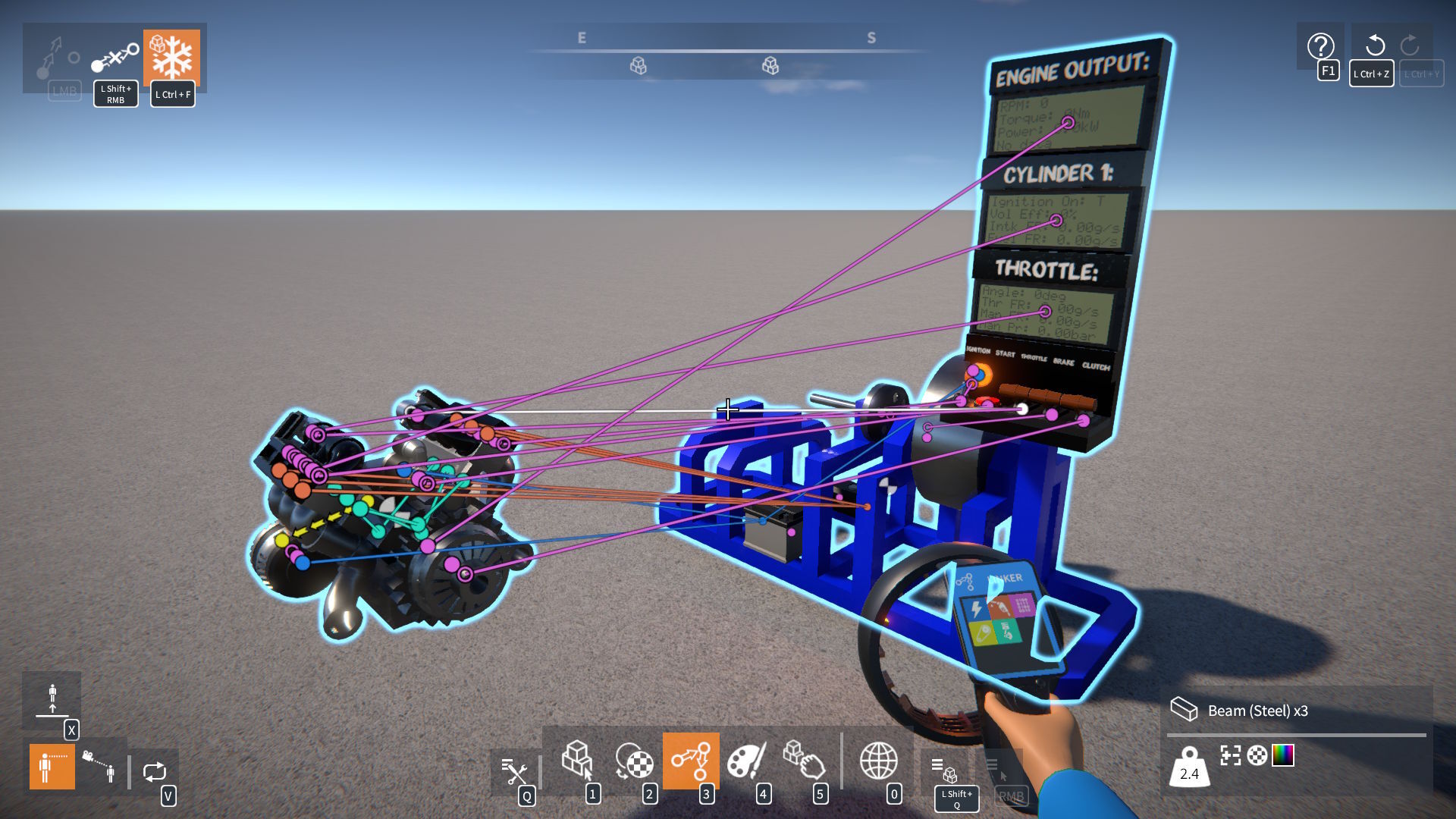
This means that parts can be detached into separate constructions without immediately removing links between them.
It also allows for links to be created between parts before attaching them together, which may be more convenient when building dense creations.
Logic
Data Channel String Formatting
Logic data channels need to be formatted into strings to be shown on linked display screens (and also in the part UI overlay). However, this had a few problems which have now been addressed.
Formatted strings (particularly for Number data channels) would sometimes run off the end of display screens. To fix this, I implemented a custom float to string formatter that adjusts to fit within a maximum number of characters. It automatically reduces the number of decimal places shown, or falls back to a more compact exponential notation if necessary.
Many of the labels and units specified by part behaviours to format their data channels have now been tweaked to improve clarity.
However, sometimes you might want to customise how a data channel is formatted into a string. To achieve this, some new logic module parts have been added.
Number Formatter: Formats an input Number into an output String, with a tweakable prefix, suffix, and max num decimal places.

String Selector: Uses an input Boolean to choose between outputting one of two tweakable Strings.

String Multi-selector: Uses an input Number to choose between outputting one of several tweakable Strings.

Number Expression Logical Operators
Two new operators have been added to the number expression module.
Logical operators: &&, ||. If a is non-zero AND / OR b is non-zero, returns 1, else returns 0.
These can be combined with the comparison and conditional operators, for example:
if(x > 5 && x < 10, y, z * 10)
Logic Module Colour Coding
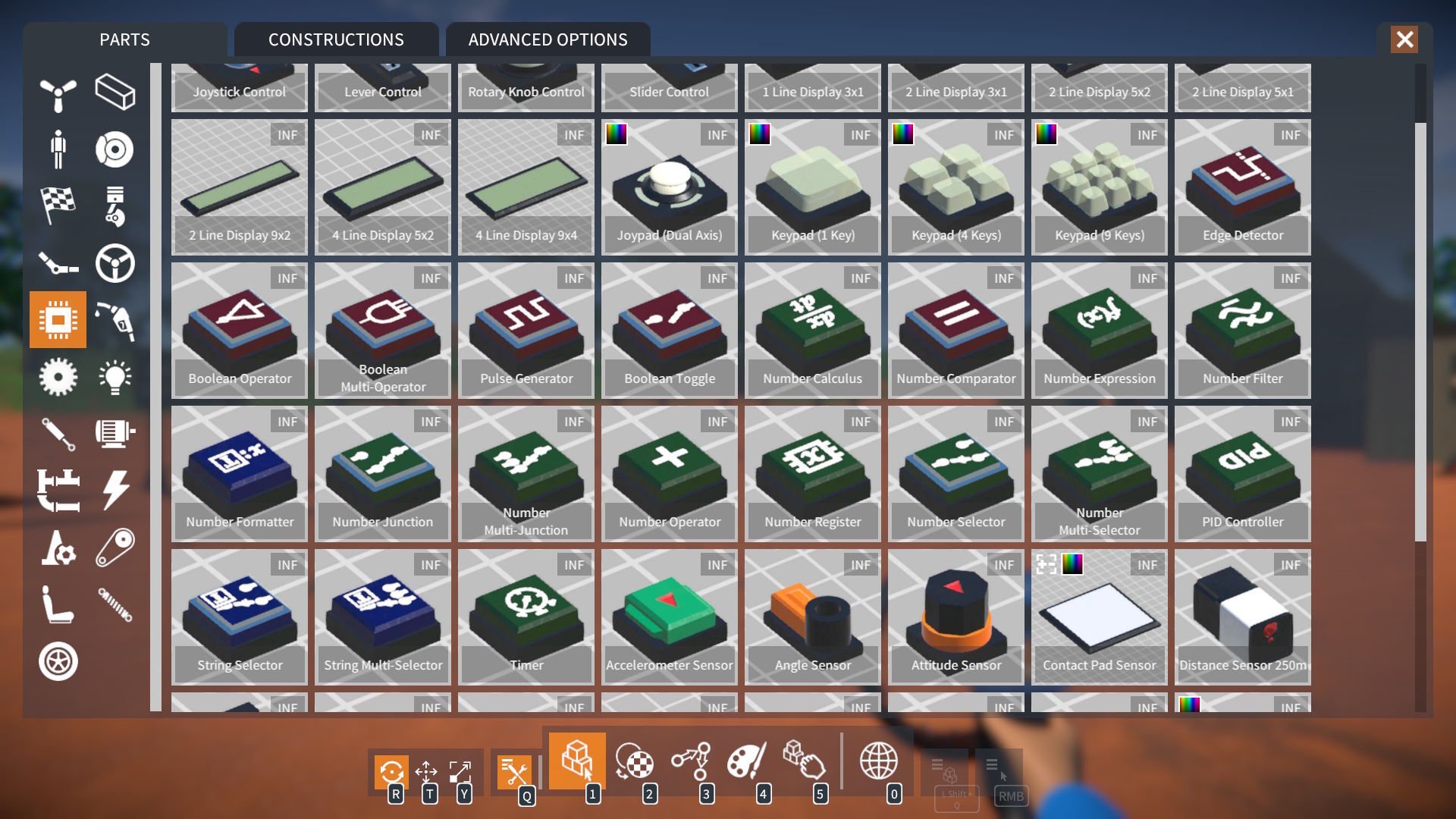
To help distinguish between logic module parts, they are now subtly colour coded by their output channel data type:-
- Red: Boolean.
- Green: Number.
- Blue: String.
Advanced Part Resizing
Many of you like to build with more flexibility than the standard "unit" step part resizing allows.
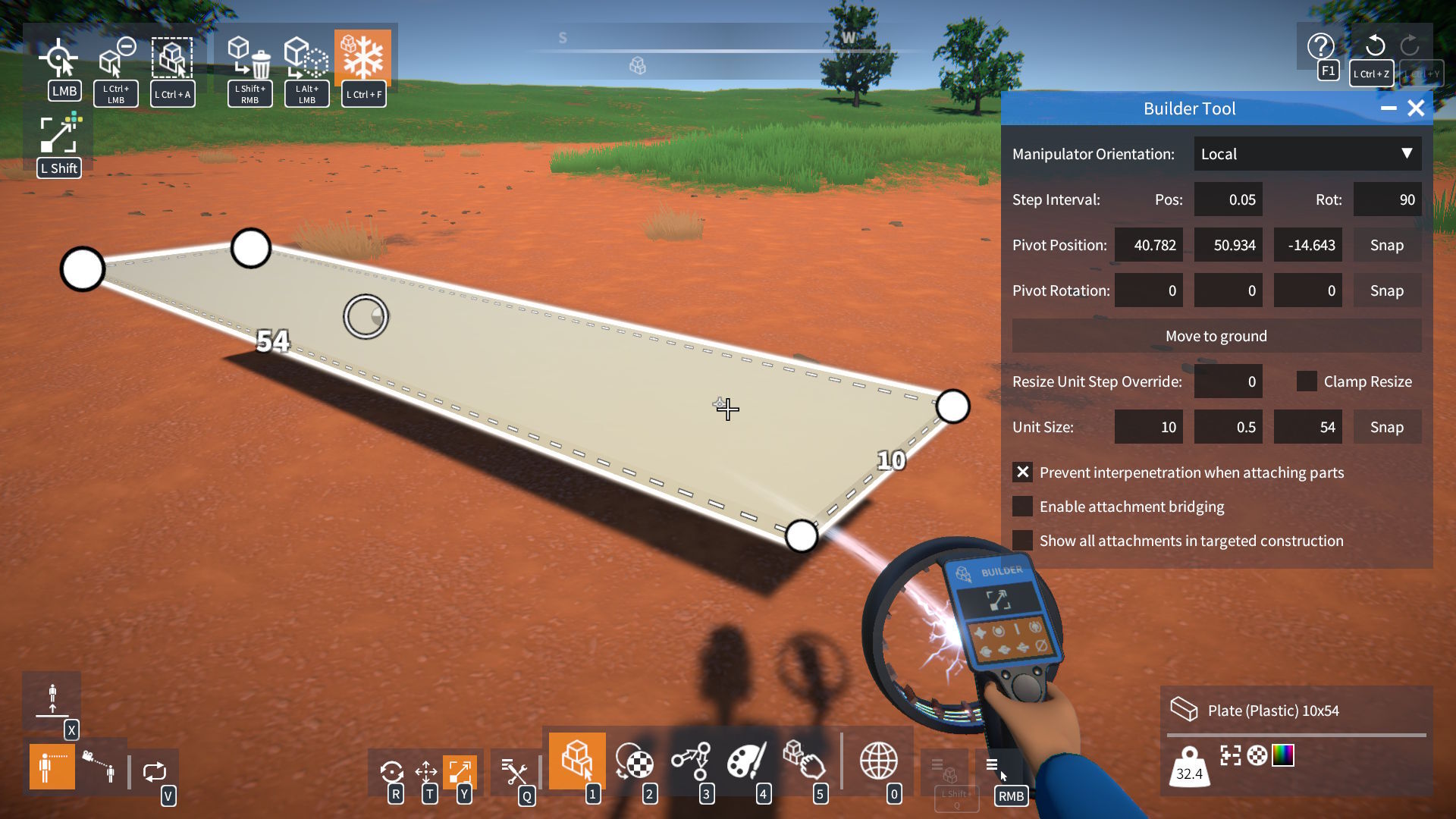
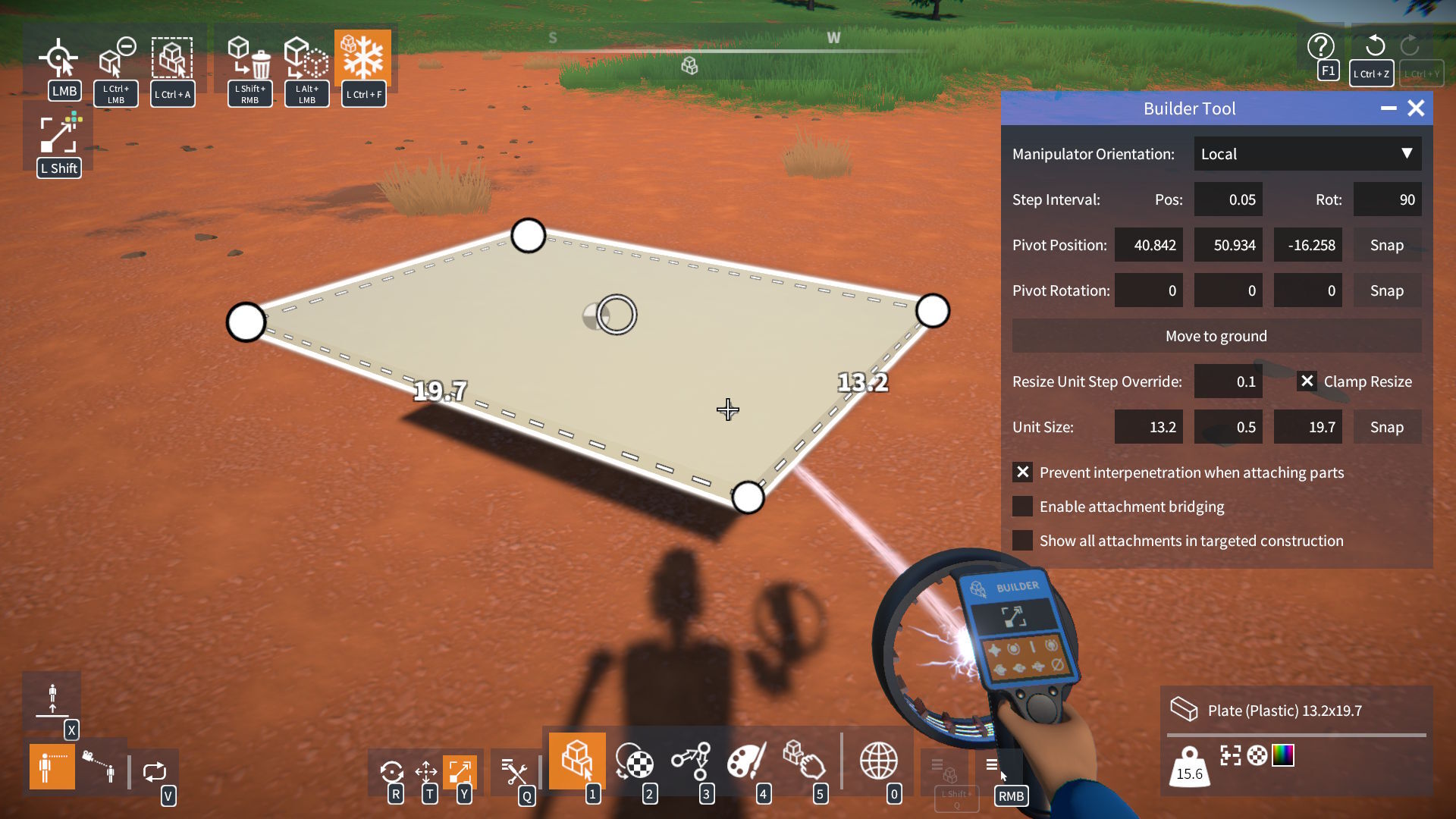
To help make this easier, I have made some additions to the BuilderToolEx script mod:-
- An option to override a part's default resize unit step.
- A toggle to disable part size clamping.
- New fields to directly type in a part's unit size.
These options allow you to circumvent normal part size limitations...
...and to resize in non-unit size intervals.
Asset GUIDs
The game used 64-bit ulong values for asset guids (parts, materials, etc.) However, in GearBlocks Lua scripting, Lua "numbers" can't properly handle 64-bit values due to precision loss: https://www.moonsharp.org/mapping.html
So a new AssetGUID type has been added which replaces ulong for asset guids.
An AssetGUID can be constructed in Lua from an asset name, for example:
local assetGUID = AssetGUID.__new( 'SteelScuffed' )
This means that previously unavailable events, variables, and methods are now usable in Lua, for example:
SelectedMaterialGuid.Value = AssetGUID.__new( 'SteelScuffed' )
NOTE: This change has necessitated modifications to a few interface methods which may break existing Lua scripts. Please refer to the release notes for more details!
Unity 6.0 Upgrade
For a while I've been wanting to upgrade the game from Unity 2022.3 to version 6, and now the time has come. This went fairly smoothly, with a few points of interest to mention.
Issues Encountered
Gear and pulley physics constraints were broken with "swap bodies" enabled, something seems to have changed with how ConfigurableJoint swapBodies behaves. I was swapping bodies based on relative rigidbody mass to improve sim stability slightly, for now I've just disabled this.
Water planar reflection render was broken (missing terrain and trees) - fixed by moving the render from OnWillRenderObject to camera OnPreCull.
Some physics performance regression in the "Welcome Tutorial" scenario, but I got most performance back by:-
- Turning off OnTriggerStay callbacks (refactoring code so they're no longer needed).
- Switching to "sweep and prune" broadphase type.
Performance
The way Unity physics is updated looks to have undergone a major overhaul, it appears to use more jobs now and make better use of multi-threading.
As mentioned earlier the Tutorial scenario loses out slightly, but otherwise these changes seem to be a performance win in most cases. I'm seeing more than 10% performance gains in some scenes, and even up to 60% for one very complex scene I tried.
Unity 6.3
This would be the next (and currently latest) LTS Unity version to upgrade to, however when I tried it, I encountered a couple of things that put me off for now.
After every time recompiling the game I'd get a null reference exception in the Unity editor (graphics settings inspector). It looks like its expecting a scriptable render pipeline, but I'm using the built-in pipeline, so I don't have one set.
There seems to be a partial move from "instance IDs" to new "entity IDs", with some API properties warning the old instance IDs are obsolete, but others are still using them.
Hopefully these issues will be addressed, and I can retry this upgrade soon.
Release notes:-
- Linker tool:-
- Links can now be created between parts that don't belong to the same construction.
- Parts can be detached into separate constructions without immediately removing links between them.
- Such links are "invalid" but will only get removed if they still exist when one of the constructions is unfrozen.
- Links can now be created between parts that don't belong to the same construction.
- Logic:-
- New parts:-
- Number Formatter (custom formatting of Number to String).
- String Selector and Multi-Selector.
- Number Formatter (custom formatting of Number to String).
- Number expression logic module:-
- Added AND and OR logical operators.
- sign(0) now returns 0 (instead of 1).
- Input to asin and acos now clamped to be between -1 and 1, to prevent inadvertent NaN result.
- Added AND and OR logical operators.
- Added "heading mode" option to attitude sensor (to optionally output heading as +/- 180 deg).
- Added "hit non-collidable" option to distance sensor (to optionally detect non-collidable objects).
- Added "enable key click sound" option to keypad.
- Added data source "label" to info shown in part behaviour UI overlay.
- Logic module parts now colour coded by their output data type (Red: Boolean, Green: Number, Blue: String).
- New parts:-
- Part behaviours:-
- Changed int tweakables to float (where appropriate), UI slider still moves in whole numbers, but non-integer values can now be typed in for finer control if needed.
- Implemented "free moving" mode for linear actuators (applies no force when control released).
- Changed int tweakables to float (where appropriate), UI slider still moves in whole numbers, but non-integer values can now be typed in for finer control if needed.
- Added buttons to Builder tool ADVANCED OPTIONS to select / deselect all enabled attachment types.
- Replaced "Part Highlighting Strength" setting in Builder tool ADVANCED OPTIONS with highlighting "outline" and "in-fill" settings in GAME options screen.
- Added setting to GAME options to adjust attachment indicator size.
- Increased mouse look clamp angles, and added setting to CONTROLS options to disable mouse look clamping altogether.
- Advanced part resizing additions to the BuilderToolEx script mod:-
- Option to override a part's default resize unit step.
- Toggle to disable part size clamping.
- Fields to directly type in a part's unit size.
- Option to override a part's default resize unit step.
- Lua scripting:-
- Added a new AssetGUID type which replaces ulong for asset guids:-
- An AssetGUID can be constructed in Lua from an asset name, for example: local assetGUID = AssetGUID.__new( 'SteelScuffed' ).
- Previously unavailable events, variables, and methods are now usable in Lua, for example: SelectedMaterialGuid.Value = AssetGUID.__new( 'SteelScuffed' )
- BREAKING CHANGE:-
- Methods in IPopulateConstructions and IInventory that used to take a part asset name have been removed.
- Instead an AssetGUID must be used when calling these from Lua, for example: PopConstructions.SpawnPart( AssetGUID.__new( 'Propeller 3Blade' ) )
- Methods in IPopulateConstructions and IInventory that used to take a part asset name have been removed.
- An AssetGUID can be constructed in Lua from an asset name, for example: local assetGUID = AssetGUID.__new( 'SteelScuffed' ).
- Changes to IPartSelection:-
- Added NumSelectedParts property to get the number of currently selected parts.
- BREAKING CHANGE: SelectedParts.Count is no longer accessible, use NumSelectedParts instead.
- Added OnSelectionChanged event that triggers whenever parts are added to / removed from the selection.
- Added NumSelectedParts property to get the number of currently selected parts.
- Added properties to InputProxy to get mouse position and scroll wheel delta.
- Added HasValue property to ITweakable (check is true before accessing a tweakable's Value).
- Added MaxNumDecimalPlaces property to INumberField to set the maximum number of allowed decimal places (when not in WholeNumbers mode).
- Added a new AssetGUID type which replaces ulong for asset guids:-
- Bug fixes.
- Upgraded to Steamworks SDK 1.6.1.
- Upgraded to Unity 6000.0.71.