This is our last major feature update which reworks multiplayer, introduces many QOL additions and brings a major update to the Layout Creator, featuring controller support!
Without further ado, let's get straight into the changes:
Tracks
Oceana
[dynamiclink href="https://www.youtube.com/watch?v=UCPgOply42o"]Oceana is the second 2280 track, a free track that completes an old concept from the cut 2280 content of version 0.8. While it's designed to play best in 2280, it's also compatible with 2159 and floorhugger just like with Gullfoss Run.
The game's soundtrack DLC has also been updated with the two songs made as ambience for the track, you can find them in the Extras folder and stream them here. Thanks to Kabelsalat, who tore up his throat for the Dodgems music!
Omega Loop
[dynamiclink href="https://www.youtube.com/watch?v=1t0Lcgxtxcg"]Omega Loop is the third 2280 track, another free track that completes the first 2280 track originally in development for version 0.8. While it's designed to play best in 2280, it's also compatible with 2159 and floorhugger.
General Changes
Enhanced Analog Control
Enhanced analog control is a new input option which maps the steering and pitch inputs onto a square, allowing diagonal inputs to provide full values to both steering and pitching on thumbsticks.
This option makes steering more sensitive when the thumbstick is fully up or down so we've left this option off by default, however we do recommend that you turn it on if you want to get the best handling performance out of your ship when playing with analog inputs.
Reworked Toggle Thrust
Toggle thrust now has a separately tracked state to the ships thrust itself so that it remembers whether it was on or off when ships respawns.
The option is now disabled during the race countdown so you can hit the start boost like normal, and thrust will start enabled by default once the countdown has finished.
Steamless Workshop Support
Steam Workshop mods now work without Steam needing to be open!
When the game has been ran once with Steam workshop content enabled, the workshop folder will be saved and used directly whenever the game can't interface with Steam. See the full changelog for more details on how this works.
Multiplayer Updates
Rollback Netcode
Rockets, missiles, cannon and plasma hits are now synced using rollback on the server. This can actually be customized, where the host can switch between three hit detection modes:
Server Authoritative : The server performs rollback to determine if it was possible for a client to have hit another client (default).
Receiver Trusted : Clients will decide if another client hit them (pre 1.4.1-d6 behaviour).
Sender Trusted : Clients will decide if they hit another client.
Multiple Gamemodes
Multiplayer now supports Knockout, Rush Hour, Upsurge, Eliminator and a multiplayer exclusive version of Team Race! All modes fully support bots if you enable them.
Dedicated Servers now also have a gamemode vote, and the random lobby example lua script has been updated to change the gamemode from time to time.
Some Notes:
When playing Eliminator, bots will combat spin to maintain proximity to the player who has the lowest race position. If there aren't any players (everybody leaves on a dedicated server), then the bots will keep proximity amongst themselves to ensure that the event can end in a somewhat reasonable time.
The placement of barriers in Upsurge are handled client-side. The tradesoffs with this was accurate positions but barriers could pop out of nowhere, or inaccurate positions but you get a chance to react, and we think it's better if you don't have to deal with barriers spawning out of nowhere.
Bot Variants
Bots will now be given random ship variants when the server is deciding which ship to give them. Beforehand, bots always used the default (2159) variant of ships.
More synchronization
Many more game events are now correctly synchronised, such as ships being eliminated, ships respawning, ships passing the mid and start line, etc.
These used to be handled client side as they aren't essential to accurately synchronize for just racing. The other gamemodes however have progress and win conditions that are bound to these events, so it was vital that the server is aware of when these events happen instead of just guessing based on the latest information it has on everybody.
This should also fix the long standing bug where some ships can stay on fire after being eliminated.
Ship combat stats are now also synced at the start of every race. If you're using a ship that others don't have installed, your weapons will now deal the damage they're supposed to.
Finally whether ships can collide with each other (both players have each others ships installed) is now synced. If you're seeing somebody in the null ship, you'll no longer collide with them. We've also made some minor improvements to collisions, but we still recommend that you keep them disabled.
Controllable Spectator Camera
The spector camera, previously only used if you died in a race with spawns disabled, is now user controlled! You can now switch between ships and the track cameras / orbit camera modes for yourself, the game will no longer do it automatically.
New Code Mod Mode
It's now possible to run servers where the host can whitelist code mods.
When in Allow Matching mode, clients do not need to be running the same code mods as the server, but can only join while running any of the mods the server is.
Layout Creator 3.0
Version 3 of the layout creator makes many changes that have facilitated the introduction of customizable hotkeys, controller support and many improvements across the board.
The layout creator was previously a mess of hard coded inputs among a sea of spaghetti code, so the first thing that needed changing was that.
We now have a tools system which has allowed us to make the editor much more modular and remove a lot of jank that came with the introduction of new features over the years.
Hotkey Editor
Now that everything is modular and has a structure, the layout creator finally has a hotkey editor!
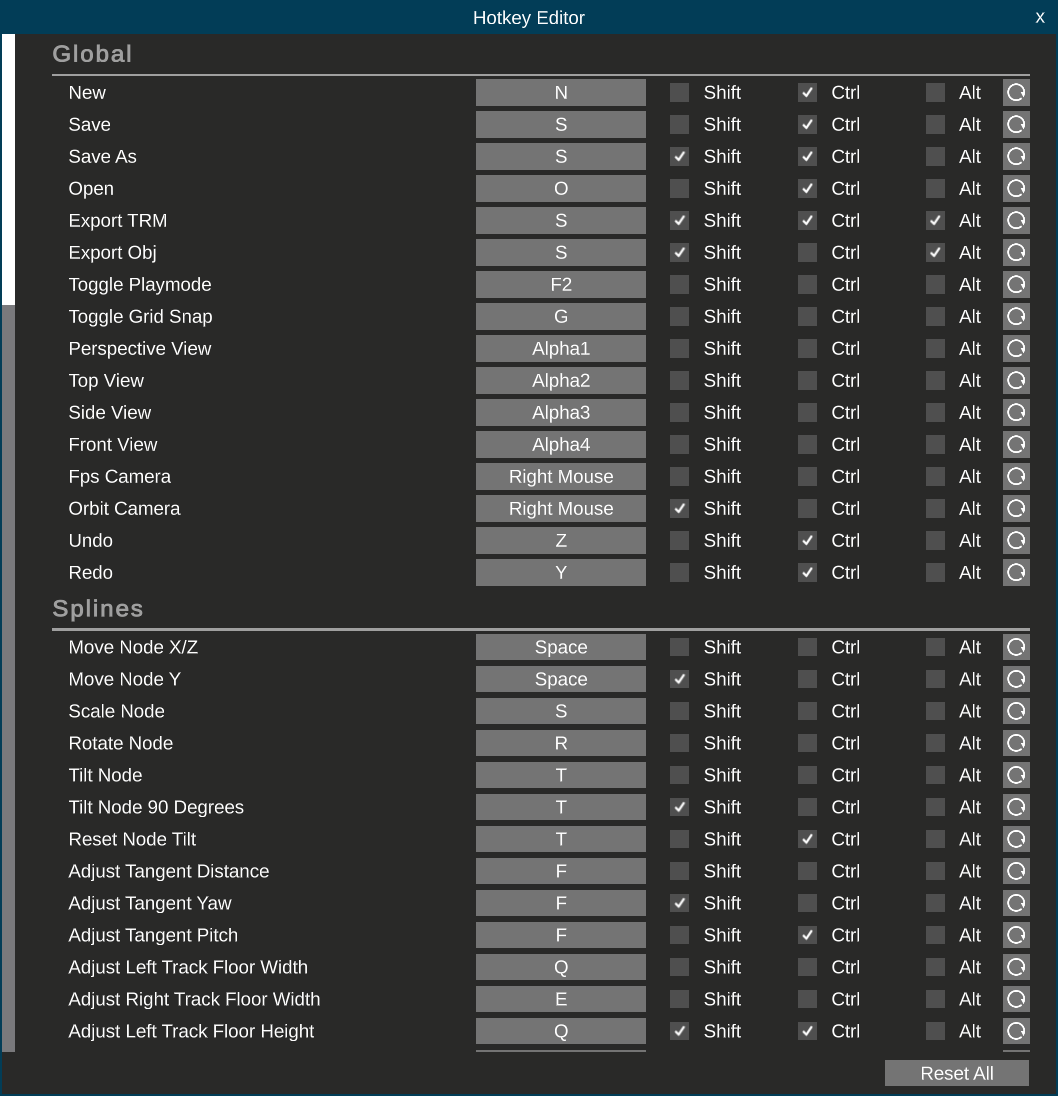
Controller Support
[dynamiclink href="https://www.youtube.com/watch?v=3O8_N3yWI9s"]With the tools system implemented, it became much more trivial for controller support to be implemented. With exception to the perspective orbit camera, the layout creator is fully functional when using a controller! You'll need a controller that's supported by Rewired's gamepad template for this. If your controller works out of the box with the game then you have a controller that's supported. You can also refer to this table, where anything with the gamepad icon on the left hand side is supported: https://guavaman.com/projects/rewired/docs/SupportedControllers.html
Analog Stick Ease Power
Similar to the steer curve option for gameplay, the layout creator has an easing curve for analog inputs to help you stay precise near the resting position of the analog sticks. By default this is set to use a power of 3 which we felt works for Dualshock 4, Dualsense and Xbox controllers, but you can customize this:
Open the menu (X for Sony controllers, A on Xbox)
Navigate down to Set Ship
Navigate right until you reach Set Analog Stick Ease Power
1 is linear, above 1 reduces sensitivty near the center of the stick, below 1 increases it.
Selection Spread Crosshair
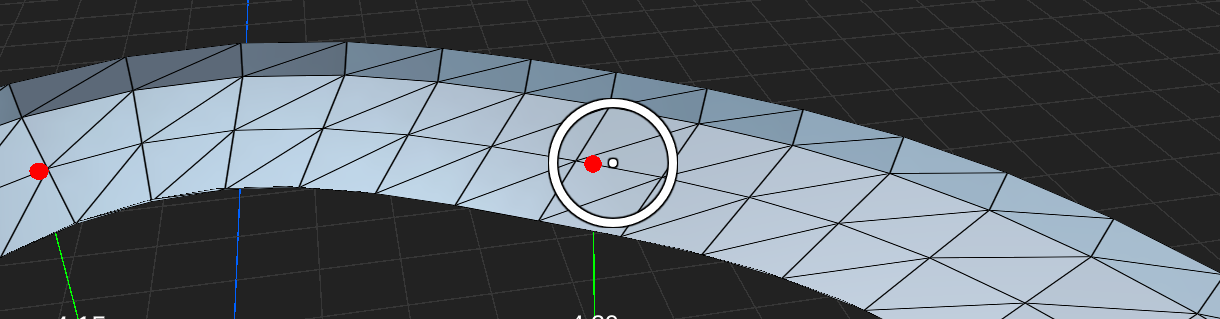 As it's harder to be as accurate with an analog stick then it is a mouse, whenever you're selecting nodes the crosshair is turned into a circle where anything that's within its radius will be considered for selection. If there's multiple nodes within the circle, the node closest to the center dot takes priority.
Templates
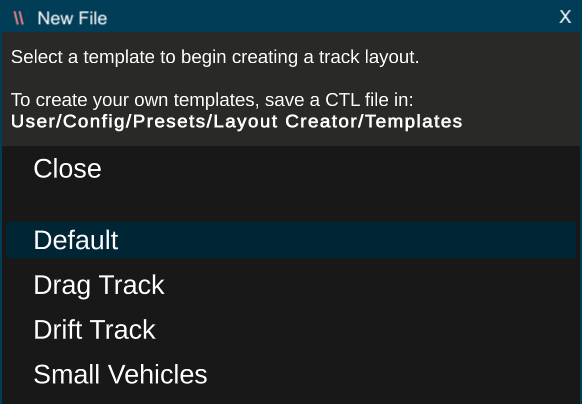
The layout creator now has templates! When you first load into it, or when you start a new file, you'll be given an option to select one of four starting templates depending on the kind of track you want to make. These templates provide an appropriate track width and play mode setting configs for each track type. You can also create your own templates by saving a CTL file into the User/Config/Presets/Layout Creator/Templates folder.
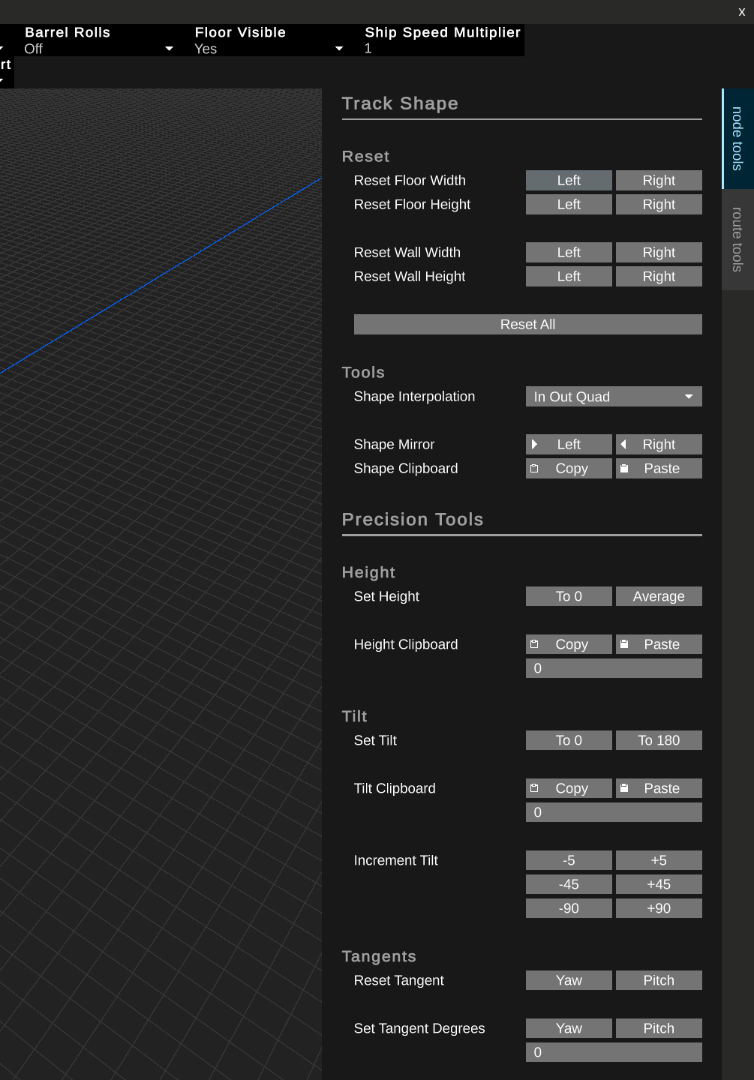
The Sidebar
Additional tools were previously hidden away in windows that were accessed through the menu bar.
These have been moved into two tabs that are more immediately accessible on the right side of the screen. The options have also seen a layout update to make the interface much cleaner.
Modding Tools
This time around we haven't had much change with the Unity Tools. A bug relating to the track camera scriipt has been fixed and we've added the Omega Loop tile textures.
These changes have been added to the 1.4 release package: https://github.com/Neognosis-Workflow/BallisticNG-Unity-Tools/releases/tag/1.4
The NeoTilemap Blender addon has however seen a major update to 1.4 with new features and QOL improvements. A lot of these changes were made during the development of Omega Loop to further speed up the UVing process.
The Sunsetting of Development
As we've talked about in previous announcements, 1.4 is BallisticNGs last major update, and 1.4.1 brings the final touches that we wanted to work on.
We'll still be fixing bugs, implementing smaller community requests and be working on some paid content DLCs, but this is our last major update and we'll now be looking at our next project.
You can get a rough outline of DLCs that will be worked on using our roadmap. We'll also be looking at more community collaborations for free additions alongside DLC development.
A huge thank you to everybody who's been playing, it's been a lot of fun to develop the game. We've come a long way in the past 10 years, we hope that all of the work helps the game stay strong for another 10 and we look forward to showing off a new project in the future!
As of this update the game's soundtrack has also been concluded. A continuous mix of every song has been uploaded to celebrate the final size!
[dynamiclink href="https://www.youtube.com/watch?v=Rrml7q6lsGc"]
Full Changelog
Tracks - Free Tracks
Added Oceana
Added Omega Loop
Tracks - Outer Reaches
Fixed random pitlane tile on Project 9 reverse
Multiplayer
Added hit detection mode option:
Server Authoritative (default) : The server performs rollback to determine if a ship has been hit by a projectile
Receiver Trusted : The client being hit decides if it was hit by a projectile (pre 1.4.1 behavior)
Sender Trusted : The client firing a projectile decides if it hit somebody else
Added auto-synced network time for event tracking
Added allow matching code mod option, whitelisting the code mods the host is running and allowing clients to exclude code mods,
The MD5 hash of code mods that prevent a connection are now displayed in the console log,
Dedicated server example CFG updated with NetHitDetectMode setting
Ship combat stats are now synced between peers
Peers now share whether they can collide with other peers (ships not installed),
Improved quaternion compression (7 bytes to 4)
Peer ship transforms are now synced with extrapolation and faster interpolation (more accurate player positions with prediction and less jitter)
Peer ship tilt is now interpolated
Ship teleportation events are now synced
Airbrake animations are now synced
Improved accuracy of predicted spawn transform for projectiles (uses predicted position without interpolation and now accounts for predicated rotation)
Peer ships now have basic PhysX rigidbody physics running to improve collisions
Peer names are now cached on their linked ships (prevent Unknown Networked Player showing if a player disconnects mid-race)
Knockout can now be played in multiplayer
Upsurge can now be played in multiplayer
Eliminator can now be played in multiplayer
Rush Hour can now be played in multiplayer
The spectator camera is now user controlled and allows access to the pause menu
Ship laps are now synced as trigger events happen instead of being included in per-tick ship data
Ship eliminations are now synced as they happen instead of being handled on each clients side (this should also fix the long standing fire ship bug)
The race completion check no longer tries waiting for players who have backed out to the lobby
Disconnected peer ships are now hidden
Bots are now assigned random ship variants
The` gamemode is now shown under the track name in the lobby
Chat messages can no longer re-enable parsing with tags
Fixed in-game host resetting ship collisions to off after the initial lobby settings load if it was enabled in the saved settings
Fixed bot ship weapon hits not registering against the host in Server Authoritative and Sender Trusted hit detection modes
Fixed pause menus remaining open when switching to result screens,
Fixed the racers list not always updating correctly when ships are eliminated
Fixed a race condition where both the gamemode and race manager can trigger a return to lobby (potential fix for inconsistent breaking of menu inputs)
Fixed players loading into events if their client hasn't confirmed the servers settings (poor connection or gamemode that isn't installed)
Fixed post server setup not running for Steam lobbies (clients would receive correct loaded config but server would not be initialized with that config)
Fixed unknown ghost players being created in Steam lobbies if a new connection happens during the handshake for another new connection
Dedicated Server
Added Vote Gamemode option
DedicatedServerExample.cfg updated with LobbyVoteGamemodePercent entry
RandomLobbyExample.cfg updated with Online Team Race entry in gamemode list
Random Lobby example scripts updated with random gamemode selection
The MD5 hash of loaded code mods are now logged in the active code mod list on startup,
The list of available code mods that can be used are now logged on startup,
CodeModsMatch CFG option replaced with CodeModPolicy. See the comment in the example CFG for accepted values,
Fixed bots not having eliminations reported
Fixed several sources of null reference exceptions being thrown due to notification buffer messages being triggered without anything listening for them
Fixed code mods not loading
Engine
Corrupt controller sava data files are now detected and deleted instead of breaking the game on launch. A message will be shown on screen to inform of this happening.
Fixed menu softlock if there's an issue loading the user profile image
Fixed softlock on launch if MacOS generates Apple Double (._) meta files where the game is reading directory contents
Ships
The eliminated fire sound is now stopped when entering a spectator camera
Elimination fire now only plays for 10 seconds
The internal camera is now used if the default view is set to cockpit and the ship doesn't have one
Fixed AI trails not being reset when teleporting
Fixed airbrake animations with a steer response not working on AI
Fixed the 2280 Barracuda Model C being classified as a high-end ship in multiplayer
Pickups
Hellstorm no longer locks onto eliminated ships
Projectiles no longer collide with eliminated ships
Player cannon hit sounds now play in multiplayer when using the Server Authoritative or Sender Trusted modes
Mines now have the same explosion sound radius as projectiles
Cannons now play their destroy animation and sound when colliding with mines
Fixed plasma impacts not creating camera shakes against walls,
Fixed multiple projectiles being able to trigger an explosion for the same mine if they collide with it in the same frame
Shooting rockets at a line of mines head on now allows you to destroy 3 of the 5 mines
Gamemodes
Added Online Team Race
Multiplayer exclusive version of Team Race
Create and join teams before the race countdown. Bots play in their own team.
Every player can be in their own team
Team setup runs for 15 seconds. After 15 seconds, any unassigned players will be auto placed into existing or new teams
Teams are scored based on the average of its members final places + the best place in the team
Team members are marked and can't be targeted by lock-ons, but can still take damage if hit
Players who DNF contribute last place scores to their team (reduces average)
Gamemodes - Rush Hour
Fixed discharge start time notice not displaying
Gamemodes - Eliminator
The target score can now be lowered to a minimum of 150
Options
Added enhanced analog control to the Input Options menu. When enabled, the steer and pitch inputs are mapped onto a square so that diagonal positions on an analog stick provide full inputs.
Fixed CRT Brightness being labeled as CRT Resolution
Input
Controllers no longer rumble when the players ship is eliminated
Toggle thrust is no longer active during the race countdown, and auto activates once the countdown has finished
Fixed toggle thrust losing its state when the ship respawns
Achievements
Look Ma can now trigger if the hit ship has a shield deployed
Fixed Look Ma triggering when a missile has a lockon
Fixed being able to shoot your own mines to unlock the Minesweeper achievement
User Interface
Input glyphs in the track and ship selectors are now hidden when an overlay is open
Xbox ABXY button glyphs now use the Aldrich font
Xbox back and start glyphs now use the modern view and menu button iconography
Multiplayer race and tournament results now display positions with text suffixes instead of just the raw place number
Fixed the lobby chat message dialog overlay staying open if the lobby is closed while it's open
Modding
Moved the small vehicles template CTL in the modding folder to User/Config/Presets/Layout Creator/Templates
CS source files can now be discovered in sub-folders when letting the game compile code mod libraries
Mods installed through the Steam Workshop now work without Steam open if workshop mods have been loaded at least once
When the game is ran with Steam open and Workshop content present, it will use the first available workshop item to cache the workshop folder location in User/Config/SteamWorkshopPath.txt
When the game is ran without Steam open, it will recall the previously saved workshop folder location to manually discover mods, otherwise it will continue to use Steamworks to fetch workshop mods and respect the load order and enabled states
Disabled workshop items will show up when loading workshop content without Steam running (Steam explicitly manages this)
Layout Creator 3.0
Tools System:
All hard coded inputs calling functions in spaghetti have been replaced with a modular context, tools and action system:
A context provides a set of tools and are selected with the edit mode dropdown at the top of the editor
A tool provides a way to interface with the editor. These are inspired by Blender and can be passive (camera movement, selection) or modal (adjusting spline nodes, transforming physic zones, etc)
Actions provide per-context access to tools through hotkeys, which can now be customized
Modal tools can provide their own inputs to expand their feature set. Actions are disabled when using a modal tool so hotkeys don't conflict
UI:
Added Hotkey Editor (Edit -> Hotkeys). Inputs are saved in User/Config/Layout Creator
Added properties side bar. The node and route tools windows have been moved here
Inputs for modal tools are shown at the bottom of the screen while the tool is being used
The physics mod zones settings list has been moved to an invisible tab in the side bar which activates when a physics zone is selected
Updated text to TextMeshPro
Hotkeys:
Added New File (Ctrl + N)
Added Open (Ctrl + O)
Added Save (CTRL + S)
Added Save As (Ctrl + Shift + S)
Added Export TRM (Ctrl + Shift + Alt + S)
Added Export OBJ (SHift + Alt + S)
Added Copy and Paste Track Shape (Ctrl + C and Ctrl + V)
Added Copy and Paste Physics Mod Zone Settings (Ctrl + C and Ctrl + V)
Added Select Next Node (Right Arrow)
Added Add Next Node To Selection (Shift + Right Arrow)
Added Remove Next Node From Selection (Ctrl + Right Arrow)
Added Active Selection To Next Selected Node (Alt + Right Arrow)
Added Select Previous Node (Left Arrow)
Added Add Previous Node To Selection (Shift + Left Arrow)
Added Remove Previous Node From Selection (Ctrl + Left Arrow)
Added Active Selection to Previous Selected Node (Alt + Left Arrow)
Added Add Route To Selection (Shift + Up Arrow)
Added Select Route (Up Arrow)
Added Deselect Route (Down Arrow)
Orbit camera changed from middle click to shift + right click
Orbit camera distance changed from W/S to scroll wheel (sensitivity is now dynamically adjusted based on distance to target instead of the FPS camera speed)
Clear selection changed from backspace to escape
General:
Added controller support
Added notification feedback to more actions
The orbit camera can now focus on objects in the reference image and physics mod zone edit modes
The track refresh rate now defaults to the monitors refresh rate
Track nodes are now smaller and always render on top
Sliders in the route tools UI have been replaced with input fields, allowing for any values to be entered
Entering the layout creator and creating a new file now opens a templates list. A few templates are provided with the game and you can add more by saving CTL files in User/Config/Presets/Layout Creator/Templates. Loading a template doesn't set it as the active file so you can't unintentionally save over it
Fixed holding speed up not increasing the speed of the FPS camera raise/lower movement
Spline Tools:
Added Transfer Routes tool, available in the route tools tab:
Select, in order, the nodes you'd like to move to another route
Select the node in the destination route you'd like to move the nodes to. The nodes will be logically placed AFTER the destination node
Run the route transfer tool
This tool can also be used to move the order of nodes within the same route
Added extract route tool, available in the route tools tab:
Select two nodes in the same route
Run the extract route tool. The nodes between, and including, the selected nodes will be moved into a new route
Track shape copy and paste can now handle sequences of shapes in the order of selection. The sequence is repeated if there's more nodes selected when pasting then there was when copying
Creating a new route now selects the last node in the route to enable immediate editing of the route
Scaling and rotating nodes now uses the mouse cursors position as the origin point. Using the previous average position method can be accessed by pressing the hotkey again when using the tool (by default)
The insert tool is now an interactive modal tool where you can click the node position onto the spline. Holding shift snaps the position to thirds, and holding CTRL allows continuous insertion of nodes
Nodes can now be click dragged on XZ without needing to use the move tool. Vertical dragging can be performed with the side or front camera views
Nodes can now be created with grid snapping and straight locking at the mouse cursor by double clicking. The grid plane is used for this, so use the bottom of the node height lines to align your mouse
Nodes can now be now grid snapped when scaling and rotating
Move To Cursor in the move tool now works when adjusting node heights
The distance that nodes have been moved during move and scale operations are now shown
The angle that nodes have been rotated and tilted are now shown
Adjusting track shapes is now handled per node instead of copying the first selections shape to others. Press space when using the track shape tool to toggle between per-node and first selection copy modes
Pressing R when adjusting track shapes now toggles between the default shape and the adjusted shape
Pressing F when adjusting node tangents now toggles between the default values and the adjusted values
Activating the scale and rotate tools with only a single node selected now switches to the tangent distance and tangent rotation modes respectively
Jumps and teleporter node types are now rendered with a line and label
Route labels now signify which route is the active route
Optimized track node rendering
Fixed resistive behavior when tilting nodes
Fixed tangents not being refreshed when toggling route close
Fixed tangents not being refreshed when appending nodes
Fixed tangents not being refreshed when inserting nodes
Fixed tangents not being refreshed when deleting nodes
Fixed Allow Out Of Bounds not being restored when undoing/redoing
Fixed route labels not rendering if the route only has a single node
Physics Mod Zone Tools:
Added undo/redo support to physics mod zones add, delete and transformation changes
Added copy and paste actions for physics mod zone settings
Physics zones can now be scaled along axis planes using Shift + X,Y,Z inputs in the scale tool
Physics zone scales can now be reset by pressing S while using the scale tool
Physics zones can now be rotated along the X and Z axes
Physics zone rotations can now be reset by pressing R while using the rotate tool
Reference Image Tools:
Added undo/redo support to transforming the image plane and changing the reference image
Editing the reference image is now its own edit mode, instead of being hacked into the spline tools edit mode
Removed reference plane locking (not unnecessary with these changes)
Debug Tools
Added visualization of steer and pitch inputs to the F1 stats overlay
When in a multiplayer game, the network time and latency are now displayed in the Debug Hub. The latency is updated every 5 seconds alongside the network time sync.
AI
The AI ahead of player lap multiplier is no longer applied in multiplayer
Soundtrack
Added the music playing in Oceana to the soundtrack Extras folders (Buccaneers Cove and Dodgems with and without voice over)