Wallpaper Engine 2.6 comes with several new features for the wallpaper editor, the update also fixes some bugs and improves compatibility with Windows 11 24H2.
Clipping Masks for Puppet Warp Animations
Clipping masks are a useful tool to implement certain animations which were not easily possible previously. With clipping masks, you can define certain areas of a puppet model which only become visible when they are hovering over the area that you have defined. This can be used to implement some unique effects and is especially useful for creating the appearance of animated shadows or shading on an object.
 Self-shadowing example achieved with a clipping mask Self-shadowing example achieved with a clipping mask |
To learn more about how to utilize clipping masks, take a look at our designer documentation.
New Editor Effects
We have also added four new effects which you can apply to image layers in the editor. As always, effects can be used in more than just one way and we are looking forward to some creative uses of these effects.
| Shimmer A recurring line of light moving across your image. 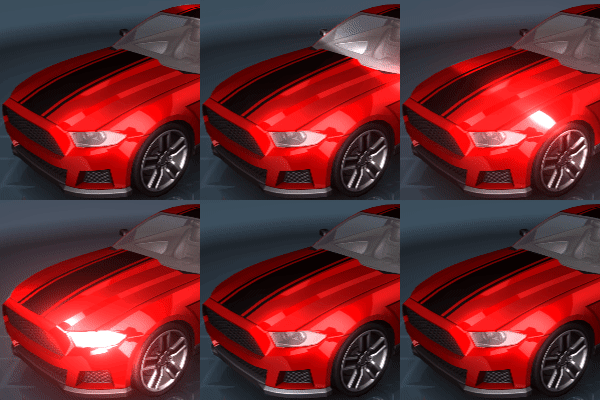 | Water Caustics Mimics light rays reflecting off of water.  |
| Glitter Bright spots of light which appear briefly.  | Cloud Motion A new option to simulate cloud movements.  |
Rope Physics Simulation
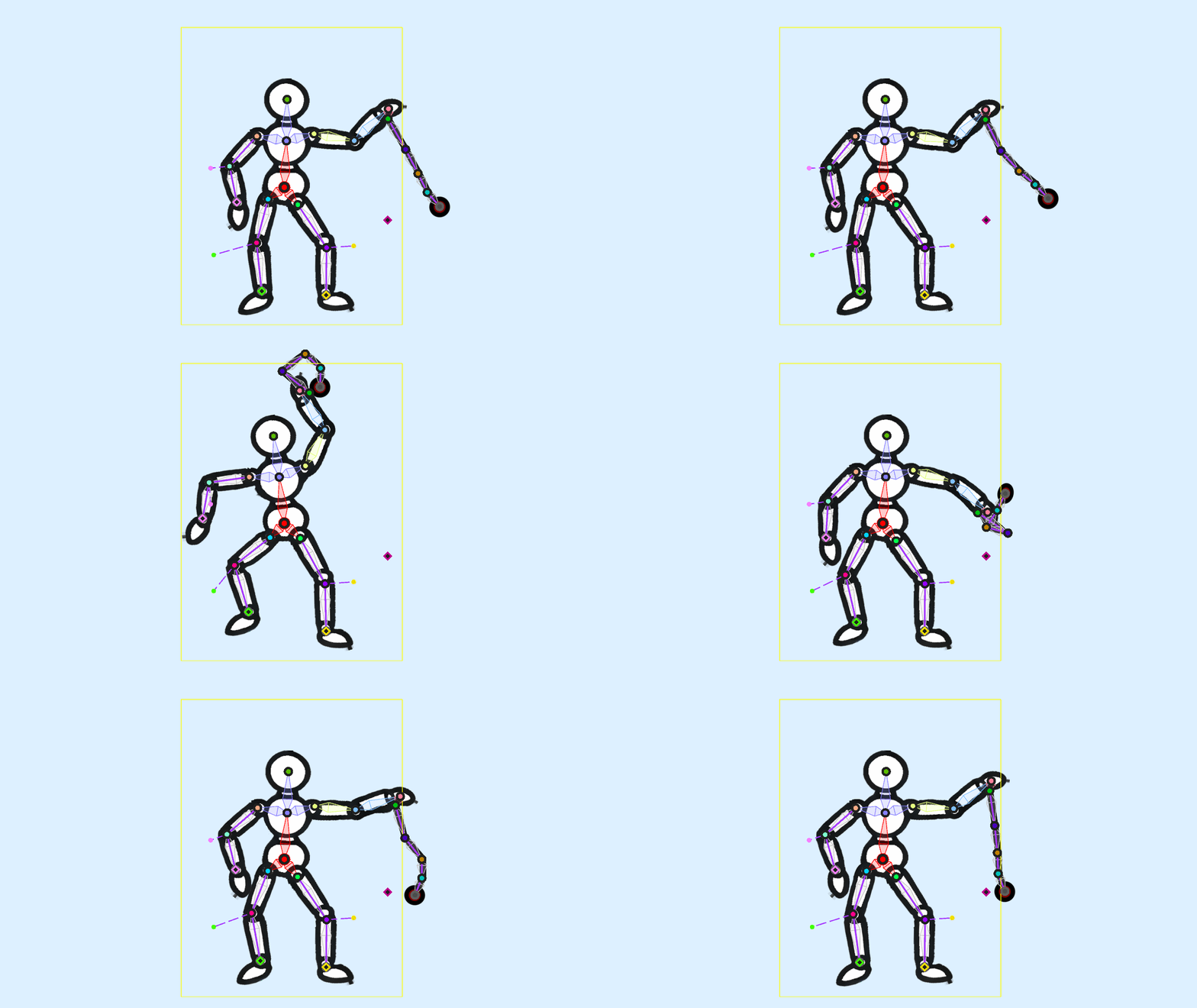
Another feature we have added is a new rope physics simulation for puppet warp animations. The new rope physics can also be used with a new global wind setting, allowing you to create objects that appear to be dangling in the wind. To learn more about this feature, see the Rope Physics with a kinematic chain section on the following page of our designer docs:
Please note that this feature is not to be confused with the old Simple Rope Physics guide which is also outlined on the same page.
Texture Variants
A relatively common feature which users like to implement is to offer multiple designs for individual wallpaper elements. However, this is often done by duplicating layers which is a pretty inefficient way to approach this problem. With the new texture variants feature, you can define multiple textures for the same image layer, as long as the textures all have the same dimensions. Users can then choose their favorite texture through user properties. This allows for efficient loading and unloading of textures and keeps the editor project in a clean state.
The feature is the right choice for you if you want to replace the look and feel of certain wallpaper elements (such as characters, objects or even entire background layers) but retain all effects, scripts and customizations on the layer. In our very simple example below, we are changing the apple from a red texture to a green texture. In a more realistic scenario, you could also think of this as a character changing their entire set of clothes or the background scenery changing.
You can also easily add new elements to a texture by using the alpha-blending feature which we showcase by adding a price tag to the apple.

Take a look at our full changelog to get an overview of all additions, changes and bug fixes:
Changelog
Additions & Changes
- Added clipping mask system to puppets.
- Added new effects: glitter, shimmer, water caustics, cloud motion.
- Added texture variant system.
- Added generic vertex editing gizmos to make rotating/scaling multiple vertices at once possible.
- Added blend shape bone modulation.
- Added puppet warp rope simulation with global gravity and wind properties.
- Added an option to control the cycle interpolation in water flow effect to reduce blurriness/image copies.
- Added low FPS preview option to editor. Especially relevant for physics simulations.
- Added wallpaper transition option for wallpaper previews. The option can be found in the "General" tab of the app settings.
- Added ability to disable color overrides on child particles.
- Added missing interpolation filter initialization for layers without reference texture.
- Faster puppet animation editor undo.
- Enabled editor degree conversion rounding for generic properties and physics constraints.
- Disabled color override on fireworks refract particle to fix background tinting.
- Changed mip map streamer to load third detail level first for slightly faster render start.
- Added automated puppet mesh depth generation. You can find the option in the Geometry settings after locking the geometry. Click on Edit Deformation, select a limb or an entire model by double-clicking it and then use the "Auto Depth" button at the bottom.
- Added masked default shader snippet to shader editor.
- Added sampler generator to shader editor.
- Added new perlin and uniform default textures.
- Added diffuse light blend mode to shader blend modes.
- Removed light layer limit and changed light system to render the closest lights only if light limit is reached.
- Added 64 bit compiler to resolve crashes on very large textures.
- Added texture size on disk to texture info page.
- Added VRAM and genre hints to publish dialog.
- Added position offset to puppet warp reference overlay.
Bug Fixes
- Fixed lockscreen override and clone functionality on certain multi-screen environments.
- Fixed Windows 11 24H2 update breaking screensaver detection.
- Fixed Windows 11 24H2 update causing freezes on web wallpaper transitions.
- Fixed editor degree conversion to work without rounding too.
- Fixed visibility property in asset packs losing meta data when uploading.
- Hide parallax settings on child layers since the parent element controls parallax in this case.
- Fixed precomposed children not rendering last effect pass with alpha writing enabled, thus being invisible.
- Fixed VHS effect mask.
- Fixed particle drag behavior on high settings when FPS are very low.
- Fixed paint message dead lock when importing multiple videos in editor.
- Fixed puppet compiler crash when model is missing initial weight data.
- Fixed sprite trail length fps compensation.
- Fixed user property main panel reload on inline binding change.
- Fixed scene script storage not properly separating data store between Workshop wallpapers.
- Fixed layer move to bottom/position with parent layers.
- Fixed crash with light cookies when using media integration album art.
Wallpaper Engine - Android Update
The Android update is being processed by all app stores. Please note that mobile app stores tend to release updates with a significant delay, so it might take a few days for the update to be accepted and finally reach you.
If you have installed the APK file directly, you can grab the latest APK on our website right now: