today we are releasing Wallpaper Engine 2.2 which comes with new editor effects, support for dynamic album covers and song data in wallpapers and a large set of improvements throughout the app and the wallpaper editor.
Media & Album Cover Integration
A long standing feature request was to implement the ability to have song data and album covers to be part of wallpapers. With Wallpaper Engine 2.2, we have now made this possible, as long as your media player provides this data to the Windows media overlay that appears in the upper left corner.
Take a look at the following sample wallpaper we created. The vinyl record will change the album cover to the currently playing album from Spotify:
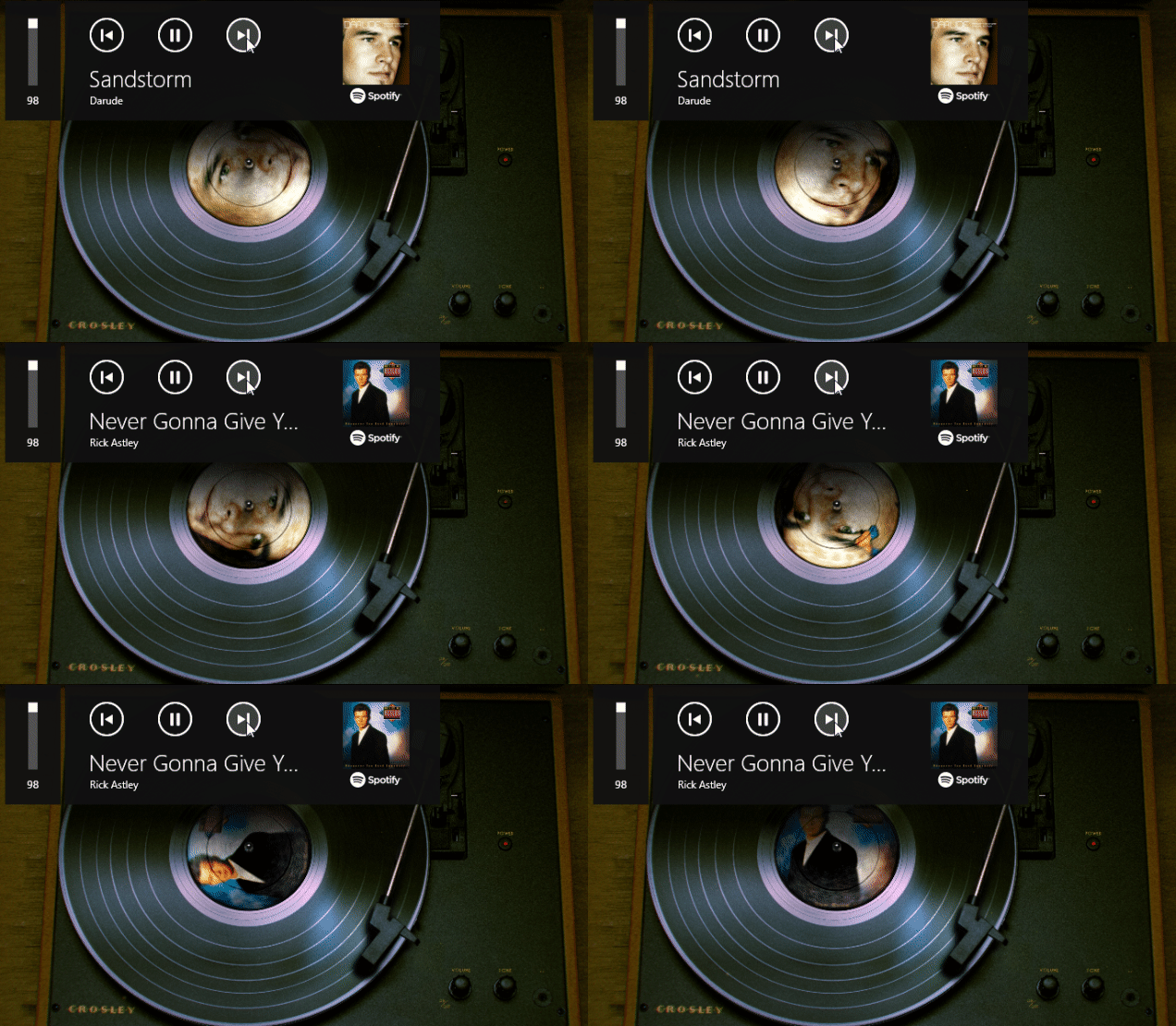
Interested in using this record player as a wallpaper or screensaver? Click here to download it.
This functionality will work with any music player as long as it sends its album cover data to the Windows media overlay (visible in the upper left of the showcase above). You may need to enable this in the settings of your media player.
If you want to utilize this feature in your own wallpapers, be sure to check out our designer documentation which covers this topic in great detail:
If you are using a wallpaper with this feature but the album covers do not appear for you or if you have another question or issue, be sure to first check out our help website, as it helps you to resolve the most common problems regarding this feature:
Dynamic Fluid Simulation
A new effect in the editor allows you to easily add dynamic fluid simulation to your wallpapers. The fluid simulation makes it possible to create interactive fluid, fire or smoke-like effects. Support for interactivity with the mouse cursor is included and you can create a collision mask, which allows the simulated fluid to bounce off of objects in the wallpaper.
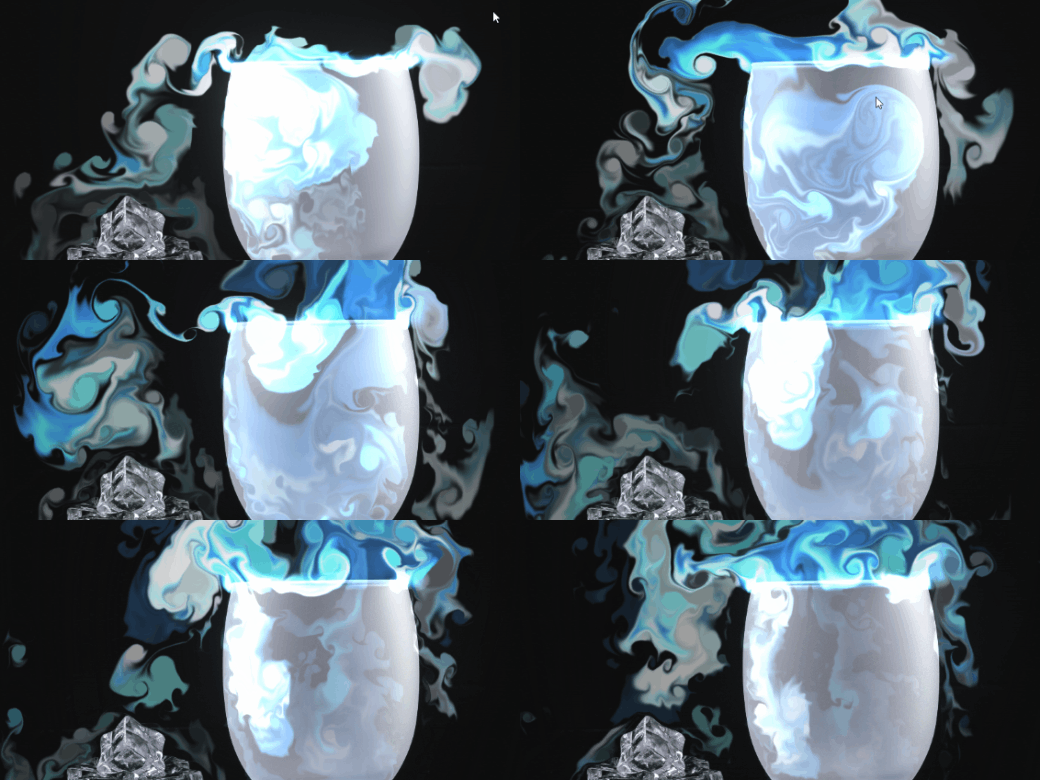
As usual, we have created an extensive documentation for this effect on our designer documentation website, be sure to check it out and give it a try:
Even More New Effects
On top of the other changes we have already showcased, we have added a bunch of additional effects to the editor that you can utilize in your wallpapers.
Cursor Ripple
The new cursor ripple effect allows you to make certain parts of your wallpaper react to the mouse cursor by giving off water ripples in its movement path.
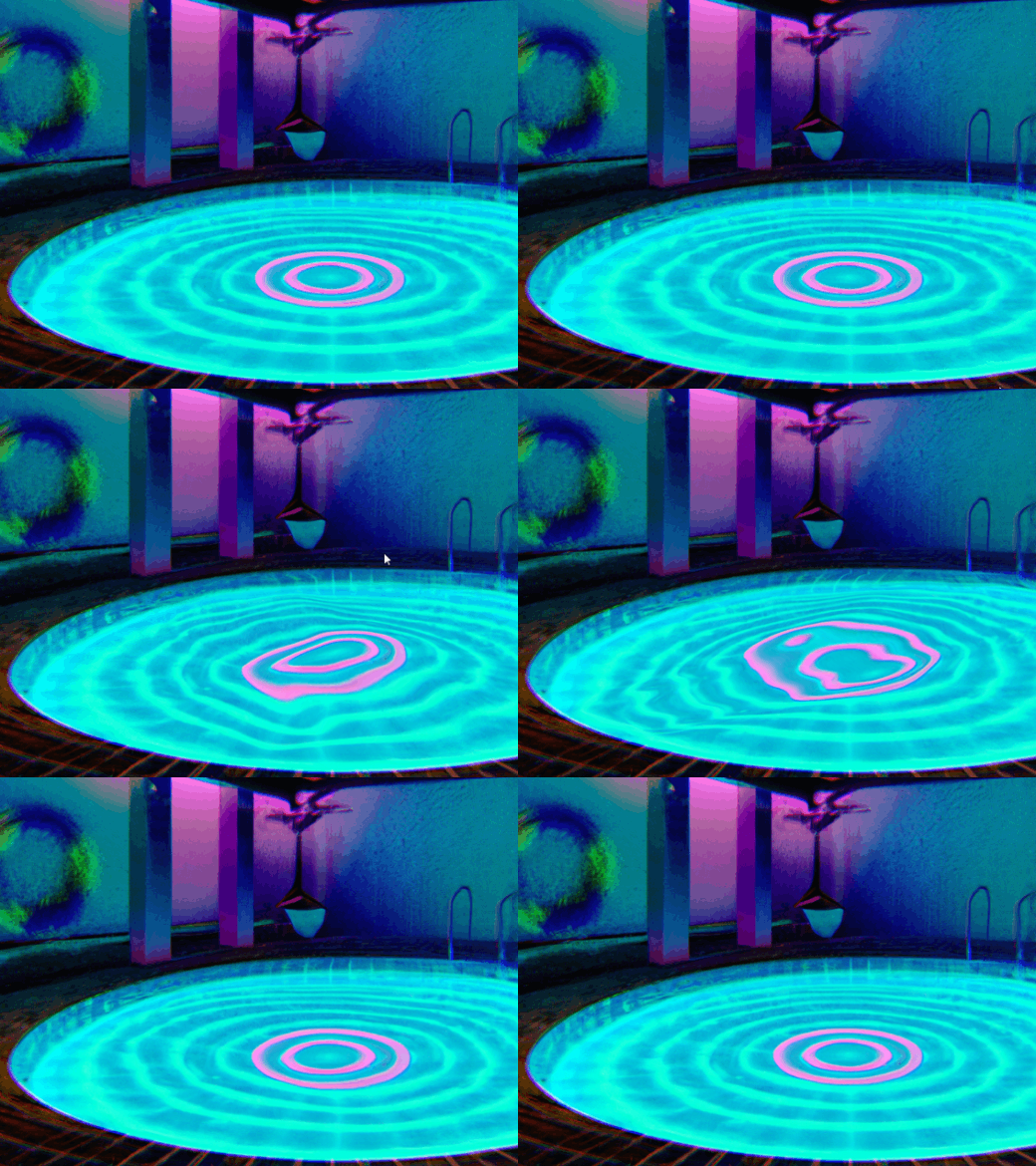
Make sure to check out the effect documentation to learn more on how to implement it into your wallpapers:
Chromatic Aberration
This effect was mainly added because previously, users often used the VHS effect for its Chromatic Aberration. We wanted to add a simpler and more performant alternative to it. If you just want to add chromatic aberration to your wallpaper, you can use this effect from now on instead of using the VHS effect instead. You can learn more about it in our designer documentation:
Gradient Blend Effect
The Gradient Blend effect allows you to create more complex transitions between two images. To learn more about it, check out its documentation page:
Radial Blur Effect
The Radial Blur effect creates a rotational blur on an image layer. We have used it in the vinyl example in the album cover section above to create a slight blur effect on the rotating vinyl record.
Texture Channels in Puppet Warp Animations
For the more advanced puppet warping system, we have added a new texture channel option. This allows you to add multiple textures into one puppet warp model and to transition between them as part of your animation. In its simplest form, it can be used for simple animations like eye blinking, but you can also change the look of entire characters or objects this way.
To learn more about this feature, check out the documentation page:
Miscellaneous Noteworthy Features
We have made a ton of additional small improvements throughout the app, here are some more noteworthy features that you might want to check out:
Quick Mobile Preview Feature
Want to quickly get an idea of what a wallpaper might look like on your Android smartphone? Right-click on an installed wallpaper, then navigate over "Play in Window" and then select "Phone Preview" to get a vertical preview of the wallpaper.
GIF Recording Feature for Preview Images
Many wallpapers already make use of animated GIFs for preview images. However, these preview images have to be created with third-party tools which can be a little bit complex for some users. For this reason, we have added a simple GIF recording functionality into the "Capture Preview" option at the end of the publishing process. Press the "G" key during the preview creation to switch to GIF recording mode, then follow the instructions in the upper left corner. We hope this will make animated preview GIFs more accessible to more users.
Wallpaper Engine - Android Update
The Android app update will start to roll out across all app stores now. Please note that mobile app stores tend to release updates with a delay, so it might take a few days for the update to reach you.
If you have installed the APK file directly, you can grab the latest APK on our website right now:
Download the latest version of Wallpaper Engine on Android
Full Changelog
To get an overview of all changes and bug fixes, be sure to read the entire changelog:
Wallpaper Engine on Windows
Additions / Changes
- Added fluid simulation effect.
- Added Media Integration for album covers and music data in Scene and Web wallpapers using Windows Global Media Sessions.
- Added cursor ripple effect.
- Added gradient blend effect.
- Added radial blur effect.
- Added chromatic aberration effect.
- Added opacity mask to precise blur effect.
- Added alpha blur option to blur effects.
- Added time offset texture to water waves effect.
- Added puppet warp alpha bone animations.
- Added puppet warp texture channel animations.
- Improved puppet bone visualization with new gizmos.
- Added polygon selection tool to separation/character sheet editor.
- Added options to control maximum width and number of rows for text layers.
- Added ability to record GIFs for Workshop snapshot in editor.
- Added asynchronous texture streaming loader to improve wallpaper loading speed.
- Added "flicker value" stock script snippet.
- Added puppet depth map painting and replaced basic extrusion.
- Added mp4 as supported image layer import format to file dialog in editor.
- Added stutter detection experiment to video playback through media foundation.
- Changed gallery context menu to use more groups and be more compact.
- Added ability to open wallpaper preview in portrait size or maximized.
- Improved property changing consistency in animation editor.
- Changed animation wrap loop option to be enabled by default.
- Added ability to copy and paste entire animation channels easily from property context menu.
- Added dark theme support to tray menu using undocumented APIs.
- Added resolution options to high-performance export for tablets.
- Added new monitor identification system (Managed) which will be used in new configs by default and will be more resilient against Windows inconsistencies.
- Changed display HDR to manage albedo brightness so extreme brightning is avoided when albedo brightness is too high.
- Improved automatic web audio muting.
- Improved lockscreen image cropping when monitors are offset vertically.
- Changed scenescript module to only unload on program shutdown so stability bugs in V8 are avoided when DLL gets reloaded too often.
- Added performance warnings to expensive (multi pass) effects.
- Added shader property grouping for complex effects.
- Added layer sorting menu to context menu in editor.
- Reduced memory required for sprite sheet base textures.
- Added 45 snapping to editor knob control when holding SHIFT down.
- Changed editor texture memory to include missing, currently invisible textures.
- Improved Workshop assets not updating after subscribing externally.
- Changed audio detection to use selected audio input device.
- Added support for HDR effects high performance encoding for mobile.
- Added ability to add application rules for files with invalid program extensions.
- Added ability to copy playlists and wallpaper properties between monitors from display selection.
- Improved key frame selection behavior in curve editor.
- Added placeholder solid layer that allows using a basic layer with dynamic user/system textures.
- Added floating rounding to nested property sliders in editor.
- Added Workshop URL copy button to editor menu and publish dialog.
- Added roboto mono as new stock mono spaced font.
- Added "getWallpaper" command to CLI to print out current wallpaper path.
- Added video texture count to editor stats.
- Added effect performance counts to editor stats.
- Updated Wuffs PNG decoder.
- Updated Windows SDK.
- Updated ASIO.
- Changed main projects to C++20.
Bug Fixes
- Fixed blend mode layers to not be pre-rendered when invisible.
- Fixed timeline editors being unlinked when toggling preview.
- Fixed customizable tag being added when invalid user property links are present.
- Fixed image reflection not working when lighting is disabled.
- Fixed font characters being unmapped too early and text rendering incorrectly.
- Fixed particle editor viewport settings.
- Fixed clean project dialog suggesting deletion of newly used files due to scene file not being updated beforehand.
- Fixed playlist app shutdown/restart delta time not being used to advance playlist on load.
- Fixed cloning shell hook not being reloaded after Explorer crashing.
- Removed unlisted option from publish dialog since it's unavailable on Steam now.
- Fixed portrait/phone wallpapers being difficult to record a snapshot for in the editor.
- Fixed brush detection on perspective/rotated layers.
- Fixed being able to upload badly encoded videos.
- Fixed video colorization sometimes not taking effect.
- Fixed wrap loop frames option causing second to last frame to not save correctly.
- Fixed UV position picker for post-processing layers.
- Changed app wallpaper to close parent window before attempting to shutdown child process to potentially improve app closing behavior.
- Fixed playlist not looping properly when the following is true: two wallpaper, intro enabled, sorted timer, change on video end enabled.
Wallpaper Engine on Android
Additions / Changes
- Added option to disable wallpapers colors API or override it for phones that choose badly readable UI colors on their own.
- Added button to clear shader cache.
- Updated Android target SDK and NDK to Android 13.
Bug Fixes
- Fixed shader cache not being used.
Hotfix 2.2.18
Additions / Changes
- Added new borderless option to "play in window" CLI command.
Bug Fixes
- Fixed issues with certain iCUE / Chroma wallpapers not working correctly by forcing LED layers to always render even when they are set to invisible in the editor.
- Fixed various audio playback issues.
- Fixed wallpapers with solid placeholder layer failing to upload.