Hi Gyldhunters! Welcome to our ninth Developer Update. We want to address the core gameplay experience and client-server performance issues that have received the most feedback from you recently. We’ll first clarify the current issues, and then we’ll outline the optimizations we’ve already completed along with our future optimization plans. To explain these issues clearly, we’ll inevitably need to introduce some relatively complex technical concepts. We appreciate your patience and understanding.
1. Explanation of Current Issues
1.1 Missing Damage & Damage Prediction Errors
Currently, our damage hit registration is processed and finalized on the game server. However, due to inevitable network latency, if we were to wait for the server to return the hit results before playing any impact visual effects, the combat feedback—which is crucial for an action game—would feel sluggish and delayed. To make combat feel smoother and more responsive, we currently have Client-Side Damage Prediction enabled by default in the settings (meaning that when you attack, your local game client will display visual effects like blood splatters and play hit sound effects based on its own prediction before receiving the final confirmation from the server).
Because of network latency, discrepancies will always exist between the client and the server. As a result, you may occasionally encounter situations where your client-side screen displays the hit effects early, but the server subsequently determines that the attack actually missed. Consequently, the enemy takes no damage and suffers no stagger. Visually, this looks like your damage went missing, but it’s fundamentally a client-side damage prediction error. This typically happens in two common scenarios:
The server determines that the opponent has already moved out of your attack range. However, due to network latency, the opponent still appears inside your attack range on your screen, causing the client to trigger the hit effects prematurely.
There is a brief window of invincibility frames (i-frames) during a dodge. The server determines that the opponent successfully used these i-frames to dodge your attack. Yet, due to network latency, your client registers that the opponent was not in an invincible state at the moment of impact, leading it to play the hit effects early.
At the same time, to match our crisp, snappy action animations, the active hit windows for many skills are generally very short. For example, the entire active hit window for the first strike of the Sword and Shield is only 62ms. Because these fast attacks have such short windows, they are naturally less forgiving when it comes to synchronization issues between the client and server. This makes prediction errors even more likely to happen when enemies are dodging or moving rapidly.
Disabling Client-Side Damage Prediction in the game settings can prevent the prediction errors described above, but it may make combat feedback feel delayed. To help everyone better understand this, we’ve put together a video to provide a more visual demonstration of these issues:
[dynamiclink href="https://youtu.be/8fV-w7B5YNQ"]Choosing whether to trust the client or the server is a classic catch-22 dilemma. If we trusted the client more for hit registration, the attacker’s experience would indeed feel better, and damage prediction errors would be significantly reduced. However, when desynchronization occurs due to high latency on the attacker’s end, the target’s gameplay experience would suffer, ultimately ruining the fairness of the engagement for both sides. Furthermore, relying more heavily on the client would drastically expand the vulnerability window for cheats, potentially leading to game-breaking hacks. To guarantee a fair experience for both attackers and targets, as well as ensure maximum anti-cheat security, we ultimately opted for a server-side hit registration model.
1.2 Missing Dodges & Skills Failing to Activate
"I executed a dodge, and my character clearly dashed away on my screen, but suddenly I got rubberbanded back to my original spot and took a beating anyway." We've received a lot of feedback regarding these kinds of missing dodge issues.
The current game mechanic works like this: the moment you press the dodge button, your local client immediately attempts to execute the dodge and plays the dodge animation. However, this command still must travel through the upstream network latency (the time it takes for your local client to send data to the server) before it actually reaches the server and gets executed.
Therefore, the first scenario where this issue happens is: at the exact split second you press the dodge button, your local client shows that you haven't been hit yet, meaning you can dodge normally—so it immediately triggers the animation. But by the time that command travels through the upstream latency and reaches the server, the server registers that you've already been struck by an attack at that exact moment, making a dodge impossible. Once the server sends this hit-state confirmation back down to your local client, our server-side hit registration system forces your client to sync up, resulting in you getting rubberbanded back to your starting position and forced into a stagger state.
Another possibility is that at the exact millisecond you press the dodge button, you've already been hit on the server's end. However, due to downstream network latency (the time it takes for the server to send data to your local client), your client hasn't received that update yet. As far as your client is concerned, you're free to dodge. This leads to the exact same missing dodge and rubberbanding issue described above.
In fact, this isn't just limited to the dodge command. Because of the desynchronization caused by the network latency mentioned above, any skill in the game can trigger this same phenomenon where the client plays the animation early, only for the server to rubberband you right back.
1.3 Server Processing Latency
To provide a sufficiently realistic and nuanced action game experience, our game servers must fully process all animation and Inverse Kinematics (IK) details for every character and monster. This ensures that the positions of all hitboxes (head, torso, upper arms, lower arms, thighs, and shins) remain completely accurate at all times, which creates a massive performance burden on the backend.
Ideally, the game server should always run at a stable frame rate, producing minimal internal server processing latency that shouldn't noticeably impact your overall perceived latency during gameplay. However, when multiple battles occur simultaneously or complex behaviors take place within a single instance, the server's frame rate can temporarily drop. This causes server latency to spike, and these sudden latency spikes increase the likelihood of the various issues mentioned above occurring, negatively affecting your gameplay experience.
Looking at our current monitoring metrics, the probability of server frame drops is higher in Brandrgarde than in Hallowgrove, which perfectly aligns with the feedback we've received from the community. This is primarily because Brandrgarde features a higher volume and higher density of monsters, resulting in a much higher average performance overhead.
2. Optimizations Since Official Launch
2.1 Splitting the Damage Prediction Hitboxes
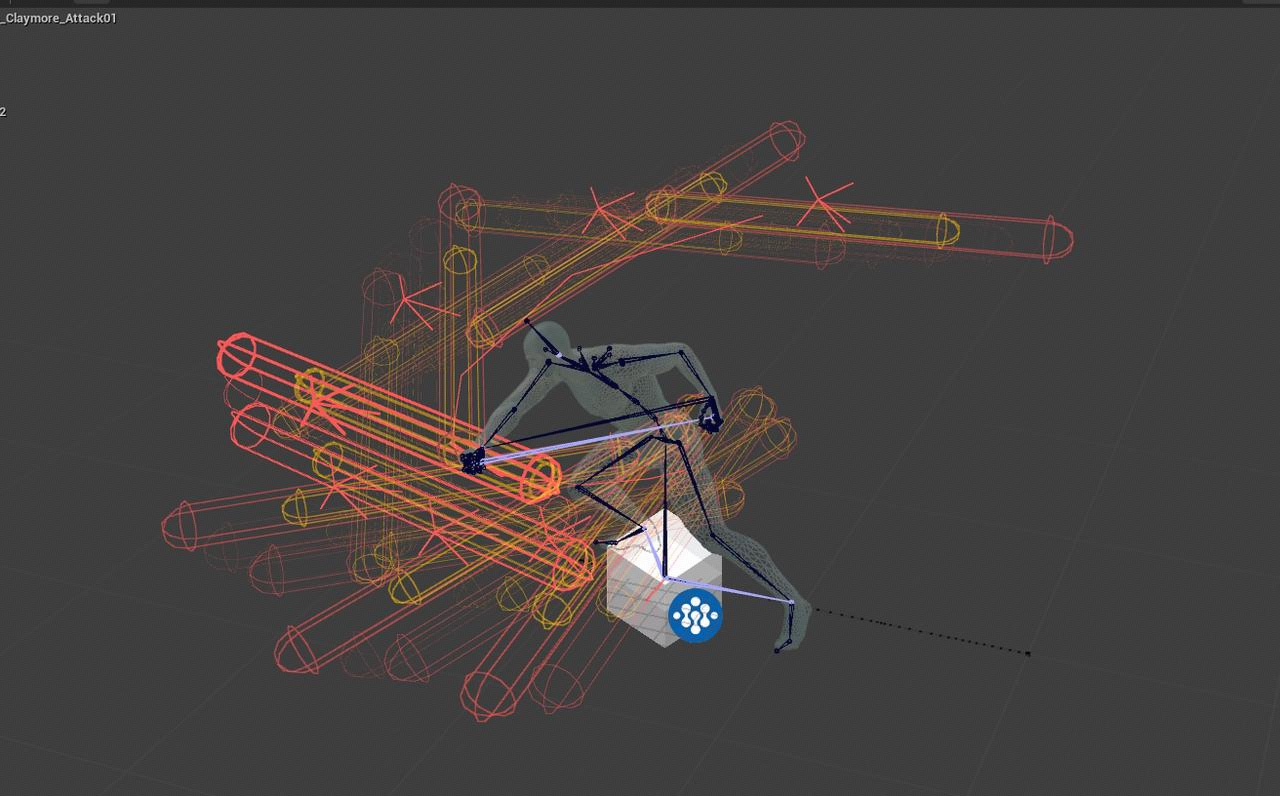
As mentioned previously when we discussed this issue with the community, we recently optimized a portion of our prediction logic. Originally, client-side damage prediction directly utilized the skill's actual hit registration hitbox (the red hitbox in the image below). We have now configured a separate, slightly smaller hitbox specifically for client-side damage prediction (the yellow hitbox in the image below). By enforcing stricter prediction boundaries, we aim to reduce prediction errors caused by positional desynchronization between the client and the server.
2.2 Server Performance Optimization
Since our official launch, we've been continuously working to optimize server performance and ensure operational stability through several methods:
Mitigating DDoS Attacks: To counter occasional DDoS attacks (where a massive volume of UDP packets from various IPs inundate our servers in a short window), we've enabled high-defense protection features on our cloud servers.
Upgrading AWS Storage: By transitioning our AWS server storage from EFS to EBS, we successfully resolved occasional, severe stutters that would last for several seconds.
Hyper-Threading Adjustments: We tweaked our configurations to prevent our cloud servers from running hyper-threaded workloads, effectively avoiding the random stuttering issues associated with hyper-threading.
Optimizing Log Overhead: We implemented batch log submission and asynchronous writing to drastically minimize the performance overhead caused by recording and reporting data logs.
Smarter AI Behavior Control: We introduced more intelligent monster behavior constraints, reducing their performance footprint on the server when there are no players nearby.
Multi-Frame Calculations: For heavy, complex operations—such as spawning multiple monsters simultaneously—we now distribute the workload across multiple frames instead of processing everything within a single frame, preventing massive CPU spikes.
Specialized Drop Optimization: We performed targeted performance passes on actions that rely on complex randomized logic, such as RNG loot generation, successfully reducing their total processing cost.
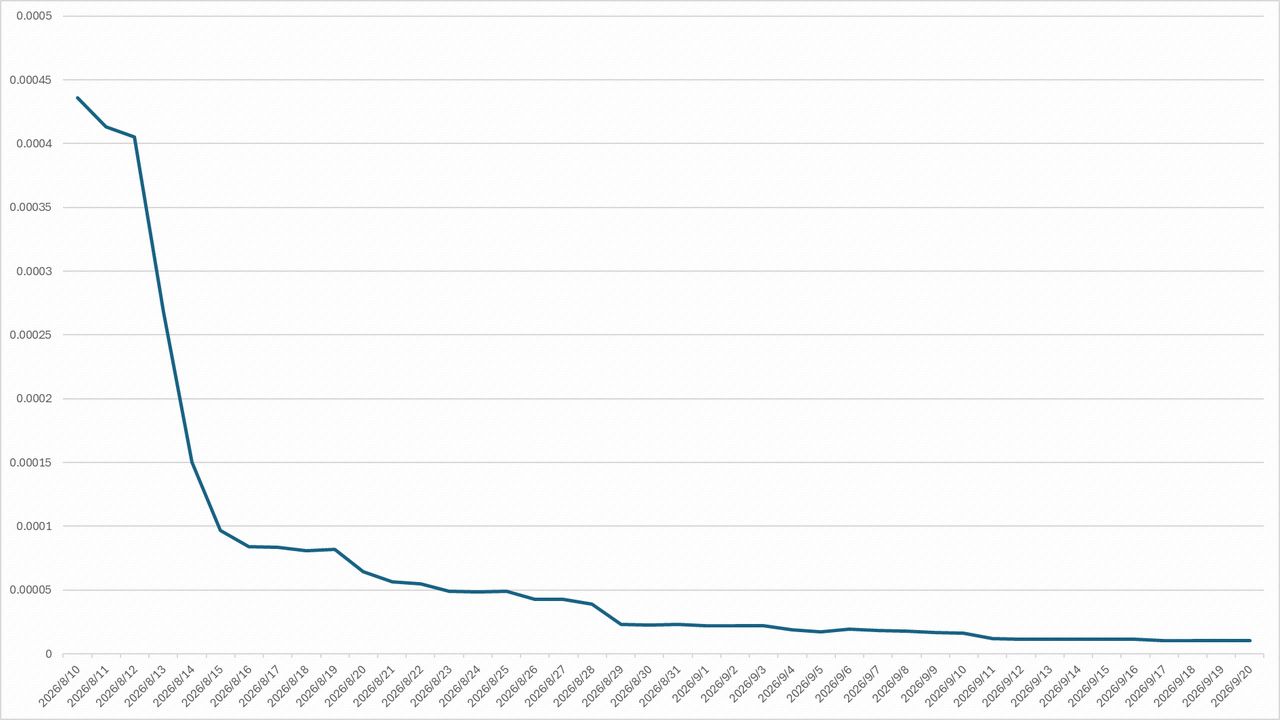
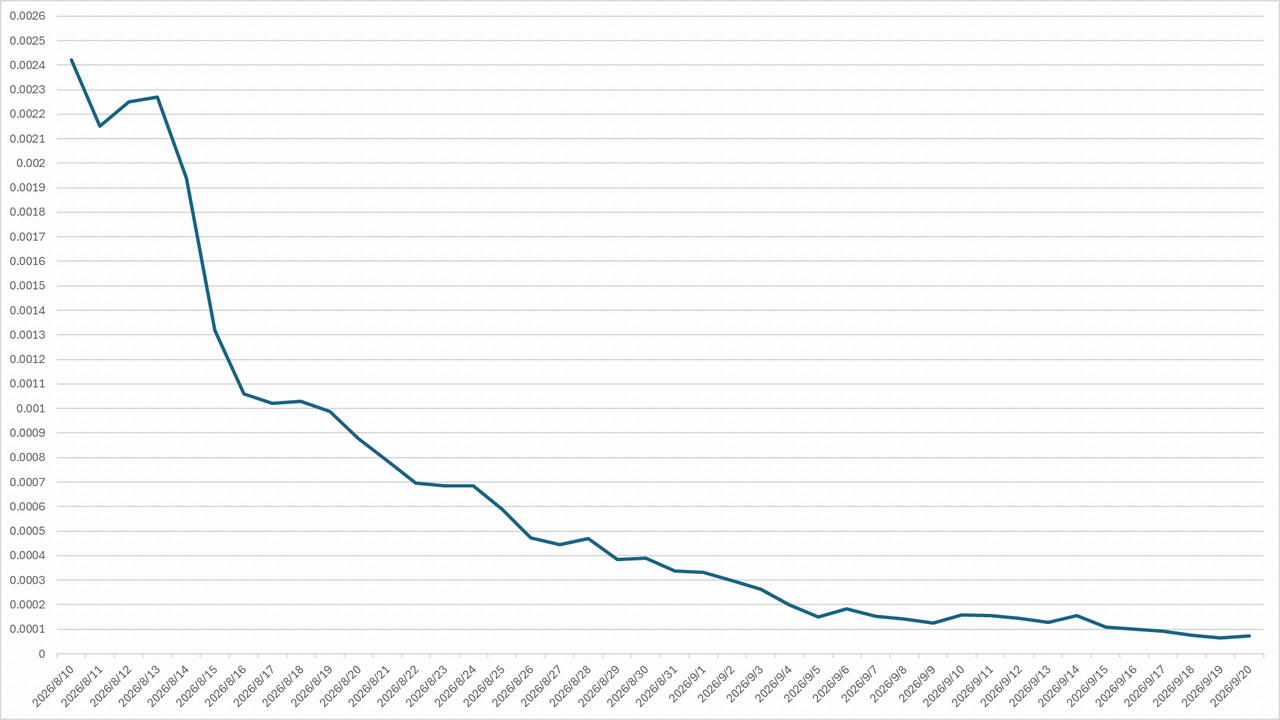
As previously stated, high server latency directly damages your overall gameplay experience. Therefore, we use the percentage of server frames with latency exceeding 50ms as our core monitoring metric. The two charts below illustrate the recent data trends for both Hallowgrove and Brandrgarde in Trio Mode:
2.3 Skill Synchronization Mechanism
After reviewing your feedback, we found that the skill synchronization mechanism does indeed have room for improvement in how it handles network fluctuations. In last week’s update, we implemented a focused round of fixes:
Added greater tolerance for network fluctuations to each class’s follow-up attacks after dodging, reducing the likelihood that network-latency-induced rubberbanding causes these attacks to fail.
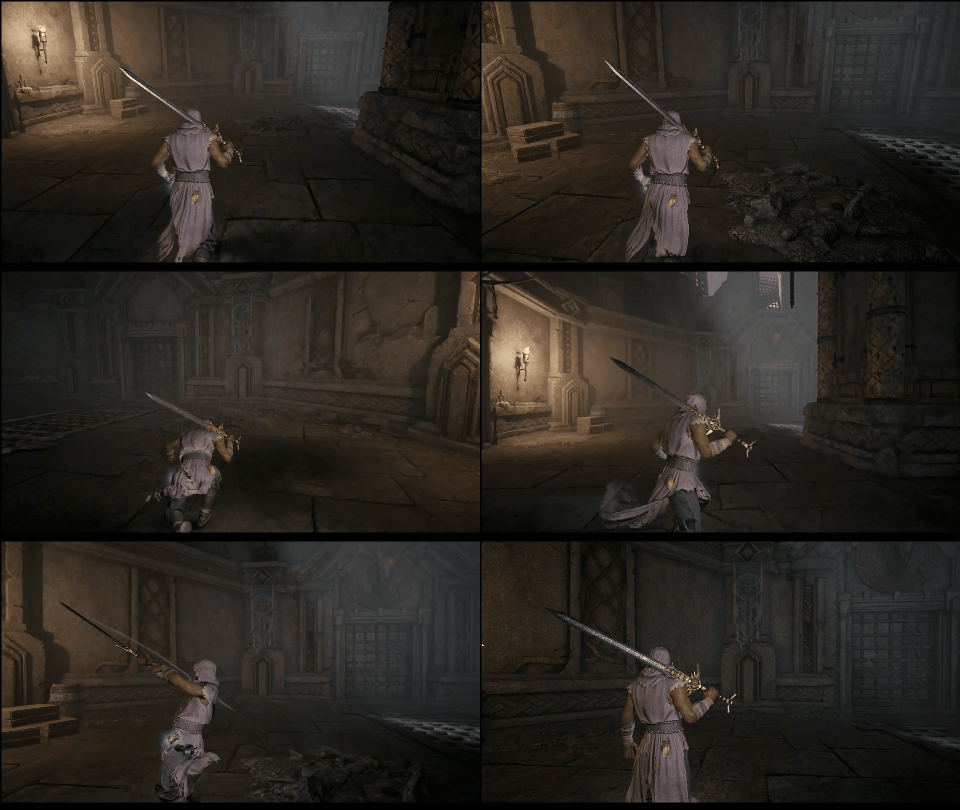
Fixed an issue where, when hit by rapid consecutive attacks such as \[Bloody Blade Dance], Breakaway and certain skills usable during the Breakaway window could be interrupted on the client while continuing to play on the server, causing the character’s position to rubberband.
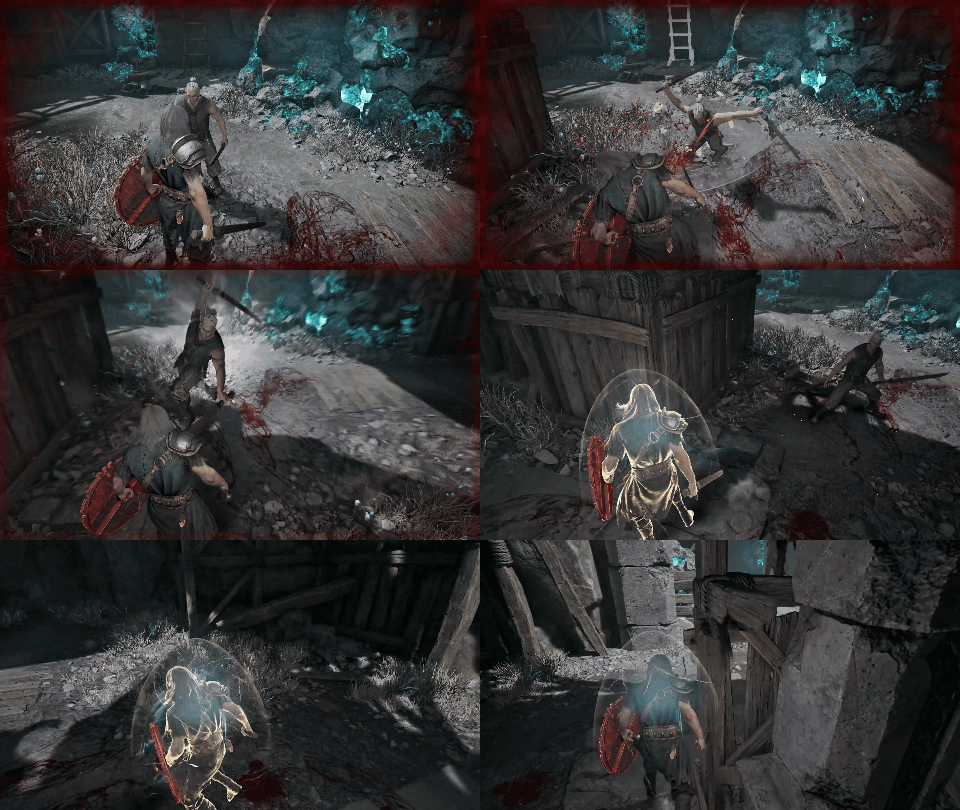
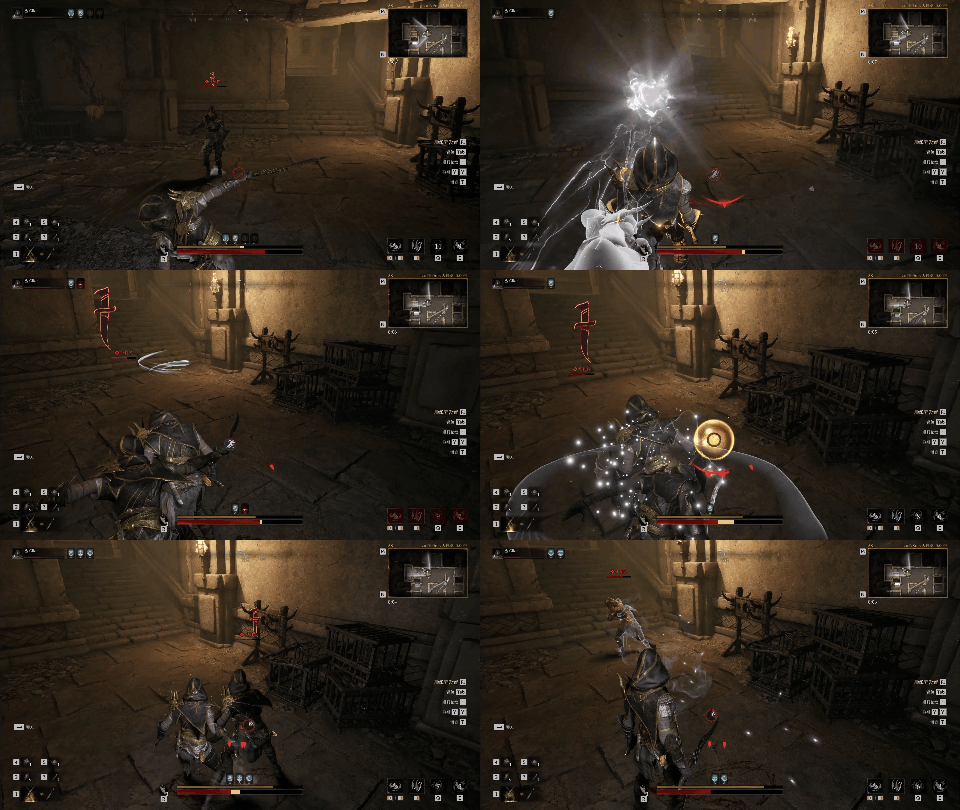
Improved the dodge direction synchronization mechanism, increasing synchronization accuracy and reducing cases where an enemy’s dodge direction is displayed incorrectly before they teleport or rubberband.
3. Future Optimization Plans
3.1 Server Performance Optimization
Refining Combat Overhead: We're continuously optimizing the performance overhead of minute combat details to further reduce the frequency of server frame drops. Specifically, we're migrating blueprint script logic over to C++ to significantly minimize processing strain. These optimization passes will be rolled out gradually as they are completed, so please keep an eye on our upcoming patch notes.
Upgrading Server Hardware: We're currently collaborating with cloud service providers like AWS to test higher-tier CPU models, aiming to boost server performance directly from the hardware level. We're currently in the stress-testing and data-collection phase. Once these tests pass successfully, we'll deploy the upgrades as soon as possible, so please stay tuned for future update announcements.
3.2 Client-Side Performance Optimization
Optimizing Map Streaming Stutters: We dynamically load map segments based on your character's current location. Currently, moving back and forth repeatedly across the boundary of a dynamically loaded area can cause micro-stutters. We're executing a specialized optimization pass on Unreal Engine's garbage collection (GC) strategies to resolve these hiccups. The first wave of these optimizations went live in this week's update.
Mitigating Encounter Stutters: To address the performance drops that occur when players from other teams appear nearby or when you enter new zones, we're actively optimizing the spawn-and-instantiation logic for both players and monsters. Our goal is to distribute the performance overhead across multiple frames as much as possible to prevent sharp frame rate fluctuations. We'll share concrete progress on this in future patch notes.
Continuous Art Asset Optimization: We're continuously performing standard art asset optimization passes. This includes reducing redundant polygon counts, refining Level of Detail (LOD) settings, simplifying textures, and streamlining lighting placement—all carefully managed to ensure that the actual visual quality of the game remains completely unaffected.
4. A Final Note
Although we conducted multiple rounds of testing prior to launch, the relatively small player count and short duration of those tests—combined with our own lack of experience in certain areas—meant that many of these fundamental gameplay and server performance issues were not fully exposed or properly resolved in time. We're incredibly sorry that we were unable to deliver a sufficiently stable and smooth gameplay experience for our official launch version! Resolving these issues is currently our team's absolute highest priority. Moving forward, we'll be leveraging your ongoing, detailed feedback to systematically polish and perfect the core experience.
If you encounter any issues regarding core gameplay mechanics or performance, please report them to us through our community channels. Providing video clips alongside your reports will immensely help our team pinpoint and address the root causes. Thank you, Gyldhunters!
Following the release of this developer update, we will host an AMA session addressing the issues players have been focusing on recently. Stay tuned!
