Changelog 0.6.3.1
Hey everyone,
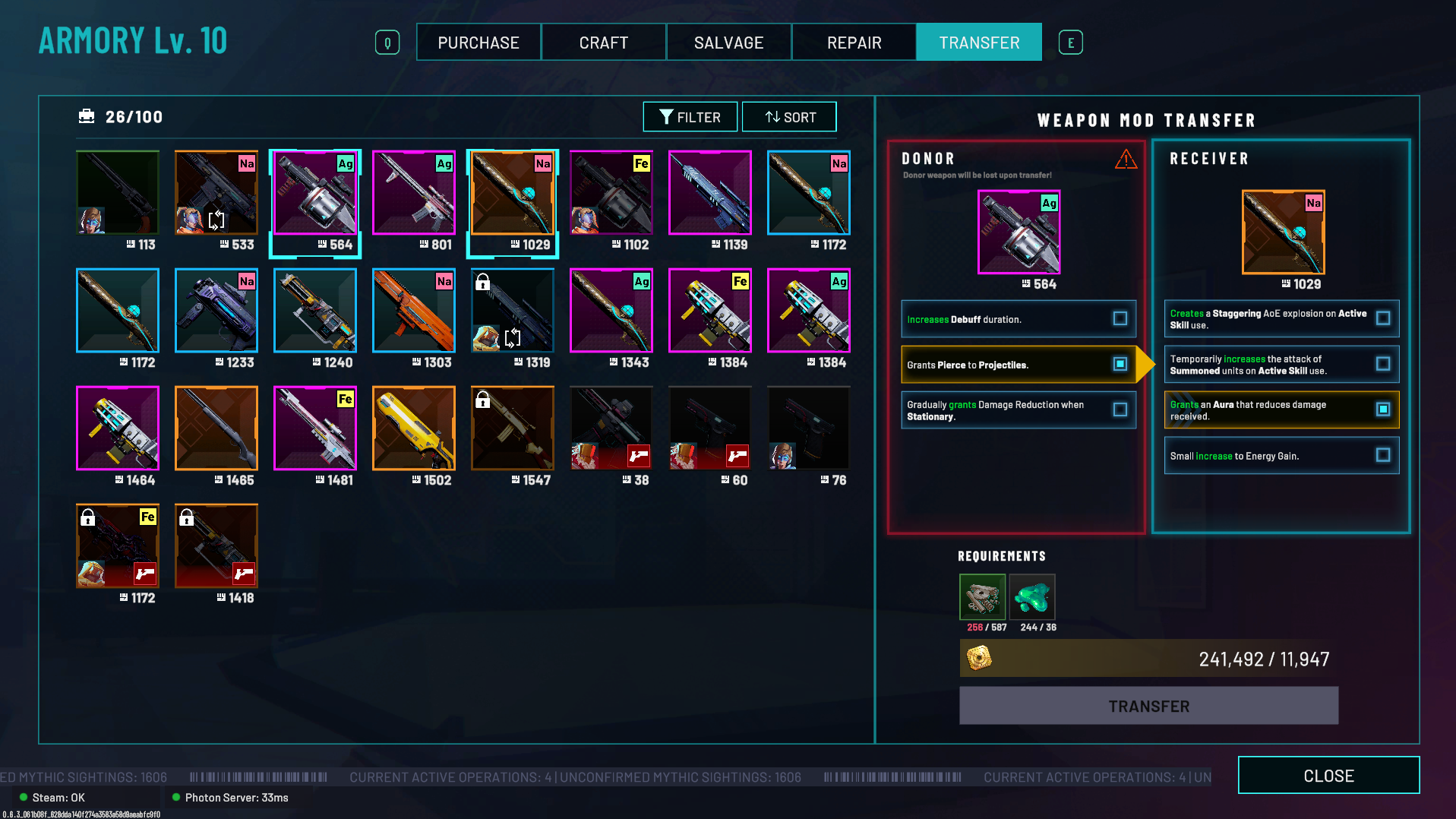
0.6.3.1 adds our first iteration of Weapon Mod Transfer system, giving you a way to move a mod you like from one weapon onto another.
This is still an early pass on the system, especially on the UX and lore side, so we’re very interested in hearing where the flow feels confusing, slow, or awkward.
Weapon Mod Transfer
You can now transfer a Weapon Mod from one weapon to another through the Armory, after completing Directive: Duskfall Protocols.
How It Works
Open Weapon Mod Transfer tab in the Armory.
Select the Donor Weapon — the weapon containing the mod you want to move (will appear on the Left Panel marked Donor).
Select the Receiver Weapon (will appear on the Right Panel marked Receiver).
Choose the single Weapon Mod you want to transfer from the Donor.
Choose the mod slot you want to replace on the Receiver.
Ensure that you have the requisite materials and Creds to complete the transfer.
Higher-rarity and combat power weapons require higher transfer costs.
Confirm the transfer.
The Donor Weapon will be destroyed in the process.
Important Notes
Weapon Mod Transfer becomes available after completing Directive: Duskfall Protocols.
A weapon that has already received a transferred mod can only receive future transfers into that same mod slot.
In other words, this system is not intended to let you fully customize every mod slot on a weapon.
A weapon that has received a transferred mod can still be used as a Donor Weapon later.
So if you find a mod you really like, you can continue moving it onto future weapons.
Scarred weapons cannot be used for Weapon Mod Transfer. (You can repair a scarred weapon first, then use it as a Donor or Receiver)
This is the first iteration of the system, so please let us know how the flow feels — especially the selection process, costs, and overall UX.
Bug Fixes & Adjustments
Fixed the floating explosion decal/VFX issue on the LA F4-H.
Adjusted the C.L.A.M.P. R2 Dataseed so it can now drop in Killbox.
Fixed an account login issue that could occur when the device’s local system time was out of date.
Known Issues
Launcher weapon stats may display lower damage values than they are actually dealing.
We’re still iterating on the stats display for weapons with non-standard projectile behavior, including Launchers and Shotguns.
The Weapon Mod Transfer UI may display incorrectly on some aspect ratios.
Explosive Orbiter formations may appear incorrectly, as their positions are currently based on the Orbiter’s spawn location.
Co-op play between players running different game versions may cause multiplayer issues when joining via Lobby Code or Steam Invite.
Players may be unable to see each other.
Parties may become stuck in the HQ countdown.
We've pushed some content and other systems back to get this in because a lot more of you are at that weapon refinement stage sooner than expected, so this Mod Transfer system is still very rough and iterative. We'll be on Discord and the Discussions to see how you guys feel about this system.
Thanks as always for the reports and feedback.
— The RIFTSTORM team