Bosses, another update is here!
This patch brings a major Market rework, new Family management options, improvements to enemy attacks and the Spy system, city expansion, driving improvements, new UI features, graphics settings, and plenty of fixes and quality-of-life changes.
📖 Our Official Wiki Is Now Live!
Our official The Boss Gangster: Criminal Empire Wiki is now open!
We created it so you can easily find answers to almost everything you might be wondering about the game, including mechanics, systems, businesses, skills, Family features, progression, and much more.
👉 https://wiki.thebossgangster.com
We’ll continue expanding and updating the Wiki alongside the game, so make sure to check it whenever you need information, Boss!
Major Changes
Market System Reworked
The Market system has been completely reworked.
You can now decide exactly which products you want to place on each shelf.
Once a product has been assigned to a shelf, your Manager will automatically restock that same product whenever the shelf becomes empty.
Managers will now only refill empty shelves according to the products you have assigned to them.
Licenses have also been added.
To sell 1-Star, 2-Star, and 3-Star drinks, you will now need to own the appropriate license.
We also fixed an issue where employees producing drinks could get stuck when the required raw materials ran out.
Family Members Can Now Be Fired
You can now remove Family members by spending Prestige Points.
But be careful who you kick out, Boss.
A fired Family member may become hostile toward you or even decide to join a rival Family.
Spy System & Enemy Attacks Reworked
The Spy system and enemy attack systems have been reworked and improved.
Attacks on your Selling Points and Tribute Places can now happen independently from each other.
This means different parts of your criminal empire may require your attention at the same time.
Stay alert, Bosses.
The City Is Expanding
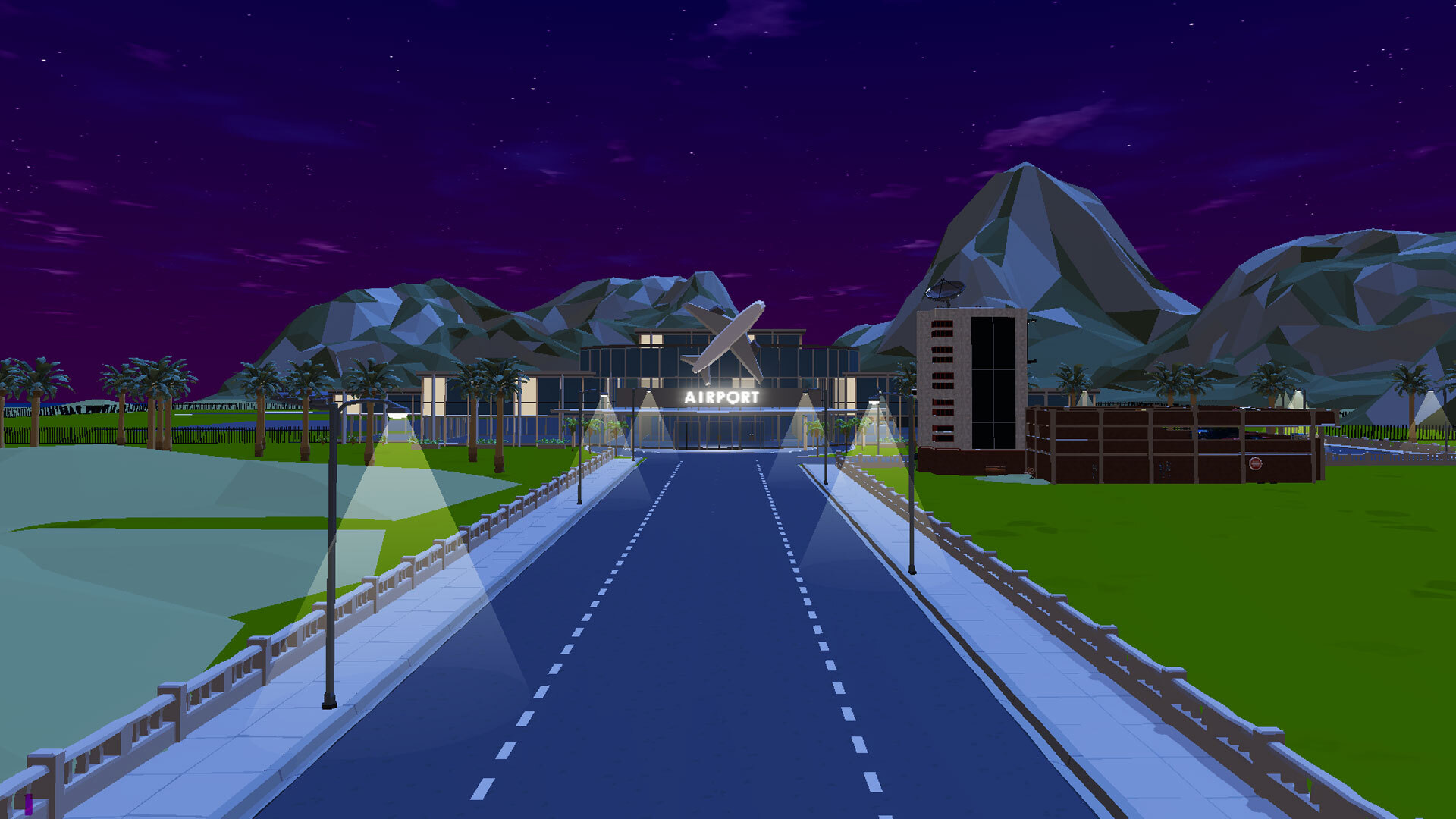
The city has grown and a brand-new Airport area has been added.
We’re not revealing everything about it just yet. More details about the Airport and what will happen there will come later.
The city itself is also being gradually refreshed with new environmental details and atmosphere improvements.
We also fixed several small issues around the map, including buildings and areas that players could accidentally enter.
Driving Improvements
Improved Vehicle Collision Detection
Vehicle collision detection around pedestrians and objects has been improved.
Previously, your vehicle could sometimes register a collision even when you had not actually touched a pedestrian or nearby object.
You can now drive much closer to pedestrians and objects without triggering unwanted collisions.
UI & Quality of Life
District Name Display
While traveling around the city, the name of the district you are currently in is now displayed directly on the main HUD.
You’ll always know which part of the city you are currently operating in.
Bulletproof Vest UI
The Bulletproof Vest UI has been added to TPS mode.
Attack Notifications Improved
Incoming attack notifications can now be interacted with even while driving.
Left Click to mark the attack location on the map.
Right Click to dismiss the notification.
This makes reacting to attacks much easier without interrupting your driving.
Faster Navigation to Marked Locations
When you mark a location on the map, a navigation pin appears on the main game screen.
You can now click this pin to quickly move the camera toward the marked location.
Warehouse Inventory Improvement
The Add to Pallet button that was available in the Club inventory has now also been added to the Warehouse inventory.
Office Automation Tracking
If you assign one of your Family members to an automated Office mission, that mission will no longer automatically move to the top of your tracked objectives.
You can still manually track any automated mission whenever you want through the Journal.
Graphics & Settings
TPS Driving View Distance
A new TPS Driving View Distance option has been added to Graphics Settings.
You can now adjust how far the city is rendered while driving in TPS mode.
Lowering this setting reduces the distance at which buildings and city details are rendered, which can provide a noticeable FPS improvement, especially on lower-end systems.
Anti-Aliasing Settings Added
Anti-Aliasing options have been added to the Graphics Settings menu.
You can now adjust Anti-Aliasing according to your visual preference and system performance.
Widescreen Improvements
Several issues affecting widescreen resolutions have been fixed.
Bug Fixes
Fixed an issue where greeting a customer inside the Club could cause the player to unexpectedly teleport.
Fixed an issue that could occur when purchasing Hot Dog Stands while using TPS mode.
Fixed an exploit that allowed players to increase their Pickpocket skill much faster than intended.
Fixed an issue that allowed players to take items from shops without paying for them.
And no, Bosses... just because nobody reported it doesn’t mean we didn’t notice. 😀
Fixed several collision and navigation issues around the city.
Fixed multiple smaller visual, UI, and gameplay issues.
Various additional annoying bugs and quality-of-life problems have also been cleaned up.
We’ve fixed plenty of frustrating little issues with this update, Bosses, and there’s much more on the way.
See you in the next patch!
And don’t forget to join our Discord community.
Your suggestions and feedback continue to shape The Boss Gangster: Criminal Empire, and we’ll keep improving the game with you until we make it the greatest crime game in the world. ❤️