MPQ R344 is arriving the week of July 23rd bringing more performance improvements, UI updates, and a wide range of bug fixes to help make your experience smoother. This update also introduces a new email-based account linking system, allowing players to link their accounts across supported platforms and play MPQ on multiple devices.
We’ve also included a summary of bug fixes made during R343 so the community has better visibility into the improvements already applied to the current build.
Performance Improvements
Image Loading Improvements
We have made changes to how images are loaded into the game:
- If an image is already downloaded, it will act the same as it currently does
- If an image needs to be downloaded from the internet, we have changed the order of how they are downloaded. In most cases, the next thing you want to see is the newest image to display. Opening a new menu will now favour the images on the new menu rather than the old images.
- For example, if you were on the roster screen, scrolled through a large roster, then started a battle, we will now download the images on the battle first, and leave the other images until later.
- In 343, it would have downloaded all the images from the roster before loading the images in battle, causing large delays or large amounts of time without showing images on the screen.
- For example, if you were on the roster screen, scrolled through a large roster, then started a battle, we will now download the images on the battle first, and leave the other images until later.
- If the image being downloaded is no longer required to be loaded before it has been downloaded, we no longer download that image until it is required again.
Account Linking with Email
Marvel Puzzle Quest uses platform account authorization in order to back up your account on a specific platform. However, this does not allow cross-platform device login, which was only possible through Facebook. As of release 344, you are also able to link an email address to an account in order to login across devices.
- Open the options menu. In the bottom left, there is a LINK EMAIL button
- Enter you email address at the prompt
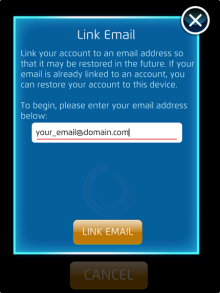
- After linking your email, the server will authorise the email via a One-Time Password to the provided email
- Enter the provided code in the prompt
Quality of Life
On Demand Download Progress Bar
We now show a Download Progress Bar on the bottom right of the screen to show the progress of any current downloads. This will show:
- The download size
- The percentage that has been downloaded
- If multiple images need to be downloaded, we show how many images are remaining in the download queue.
UI
- On Steam, clickable links in popups will open in the Steam overlay rather than a separate browser
- The “network disconnected” popup should appear a little less often when connection to MPQ servers is flaky
- Opening vaults no longer shows the “Tap to open!” text too early, so you don’t tap on it thinking it will open when it doesn’t
Bug Fixes
Gameplay & Heroes
- Descended characters are set to maximum champion level now, rather than the lowest champion level
- Refreshment Cart support at rank 3 now enforces the “to a minimum of 1” (turn) part of the description
- Viewing a level 500 6* character in a Versus opponent’s roster will no longer say level 1526
UI
- Age verification should hopefully now not be restricting users (particularly from Brazil) who are over the age of 18
- Pending any unexpected changes to data returned from Google’s Play Age Signals API
- Pending any unexpected changes to data returned from Google’s Play Age Signals API
- The S.H.I.E.L.D. Resupply popup no longer soft-locks the game if you access it pre-battle on a day with no rewards
- The “>” button for opened comics in offer popups now leads to the Character Info screen, rather than being non-responsive
- Selecting supports in offer popups now displays the Supports screen in front of the offer popup, rather than behind
- In the Supports Roster screen:
- The “EQUIPPED” banner is now shown correctly on top of the equipped character, rather than off to the right and/or cropped
- The number of active slots from the regular Roster screen is no longer shown in the top-right of the screen
- The “EQUIPPED” banner is now shown correctly on top of the equipped character, rather than off to the right and/or cropped
- On iOS / Android, the bottom row of comics are no longer obscured by other UI elements in the scrollable roster lists in:
- The Roster screen
- The Team Select screen
- The Roster screen
- Player names containing spaces now show spaces instead of pluses in the Alliance chat
- Various texts no longer show empty squares for certain Japanese characters
- Known issue: currency symbol still may not show correctly if device language is set to Japanese
- Known issue: currency symbol still may not show correctly if device language is set to Japanese
- On Steam, in the Battle screen’s character popup, hovering the mouse over the edge of an ability icon won’t make it rapidly flicker anymore
- No longer show multiples of the first hero on each team when a battle begins.
344 Known Issues
- Purchasing a multi-stage offer does not show the reward list of what was awarded when purchased. You still get all the items that were purchased. This should be fixed in the next update.
343 Character Bug Fixes
Note: The following were all fixed during the live release of 343 via data patches and are summarized below
- Green Goblin (Norman Osborn)
- Reduces friendly Countdowns by the correct amount
- Allows you to select multiple tiles to convert to Countdowns, rather than just one
- Has debug text removed from some Countdown tile texts
- Has corrected plural text in the Goblin King ability description and next level descriptions
- Reduces friendly Countdowns by the correct amount
- Famine (First Horsemen)
- Boosted 4* Famine no longer has a value of 0 for dealt damage etc
- Famine’s Welcome to S.H.I.E.L.D. event popup shows the event description rather than debug text
- Boosted 4* Famine no longer has a value of 0 for dealt damage etc
- Man-Thing (Swamp Walker)
- Invasive Species ability now displays the current total damage from matched Green tiles in the Battle screen description
- Swamp-Things ability no longer shows the “No Effect” popup when used as a team-up
- Invasive Species ability now displays the current total damage from matched Green tiles in the Battle screen description
- The Hunter (Initiate)
- Slash ability no longer shows the “No Effect” popup when used as a team-up
- Slash ability no longer shows the “No Effect” popup when used as a team-up
- Big Wheel (Jackson Weele)
- Tread On Me ability can now still rotate tiles even if damage can’t be dealt to the enemy team
- Tread On Me ability can now still rotate tiles even if damage can’t be dealt to the enemy team
- Aunt May (Iron May)
- Fan Favourite Quests requiring Aunt May (Iron May) are completable now
- Fan Favourite Quests requiring Aunt May (Iron May) are completable now
- Honey Badger (Gabby Kinney)
- The default costume icon no longer shows a placeholder image
- The default costume icon no longer shows a placeholder image
- A plain background is now shown instead of a Deadpool background with the selection popups for:
- Toni Ho (Rescue)'s Modular Engineering ability
- Hobgoblin (Roderick Kingsley)'s Behind The Schemes ability
- Havok (Classic)'s Radiation Absorption ability
- Toni Ho (Rescue)'s Modular Engineering ability
- An Educated Wish event
- The map is now vertically scrollable, so that you can see the top nodes hidden behind the top UI elements
- The map is now vertically scrollable, so that you can see the top nodes hidden behind the top UI elements