No sign-up, no codes: just opt in through Steam and play.
What's new in the Unity version
- Higher display resolution for modern monitors (the original engine maxed out at 640×480, resulting in a tiny window on today's screens)
- Toggle furigana on/off for kanji
- Toggle romaji on/off for Japanese dialogue
- Toggle Max Japanese mode on or off at any time
- Many other quality of life improvements
How to opt in
- In your Steam Library, right-click Learn Japanese RPG and choose Properties
- Select the Game Versions & Betas tab
- In the Beta Participation dropdown, choose unity_beta2
- Steam will download the Unity version automatically
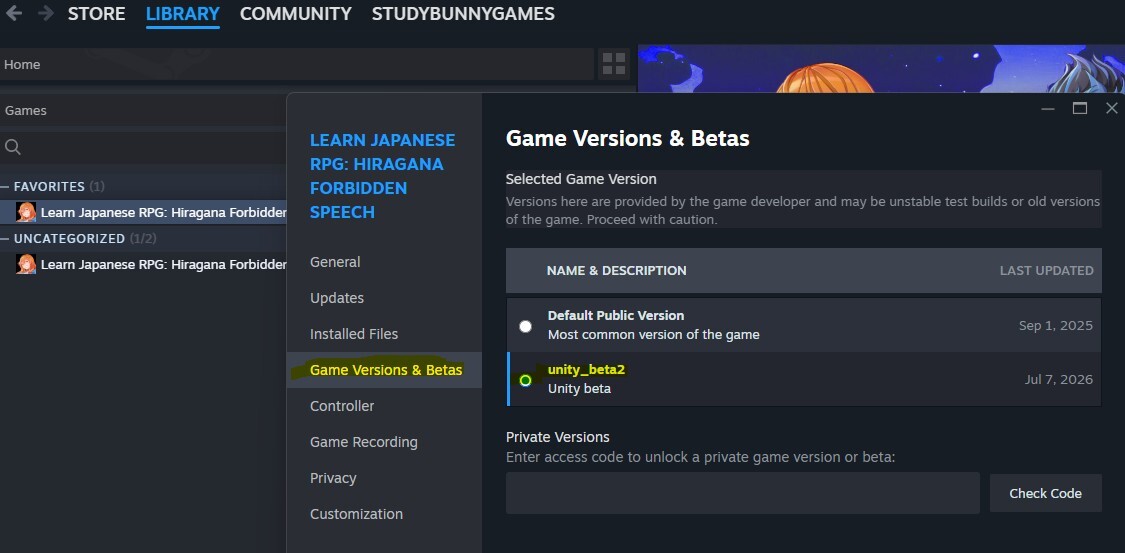
You can switch back to the original version at any time by selecting Default Public Version in the same location.
Your existing saves
The Unity version automatically imports your existing save files the first time you launch it. You can pick up right where you left off. Your original saves are never modified, so switching back is always safe.
What happens next
In about a month, the Unity version will become the default download on Steam for all players. Opting in now is a great way to enjoy the improvements early, and if you spot anything that feels off, we'd love to hear about it.
Found a bug?
Report it in our Discord: https://discord.gg/tAhtJN7g or in the Steam discussions.
Happy learning!
Lun