This update has the same version for both the official release and the beta
Changelog
Brand-new compilation method improves stability
Fixed memory leak issues in some system graphics card drivers from previous versions (to be tested)
Optimized D3D resource release to improve stability
Fixed issue in the last version where ALT + F4 shutdown menu and scheduled shutdown weren't working
Fixed issue present in all previous versions where dragging and dropping files onto the dock would prevent minimizing the window by clicking the dock icon
Fixed crashes caused by interface rendering in previous versions
Fixed issue in the last version where dock icons displayed incorrectly after waking the screen from shutdown
Fixed rendering issues in the last version’s weather forecast window when three or more cities were displayed
Fixed crashes in all previous versions when moving the mouse quickly back and forth across the dock while high-quality rendering icons were enabled
Fixed sunrise/sunset recognition errors on startup when auto-switching between light and dark modes in previous versions
Fixed freezing issue when restarting the program from Preferences in the last version
Fixed rendering stutter due to CPU scheduling in earlier test versions
Fixed crashes in all previous versions caused by moving sliders too fast with the mouse
Adjusted window minimizing interception mechanism, fixing issues in all previous versions where some systems didn’t show minimize animations after UAC was turned off
Fixed WiFi list not refreshing in previous versions
Fixed mismatch between clicked WiFi name and actual connected WiFi in all previous versions
Fixed freezing issue when editing lyrics if the player’s lyrics window was too wide in previous versions
Fixed issue in the last version where high-quality rendered icons didn’t display for original icons smaller than 128 pixels
Optimized UWP screenshot code
Fixed dock icon progress bar remnants
Fixed crashes caused by some system explorer interfaces
Fixed incomplete display of left-side icons in the advanced icon editing interface in the last version
Added a power icon in desktop Finder for switching power management; on Windows 11, if only Balanced power management exists, you can choose Power Saver, Balanced, or Performance, and added a Power Saver mode hint on the battery/power icon
Fixed garbled rendering of dock icons with HDR enabled in all previous versions.After this update, you'll need to edit the icon again for it to display properly.
Fixed garbled display of oversized tray icons in some programs in the last version
Fixed tray icon flickering and freezing of MyFinder after long standby
The temperature detection program has been identified as a virus by Windows Security Center due to a vulnerability in the Winring0 driver, and is currently searching for a new temperature detection method
supplement
win11 24H2 system does not show WiFi, you need to turn on the geolocation of the system
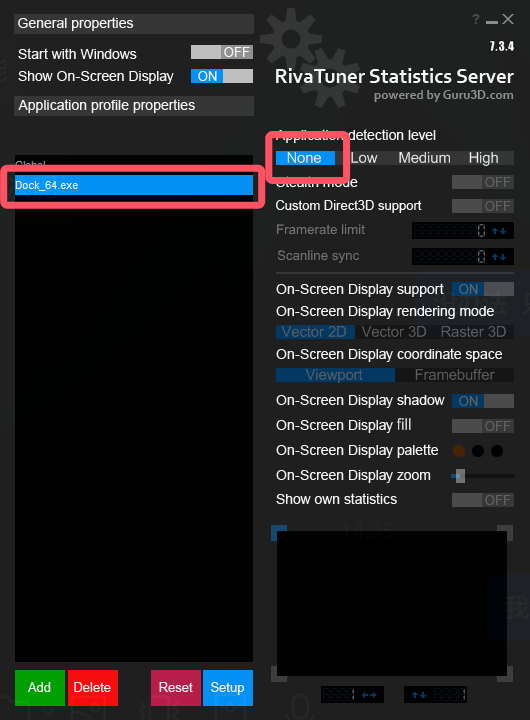
If using MSI afterburner will cause irregular freezing or crashing issues, you can set it in MSI afterburner, add dock_64.exe, then select dock_64.exe, and finally select "None" on the right side.
If you have some problems with the game stuttering or unable to enter the game, you can go to the game icon in the dock - right-click menu - options - no longer show this program to minimize the animation, and then in the preferences - window animation, window display and hide animations all add the exclusions of the game, and finally restart mydockfinder
All the function buttons in Dock and Finder have corresponding functions in the middle button of the basic mouse wheel, dock icons, window previews, stage scheduling window lists, myfinder buttons, scrolling up and down and clicking on the scroll wheel
After turning on the multi-screen display dock at the same time, you can't drag the icon, because you are afraid that the icon configuration will be out of order
Version 2.0 takes a while, and I want to make a super stable version before version 2.0, because as soon as there are new features, there will be new bugs, and all new features will be released when there are almost no bug fixes.
Known issues
Dock icon masks cannot follow global color changes after advanced editing
Occasionally, the dock does not activate the window, and it is currently being investigated
Additional instructions
myfinder volume menu added the function of switching sound effects spatial sound effects,At present, this function is not due to the fact that there is no example on the network, even if it is AI,So every time this function is run, the sound will be stuck when it is displayed for the first time,The reason is that the background will switch all the spatial sound effects once to detect whether which sound effects are installed
If the Win10 system to open this feature after the crash you can open the program installation directory config.ini file, search for "dockicoImmersion=1", delete this line of text to save and restart the computer can be!
Win10 2004 before some systems may have a crash after opening the dock icon reflection, and even the task manager can not end the process, you can open the config.ini file in the program installation directory, search for "enable_iconreflection=1", delete this line of text and save it after restarting the computer
Once the Trash is deleted, it can be re-added in the Add System icon
The window display animation is not perfect at present, if there are many problems, you can close or add exclusions to individual programs, it is known that the window will occasionally disappear after the window animation is displayed, and the window needs to be reactivated to display, the UWP program animation will be displayed twice, and some program windows may be clicked invalid after display, such as Task Manager and Notepad
After MyFinder hides the window with its own menu bar, if the program that hides the menu is displayed abnormally or unstable, please unhide the window menu bar