
Technical news. Radmin. At the moment, many players will not be able to start a combat session. We are forced to return to using Radmin by players to connect to combat sessions. Before starting the game and going into battle, we strongly recommend installing Radmin according to the instructions, and if you have any questions or need help, write to the Support chats in telegram, VKontakte, discord. We attach the instructions below: 1) Download and install Radmin https://www.radmin-vpn.com
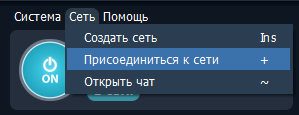
2) Press the big round power button (ON), waiting for connection. Next, click "Network", then "Join the network", the "Gaming network" tab and enter Prime World. Click and that's it. "PWClassic Server" should be displayed at the bottom of the list, no need to click.

3) Turn off the existing VPN applications in all installed applications with the exception of Radmin VPN.
4) Go to the lock, then to "Settings", then "Additional settings", then check the box next to RadminVPN.

5) Start the search for a fight and go into battle.
