We have deployed a new Beta patch in response to the latest feedback. It is centred on the mod architecture and the tools around it, but this round also incorporates more bugfixes, economy/balance tweaks, UI Scaling and new minor additions.
To access this beta patch, you must opt-in to the Beta branch by navigating to Steam Library > The Guild 2: Renaissance > Properties > Game Versions & Betas > patch_4.6.
For this release, the version shown on the main menu is "4.672".
Our official mod Reforged has been updated for this update. It may take a few minutes for Steam workshop to distribute the new files. Do not forget to update your mod in the game's launcher, using SYNC after the Steam workshop download has finished downloading the new mod update.
Since mod architecture has been changed, it is important to grab the new changes. By default, Steam Workshop and our mod launcher should get rid of older, deleted files. If that is not the case on your side for some reason, and issues arise, please attempt to delete the mods manually both in the mods folder of the game and in the Steam workshop's download paths (typically in \\steamapps\\workshop\\content\\39680\\*) and force re-downloading the mods.
New:
Stackable mods. Multiple content mods can now be enabled at the same time and are merged by load order: databases, localization, textures, scenes, objects, GUIs and scripts all overlay additively, with the highest-priority mod winning where two mods touch the same thing. You no longer have to choose just one!
Mod load order. Active mods have a clear priority (1 = highest / applied last) that you can reorder in the launcher.
World mods alongside any setup. World map-pack mods can now be toggled on and played together with the base game (Vanilla), not just with a specific content mod. A mod can mark itself compatible with Vanilla or with everything, and the launcher gives world mods their own Activate/Deactivate toggle.
(WIP) Auto-Changelog generator (Mod Launcher). Select any mod and hit Auto-Changelog to get a readable, grouped summary of everything it changes versus the base game.
Conflict Viewer (Mod Launcher). The conflict overview for mods is a collapsible folder tree which you can expand down to individual files. Each folder shows how many conflicts / overlaps / compatible items it contains.
ModArchitecture marker. Content mods now declare which architecture version they were built for. Up-to-date mods load normally and others are disabled and clearly flagged (see the modder notice below).
Modernised scripting. The Lua scripting layer now exposes the standard table library, ipairs, type/tostring/tonumber and a new len() helper. Additionally, some script errors in the log now tell you the exact script file and line (Alias Not Found).
Ability to Update Save Files. Reload all Lua scripts from disk on the fly! In single-player it reloads locally and as the multiplayer host it refreshes and resyncs every client. It is useful for regular players who simply want to continue playing their savefiles while applying our latest game update changes (and/or those of a modder).
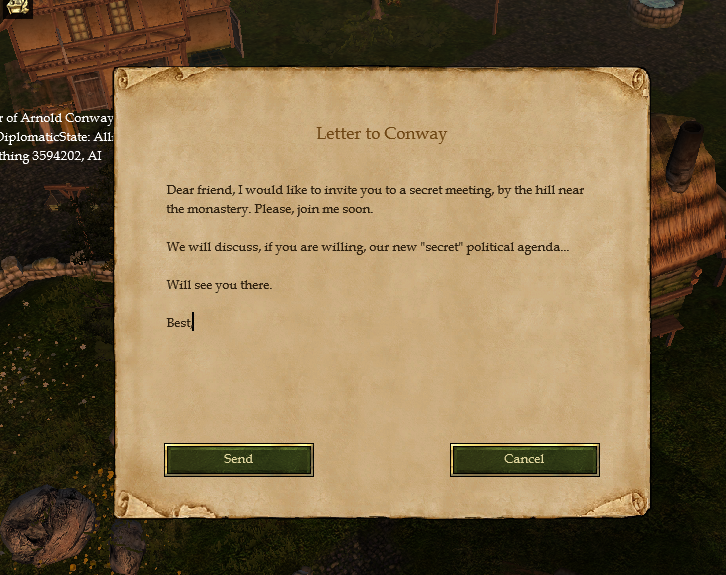
Write letters to players. We made it possible to write custom letters to players from within the game so as to open up diplomacy options in a more immersive way. You will need the Escritoire house upgrade to do so, and use the new "Write Letter" measure that shows in the action bar when your character is selected. But, will your writing skills be intact, if you are hurt? That is for you to discover...
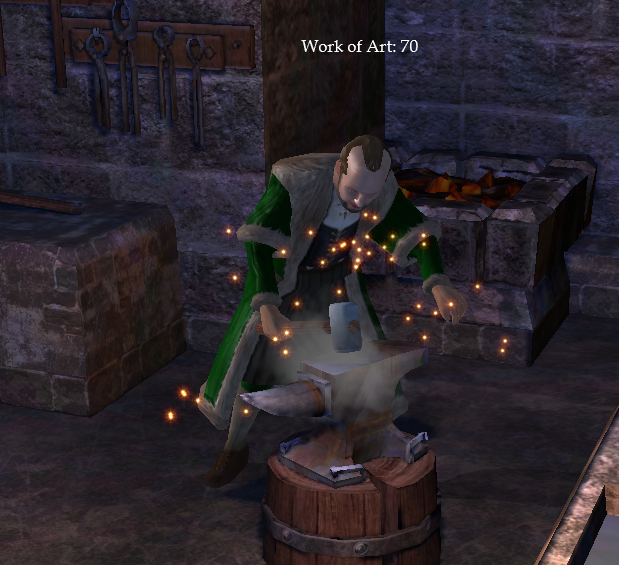
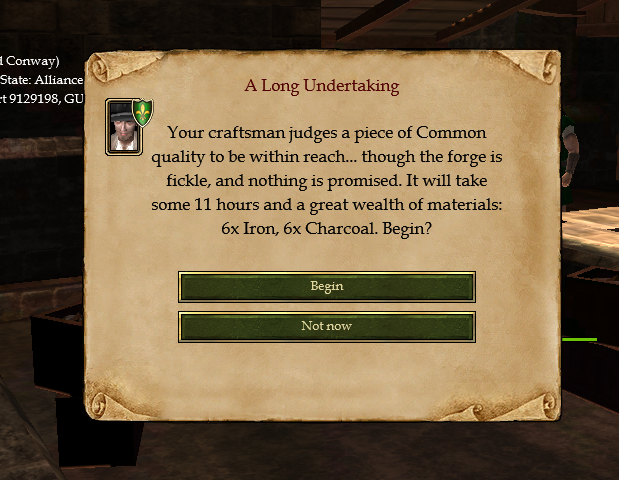
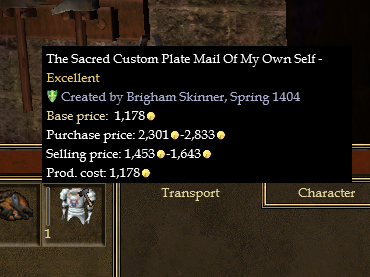
Craftsmen are now able to create special "Works of Art": this is our first installment of items with quality tiers. Get in your foundry and work on your special piece of equipment, and name it! However... will you be skilled enough to make a work of art that is worth it? Anywho, the experience you'll learn in your journey surely will compensate your first attempts! Watch out, for you might also run into a few accidents on your way there...
Fixed:
A multiplayer crash that could happen shortly after a resync.
A rare crash linked to cart movement control.
A rare crash that was linked to in-game actions triggering character memory events.
A rare issue whereas nobody could apply for the entry-level offices in the political tree of a settlement after a certain point (possibly when saving during a city council cutscene).
An issue whereas the "Resync" fallback that starts as a result of not using the "Share Save" button in Steam MP when loading a game would fail to proceed if, during that game, a player's dynasty had died, and that player had left the game, which the game would fail to notice and thus it would force everyone to wait for an extra player slot to validate the resync process while that very player slot was no longer occupied.
Improved some more synchronisation code for Steam MP.
Fixed an issue whereas you could no longer apply to entry-levels in the office tree in a specific scenario.
Fixed an issue whereas you would sometimes be unable to use your gold.
The game should now properly prevent you from going back to the Steam Multiplayer interface if you did not fully restart the game in between two Steam MP sessions.
Improved behaviour of AI-managed hospitals (by a little bit).
Localization from a content mod failing to load when a second content mod was enabled above it.
Moving a selected object with the arrow keys in GiTSE now keeps its new position (it used to snap back to the start).
Improved overall Objects handling in 3D World in GiTSE (by a little bit).
Fixed some Rich Presence for other languages.
Fixed Thesis Paper Lua script.
Fix for flickering cursor impacting some players.
Frequency of Music option had no effect: the setting was only read once at startup, so changing it did nothing. The music could then go silent for a very long time. It's now re-read live, so the slider actually controls the gap between songs.
Fixed some older UI-related issues with misplaced elements on screen and stretched HP bars that could occur on occasions in certain resolutions/ratio.
Fixed a potential issue that leads to black screen or black elements on screen when Alt Tabbing in Fullscreen mode.
Changed:
LIMITED SETTLEMENT POPULATION (Performance): 400 max for all towns, except Imperial Settlements with 600 total.
Minor adjustments to economy and items in market stalls.
Workshop counter pricing. Selling goods directly from your own workshop's sales counter now earns closer to the market's price.
Random settlement fire disaster removed. The city-wide fire random event no longer triggers.
Language handling. The game language is now a single global setting and the launcher no longer prompts per-mod. The language list now also includes languages provided by your active mods, so a mod can add a language the base game doesn't ship.
Creating mods. Making a World or Translation mod no longer requires holding Shift while launching the application. The mod type is always selectable in the Create Mod dialog.
Savegames now record the set of mods they were created with. The load list shows every save and marks the ones whose mods differ from your current setup.
Improved GiTSE Localization systems.
Added GiTSE Polish translation by [dynamiclink href="https://steamcommunity.com/id/Szekiel1099/"].
Hardened savegame loading against corrupt Lua script state, so a damaged save can SOMETIMES degrade gracefully instead of crashing.
Long button captions in the launcher are no longer clipped, so the buttons now size to fit their label properly.
The Steam multiplayer player overview is now expandable / minimizable.
The Steam multiplayer player overview is now properly positioned on screen.
Updated File Hash calculation to reflect new data loading architecture.
Player main characters now gain more experience working in their own workshop (raised from 15 to 25 XP per in-game hour).
UI Scaling / High-DPI / high-resolution display support. The game and launcher are now DPI-aware, so high-DPI laptops and 4K monitors report their true resolution. Borderless windowed now renders at the native monitor resolution instead of a stretched/blurry image, and the Monitor dropdown shows the correct resolution. Additionally, you can select on which monitor to start the game using the new options in the launcher.
Good to know: If you share your game's session on a Discord livestream, it has been seen to cause heavy stuttering over long periods of time. It is recommended to restart your Discord livestream when this happens.
On some occasions, if the host takes too long to complete an autosaving operation, the game might ask for a resynchronisation. We are investigating this issue.
Special Notice for Modders
With stackable mods, content mods now need to declare compatibility. Add this line to your modinfo.txt once you have adapted your mod for 4.67+:
ModArchitecture=4.67
Any content mod missing this line (or declaring an older version) is automatically disabled at startup, with a message listing what was turned off, and marked "⚠ OUTDATED" in the launcher. This now applies even if the mod was enabled directly in the activation file. Add the line once you've verified your mod works with this version. World mods and Light Translation mods are exempt.
Please update your mods to use the newest architecture. If you are a translation mod that is not set as a "Light Translation Mod", we recommend converting your mod to be a "Light Translation Mod".
Please note that the game launcher should successfully get rid of deleted files in a mod update.
We will monitor the workshop to ensure mods get updated as intended and will provide support to help navigate through this new dynamic system.
See below for more details.
Special Notice for Community Translators
Once you've joined us on Discord, you can find a list of tokens used in the localization tables here.
Special Notice for Save Files
You can load a save regardless of which mods are currently active. If a save's scripts differ from what is installed, the game now offers to update them (it does it automatically in singleplayer). The older saves update automatically when a game update is downloaded, as well as when you update a mod.
Your savefiles should be compatible with the previous versions of the game. But it is possible that you run into issues regardless of our attention for it. If you do, you may try to start a new game. The most sensitive in this case would be if you are wanting to continue playing a Reforged savefile: make sure your mod is updated using the game launcher and hitting SYNC to grab its 4.67+ update (available right now).
When the host updates a save's scripts in Steam MP, the change is synced to everyone in the session. If you are playing alone, no resync is needed.
Special Notice for Mods Conversion following 4.67+
More are now overlaying each other, and are applied on top of vanilla. The only files you ship with your mods are those that are either modified or added. Everything mirrors the game's own structure.
vanilla > mod (low priority) > mod (higher priority) > mod (highest priority).
A mod with the highest priority is applied last in the stack, which means that it rules over vanilla and all other files.
Files can combine during this entire overlaying stack, accross all mods, from vanilla to the end of the chain. Regular DataBase Tables (.DBT) include a brand new "per row level merge" with complete line-per-line changeability and updating. Though of course, localization tables work just the same as before, with fallbacks to English and vanilla (everything is merged in the end).
Lua Scripts, Textures, Objects, Sounds, GUI, Worlds, etc: these operate on a whole-file override principle. If your mod includes any new file, it will load and add them to the flowing stack of modified content, and also will replace any other of the same name added in the chain of modification from before.
A typical mod folder layout would be the following (although not all new features are reflected here):
MyMod/
├─ modinfo.txt ← required: name, author, version...
├─ DB/
│ ├─ Items.dbt ← partial data edits
│ ├─ Items.del ← (optional) row deletions for Items
│ ├─ deletions.txt ← (optional) deletions for many tables at once
│ └─ Languages/*
│ │ └─ Text.dbt ← text/loca additions & overrides (root folder English)
├─ Scripts/
│ └─ Measures/
│ │ └─ ms_022_ProduceSmithy.lua ← overrides the vanilla script of the same path
├─ Textures/Hud/myicon.tga
├─ Objects/... ← models etc
├─ sfx (or msx)/... ← sound effects, voices / music
├─ GUI/... ← .gui layouts
└─ Worlds/... ← custom maps
So two mods may for example edit the same .DBT file, such as "Items.dbt", without ever breaking the game. And if there is any conflict, the mod launcher will report on that ; although it doesn't always mean that the game would be not running properly.
.DBT files start with a "Table Description", which enumerate what will be expected in themselves. Typically this would be a block declaring the columns, and Data: would show its rows.
When the engine merges your partial table onto the base, it works row by row, matched by IDs:
ID already exists in the base? Fine, your changes will apply to that base row.
ID is new? Awesome, it'll be added.
A new token, ~, is now used to specify "Keep what precedes me for this parameter". It is a key to clean edits for DataBase Tables. When you put it into a column, it means that whatever comes before stays as it was: do not touch it, keep vanilla or lower mods for this specifically!
Example.
Table Description:
"id" INT 0 | "name" STRING 0 | "type" INT 0 | "price" INT 0 |
Data:
1042 "~" "~" 85 |
In this example, you only modify the price of row 1042 to 85. If a later patch modify "name" or "type", then your mod will adapt, since it is set to ignore these modifications except for the "price". But how to add a brand-new row?
Data:
7200 "MyNewSword" 2 500 |
As simple as that, simply put your new row in that file.
Please note that you do not have to include the entire vanilla rows into your modded .DBT files. Only include your editions and additions!
How to delete rows, then? You can use a ".del" file that you put next to the table. For example, DB/Items.del with this content:
# remove these items entirely
1042
1043
Alternatively, you can consolidate all deletions in a global "deletions.txt" in your DB/ folder with the following pattern:
\[Items]
1042
1043
\[Measures]
7150
When adding new entries, it is recommended to specify a numerical ID that is not used in vanilla and other mods.
On the topic of localization.
The DB/Languages/* files work differently than regular .DBT files. They all merge into one keyspace, ordered by the string label and not by row IDs. If you want to change or add text, you simply ship a Text.dbt (for example) that contains the labels you added or edited such as:
Data:
16850 "_MP_LOBBY_MUSTRESTART" "Restart required to play multiplayer again." |
99001 "_MY_NEW_STRING" "Hello, world!" |
To override an existing string, use the same label with your next text.
To add a new string, simply add it and give it a unique unused string key.
For translations, you can drop language copies in DB/Languages/#thelanguagename/Text.dbt etc (root folder is English).
On the topic of Lua Scripts.
Lua scripts are whole-file overrides by path (and additions). To change existing behavior, you must drop your edited copy at the exact same path than a vanilla script (unless its path was modified in a .DBT file). Your version will win over all mods and vanilla that precedes.
Usually, to create new measures, you would edit the Measures.dbt, MeasureToObjects.dbt, Filter.dbt and add the localization keys it needs in the Languages DBTs.
You can specify which scripts to delete in _removed.txt in the Scripts folder, if there is any that you want prior mods or vanilla to not include.
Please make sure your new lua scripts do not overwrite other scripts if they are not meant to do so: name them with a unique name, even if the pathing is different.
All Lua functions can be accessed in other scripts. You simply have to type to access them.
Textures, 3D files, sounds, GUI, worlds.
These are also whole-file overrides by path (and additions).
We would like to thank our beta-testers, with whom we ran multiple hours-long lobbies (with up to 10 players at once):
[dynamiclink href="https://steamcommunity.com/id/OG_USEC/"]
[dynamiclink href="https://steamcommunity.com/id/DachiMustDie_TTV/"]
[dynamiclink href="https://steamcommunity.com/id/Goated0nTheKeys/"]
[dynamiclink href="https://steamcommunity.com/id/SaintTrick/"]
[dynamiclink href="https://steamcommunity.com/id/FisherPete/"]
As always, please make sure the version shown on the main menu is "4.672" before playing, and let us know if you run into anything.
Thank you for your patience, and happy modding!