Hi UNO™ players!
We’re Snap Finger Click. We are a small, independent studio of developers working on UNO™, and we love creating party games for your game nights.
Today, we are thrilled to bring a highly requested crossover to the game, but before we get into the arena, we want to take a moment to talk about personalising your UNO™ experience
🎨 MAKING UNO™ YOUR OWN WITH MYDESIGN
We know that many of you love diving straight into a Classic match, which means some of you might not have fully explored the MyDesign feature yet!
Last year, we did a massive overhaul to improve your experience and give you greater choice over your items. We integrated MyDesign customisations directly into the main 'Classic' game flow so that more players experience the feature without having to choose a completely separate game mode.
We also want to clarify how you can always view your hard-earned cosmetics during a match. The option appears under a 'MyDesign' section of the game settings and the player can choose between three options: Opponents' Designs, My Designs, and My Cards Only.
Opponents' Designs See the match exactly as others have customised it. You will see your opponents' chosen card themes and avatars, as well as the host’s selected board and music.
My Cards Only Every card on the table will appear in your chosen theme. Other elements, such as avatars and the host’s board or music, will still use the designs chosen by your opponents.
My Designs The entire match - including all cards, the board, and the music - will use your personal designs. This only affects your own view; other players will still see the themes they have chosen.
A Quick Note on a Recent Bug: We know some of you experienced an issue where your chosen MyDesign cosmetics would not show up correctly after joining a game, even with your settings configured correctly. We want to be clear: this was a bug and unintended behaviour. While we patched the bulk of this issue in our last update, today's patch wipes out the lingering edge cases. Your designs should now display flawlessly!
⚔️ BRAWLHALLA IS HERE!
Now that your MyDesign settings are switched on, our art team has been working on something completely different to bring a fresh vibe to the table.
The Grand Tournament is crashing the party: Brawlhalla has officially arrived in UNO™! If you’re ready to brawl, this new premium cosmetic pack is available to purchase right now on the Steam Store.
Here is what you can get:
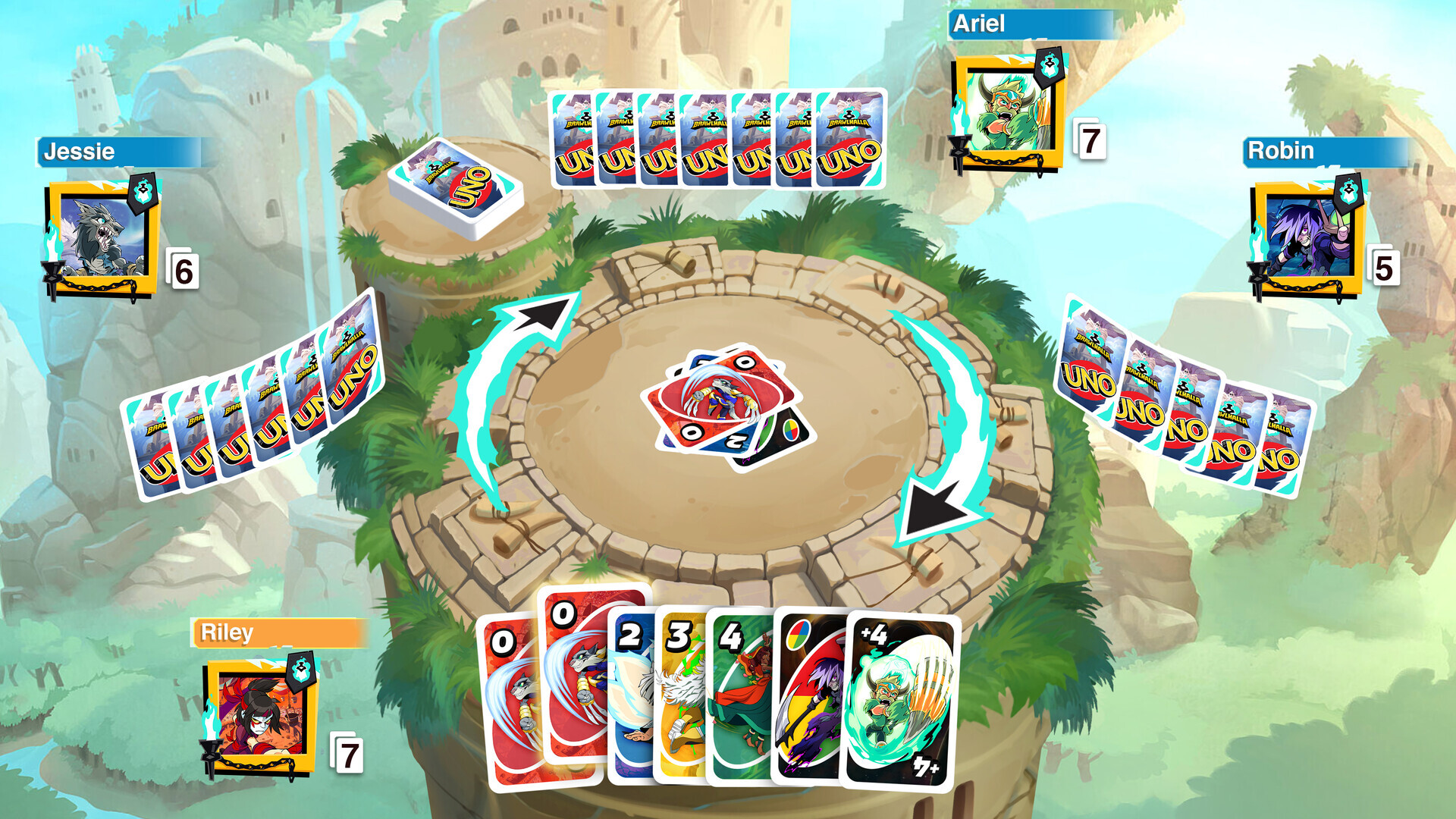
1x Board - The Arena: Take the fight to the skies! Play your cards on a brand-new floating stone stage inspired by the Mammoth Fortress, complete with lush greenery and waterfalls in the background.
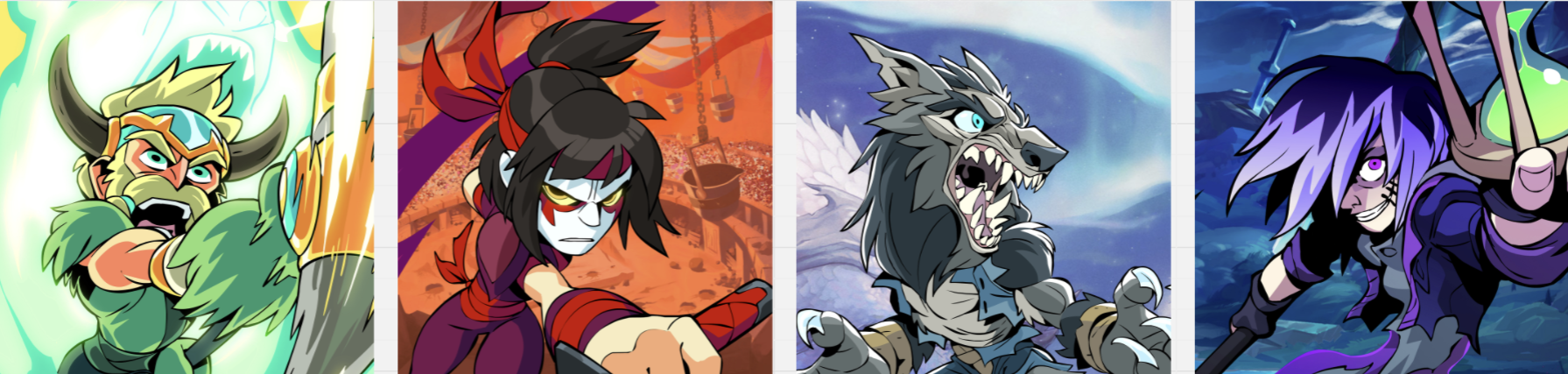
4x Avatars - The Legends: Rep your favourite brawlers and intimidate your opponents before the first card is even played!
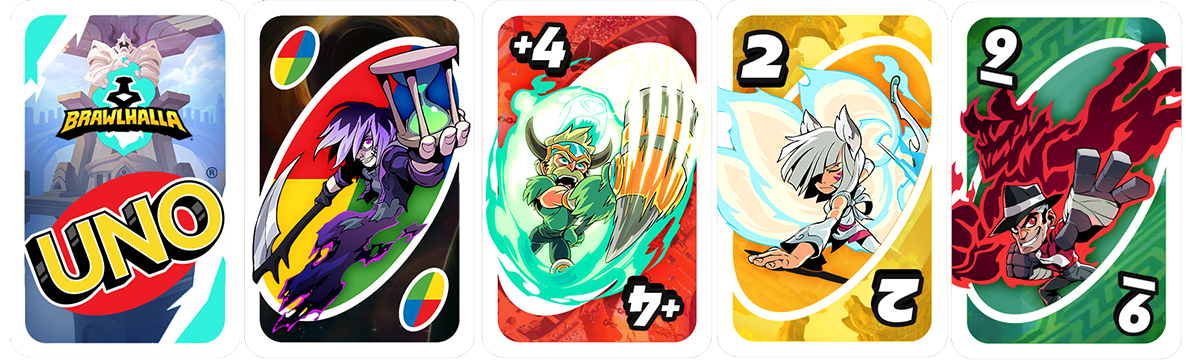
1x Card Deck - Brawlhalla Theme: Deal out the damage with this epic deck featuring the mighty Legends of Brawlhalla.
1x Frame - Brawlhalla Emblem: Upgrade your profile and show your warrior spirit with this rugged new frame, featuring the iconic blazing blue torch and heavy iron chains.
1x Soundtrack - Tribes of Brawlhalla: Bring the roaring energy of the arena to your UNO™ game with this action-packed battle track.
1x VFX - Blue Swirl: Knock out your opponents with this swirling blue energy effect!
1x UNO™ Call - Brawlhalla Announcer: Let the official Brawlhalla VO announcer step in and shout "UNO!" when you're down to your very last card.
Grab the Brawlhalla Premium Cosmetic Pack here: [dynamiclink href="https://store.steampowered.com/app/4093730/UNO__BRAWLHALLA_COSMETIC_PACK/"]
⚙️ HOW TO EQUIP YOUR NEW COSMETICS
Got your new Brawlhalla gear and want to show it off? Once you've purchased the premium cosmetic pack from the Steam Store, here is how to set it up:
1. Navigate to MyDesign from the main menu and select the Brawlhalla pack from the Packs section to quickly set up the full theme!
2. To ensure you see your new designs in every match you play, go to Options, open MyDesign Settings, and choose 'My Designs'. This guarantees your Brawlhalla items will always be visible to you in any Classic game, online or local.
🔧 TECH UPDATES
Making sure the game runs smoothly is just as important to us as making it look good. While our artists were busy creating the new premium Brawlhalla cosmetic content, our programming team has been strictly focused on code improvements.
We are always reading your feedback on Discord and the Steam forums, and making sure the game runs smoothly is just as important to us as making it look good. So, today’s update brings a fresh batch of tech fixes alongside the new cosmetic to make your matches better than ever 🛠️
Here are a few of the highlights of what we fixed since the previous update:
MyDesign: Fixed a bug where a player's MyDesign cosmetics would sometimes not show correctly after joining a game.
Wild Weeks Rewards: We've updated the reward requirements! You will now earn the Participation Reward simply by completing a Wild Week match - you no longer need to win to get a prize.
Multiplayer Connectivity: Fixed an issue where players could sometimes not join an online game after accepting an invite.
UI/Visuals: Fixed a bug where viewing an opponent's player card showed a blurred screen.
Coin Balance: Corrected a display error where your Coin balance could sometimes be shown incorrectly. (Your actual Coins are safe!)
UNO The Call of Yara™ DLC: Addressed a soft lock bug in the Call of Yara DLC where the game could sometimes get stuck after the Guerrilla Broadcast card was played.
And More: Plus multiple other minor bug fixes and stability improvements to keep things running smoothly.
💬 WHAT’S NEXT
As an indie team, your support and feedback mean everything to us.
If you run into any new issues, or just want to show off your new Brawlhalla setup, come say hi directly to our team in the Community Discord: discord.gg/snapfingerclick
Thanks for playing UNO™!
- Snap Finger Click