The official version and the beta version of this update are the same. Why run in debug mode?
Because when providing remote assistance to some users, it was found that no bugs would appear when running in debug mode, but the bugs would show up immediately after disconnecting the debugger. That's why this method was thought of to avoid some mysterious bugs.
Changelog
Added a debug mode toggle, which can be enabled in Preferences - Global Settings.
Fixed a freeze crash caused by using the UWP message loop in the previous version.
Fixed a freezing issue in all previous versions when a large number of windows were generated in the background by certain programs (e.g., IDM batch background downloads).
Fixed overexposure of the launcher background after enabling HDR in all previous versions.
Fixed too dark color rendering in gradient blur effects after enabling HDR.
Fixed crashes in all previous versions caused by multithreaded modifications of dock icon data.
Fixed crashes caused by gradient blur effects in window previews.
Fixed misaligned window-switching animations when too many windows are listed in the front dispatch window list.
Fixed misalignment of launcher icons in portrait mode.
Added the option to capture screenshots with minimized window animations, with choices of UWP, DXGI, or GDI. In all previous versions, the default was UWP, which also provides the best effect. Only Windows 10 systems may have a yellow border in the screenshots; if this border is a concern, you can choose DXGI or GDI. It is not recommended to change this on Windows 11 systems. Only UWP screenshots allow you to enable the dynamic refresh feature when minimized.
Added the ability to add non-fullscreen applications. After adding a non-fullscreen application, the dock and Finder can be activated when this program window is in fullscreen, in Preferences - Window Management.
Added the ability to add game applications. After adding a game application, DLL injection will not be used to intercept minimize window animations and show/hide window animations, ensuring smooth gameplay. It also allows the dock and Finder to automatically restart when a fullscreen game is running in windowed fullscreen mode, in Preferences - Window Management.
The temperature detection program has been identified as a virus by Windows Security Center due to a vulnerability in the Winring0 driver, and is currently searching for a new temperature detection method
supplement
win11 24H2 system does not show WiFi, you need to turn on the geolocation of the system
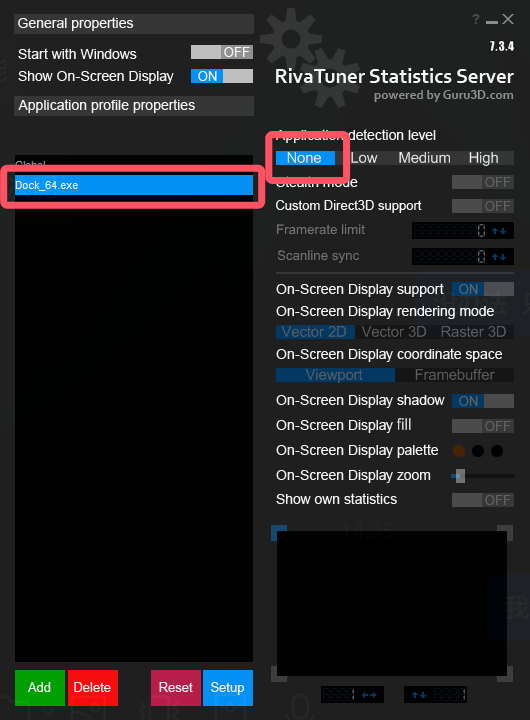
If using MSI afterburner will cause irregular freezing or crashing issues, you can set it in MSI afterburner, add dock_64.exe, then select dock_64.exe, and finally select "None" on the right side.
If you have some problems with the game stuttering or unable to enter the game, you can go to the game icon in the dock - right-click menu - options - no longer show this program to minimize the animation, and then in the preferences - window animation, window display and hide animations all add the exclusions of the game, and finally restart mydockfinder
All the function buttons in Dock and Finder have corresponding functions in the middle button of the basic mouse wheel, dock icons, window previews, stage scheduling window lists, myfinder buttons, scrolling up and down and clicking on the scroll wheel
After turning on the multi-screen display dock at the same time, you can't drag the icon, because you are afraid that the icon configuration will be out of order
Version 2.0 takes a while, and I want to make a super stable version before version 2.0, because as soon as there are new features, there will be new bugs, and all new features will be released when there are almost no bug fixes.
Known issues
Dock icon masks cannot follow global color changes after advanced editing
Occasionally, the dock does not activate the window, and it is currently being investigated
Additional instructions
myfinder volume menu added the function of switching sound effects spatial sound effects,At present, this function is not due to the fact that there is no example on the network, even if it is AI,So every time this function is run, the sound will be stuck when it is displayed for the first time,The reason is that the background will switch all the spatial sound effects once to detect whether which sound effects are installed
If the Win10 system to open this feature after the crash you can open the program installation directory config.ini file, search for "dockicoImmersion=1", delete this line of text to save and restart the computer can be!
Win10 2004 before some systems may have a crash after opening the dock icon reflection, and even the task manager can not end the process, you can open the config.ini file in the program installation directory, search for "enable_iconreflection=1", delete this line of text and save it after restarting the computer
Once the Trash is deleted, it can be re-added in the Add System icon
The window display animation is not perfect at present, if there are many problems, you can close or add exclusions to individual programs, it is known that the window will occasionally disappear after the window animation is displayed, and the window needs to be reactivated to display, the UWP program animation will be displayed twice, and some program windows may be clicked invalid after display, such as Task Manager and Notepad
After MyFinder hides the window with its own menu bar, if the program that hides the menu is displayed abnormally or unstable, please unhide the window menu bar