Developer Note
Hey Oblivity Community,
It’s been a while since our last update, but we are still at work moving towards the Update: Oblivity 3.0 and its upcoming core feature.
For this Update (v2.10.0), we focused heavily on refactoring and improving a majority of the internal systems. As requested by the community, the main goals here were optimizing performance and reducing clutter. As part of this cleanup, we have removed the old settings profiles to streamline the experience.
You will also notice that we have completely reworked the Settings Menu, it is now cleaner, faster, and much easier to navigate. Additionally, we are introducing Assistance Drawers, which act as the replacement for the old mouse path visualizers. This new system is far more powerful and modular, allowing us to add new visualization options easily in the future.
Most of the work in this patch is "under the hood." In the best-case scenario, you won't notice the changes themselves, just the improved performance. However, these steps are strictly necessary to make Oblivity 3.0 possible and will speed up our development on future updates.
If you run into any issues with the new systems, please don’t hesitate to reach out to us on Discord.
Cheers,
The Poly Games Team
Changes
Settings Menu Rework
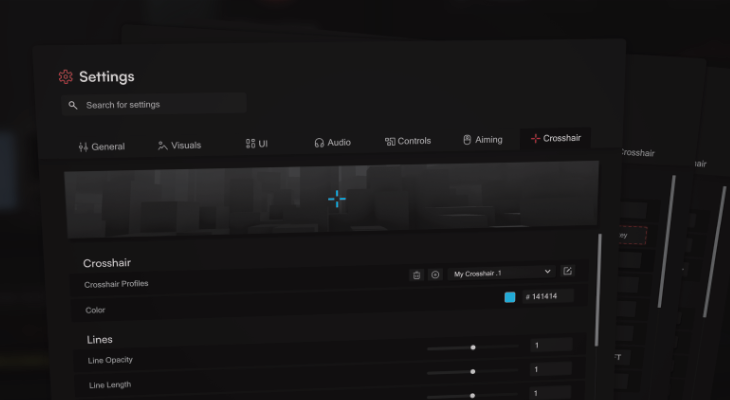
We’ve completely reworked the Settings Menu UI to make it cleaner, faster, and easier to navigate. The main goal here was to reduce clutter and overall complexity in the app.
Better Organization: We resorted all settings into more logical categories.
Compatibility: Most of your settings are backward compatible with the new system. However, there might be a few instances where we decided against it, so it’s worth a quick look to make sure everything is set up how you like it.
Settings Profiles: We removed Online Settings Profiles. They added a lot of complexity but weren't used much, so we cut them to keep Oblivity streamlined.
Crosshair Editor: The crosshair editor and renderer were also reworked in the process. We kept Crosshair Profiles though, so you can still easily switch between your different crosshair setups.
The New Assistance Drawer System - Help Lines for Training
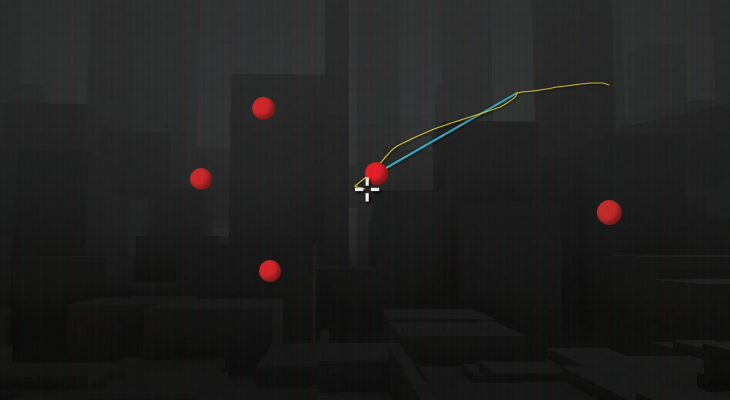
This is our new system for visual training aids. These "Drawers" are help lines/graphics designed to assist your training or help you spot aiming mistakes in real-time. It replaces and expands on the old mouse path visualizers.
We are launching with support for Player Mouse Trail and 4 assistance systems:
Optimal Mouse Path: A more performant and customizable version of the previous system. It predicts the shortest path for target selection to help you clear targets as efficiently as possible. We recommend to use it in scenario with many static targest where you try to find the fastest path.
Simple Mouse Path: Draws simple lines from your crosshair to either the closest or the oldest target.
Predict Target Movement: This visualizes where a target will be in the future based on its current velocity. It calculates this by extrapolating the target's movement and estimating the time it will take you to move your crosshair there. It comes with tons of options to configure every part of the prediction logic. We recommend trying it in click timing scenarios with predictable moving targets.
Static Mouse Path: A great "reality check" for your pathing. This shows the perfect straight line to the next target, starting exactly where you killed the last one. You can compare this static line with your actual mouse trail to see exactly where your movement deviates from the optimal path. Optimal for all kind of static click timing scenarios.
These drawers are modular and very easy for us to add, so this is just the beginning. This system is another puzzle piece for Oblivity 3.0 main feature, so feel free to reach out with ideas for new ones!
Performance
This is Oblivity’s biggest performance update in a long time. The massive refactor of the codebase results in better performance across Oblivity.
In-Game Smoothness: We focused on stabilizing frame times to reduce micro-stutters and lag spikes.
Higher FPS: Beyond just smoothness, general frame rates should be higher, especially on lower-end hardware.
UI Optimization: We overhauled how complex screens are rendered. Screens with many scenario thumbnails should benefit the most from these adjustments.
Thumbnail Generation: The system that generates scenario previews is now much more efficient, reducing the load on your system while browsing content.
Quality of Live and Bugs
targets not spawning bug fixed
replay kill hit info chart works again
renamed the Analysis to My Runs and moved it to features, making more space on the navbar
fixed tons of issues with the audio system and importing files
fixed problems with the optimal mouse path
fixed an issue with warmup videos continuing to play after skipping
improved title updating for eye and wrist warmup sequences
fixed back button visibility on the first wrist warmup sequence
resolved a bug preventing eye warmups from starting after leaving another routine
warmup videos now properly reset when switching or exiting routines
improved play/pause button behavior in warmup screens
file and image uploads in the support system now appear instantly in chat
removing the option to override ads scopes, as it was unnessecary complexity
fixed issues with the ads sensitivity multipliers
fixed an issue with The Finals Advanced Sensitivity Finder Playlist
fixed tons of issues with the scenario search
fixed issues with the scenario viewer on the Dashboard
fixed issues of thumbnail not displaying correctly in the overall improvement chart
fixed issues in the sensitivity finder ui, when switching profiles rapidly
oblivity now supports fov with decimal numbers
fixed scroll issues in the trainer
a lot of small ui changes
we also switched our update version system to Major.Minor.Patch notation: v2.10.0
...
Once again the real value of this update, is under the hood with tons of improvements that help us to develop more complex features in future Oblivity Updates.