Hello! We have an update regarding Accessibility Features in the game.
First off, we'd like to give a huge shout out to our closed accessibility branch testers. Their feedback and suggestions were invaluable. Most of our testers were able to finish the content currently available in Story Mode without sighted assistance. With that said however, there are some limitations that we hope to address in the Early Access period.
New Features
Screen reader narration for navigating the main menu, level select, and custom levels menu. Use the F8 key to toggle this on or off.
Context sensitive input instructions. Press F1 to hear these at any time.
Audio cues and narrated text for patient status updates.
Screen reader narrated story dialogue. For Story Mode day shift levels, there are also optional scene descriptions.
Limitations
Windows only
The feature might function on MacOS, but may not follow system VoiceOver settings. It does not work on Linux at all.
Pseudo-support for NVDA
Rhythm Doctor runs in the Unity game engine. Due to how Unity handles UI information, we can't add "true" screenreader support that would work like a webpage or native application. Instead, we use a plugin that recreates functionality similar to a screenreader from scratch. Unfortunately, aside from Windows SAPI and MacOS VoiceOver, the plugin only supports the NVDA screenreader on Windows through the NVDA controller client. Some features of NVDA might not work inside Rhythm Doctor, and other popular screenreaders such as JAWS, Zhengdu, and Sense Reader are not supported.
Missing Scene Descriptions
Much of our storytelling is done through the art and animations. We've tried to make them more accessible by writing scene descriptions, but we still have more work to do! Currently only the main levels of the story (known as the "day-shift" levels) are described. Descriptions for optional challenge levels (known as the "night-shift" levels), collaborations, and other bonus levels will come at a later date.
No Level Editor
The Level Editor feature for custom level creation is unsupported, as it is a mouse-driven interface. However, rdlevel files are encoded using JSON, and we have players who have learned how to create custom levels inside a code editor.
Between now and the 1.0 launch of the game, our focus is on making Story Mode more accessible for visually impaired players, so we haven't looked into the Level Editor. Unfortunately we're a small team, so we won't be able to consider Level Editor improvements in that regard before the 1.0 launch.
Other Known Issues
Narration on MacOS might not follow system VoiceOver settings.
The hotkeys for narration features (F8, F1, F5, etc.) currently do not have bindings for gamepad.
Lyric subtitles might be narrated in large chunks, instead of line by line in time with the song.
For Custom Level Creators: New Narration Tools
To help creators make their levels more accessible, we've also added new events and new functions to some existing events in the level editor!
In the Sounds tab, there are two new events: Read Narration and Narrate Row Info.
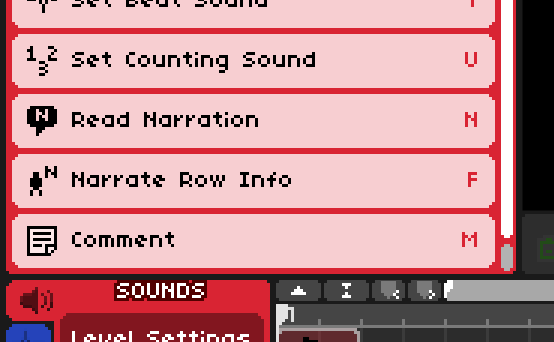
Read Narration is a versatile event that can be used to send any text to narration. In story levels, it is most commonly used for scene descriptions. Be sure to check the "Narration Categories" section down below too.
Narrate Row Info is useful for signalling many gameplay changes, such as a new patient arriving, or an existing patient's behaviour changing.
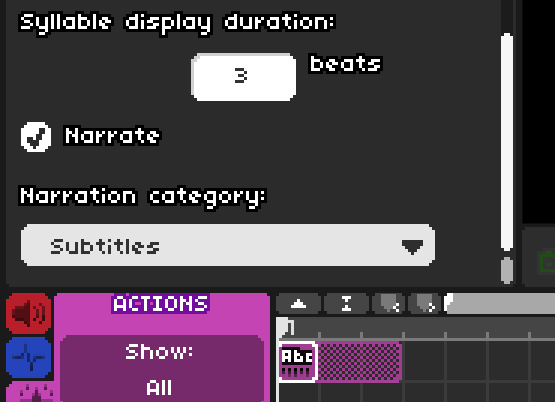
In the Actions tab, the two events Floating Text and Show Status Sign have new toggle settings for narration. We recommend leaving these on in most cases. Exceptions include duplicate or unintentionally repeating messages, purely decorative ASCII art, etc..
Dialogue events will always be narrated automatically.
These new events and functions will only run if the custom level's player has enabled narration in their settings, so don't hesitate to make use of them.
Narration Categories
Read Narration and Floating Text events must be set to one of four categories.
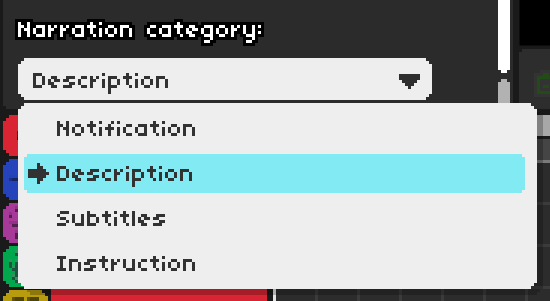
Notification: Meant for general on-screen text. Show Status Sign messages count in this category.
Description: The default category for Read Narration events. Meant to be used for descriptions of visual-only information, like character animations and the background environment. Players can press F6 to toggle them on or off.
Subtitles: The default category for Floating Text events. Meant to be used for subtitles of audible speech, like lyrics. Useful for translations. Players can press F7 to toggle them on or off.
Instruction: Meant to be used for explanations of game controls. After an Instruction message is narrated, players can press F1 to replay it at any time, until overridden by the next Instruction message.
We also have a guide on testing how screenreaders will interpret a level here. TL;DR: turn the speed up!
Other changes
2-3 Tutorial: Player Two's patient no longer shows up in single player mode.
Two player mode: Fixed various intern arm positioning errors.
As always, thanks for playing!
[p align="start"]X/Twitter: @RhythmDrGame[p align="start"]Bluesky: @rd.7thbe.at[p align="start"]Official Discord Server: https://7thbe.at/discord/[p align="start"]Instagram: https://www.instagram.com/rhythm.doctor/[p align="start"]