Stairs tool
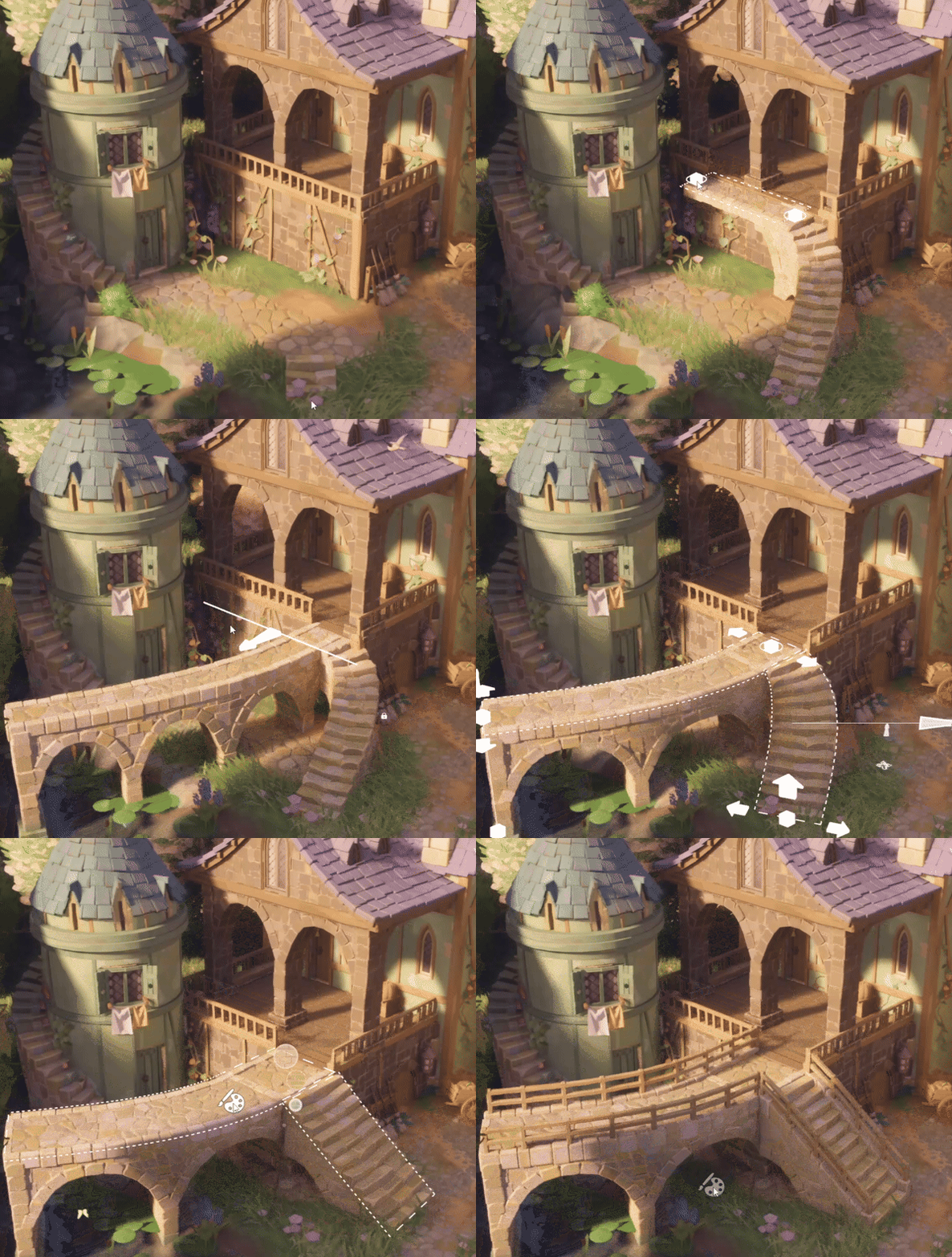
The star of this update is of course the new stairs! Initially the tool set was intended for stairs alone, but we've designed it to also accommodate bridges and walkways. You click to place individual nodes, and you can access a detailed editing mode by right-clicking existing stairs. They come with customization of color and railings, and you can even place clutter on top.
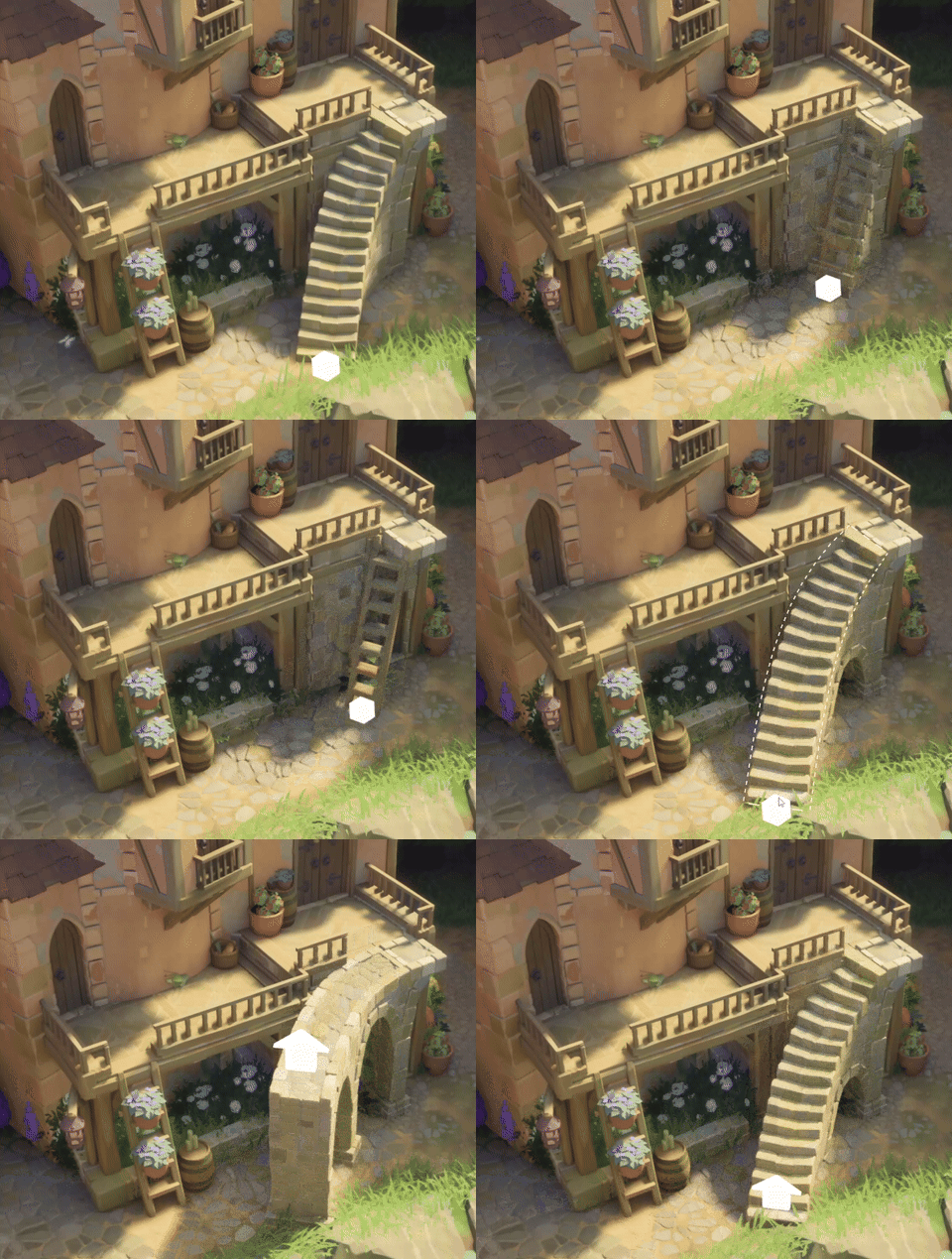
Stairs turn into platforms & ladders depending on steepness, and can be attached to walls and flattened roofs.
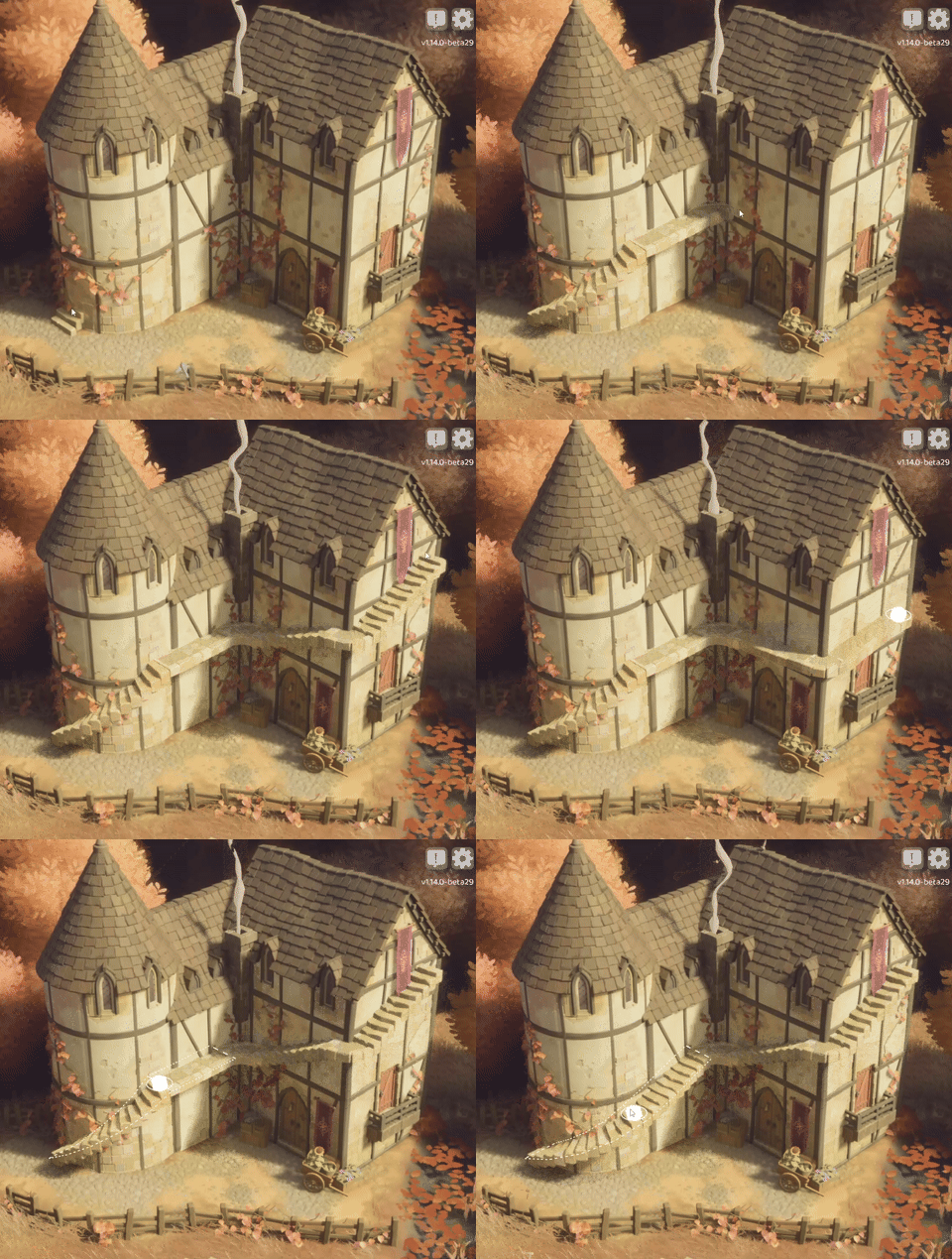
Stairs understand if you place them on buildings - they snake around towers, and automatically create little platforms to go around corners.
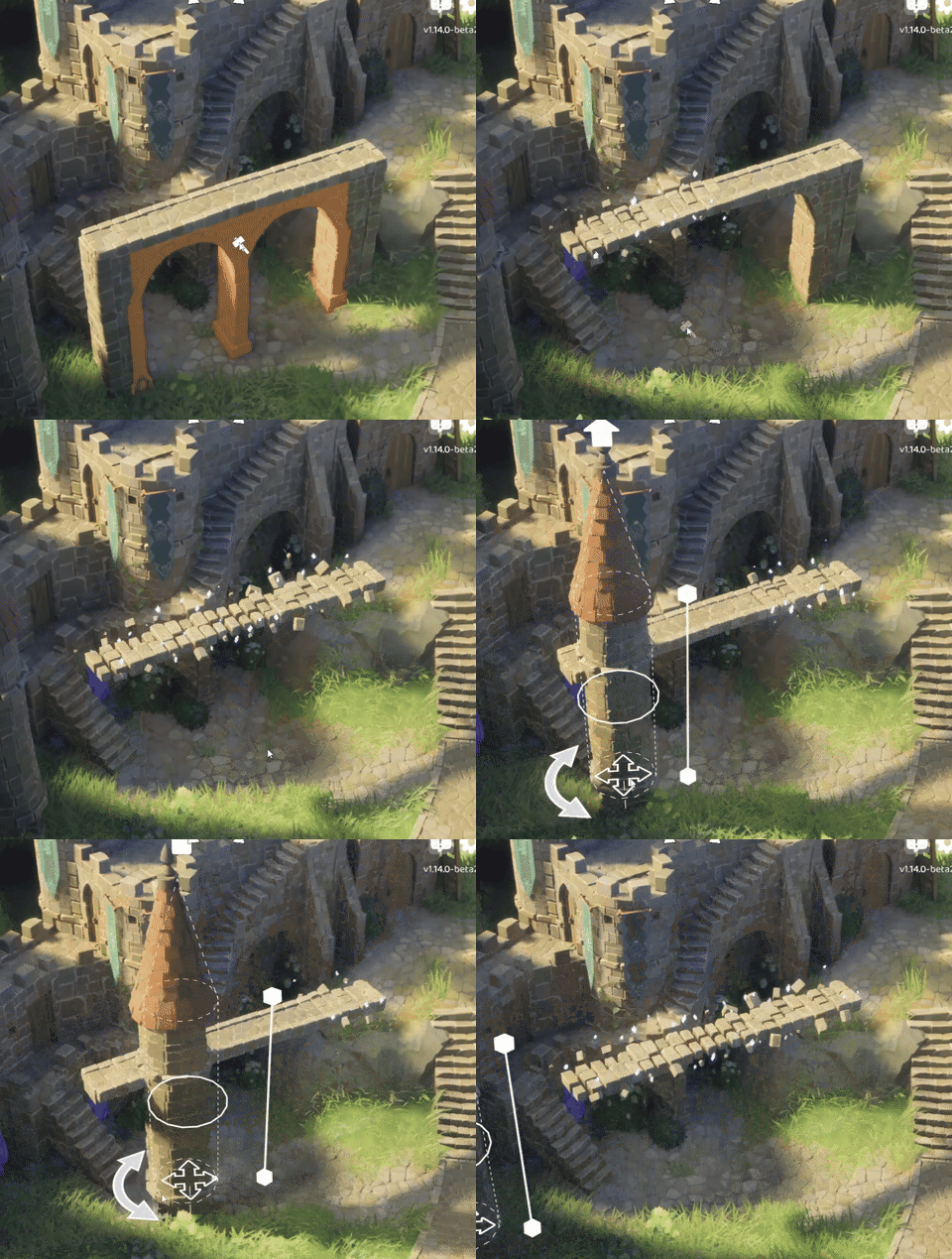
At some point we realized that it would be nice to have the ability to delete supports where you don't want them. But what should happen if all supports are deleted? Should we still try to create a pillar or stilts? Well, luckily we know a few wizards, and they happily lent us some of their spells 🧙 Thus, when stairs are unsupported, a magical effect will appear to help them levitate. Of course we conform to the Mana Conservation Act of 2016, and don't cast those spells for nothing - stairs can be non-magically supported by many things, for example a building, a wall, even other supported stairs.
Okay, let's see if there is anything else on my list... ohh! yes! There is also a secret feature 👀 If you want a hint: cart + stairs = ??? . If you want another hint: SHOW ME THE SECRET FEATURE. The secret feature comes with additional controls: You can use WASD to go faster, slower as well as lean left and right. There's also an advanced version: cart + cart + cart + stairs = ???.
Full spoilers:

Cobblestone
Another new addition is cobblestone roads. They are located under a path tool, and they come in 3 variants.
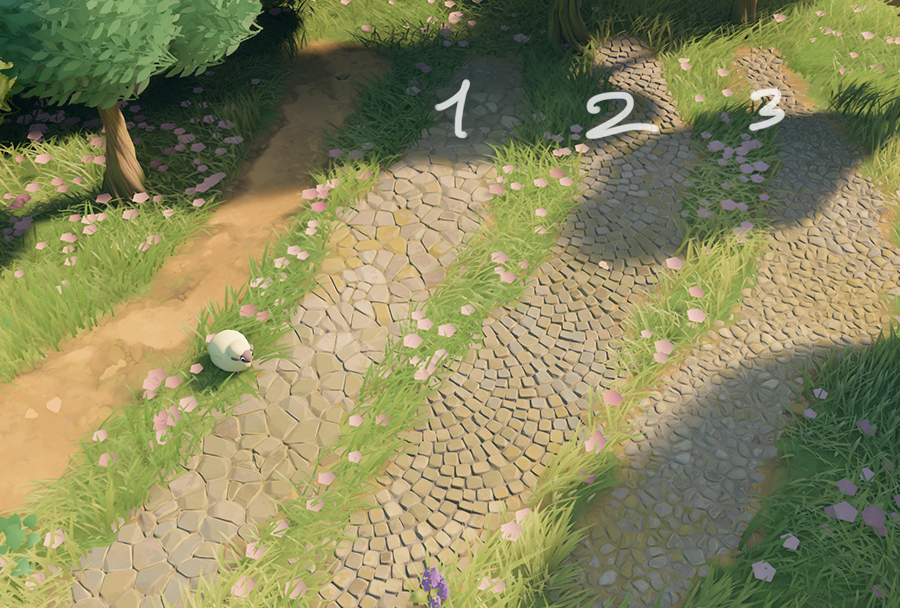
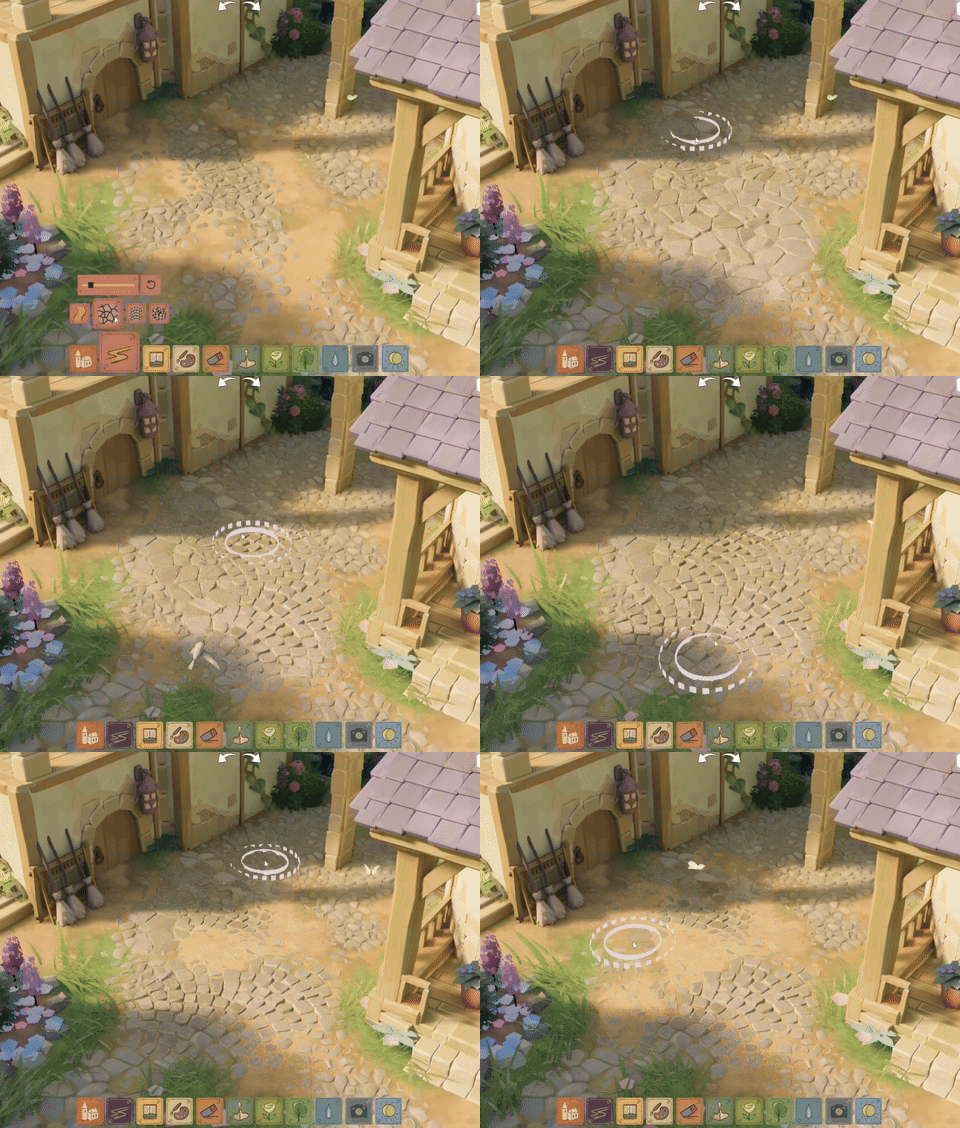
You can combine the variants, and blend them with paths, creating more run-down or chaotic surfaces. Me, I'm more of a lawful-alignment cobblestone person, but I’m very curious how you’re gonna use them! Could this be the sunset of using platforms for cobblestone-clad towns? :o
New floor textures
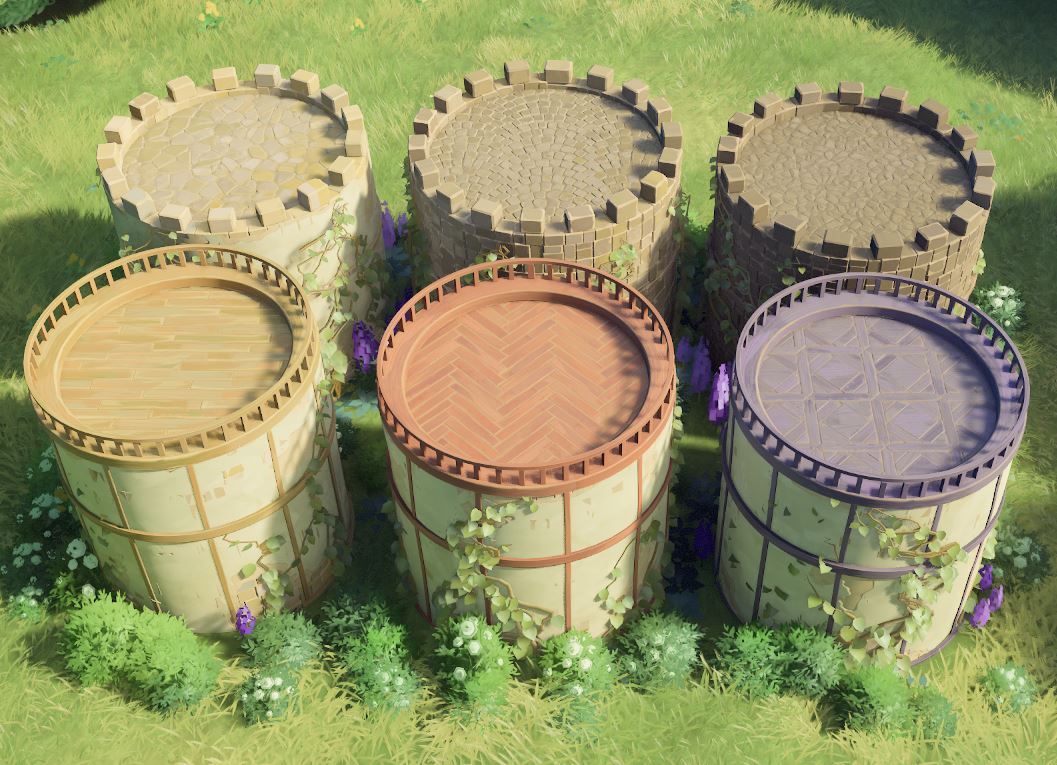
The old floor pattern got a visual uplift, and acquired new friends: 2 stone and 3 wood patterns. They can be accessed via the customization tool.
Plaster peel parameter
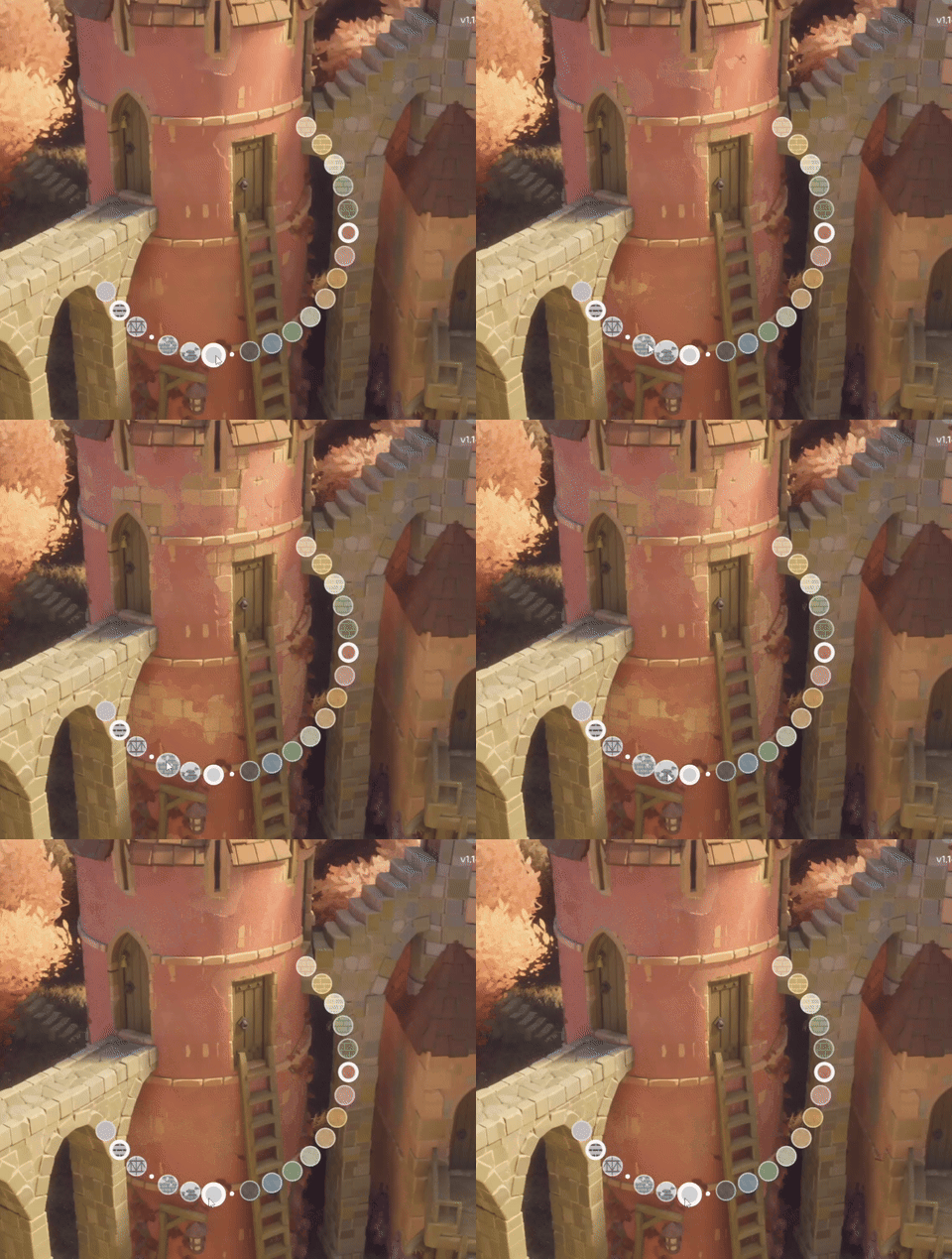
Buildings with plaster got a new customization option: the intensity of plaster peeling off.
Ability to cycle through clutter
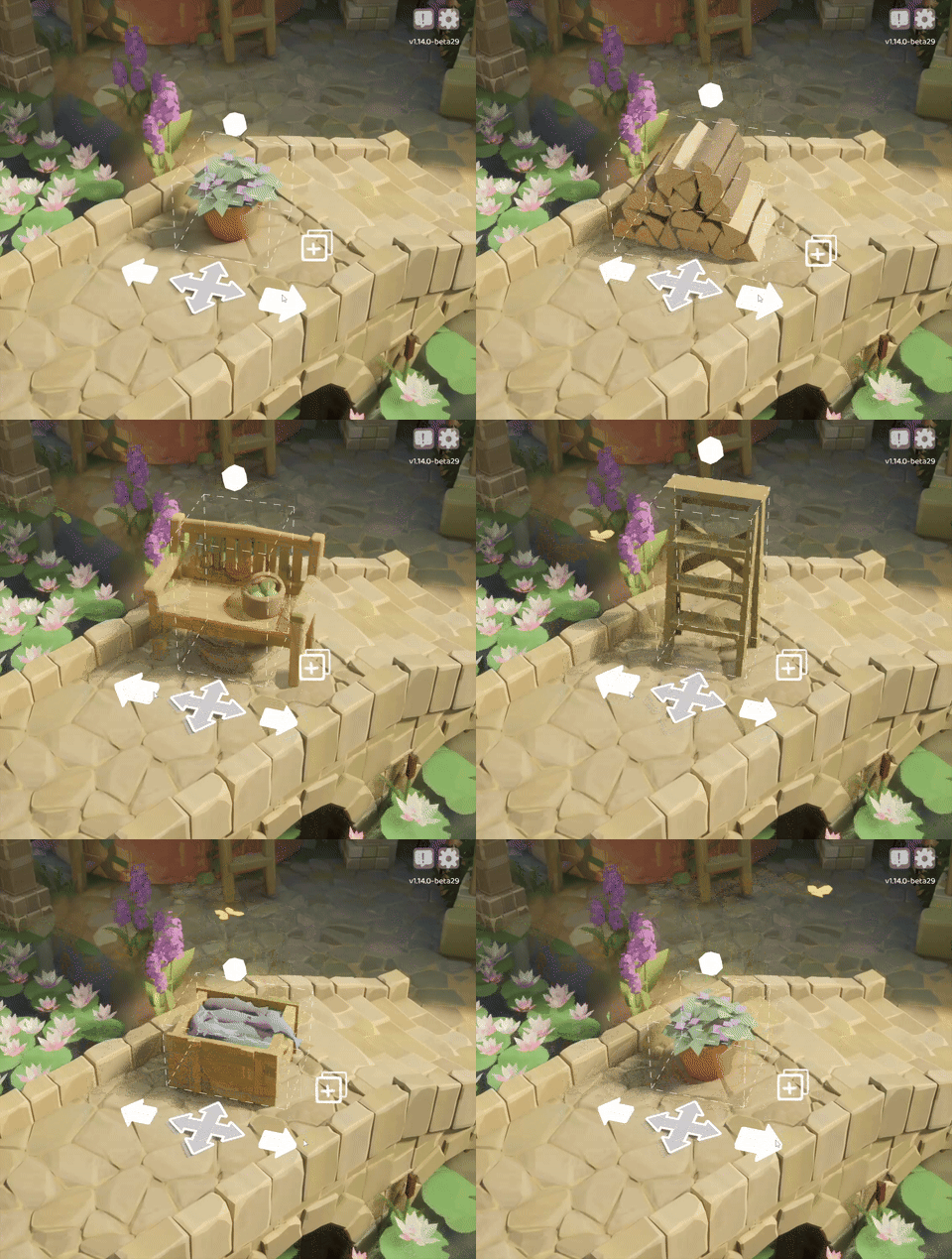
You can now select which clutter you want by entering its focus mode (by default, right-click). This also includes additional clutter with carved pumpkins with glowing eyes from the Halloween update, so you don't need to have a special glade anymore to get them.
Photo mode filters in build mode
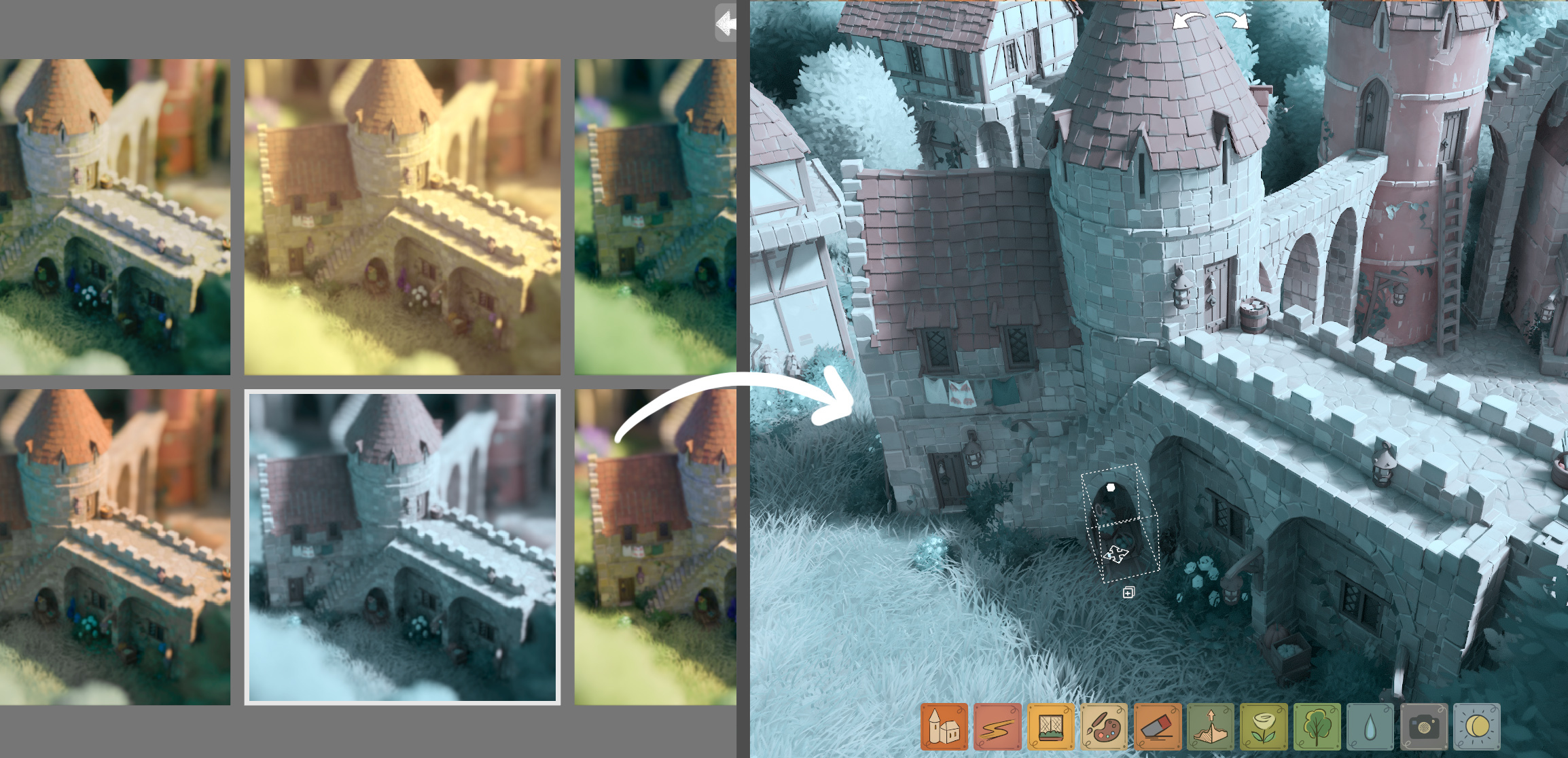
The filters, brightness, contrast and saturation adjustments will now also be applied in build mode. So if you want to make it more spoopy, or turn summer into a chilly day, now you can do that even while building. To reset it all back to default, select the first filter in the gallery (the one with a bookmark icon), and click the reset buttons next to sliders.
Auto-save & backup menu
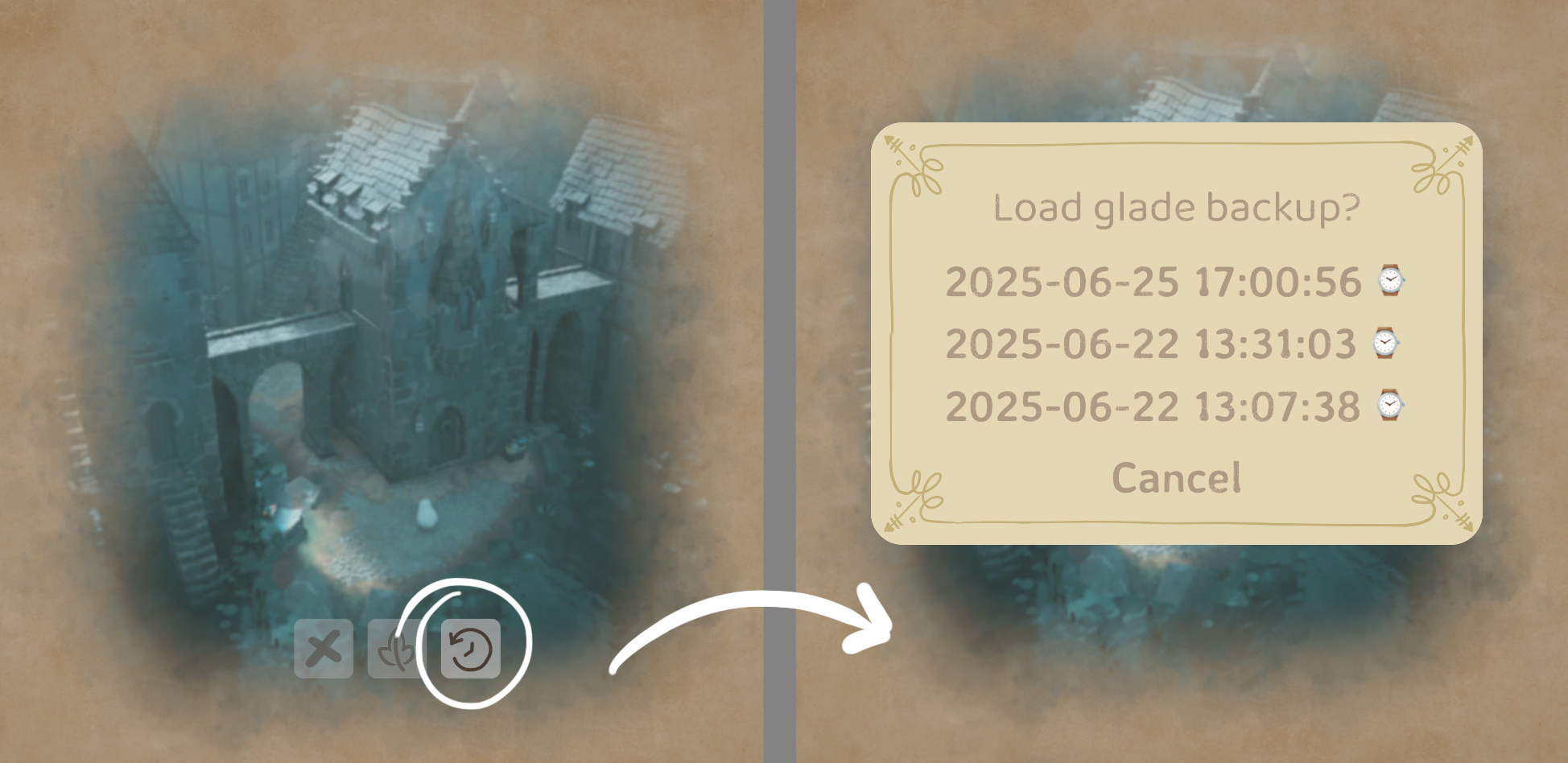
We've rewritten our save system, and added autosave in the background. Previously saving the game was an expensive operation, and happened only if you pressed the ESC key, entered photo mode, quit the game, or if the game panicked (crashed in a controlled manner). While this worked fairly well, if your computer lost power or hard-crashed, you could lose progress. Now the game saves automatically and transparently in the background after *every* operation you perform (don't worry about your hard drive's longevity - only the relevant updates are sent to disk).
In addition to that, Tiny Glade will automatically backup your save every 5 minutes, keeping four of those backups around, approximately 5, 10, 60 and 120 minutes old (additional backups are also created upon panics too). This means that if something catastrophic happens to your system, or Steam Cloud goes haywire, you should still be able to load a relevant backup. There's also UI for loading those now.
Notable visual changes
Circular half-timber rework + roof tiles
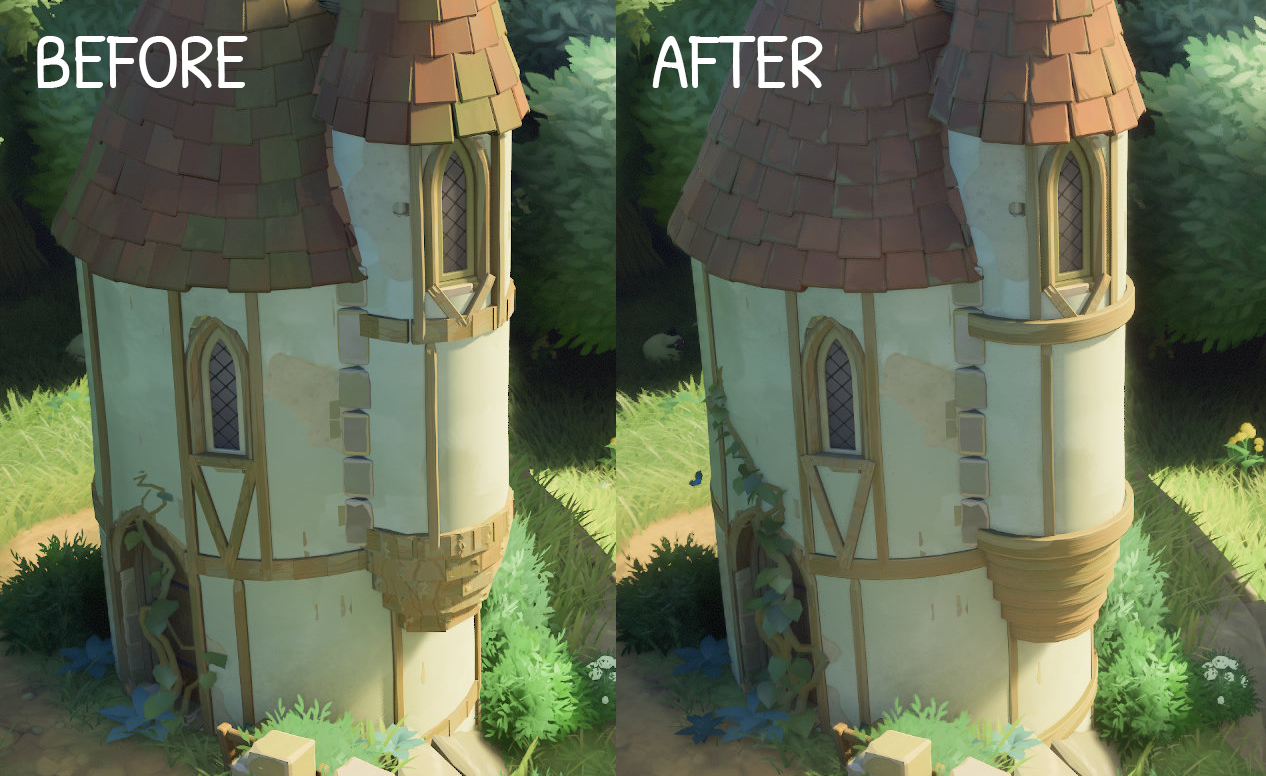
Timbering on towers has received a visual uplift too! They're no longer made out of small wooden pieces (which could look broken in certain configurations), but instead are one continuous curved wooden beam. The roof tiles have also been upgraded to have more detail.
Fix snow on platform borders
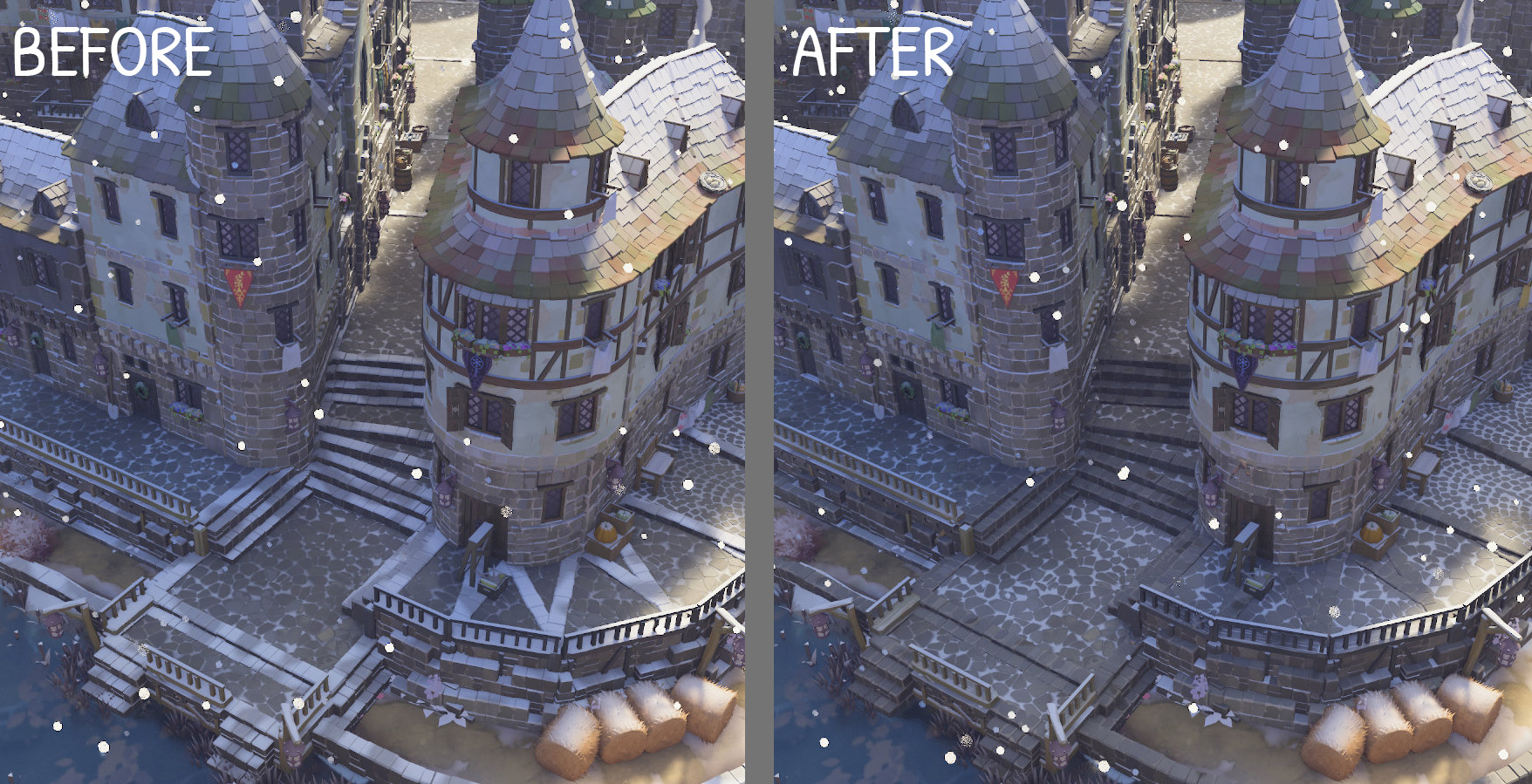
(thank you, anonymous player, for sending us a bug report with this beautiful scene attached)
The snow on auto-generated stairs and platform borders has been cleaned up, so the snowy towns should look more consistent now!
New music
Oda Tilset has composed 5 new music tracks 💞 one for each glade type.
Optimizations
This patch also includes a number of optimizations, primarily on the CPU side. If the performance on your system was limited by the graphics card, they won't do much, but otherwise you might notice your frame rate doubling in more complex builds.
Experimental Mac compatibility
While we don't yet have a Mac build that we can share, we've been working on it in the background, and made some progress. The fixes and workarounds for Mac's quirks are in our codebase now, and it's now possible to run the Windows version inside a patched CrossOver 25 on macOS on Apple Silicon.
Please note that this is still experimental, and we can't offer assistance with running the game on Mac - we're still unfamiliar with the platform, and the Windows→macOS translation layers are outside of our control.
Please read our guide for more details.
More disclaimers and stuffs: This is a temporary workaround until we've resolved all remaining issues with native macOS support. Also note that we don't plan to support Intel Macs via macOS - most couldn't run the game due to hardware & driver limitations, and the ones with Radeon cards that could, have been able to run it all along on Linux/Windows via Boot Camp
Copying your beta saves into the main game
If you helped us testing the beta, first of all, a huge thank you!! If you'd like to transfer your beta saves into the main game, you need to manually copy them from the beta saves folder:
* Each save folder is named with a bunch of numbers. You can see which save it is by looking at "screenshot.jpg" inside the folder.
* Copy the desired saves from the "beta-saves" folder into "saves" in "C:/Users/YOUR_USER_NAME/Saved Games/Tiny Glade/Steam/YOUR_STEAM_ID" ("~/.local/share/Tiny Glade/Steam/YOUR_STEAM_ID" on Linux)
Staying on the old version
If you wish to stay on the old version for any reason, it's still available. To switch to the old build, right-click Tiny Glade in your Steam Library, then go to Properties → Betas → Beta Participation, and select "old-1_13_2". Please note that we won't support the old version with any new features or fixes.
Please note that an older version of the game won't be able to load saves made by a newer version. Tiny Glade automatically upgrades saves upon loading, so if you downgrade Tiny Glade, it won't be able to load saves that you'd previously saved or loaded in the new version. When in doubt, manually back up your "saves" folder.
If your save file has already been upgraded, and you can't load it in the old game, you can restore the save from a special backup automatically created when upgrading (more info here).
----------------------------------------------------------------------
Patch notes:
Major:
- ✨ Stairs tool
- ✨ 3 variants of cobblestone
- ✨ 5 new floor variants
- 🎢 Roller coaster mode
- ⛑️ Background autosave and backups
Gameplay & UX:
- ✨ Add ability to cycle through the available clutter in the clutter focus mode
- 👩🏫 Update starting builds with new features + add 3 new ones
- 🎨 Add customization of plaster peel amount
- ⛑️ Add UI for loading game backups
- ✍ Holding "disable snapping" key (default: LCtrl) now prevents windows from turning into doors
- ✍ Rectangle editing now behaves itself when in low camera angles
- ✍ Rectangle rotation is now snappier & no longer does a small jump at the start of an edit
- ✋ Prevent “sheep pet hand” from taking over the screen
- 💡 Don't offer window light customization for trapdoors (since they don’t emit light)
- 🌥️ Adapt object highlight color to surrounding lighting (to avoid excessive contrast at night when hovering over building elements)
- 🐛 Fix stuttering when building on water (fix intermittent misses in cursor-terrain intersection)
- 🐛 Fix first-person ghost mode (noclip) toggle not working on gamepads/controllers
- 🖱️ Fix Steam Deck being hesitant to switch to mouse & keyboard mode
- 📈 Bump max wall limit to 20,480
Visual:
- 📷 Apply photo mode filters in build mode too
- 🎨 Add subtle edge damage and remove green noise overlay from roof tiles
- 🎨 Rework circular half-timbering
- 🎨 Fix snow on platform borders and auto-generated stairs
- 🎨 Add random slits to lilypads
- 🎨 Update stone floor texture
- 🎨 Add parallax mapping to floors (ray march all the things!)
- 🐛 Remove diagonal supports from wooden pillars on towers if there is not enough space
- 🐛 Prevent platforms from going below minimum height limit in very old save files
- 🐛 Fix cottage window outlines being glitchy / black / colorful
SFX & Music:
- 🎼 Add five new music tracks
- 🔊 Tweak undo sounds
- 🔊 Add an additional audio detail when moving a building overlapping other buildings
- 🔊 Fix volume difference between placing decorators and moving them
- 👂 Make path draw sounds quicker to stop
- 👂 Slightly reduce latency of all audio events
- 🐛 Fix window audio not playing when moving camera instead of cursor
Image Quality:
- 🕶️ Speed up brightness adaptation, and fix flicker therein
- 🌅 Add subtle glare (“bloom”) around bright objects
- 🌞 Fix gradient inversion / dark outline around the sun
- 🔬 Improve quality of indirect lighting’s rough specular reflections
- 🔬 Improve image upsampling quality with "resolution scale" < 1.0 (use edge-adaptive spatial upsampling)
- 🐛 Make "white wall" albedo actually white in global illumination (it was greenish)
- 🐛 Fix tree branches abruptly disappearing close to the camera
- 🐛 Fix depth of field artifacts in close-up tree branches
- 🐛 Fix color banding on sky by dithering it
- 🐛 Fix additional color banding on sky and other smooth gradients coming from image rescaling
- 🐛 Fix black halos around bright objects (clamp negative ringing in image resampling)
- 🐛 Fix colors of trees & terrain in global illumination
- 🐛 Fix indirect light leaking through terrain
- 🔬 Improve accuracy of shadows in global illumination
Performance:
- 🦥 Make the processing of decorators (windows etc.) lazy, so we don’t burn CPU cycles for nothing
- 🏇 Parallelize the processing of in-world 3D UI
- 🏇 Tweak level of detail selection for plank meshes (make planks faster and prettier)
- 🏇 Discard tiny distant objects from being shadow casters
- 🏇 Parallelize Vulkan command buffer recording
- 🐛 Fix duck trajectory planner wasting CPU cycles if ducks can’t find landing spots
- 🔬 Limit max anisotropy of textures from 16 to 4
- 🤏 Enable BC7 texture compression for more assets
- 🤏 Switch some assets to BC4 texture compression
- 🧊 Limit menu frame rate to <= 60 (to save power)
Platform support:
- ✨ Add Qualcomm Snapdragon X as a recognized platform (add driver version check & download links)
- 🐧 Fix color channel swap on Linux + Wayland
- 🐧 Maybe fix Linux crash reporter copy-to-clipboard
- 🍏 Add experimental compatibility with patched CrossOver 25 on MacOS
- 🍏 Add CrossOver/WINE - specific workarounds for the driver info screen being black
- 🍏 Fix out-of-bounds GPU buffer writes on Mac
- 🍏 Add compatibility with MoltenVK 1.3+
Misc:
- 🚒 Handle more silly graphics drivers (swapchain image acquisition freezing the game)
- 🧊 Add diagnostic tool for detecting game freezes/hangs (“--detect-hang” launch parameter)
- 🧯 Gracefully handle disk write errors in the save system, and surface them via UI
- 🤏 Slim down save file size a bit
- 🌡️ Default FPS limit to 60 for new game installations
- 🐛 Fix numerical overflow crashing long sessions (recycle render instance identifiers)
- 🐛 Fix a crash related to near-zero-sized gates
- 🐛 Fix half texel offset in CPU-side texture sampling (fix applies only in new glades)
- 🐛 Fix ghost lantern & crash when switching from lantern mode to wall eraser
- 🐛 Fix an assortment of numerical errors in curve processing
- 🖖 Fix a few graphics validation errors revealed by Vulkan Configurator’s extra tests
- 🖖 Move from compute- to raster-based presentation for improved compatibility
P.S. If you encounter any bugs, please send us a report by pressing F6 while in the game. If you encounter any crashes, please share the crash codes via Steam forums. We will be actively monitoring them in the upcoming days! Thank you!
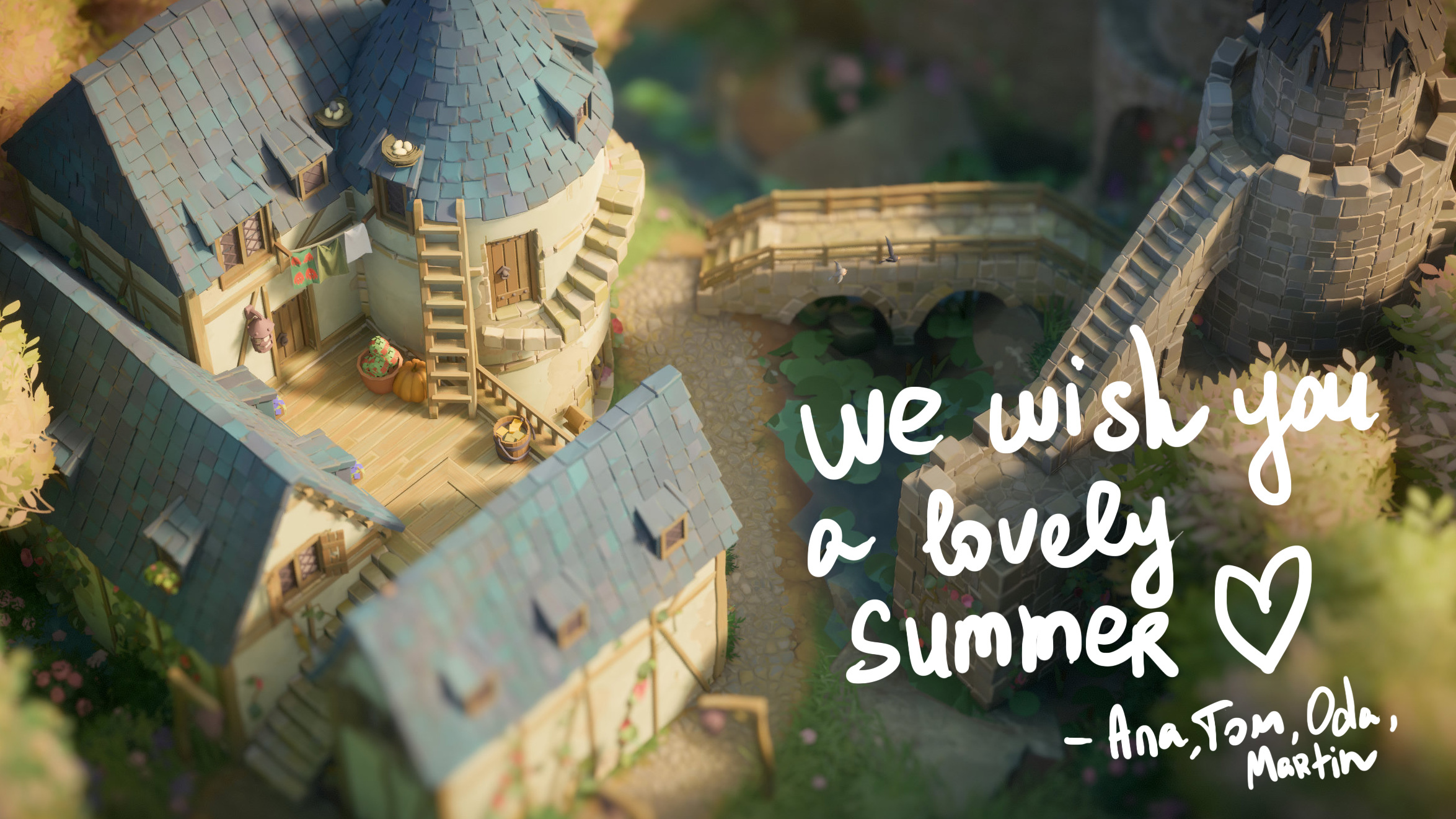
(or, should I say, the remainder of summer 😄)
Love,
Ana & Tom
P.P.S. build 1.14.0a contains a quick crash fix: sometimes when switching to Halloween glades, the music system was trying to incorrectly reference one of the new tracks (thank you for the swift crash report!)