Remember to check out our roadmap for a look at what we're working on for 1.4.1.
Playing on development builds
- Right click BallisticNG in your steam library and go to Properties
- Go to the betas tab on the window that opens
- From the dropdown select development. If the update doesn't automatically queue for download, restart Steam
- Once you have opened the game, the version at the bottom right of the menu for this release will read 1.4.1-d3
Layout Creator 3.0
Version 3 of the layout creator makes many changes that have facilitated the introduction of customizable hotkeys, controller support and many improvements across the board.
The layout creator was previously a mess of hard coded inputs among a sea of spaghetti code, so the first thing that needed changing was that.
We now have a tools system which has allowed us to make the editor much more modular and remove a lot of jank that came with the introduction of new features over the years.
Note that documentation on our readthedocs hasn't been updated yet. We'll be doing that closer to the release of 1.4.1.
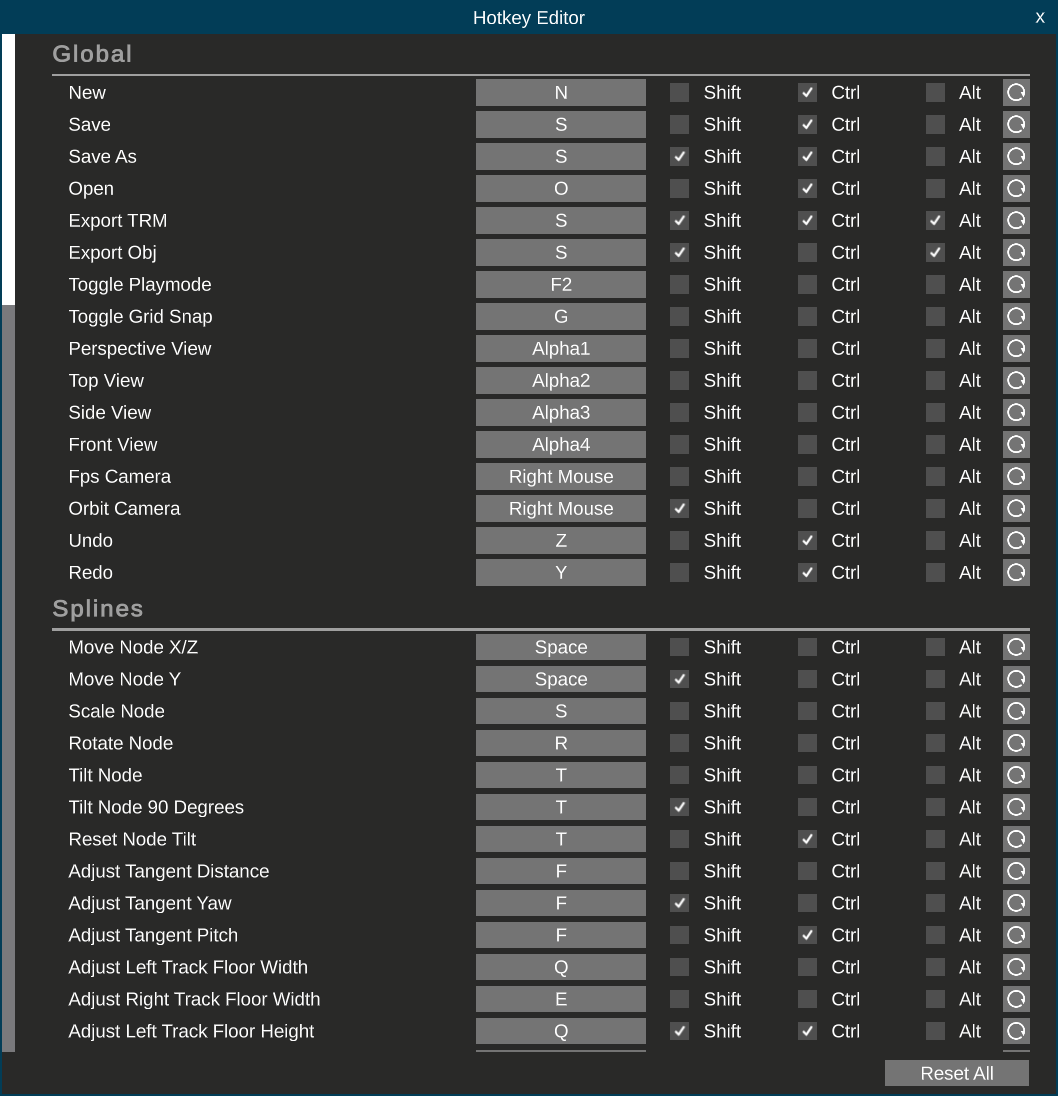
Hotkey Editor
Now that everything is modular and has a structure, the layout creator finally has a hotkey editor!
Controller Support
https://www.youtube.com/watch?v=3O8_N3yWI9s
With the tools system implemented, it became much more trivial for controller support to be implemented. With exception to the perspective orbit camera, the layout creator is fully functional when using a controller!
You'll need a controller that's supported by Rewired's gamepad template for this. If your controller works out of the box with the game then you have a controller that's supported. You can also refer to this table, where anything with the gamepad icon on the left hand side is supported:
https://guavaman.com/projects/rewired/docs/SupportedControllers.html
Analog Stick Ease Power
Similar to the steer curve option for gameplay, the layout creator has an easing curve for analog inputs to help you stay precise near the resting position of the analog sticks. By default this is set to use a power of 3 which we felt works for Dualshock 4, Dualsense and Xbox controllers, but you can customize this:
- Open the menu (X for Sony controllers, A on Xbox)
- Navigate down to Set Ship
- Navigate right until you reach Set Analog Stick Ease Power
- 1 is linear, above 1 reduces sensitivty near the center of the stick, below 1 increases it.
Selection Spread Crosshair
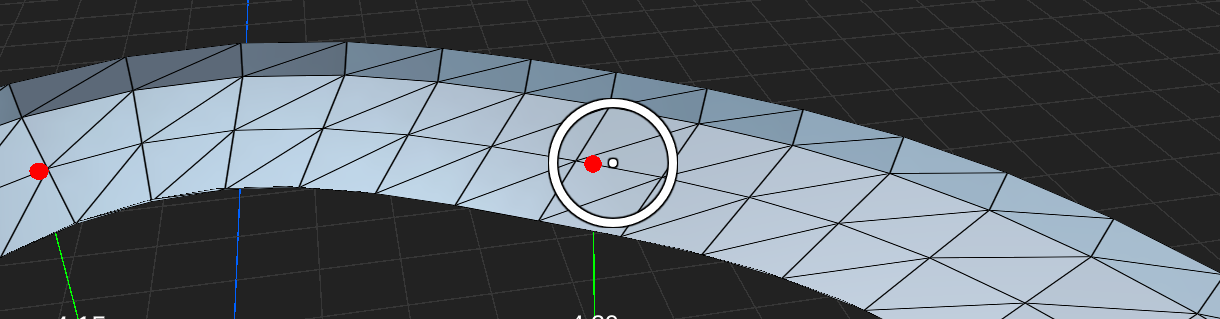
As it's harder to be as accurate with an analog stick then it is a mouse, whenever you're selecting nodes the crosshair is turned into a circle where anything that's within its radius will be considered for selection. If there's multiple nodes within the circle, the node closest to the center dot takes priority.
Templates
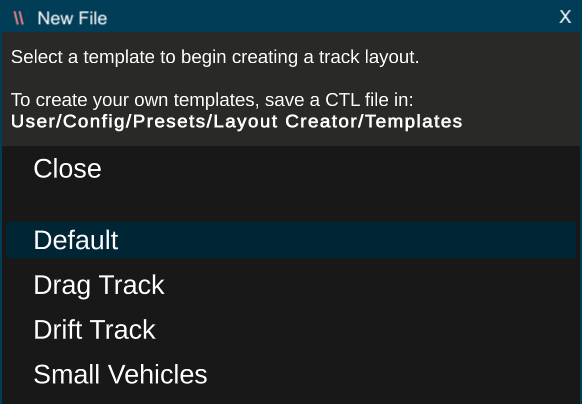
The layout creator now has templates! When you first load into it, or when you start a new file, you'll be given an option to select one of four starting templates depending on the kind of track you want to make.
These templates provide an appropriate track width and play mode setting configs for each track type.
You can also create your own templates by saving a CTL file into the User/Config/Presets/Layout Creator/Templates folder.
The Sidebar
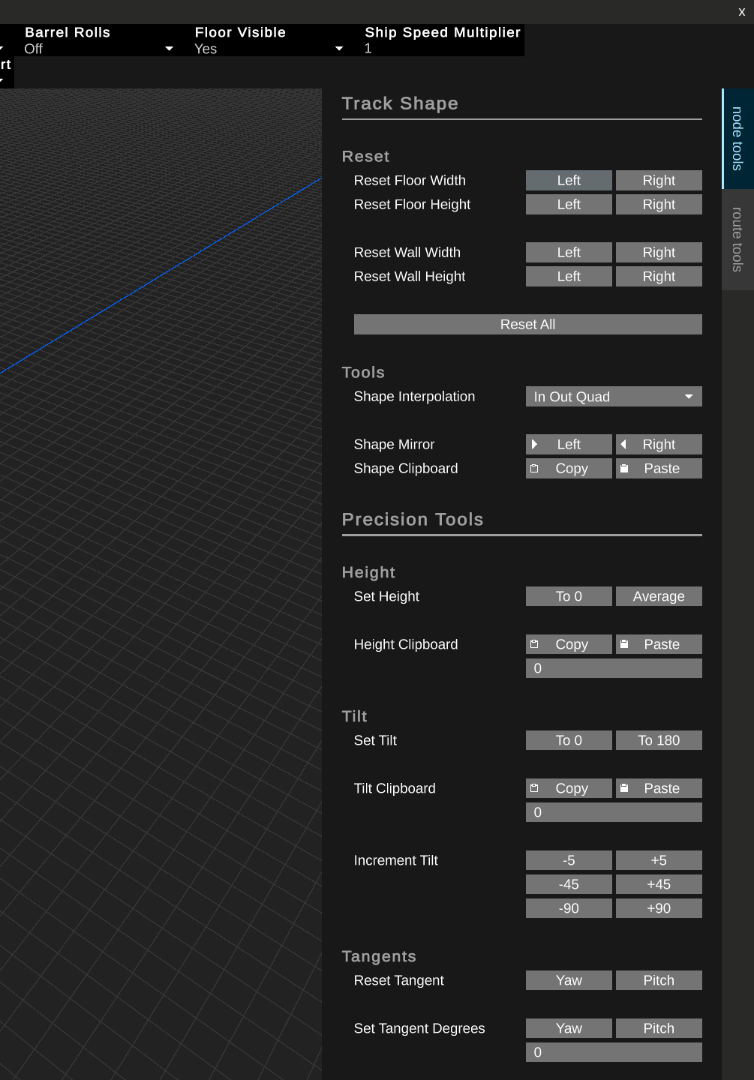
Additional tools were previously hidden away in windows that were accessed through the menu bar.
These have been moved into two tabs that are more immediately accessible on the right side of the screen. The options have also seen a layout update to make the interface much cleaner.
Full Changelog
Engine
- Corrupt controller sava data files are now detected and deleted instead of breaking the game on launch. A message will be shown on screen to inform of this happening.
Options
- Fixed CRT Brightness being labeled as CRT Resolution
Modding
- Moved the small vehicles template CTL in the modding folder to User/Config/Presets/Layout Creator/Templates
Layout Creator 3.0
Tools System
All hard coded inputs calling functions in spaghetti have been replaced with a modular context, tools and action system:
- A context provides a set of tools and are selected with the edit mode dropdown at the top of the editor,
- A tool provides a way to interface with the editor. These are inspired by Blender and can be passive (camera movement, selection) or modal (adjusting spline nodes, transforming physic zones, etc),
- Actions provide per-context access to tools through hotkeys, which can now be customized.
- Modal tools can provide their own inputs to expand their feature set. Actions are disabled when using a modal tool so hotkeys don't conflict
UI
- Added Hotkey Editor (Edit -> Hotkeys). Inputs are saved in User/Config/Layout Creator,
- Added properties side bar. The node and route tools windows have been moved here,
- Inputs for modal tools are shown at the bottom of the screen while the tool is being used,
- The physics mod zones settings list has been moved to an invisible tab in the side bar which activates when a physics zone is selected,
- Updated text to TextMeshPro
Hotkeys
- Added New File (Ctrl + N),
- Added Open (Ctrl + O),
- Added Save (CTRL + S),
- Added Save As (Ctrl + Shift + S),
- Added Export TRM (Ctrl + Shift + Alt + S),
- Added Export OBJ (SHift + Alt + S),
- Added Copy and Paste Track Shape (Ctrl + C and Ctrl + V),
- Added Copy and Paste Physics Mod Zone Settings (Ctrl + C and Ctrl + V),
- Added Select Next Node (Right Arrow),
- Added Add Next Node To Selection (Shift + Right Arrow),
- Added Remove Next Node From Selection (Ctrl + Right Arrow),
- Added Active Selection To Next Selected Node (Alt + Right Arrow),
- Added Select Previous Node (Left Arrow),
- Added Add Previous Node To Selection (Shift + Left Arrow),
- Added Remove Previous Node From Selection (Ctrl + Left Arrow),
- Added Active Selection to Previous Selected Node (Alt + Left Arrow),
- Added Add Route To Selection (Shift + Up Arrow),
- Added Select Route (Up Arrow),
- Added Deselect Route (Down Arrow),
- Orbit camera changed from middle click to shift + right click,
- Orbit camera distance changed from W/S to scroll wheel (sensitivity is now dynamically adjusted based on distance to target instead of the FPS camera speed),
- Clear selection changed from backspace to escape
General
- The orbit camera can now focus on objects in the reference image and physics mod zone edit modes,
- The track refresh rate now defaults to the monitors refresh rate,
- Track nodes are now smaller and always render on top,
- Sliders in the route tools UI have been replaced with input fields, allowing for any values to be entered,
- Entering the layout creator and creating a new file now opens a templates list. A few templates are provided with the game and you can add more by saving CTL files in User/Config/Presets/Layout Creator/Templates. Loading a template doesn't set it as the active file so you can't unintentionally save over it
- Fixed holding speed up not increasing the speed of the FPS camera raise/lower movement
Spline Tools
- Added Transfer Routes tool, available in the route tools tab:
- Select, in order, the nodes you'd like to move to another route,
- Select the node in the destination route you'd like to move the nodes to. The nodes will be logically placed AFTER the destination node.,
- Run the route transfer tool,
- This tool can also be used to move the order of nodes within the same route
- Select, in order, the nodes you'd like to move to another route,
- Added extract route tool, available in the route tools tab:
- Select two nodes in the same route,
- Run the extract route tool. The nodes between, and including, the selected nodes will be moved into a new route
- Select two nodes in the same route,
- Track shape copy and paste can now handle sequences of shapes in the order of selection. The sequence is repeated if there's more nodes selected when pasting then there was when copying,
- Creating a new route now selects the last node in the route to enable immediate editing of the route,
- Scaling and rotating nodes now uses the mouse cursors position as the origin point. Using the previous average position method can be accessed by pressing the hotkey again when using the tool (by default),
- The insert tool is now an interactive modal tool where you can click the node position onto the spline. Holding shift snaps the position to thirds, and holding CTRL allows continuous insertion of nodes,
- Nodes can now be click dragged on XZ without needing to use the move tool. Vertical dragging can be performed with the side or front camera views,
- Nodes can now be created with grid snapping and straight locking at the mouse cursor by double clicking. The grid plane is used for this, so use the bottom of the node height lines to align your mouse.,
- Nodes can now be now grid snapped when scaling and rotating,
- Move To Cursor in the move tool now works when adjusting node heights,
- The distance that nodes have been moved during move and scale operations are now shown,
- The angle that nodes have been rotated and tilted are now shown,
- Adjusting track shapes is now handled per node instead of copying the first selections shape to others. Press space when using the track shape tool to toggle between per-node and first selection copy modes.,
- Pressing R when adjusting track shapes now toggles between the default shape and the adjusted shape,
- Pressing F when adjusting node tangents now toggles between the default values and the adjusted values,
- Activating the scale and rotate tools with only a single node selected now switches to the tangent distance and tangent rotation modes respectively,
- Jumps and teleporter node types are now rendered with a line and label,
- Route labels now signify which route is the active route,
- Optimized track node rendering,
- Fixed resistive behavior when tilting nodes,
- Fixed tangents not being refreshed when toggling route close,
- Fixed tangents not being refreshed when appending nodes,
- Fixed tangents not being refreshed when inserting nodes,
- Fixed tangents not being refreshed when deleting nodes,
- Fixed Allow Out Of Bounds not being restored when undoing/redoing,
- Fixed route labels not rendering if the route only has a single node
Physics Mod Zone Tools
- Added undo/redo support to physics mod zones add, delete and transformation changes,
- Added copy and paste actions for physics mod zone settings,
- Physics zones can now be scaled along axis planes using Shift + X,Y,Z inputs in the scale tool,
- Physics zone scales can now be reset by pressing S while using the scale tool.,
- Physics zones can now be rotated along the X and Z axes.,
- Physics zone rotations can now be reset by pressing R while using the rotate tool,
Reference Image Tools
- Added undo/redo support to transforming the image plane and changing the reference image,
- Editing the reference image is now its own edit mode, instead of being hacked into the spline tools edit mode,
- Removed reference plane locking (not unnecessary with these changes)
